
WebSocket怎么实现实时通信?心跳和断线重连怎么写?
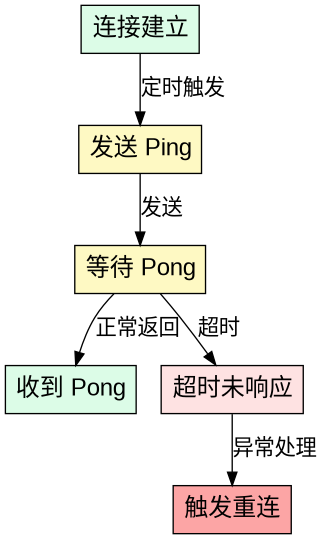
在浏览器端实现 WebSocket 实时通信,核心是实例化 WebSocket 对象并监听 onopen 、 onmessage 、 onclose 和 onerror 四个事件。针对网络波动导致的断连,需结合心跳机制与自动重连逻辑:客户端定期发送 Ping 包,服务端回复 Pong ;若超时未收到响应或连接意外关闭,
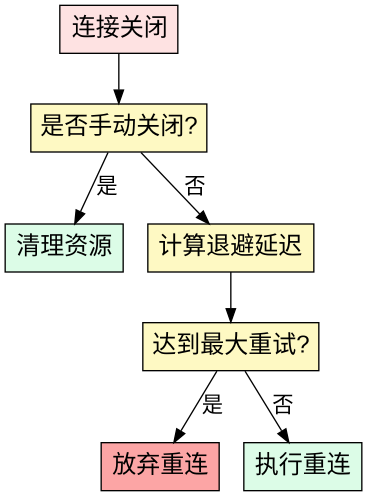
在浏览器端实现 WebSocket 实时通信,核心是实例化 WebSocket 对象并监听 onopen、onmessage、onclose 和 onerror 四个事件。针对网络波动导致的断连,需结合心跳机制与自动重连逻辑:客户端定期发送 Ping 包,服务端回复 Pong;若超时未收到响应或连接意外关闭,则触发重连函数,利用指数退避算法避免频繁请求。

WebSocket 基础连接与消息收发
使用 JavaScript 创建 WebSocket 连接非常简单,只需传入服务器地址即可。连接建立后,通过 send() 方法发送数据,接收数据则在 onmessage 回调中处理。需注意数据格式通常为 JSON 字符串,发送前需序列化,接收后需反序列化。
在实际开发中,连接状态管理至关重要。readyState 属性用于判断当前连接状态:CONNECTING (0)、OPEN (1)、CLOSING (2)、CLOSED (3)。只有在 OPEN 状态下才能安全调用 send()。为了区分不同类型的业务消息,建议在 JSON 结构中加入 type 字段,如 {"type": "chat", "content": "hello"},以便前端根据类型分发处理逻辑。
心跳检测与断线重连实现
将心跳与重连逻辑封装为类或模块,便于复用。初始化时启动定时器发送心跳,并在连接关闭事件中触发重连尝试。以下代码展示了完整的客户端实现,包含心跳计时器、重连队列及指数退避策略。
class WebSocketClient {
  constructor(url) {
    this.url = url;
    this.ws = null;
    this.reconnectTimer = null;
    this.heartbeatTimer = null;
    this.pingTimer = null;
    this.retryCount = 0;
    this.maxRetries = 5;
    this.baseDelay = 1000;
    this.isManualClose = false;

    this.init();
  }

  init() {
    this.connect();
  }

  connect() {
    if (this.ws && (this.ws.readyState === WebSocket.OPEN || this.ws.readyState === WebSocket.CONNECTING)) {
      return;
    }

    try {
      this.ws = new WebSocket(this.url);
    } catch (e) {
      console.error('WebSocket creation failed:', e);
      this.scheduleReconnect();
      return;
    }

    this.ws.onopen = () => {
      console.log('WebSocket connected');
      this.retryCount = 0;
      this.startHeartbeat();
    };

    this.ws.onmessage = (event) => {
      const data = JSON.parse(event.data);
      if (data.type === 'pong') {
        console.log('Heartbeat OK');
        return;
      }
      // Handle business messages
      console.log('Received message:', data);
    };

    this.ws.onclose = (event) => {
      console.log('WebSocket closed:', event.code, event.reason);
      this.stopHeartbeat();
      if (!this.isManualClose) {
        this.scheduleReconnect();
      }
    };

    this.ws.onerror = (error) => {
      console.error('WebSocket error:', error);
    };
  }

  send(data) {
    if (this.ws && this.ws.readyState === WebSocket.OPEN) {
      this.ws.send(JSON.stringify(data));
    } else {
      console.warn('WebSocket is not open');
    }
  }

  startHeartbeat() {
    this.stopHeartbeat();
    this.heartbeatTimer = setInterval(() => {
      if (this.ws && this.ws.readyState === WebSocket.OPEN) {
        this.send({ type: 'ping' });
      }
    }, 30000); // Every 30 seconds
  }

  stopHeartbeat() {
    if (this.heartbeatTimer) {
      clearInterval(this.heartbeatTimer);
      this.heartbeatTimer = null;
    }
    if (this.pingTimer) {
      clearTimeout(this.pingTimer);
      this.pingTimer = null;
    }
  }

  scheduleReconnect() {
    if (this.reconnectTimer) return;
    if (this.retryCount >= this.maxRetries) {
      console.error('Max retries reached');
      return;
    }

    const delay = Math.min(this.baseDelay * Math.pow(2, this.retryCount), 30000);
    console.log(`Reconnecting in ${delay}ms...`);

    this.reconnectTimer = setTimeout(() => {
      this.reconnectTimer = null;
      this.retryCount++;
      this.connect();
    }, delay);
  }

  close() {
    this.isManualClose = true;
    this.stopHeartbeat();
    if (this.reconnectTimer) {
      clearTimeout(this.reconnectTimer);
      this.reconnectTimer = null;
    }
    if (this.ws) {
      this.ws.close();
    }
  }
}

// Usage example:
// const client = new WebSocketClient('wss://example.com/ws');
// client.send({ type: 'chat', content: 'Hello' });
// window.addEventListener('beforeunload', () => client.close());
运行此代码后,控制台会输出连接状态、心跳响应及业务消息。若模拟断网,客户端会在 1秒、2秒、4秒... 的间隔后自动重连,直至成功或达到最大重试次数。输入变化测试:手动调用 client.close() 可触发正常关闭流程,不再重连;若直接杀死进程模拟异常断开,则触发重连逻辑。排错时检查 readyState 是否为 1,以及心跳定时器是否被正确清除。
该实现重点解决了两个问题:一是网络假死(TCP 连接断开但应用层无感知),通过心跳保活;二是网络恢复后的自动接入,通过重连机制保证服务可用性。代码中使用了 setTimeout 而非 setInterval 来避免在重连期间累积多个心跳任务,确保逻辑清晰。
重连失败与资源清理细节
当重连次数达到上限或用户主动关闭页面时,必须彻底清理定时器与引用,防止内存泄漏。若重连持续失败,应停止重试并通知上层业务逻辑,避免无效的资源消耗。
在 reconnect() 函数中,每次重试成功后需重置退避时间计数器。若 maxRetries 耗尽,则清除所有定时器并抛出错误。另外,在页面卸载事件(window.beforeunload)中应主动调用 ws.close(),优雅断开连接,避免浏览器强制关闭导致的异常日志干扰排查。
JS多级嵌套下拉菜单的定位与状态管理实现
2026-11-25 20:02:32
JS下拉菜单怎么实现点击外部区域自动关闭
2026-11-25 11:30:16
支持移动端手势滑动的JS触屏幻灯片代码
2026-11-25 09:51:14
JavaScript中onclick的this指向详解与修正技巧
2026-11-24 10:26:12
JS动态切换CSS类实现Flexbox垂直居中
2026-11-23 23:50:40