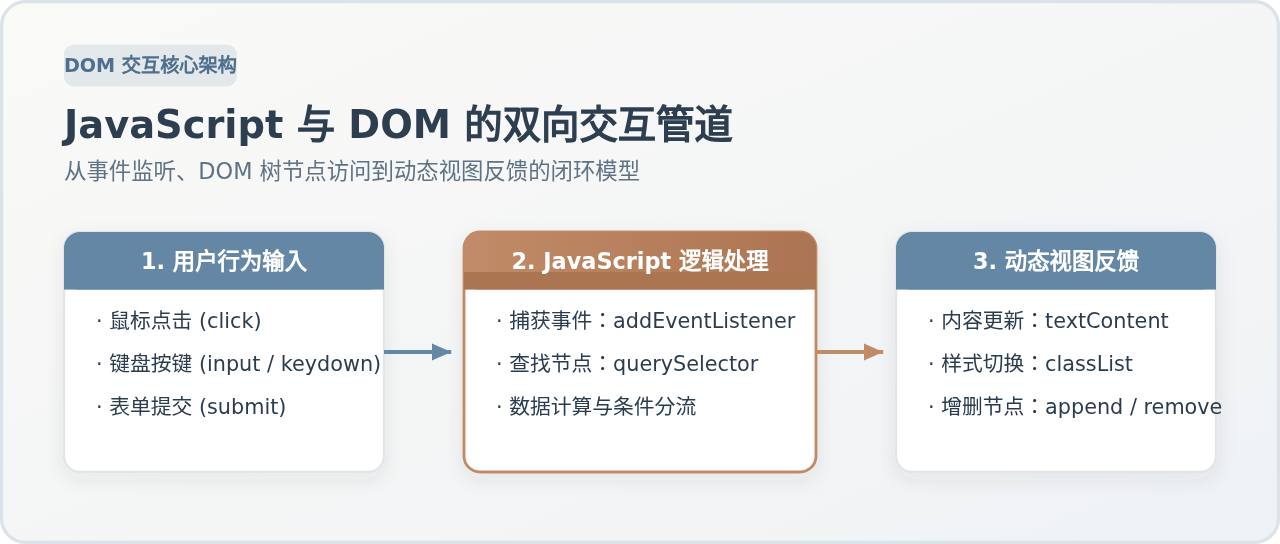

支持移动端手势滑动的JS触屏幻灯片代码
直接引入 touchSlide.js 并在初始化时开启 swipe:true ,即可让幻灯片支持移动端手势滑动。

触屏事件与 DOM 结构绑定
核心思路是监听容器上的 touchstart、touchmove 和 touchend 事件,计算手指滑动的水平距离来判断切换方向。HTML 结构需保持标准的幻灯片布局,外层为视口容器,内层为包含所有幻灯片的轨道。

在 touchstart 阶段记录起始坐标,在 touchmove 中实时更新当前坐标并阻止默认滚动行为,防止页面跟随滑动。当手指抬起触发 touchend 时,比较位移差值,若超过阈值则执行切换逻辑。这种机制确保了交互的流畅性,同时避免了与原生页面滚动的冲突。
完整实现代码与运行环境
将以下代码保存为 index.html,直接在浏览器或手机模拟器中打开即可看到效果。代码包含了完整的 HTML 结构、CSS 样式以及核心的 JavaScript 逻辑。
<!DOCTYPE html>
<html lang="zh-CN">
<head>
    <meta charset="UTF-8">
    <meta name="viewport" content="width=device-width, initial-scale=1.0">
    <title>JS Touch Slider</title>
    <style>
        * { margin: 0; padding: 0; box-sizing: border-box; }
        body { font-family: sans-serif; overflow: hidden; }
        .slider-container {
            width: 100vw;
            height: 100vh;
            position: relative;
            overflow: hidden;
        }
        .slider-track {
            display: flex;
            width: 300%;
            height: 100%;
            transition: transform 0.3s ease-out;
        }
        .slide {
            width: 100vw;
            height: 100%;
            display: flex;
            justify-content: center;
            align-items: center;
            font-size: 2rem;
            color: white;
        }
        .slide:nth-child(1) { background-color: #FF6B6B; }
        .slide:nth-child(2) { background-color: #4ECDC4; }
        .slide:nth-child(3) { background-color: #45B7D1; }
    </style>
</head>
<body>
    <div class="slider-container" id="slider">
        <div class="slider-track" id="track">
            <div class="slide">第一页</div>
            <div class="slide">第二页</div>
            <div class="slide">第三页</div>
        </div>
    </div>

    <script>
        class TouchSlider {
            constructor(containerId) {
                this.container = document.getElementById(containerId);
                this.track = this.container.querySelector('.slider-track');
                this.slides = this.track.querySelectorAll('.slide');
                this.currentIndex = 0;
                this.startX = 0;
                this.currentX = 0;
                this.isDragging = false;
                this.threshold = 50;

                this.bindEvents();
                this.updateTransform();
            }

            bindEvents() {
                this.container.addEventListener('touchstart', (e) => this.handleStart(e), { passive: false });
                this.container.addEventListener('touchmove', (e) => this.handleMove(e), { passive: false });
                this.container.addEventListener('touchend', (e) => this.handleEnd(e));
            }

            handleStart(e) {
                this.isDragging = true;
                this.startX = e.touches[0].clientX;
                this.track.style.transition = 'none';
            }

            handleMove(e) {
                if (!this.isDragging) return;
                e.preventDefault();
                this.currentX = e.touches[0].clientX;
                const diff = this.currentX - this.startX;
                const baseTranslate = -this.currentIndex * this.container.offsetWidth;
                this.track.style.transform = `translateX(${baseTranslate + diff}px)`;
            }

            handleEnd() {
                this.isDragging = false;
                const diff = this.currentX - this.startX;
                this.track.style.transition = 'transform 0.3s ease-out';

                if (Math.abs(diff) > this.threshold) {
                    if (diff > 0 && this.currentIndex > 0) {
                        this.currentIndex--;
                    } else if (diff < 0 && this.currentIndex < this.slides.length - 1) {
                        this.currentIndex++;
                    }
                }
                this.updateTransform();
            }

            updateTransform() {
                const translate = -this.currentIndex * this.container.offsetWidth;
                this.track.style.transform = `translateX(${translate}px)`;
            }
        }

        // 初始化
        new TouchSlider('slider');
    </script>
</body>
</html>
运行后,在手机或模拟器的开发者工具中,用手指左右滑动屏幕,幻灯片会随之切换。若滑动距离不足 50px,页面会自动回弹到原位置。修改 this.threshold 可调整灵敏度。确保在移动设备或模拟环境下测试,因为桌面鼠标事件未在此代码中映射。
该示例构建了一个简单的三页幻灯片,通过 CSS 控制布局,JS 处理触摸逻辑。重点在于 TouchSlider 类的封装,它独立管理状态,不依赖任何第三方库,便于集成到现有项目中。
滑动阈值与惯性回弹处理
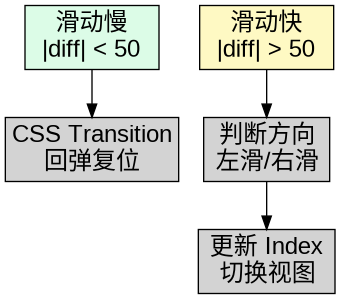
当用户滑动距离小于设定阈值(如 50px)时,应自动回弹至当前位置,避免误触导致页面意外切换。这一细节提升了用户体验,使操作更具确定性。
在 touchend 事件中,若计算出的位移绝对值未达标,则通过 CSS transition 平滑复位。若达标,则根据方向更新索引并重新渲染。可加入简单的惯性判断,即滑动速度越快,越倾向于确认切换,进一步增强手感。
JavaScript中onclick的this指向详解与修正技巧
2026-11-24 10:26:12
JS动态切换CSS类实现Flexbox垂直居中
2026-11-23 23:50:40
JS怎么用正则表达式批量替换HTML标签
2026-11-23 22:02:28
JS中appendChild与append方法插入字符串的区别
2026-11-23 21:02:54
JavaScript操作浏览器页面历史记录实现无刷新跳转
2026-11-23 20:34:04