
JS文件上传怎么实时显示进度条
使用 XMLHttpRequest 的 upload.onprogress 事件监听上传字节数,结合总大小计算百分比并更新 DOM 。
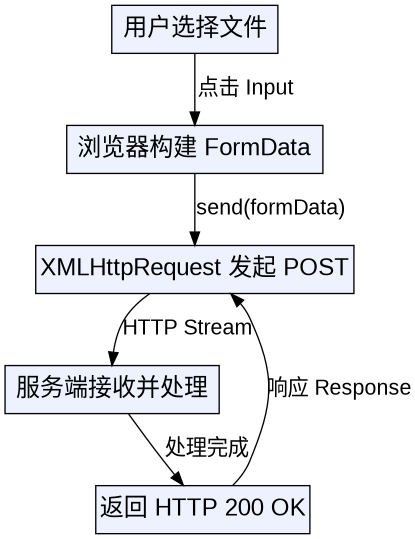
核心原理与数据源
浏览器原生提供 FormData 对象配合 XMLHttpRequest 进行异步上传。关键在于获取 request.upload 对象,它暴露了进度事件流。
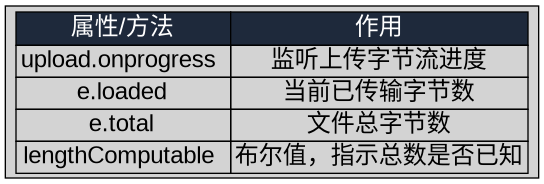
需要明确两个数值:已上传字节数(e.loaded)和文件总大小(e.total)。通过这两个值计算进度百分比,实时修改进度条的宽度或文本内容即可实现视觉反馈。
完整实现代码
将以下代码保存为 upload.html,在本地服务器环境(如 VS Code Live Server)中打开,选择大文件测试效果。

<!DOCTYPE html>
<html lang="zh">
<head>
    <meta charset="UTF-8">
    <title>JS File Upload Progress</title>
    <style>
        .progress-bar {
            width: 100%;
            height: 20px;
            background-color: #f0f0f0;
            border-radius: 4px;
            overflow: hidden;
            margin-top: 10px;
        }
        .progress-fill {
            height: 100%;
            width: 0%;
            background-color: #4CAF50;
            transition: width 0.2s;
        }
        #status { margin-top: 5px; font-size: 14px; color: #666; }
    </style>
</head>
<body>
    <h3>文件上传进度演示</h3>
    <input type="file" id="fileInput">
    <div class="progress-bar">
        <div class="progress-fill" id="progressFill"></div>
    </div>
    <div id="status">等待上传...</div>

    <script>
        const fileInput = document.getElementById('fileInput');
        const progressFill = document.getElementById('progressFill');
        const statusDiv = document.getElementById('status');

        fileInput.addEventListener('change', function(e) {
            const file = e.target.files[0];
            if (!file) return;

            const formData = new FormData();
            formData.append('file', file);

            const xhr = new XMLHttpRequest();

            // 监听上传进度
            xhr.upload.onprogress = function(e) {
                if (e.lengthComputable) {
                    const percentComplete = Math.round((e.loaded / e.total) * 100);
                    progressFill.style.width = percentComplete + '%';
                    statusDiv.textContent = `上传中: ${percentComplete}% (${formatBytes(e.loaded)} / ${formatBytes(e.total)})`;
                }
            };

            xhr.onload = function() {
                if (xhr.status === 200) {
                    statusDiv.textContent = '上传成功!';
                    progressFill.style.backgroundColor = '#4CAF50';
                } else {
                    statusDiv.textContent = '上传失败: ' + xhr.statusText;
                    progressFill.style.backgroundColor = '#f44336';
                }
            };

            xhr.onerror = function() {
                statusDiv.textContent = '网络错误';
                progressFill.style.backgroundColor = '#f44336';
            };

            // 替换为你的后端接口地址
            xhr.open('POST', '/upload', true);
            xhr.send(formData);
        });

        function formatBytes(bytes) {
            if (bytes === 0) return '0 Bytes';
            const k = 1024;
            const sizes = ['Bytes', 'KB', 'MB', 'GB'];
            const i = Math.floor(Math.log(bytes) / Math.log(k));
            return parseFloat((bytes / Math.pow(k, i)).toFixed(2)) + ' ' + sizes[i];
        }
    </script>
</body>
</html>
程序运行后,选择大于 1MB 的文件可清晰看到进度条变化。控制台无报错且状态栏显示“上传成功”即代表流程正确。若进度卡在 99%,通常是因为服务端处理耗时过长,此时 onprogress 不再触发新事件,直到请求结束。
注意:现代开发也可用 fetch + ReadableStream,但 XHR 对进度支持最稳定且无需额外封装。
跨域与错误处理细节
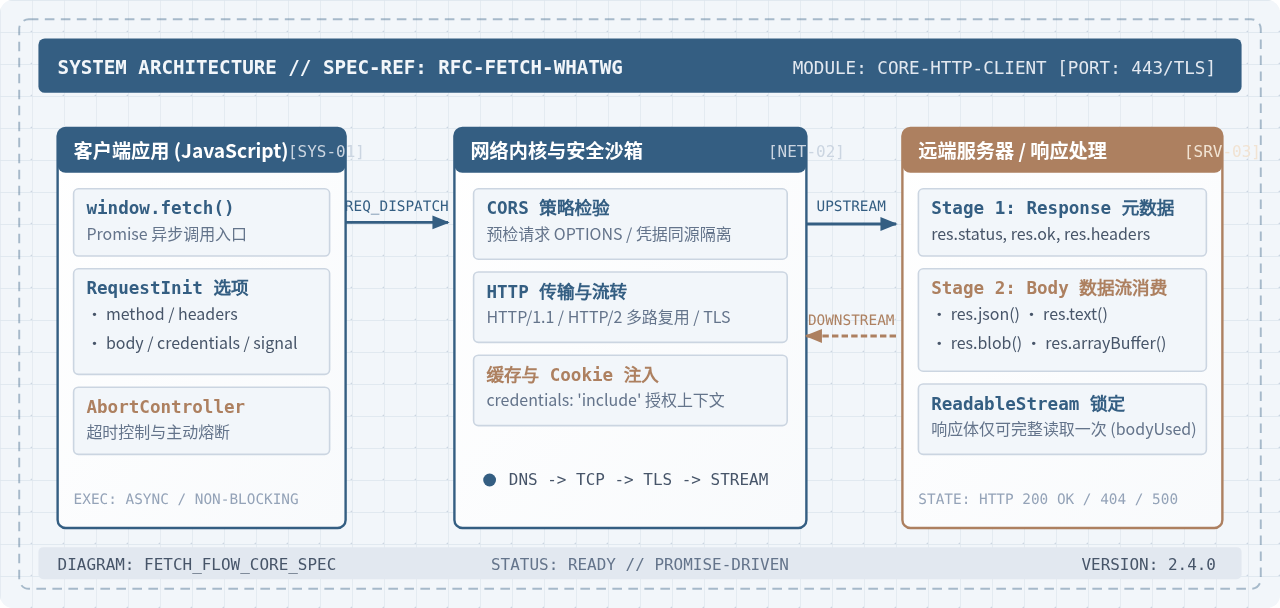
当服务端返回非 200 状态码时,onprogress 可能不会触发完成信号,需监听 onerror 和 ontimeout。
若遇到 CORS 限制,确保服务端响应头包含 Access-Control-Allow-Origin。网络中断时 onabort 会被触发,应重置 UI 状态。
怎么使用Intl.DateTimeFormat在JS中格式化日期
2026-11-26 15:16:40
AWS Lambda 新增 MicroVM 编排预览
2026-11-26 14:46:16
海棠搜书最新版官方网址导航,稳定可用网站入口
2026-11-26 14:10:10
JS调用Java方法时的数据类型转换与异步处理
2026-11-26 13:50:53
Qwen Code 1.0.0-preview.2 如何调整订阅 OAuth 限流重试?
2026-11-26 11:12:55