

OpenLayers实现地图弹窗功能详解
作者:百宝袋时间:2026-10-23 22:12:08浏览:144
本文介绍了如何使用OpenLayers库在Web地图中实现弹窗功能。通过引入OpenLayers及jQuery库,结合HTML结构与CSS样式,展示点击地图标记时弹出信息窗口的方法。包含完整的HTML、JS及CSS代码示例,帮助开发者快速掌握地图交互弹窗的实现技巧。
OpenLayers地图弹窗实现
本文分享了利用OpenLayers库实现地图弹窗功能的具体代码示例,供开发者参考学习。
<html xmlns="http://www.w3.org/1999/xhtml">
<head>
 <meta http-equiv="Content-Type" content="text/html; charset=utf-8" />
 <link rel="stylesheet" href="https://openlayers.org/en/v5.3.0/css/ol.css" />
 <script type="text/javascript" src="https://openlayers.org/en/v5.3.0/build/ol.js"></script>
 <script src="https://code.jquery.com/jquery-3.5.1.min.js"></script>
 <title>Ol3 popup</title>
 <style type="text/css">
 body, #map {
 border: 0px;
 margin: 0px;
 padding: 0px;
 padding: 0px;
 padding: 0px;
 width: 100%;
 height: 100%;
 font-size: 13px;
 }

 .ol-popup {
 display: none;
 position: absolute;
 background-color: white;
 -moz-box-shadow: 0 1px 4px rgba(0,0,0,0.2);
 -webkit-filter: drop-shadow(0 1px 4px rgba(0,0,0,0.2));
 filter: drop-shadow(0 1px 4px rgba(0,0,0,0.2));
 border: 1px solid #cccccc;
 bottom: 12px;
 left: -50px;
 width: 200px;
 }
 .ol-popup:after, .ol-popup:before {
 top: 100%;
 border: solid transparent;
 content: " ";
 height: 0;
 width: 0;
 position: absolute;
 pointer-events: none;
 }
 .ol-popup:after {
 border-top-color: white;
 border-width: 10px;
 left: 48px;
 margin-left: -10px;
 }
 .ol-popup:before {
 border-top-color: #cccccc;
 border-width: 11px;
 left: 48px;
 margin-left: -11px;
 }
 .popup-title{
 font-weight: bold;
 border-bottom:1px solid #cccccc;
 padding: 5px 8px;
 }
 .popup-content{
 padding: 5px 8px;
 }
 .ol-popup-closer {
 text-decoration: none;
 position: absolute;
 top: 6px;
 right: 6px;
 }
 .ol-popup-closer:after {
 content: "✖";
 }
 </style>

 <script type="text/javascript">
 function init(){
 var format = 'image/png';
 var bounds = [73.4510046356223, 18.1632471876417,
 134.976797646506, 53.5319431522236];
 var vectorSource = new ol.source.TileWMS({
 url: 'http://localhost:8080/geoserver/map/wms?service=WMS&version=1.1.0&request=GetMap&layers=map:capital&styles=&bbox=87.57607938302118,19.97015007757606,126.56705607814561,45.69385655384421&width=768&height=506&srs=EPSG:4326&format=application/openlayers',
   params:{
    'LAYERS':'capital',
    'TILED':false
   },
 serverType:'geoserver'

 });
 var untiled = new ol.layer.Tile({
 source: vectorSource
 });
 var container = document.getElementById('popup');
 var content = document.getElementById('popup-content');
 var title = document.getElementById('popup-title');
 var closer = document.getElementById('popup-closer');
 closer.onclick = function(){
 container.style.display = 'none';
 closer.blur();
 return false;
 };
 var overlay = new ol.Overlay({
 element: container
 });

  var osmsource = new ol.source.OSM()
 //console.log(osmsource.getProjection().getCode());
 var map = new ol.Map({
 controls: ol.control.defaults({
 attribution: false
 }),
 target: 'map',
 layers: [new ol.layer.Tile({
 source: osmsource, //将数据源坐标系统进行转换
 projection:ol.proj.getTransform("EPSG:3857", "EPSG:4326")
 }),
 untiled],
 overlays: [overlay],
 view: new ol.View({
 center:[117,42],
 projection:'EPSG:4326',
 zoom:1
 })
 });
 map.addOverlay(overlay);
 map.getView().fit(bounds, map.getSize());

 map.on('click', function(evt) {
 var coordinate = evt.coordinate;
 var hdms = ol.coordinate.toStringHDMS(ol.proj.transform(
 coordinate, 'EPSG:4326', 'EPSG:4326'));
 overlay.setPosition(coordinate);
 content.innerHTML = '<p>You clicked here:</p><code>' + hdms +
 '</code>';
 container.style.display = 'block';
 title.innerHTML = "提示信息";
 title.style.display = 'block';
 map.getView().setCenter(coordinate);
 });
 }
 </script>
</head>
<body onLoad="init()">
<div id="map">
 <div id="popup" class="ol-popup">
 <a href="#" rel="external nofollow" id="popup-closer" class="ol-popup-closer"></a>
 <div id="popup-title" class="popup-title"></div>
 <div id="popup-content" class="popup-content"></div>
 </div>
</div>
</body>
</html>
具体实现效果如下图所示:
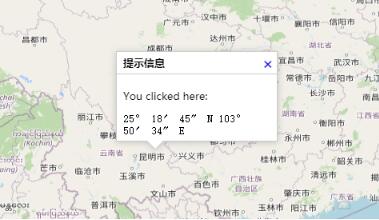
以上内容即为OpenLayers地图弹窗功能的完整实现方案,希望对各位的技术学习有所启发,欢迎持续关注本站获取更多技术分享。
作者最新文章
JS中parseInt与Number转整数的核心区别及适用场景
2026-11-05 17:35:53
定制 Quill.js 主题样式:修改默认 CSS 与添加自定义类名
2026-11-04 11:21:35
混淆JS代码怎么在线反混淆并格式化阅读
2026-11-03 21:46:39
JS在线编辑器代码报错怎么调试?控制台使用技巧
2026-11-03 21:24:56
从 marked.js 旧版本升级到最新版:API 变更与迁移指南
2026-11-03 17:38:17