

Vue购物车全选单选与价格动态计算实现
作者:山岚时间:2026-10-23 06:57:40浏览:80
本文详细解析在Vue项目中实现购物车全选、单选及价格动态显示的具体方法。通过绑定checkbox事件与v-model,利用数组存储选中商品ID,结合checkAll逻辑判断全选状态,并实时计算选中商品的总价与数量,提供完整的HTML与JS代码示例供参考。
Vue购物车功能实现概述
经过一段时间的开发,目前已在项目中实现了购物车的单选、全选功能以及数据的动态显示。在此分享个人的实现方案,供初学者参考。
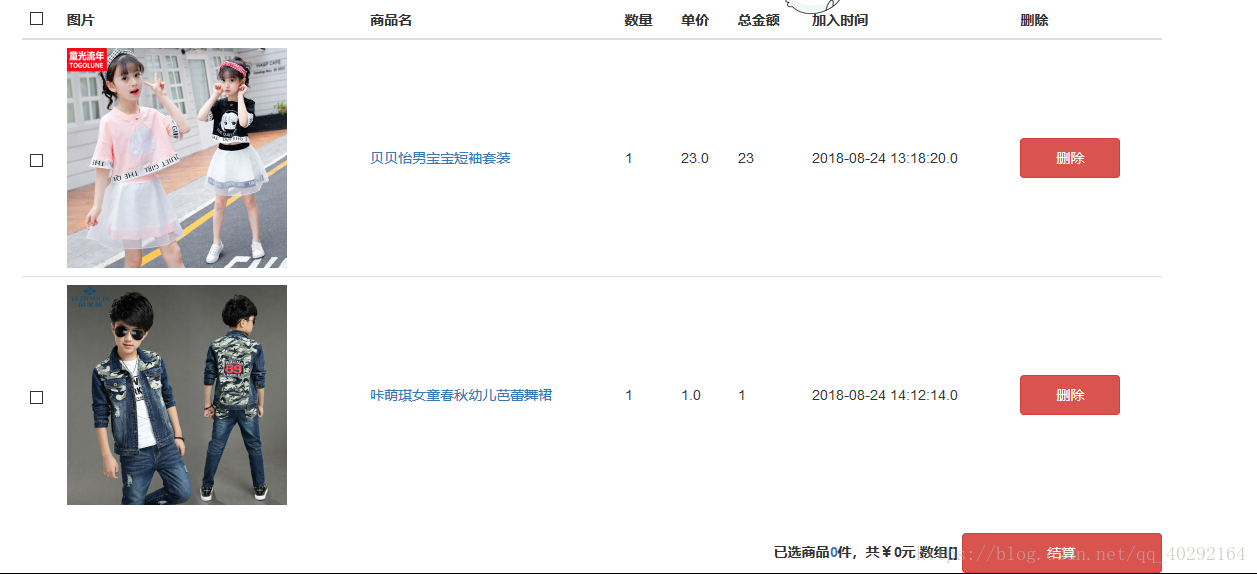
购物车的基础页面布局如下所示:
核心逻辑与实现思路
接下来阐述实现的整体思路。
- 首先,在表格的表头th元素中添加一个checkbox,并绑定@click事件为checkAll,同时使用v-model绑定checkall变量。
- 其次,在对应的tr行中为每个商品添加一个checkbox,绑定事件并设置v-model为checked。此处将checked定义为数组,专门用于存储已选中商品的ID。
- 默认情况下,checkall的值为false。当用户勾选全选框时,将checkall设为true,并遍历将所有商品ID添加到checked数组中,从而使各列中的checkbox自动处于选中状态,以此实现全选与取消全选的功能。当进行单选操作时,需将checkAll的状态设为false,从而支持单选与多选并存。
- 最后一步是实现数据的动态显示。在data中定义price和count两个变量,当勾选某一列商品时,通过@click事件(如xx(price,count,productId))传递参数,从而在页面上动态更新显示结果。
- 关于单选的选中与取消逻辑,可以通过判断商品ID是否存在于数组中来处理,即检查indexOf(productId)是否等于-1。如果数组中已存在该商品ID,点击单选框时应减少价格;反之,若不存在,则增加价格。
以上为个人的实现思路,具体代码实现如下所示。
代码实现示例
HTML结构部分:
<div id="a" class="container">
        <table class="table table-hover" v-if="list.length">
          <thead>
            <tr>
              <th><input type="checkbox" id="box" @click="checkAll" v-model="checkall" /></th>
              <th>图片</th>
              <th>商品名</th>
              <th>数量</th>
              <th>单价</th>
              <th>总金额</th>
              <th>加入时间</th>
              <th>删除</th>
            </tr>
          </thead>

          <tbody>
            <tr v-for="(dateil,index) in list" :key="index">
              <td><input type="checkbox" class="checkbox" v-model="checked"  @click="select(dateil.detailId,dateil.detailProductprice,dateil.detailProductnum)" :value="dateil.detailId" /></td>
              <td><a @click="goShop(dateil.detailProductId)" style="cursor: pointer;"><img v-bind:src="web_server_static+dateil.product.productPhoto"></a></td>
              <td><a @click="goShop(dateil.detailProductId)" style="cursor: pointer;">{{dateil.product.productName}}</a></td>
              <td>{{dateil.detailProductnum}}</td>
              <td>{{dateil.detailProductprice}}</td>
              <td>{{dateil.detailProductprice*dateil.detailProductnum}}</td>
              <td>{{dateil.detailDatetime}}</td>
              <td>
                <button type="button" id="but" @click="del(dateil.detailId)" class="btn btn-danger">删除</button>
              </td>
            </tr>

          </tbody>

        </table>
        <div v-else style="font-size: 25px;text-align: center; margin-top: 300px;height: 100px;">购物车空空如也,请先去购买商品~</div>
        <div id="label_btn">
          <span><label>已选商品<a>{{count}}</a>件,共</a>¥{{price}}</a>元 数组{{checked}}</label>

          </span>
          <span><button type="button" id="btn-close" @click="jiesuan()" class="btn btn-danger">结算</button></span>
        </div>
        <!--结算按钮-->

      </div>
Vue中的数据对象定义方式如下:
var vue = new Vue({
        el: '#a',
        data: {
          list: [],
          checkall: false,
           checked: [],
           price:0,
           count:0,
        }
JavaScript逻辑部分:
checkAll: function() {
            /**
            *控制全选反选
            */
            var _this = this
            //true的时候是全选,false是不选
            if(this.checkall) {
              // 实现反选,按钮选中时 实现了反选,列表为空
              this.checked = []
              this.price=0;
              this.count=0;
            } else {
              // 实现全选
                this.price=0;
              this.count=0;
              this.checked = []
              this.list.forEach(function(dateil) {
                _this.price+=parseInt(dateil.detailProductprice);
                _this.count+=parseInt(dateil.detailProductnum);
                _this.checked.push(dateil.detailId)
              })
            }
            if(this.checked.length === this.list.length) {
              this.checkall = true
              // console.log(this.checkall)
              // console.log(this.checked)
            }
          }
        /**
           * 当单选框选中时
           */
          checkAll: function() {

            var _this = this
            //true的时候是全选,false是不选
            if(this.checkall) {
              // 实现反选,按钮选中时 实现了反选,列表为空
              this.checked = []
              this.price=0;
              this.count=0;
            } else {
              // 实现全选
                this.price=0;
              this.count=0;
              this.checked = []
              this.list.forEach(function(dateil) {
                _this.price+=parseInt(dateil.detailProductprice);
                _this.count+=parseInt(dateil.detailProductnum);
                _this.checked.push(dateil.detailId)
              })
            }
            if(this.checked.length === this.list.length) {
              this.checkall = true
              // console.log(this.checkall)
              // console.log(this.checked)
            }
          }
通过上述配置,即可完整实现购物车的全选、单选以及商品价格的动态显示功能。
以上介绍了Vue实现购物车全选、单选及价格显示的详细整合方案,希望能对大家有所帮助。如有任何疑问,欢迎留言,小编会及时回复。感谢大家对本站的支持!
作者最新文章
Vue.js官网地址是多少?区分国际站与中文文档入口
2026-11-05 16:29:53
Vue/React 项目中怎么封装复用 flv.js 播放器组件
2026-11-03 19:42:36
Vue.js 动态路由权限控制与菜单生成实战方案
2026-11-03 13:46:47
Vue.js 企业级项目架构搭建与目录规范实战
2026-11-03 12:25:32
Vue 或 React 项目中集成 Swiper.js 的最佳实践
2026-11-02 10:29:42