

Vue结合Element UI实现文件上传与后端交互详解
作者:山岚时间:2026-10-22 16:47:30浏览:154
本文详细介绍如何在Vue项目中利用Element UI的el-upload组件实现文件上传功能。内容涵盖前端页面代码编写、上传前对文件格式(xls/xlsx)及大小(5MB)的校验逻辑、手动触发提交机制,以及后端Spring Boot接口接收MultipartFile的处理方式,提供从界面到后台的完整解决方案。
Vue文件上传功能概述
本文介绍Vue实现文件上传的具体方法,供读者参考。
首先说明期望实现的效果。
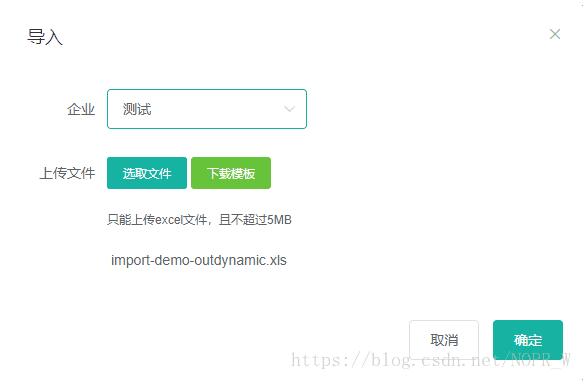
如截图所示,需要将企业信息及上传的文件提交至后台进行处理,接下来将阐述具体实现步骤。
在Vue中进行实现。
展示Vue页面的相关代码结构。
前端页面与组件配置
 <el-upload
 class="upload-demo"
 ref="upload"
 action="doUpload"
 :limit="1"
 :file-list="fileList"
 :before-upload="beforeUpload">
 <el-button slot="trigger" size="small" type="primary">选取文件</el-button>
 <a href="./static/moban.xlsx" rel="external nofollow" download="模板"><el-button size="small" type="success">下载模板</el-button></a>
 <!-- <el-button style="margin-left: 10px;" size="small" type="success" @click="submitUpload">上传到服务器</el-button> -->
 <div slot="tip" class="el-upload__tip">只能上传excel文件,且不超过5MB</div>
 <div slot="tip" class="el-upload-list__item-name">{{fileName}}</div>
 </el-upload>
 <span slot="footer" class="dialog-footer">
 <el-button @click="visible = false">取消</el-button>
 <el-button type="primary" @click="submitUpload()">确定</el-button>
 </span>
介绍在文件上传前进行大小及格式校验的逻辑。
上传前校验逻辑实现
beforeUpload(file){
 debugger
 console.log(file,'文件');
 this.files = file;
 const extension = file.name.split('.')[1] === 'xls'
 const extension2 = file.name.split('.')[1] === 'xlsx'
 const isLt2M = file.size / 1024 / 1024 < 5
 if (!extension && !extension2) {
  this.$message.warning('上传模板只能是 xls、xlsx格式!')
  return
 }
 if (!isLt2M) {
  this.$message.warning('上传模板大小不能超过 5MB!')
  return
 }
 this.fileName = file.name;
 return false // 返回false不会自动上传
 },
说明如何通过手动操作确认并提交文件。
手动提交与FormData构建
submitUpload() {
 debugger
 console.log('上传'+this.files.name)
 if(this.fileName == ""){
  this.$message.warning('请选择要上传的文件!')
  return false
 }
 let fileFormData = new FormData();
 fileFormData.append('file', this.files, this.fileName);//filename是键,file是值,就是要传的文件,test.zip是要传的文件名
 let requestConfig = {
  headers: {
  'Content-Type': 'multipart/form-data'
  },
 }
 this.$http.post(`/basedata/oesmembers/upload?companyId=`+this.company, fileFormData, requestConfig).then((res) => {
  debugger
  if (data && data.code === 0) {
  this.$message({
  message: '操作成功',
  type: 'success',
  duration: 1500,
  onClose: () => {
  this.visible = false
  this.$emit('refreshDataList')
  }
  })
  } else {
  this.$message.error(data.msg)
  }
 })
 }
展示后台接收文件处理的代码实现。
后端接口接收处理
/**
 * 上传文件
 */
 @PostMapping("/upload")
 @RequiresPermissions("basedata:oesmembers:upload")
 public R upload(@RequestParam("file") MultipartFile file, @RequestParam("companyId") Integer companyId) {
 System.out.println(companyId);
 if (file.isEmpty()) {
  throw new RRException("上传文件不能为空");
 }
 //上传文件 相关逻辑

 return R.ok();
}
以上内容为本文全部总结,希望能对读者的学习有所帮助,同时也欢迎大家继续支持本站。
作者最新文章
Vue.js官网地址是多少?区分国际站与中文文档入口
2026-11-05 16:29:53
Vue/React 项目中怎么封装复用 flv.js 播放器组件
2026-11-03 19:42:36
Vue.js 动态路由权限控制与菜单生成实战方案
2026-11-03 13:46:47
Vue.js 企业级项目架构搭建与目录规范实战
2026-11-03 12:25:32
Vue 或 React 项目中集成 Swiper.js 的最佳实践
2026-11-02 10:29:42