

JS中使用textPath实现线条上的文字
作者:百宝袋时间:2026-10-22 11:18:15浏览:260
本文介绍如何在SVG中使用textPath元素将文字沿自定义路径排列,适用于关系图等场景。通过定义path并设置ID,利用textPath的xlink:href属性关联路径,实现文字沿曲线分布。结合D3.js操作,可简化代码编写,避免手动处理繁琐的SVG结构,提升开发效率。
SVG中使用textPath实现路径文字
近期在项目中要实现关系图,需要在线条上绘制文字。要实现这个功能,我们需要在SVG中连接的线条从标签line修改为path,这样才可能实现类似如下的效果:
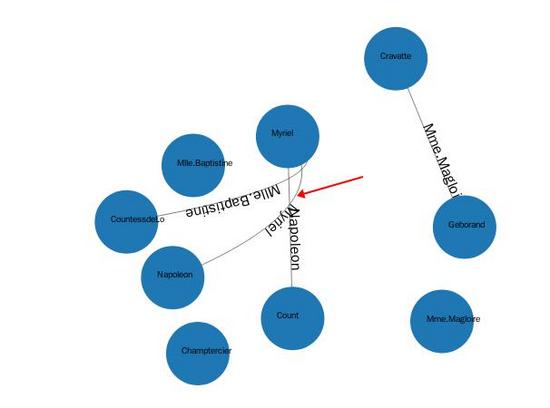
1个简单的例子如下所示:
<svg viewBox="0 0 1000 300"
   xmlns="http://www.w3.org/2000/svg"
   xmlns:xlink="http://www.w3.org/1999/xlink">
  <path id="MyPath"
     d="M 100 200
       C 200 100 300  0 400 100
       C 500 200 600 300 700 200
       C 800 100 900 100 900 100" fill="none" stroke="red"/>
 <text font-family="Verdana" font-size="42.5">
  <textPath xlink:href="#MyPath" rel="external nofollow" >
   We go up, then we go down, then up again
  </textPath>
 </text>
</svg>
在这里我们需要实现1个path,然后设置其ID属性,之后我们创建textPath标签,并链接到上述的ID属性,这样就可以实现在路径上关联文字了。
结合D3.js简化代码实现
而在D3中我们可以这样操作:
var link = svg.append("g").selectAll(".edgepath")
       .data(graph.links)
       .enter()
       .append("path")
       .style("stroke-width",0.5)
       .style("fill","none")
       .attr("marker-end",function(d){
        return "url(#"+d.source+")";
       })
       .style("stroke","black")
       .attr("id", function(d,i){
        return "edgepath"+i;
       });
var edges_text = svg.append("g").selectAll(".edgelabel")
        .data(graph.nodes)
          .enter()
          .append("text")
          .attr("class","edgelabel")
          .attr("id", function(d,i){
           return "edgepath"+i;
          })
          .attr("dx",80)
          .attr("dy",0);
edges_text.append("textPath")
      .attr("xlink:href", function(d,i){
        return "#edgepath"+i;
      }).text(function(d){
       return d.id;
      })
实际上这段代码就是上述例子的实现,这样就可以避免编写繁琐的SVG代码了。
总结
以上所述是小编给大家介绍的使用textPath实现线条上的文字,希望对大家有所帮助,如果大家有任何疑问请给我留言,小编会及时回复大家的。在此也非常感谢大家对本站网站的支持!
作者最新文章
JS中parseInt与Number转整数的核心区别及适用场景
2026-11-05 17:35:53
定制 Quill.js 主题样式:修改默认 CSS 与添加自定义类名
2026-11-04 11:21:35
混淆JS代码怎么在线反混淆并格式化阅读
2026-11-03 21:46:39
JS在线编辑器代码报错怎么调试?控制台使用技巧
2026-11-03 21:24:56
从 marked.js 旧版本升级到最新版:API 变更与迁移指南
2026-11-03 17:38:17