

JavaScript实现反弹动画的优化方案与核心规则
本文详细介绍JavaScript中反弹动画的实现与性能优化。通过封装函数创建私有作用域避免累积,利用元素自定义属性共享定时器ID以支持多动画并行,并总结边界判断、清除无用定时器及参数传递等四条核心优化规则,确保动画流畅且无冲突。
JavaScript反弹动画代码实现
具体实现代码如下所示:
<!DOCTYPE html>
<html lang="en">
<head>
  <meta charset="UTF-8">
  <title>Document</title>
  <style>
    #box{
      width:200px;
      height:200px;
      position: absolute;
      top:0;
      left:200px;
      background:lightblue;
    }
    .btn{
      position:absolute;
      top:200px;
      left:100px;
      height:50px;
    }
    .btn input{
      display:inline-block;
      margin-left:50px;
      outline: none;
      width:100px;
      height:50px;
      border:1px solid green;
      cursor:pointer;
    }
  </style>
</head>
<body>
  <div id='box'></div>
  <div class='btn'>
    <input type="button" value='向左' id='btnLeft'>
    <input type="button" value='向右' id='btnRight'>
  </div>
  <script>
    var oBox = document.getElementById("box");
    var minLeft = 0;
    var maxLeft = utils.win('clientWidth')-oBox.offsetWidth;
    var step = 5;
    var timer = null;
    function move(target){
      //target:告诉我要运动的目标位置
      window.clearTimeout(timer);
      var curLeft = utils.css(oBox,"left");
      if(curLeft<target){//向右走
        if(curLeft+step>target){//边界
          utils.css(oBox,"left",target);
          return;
        }
        curLeft+=step;
        utils.css(oBox,"left",curLeft)
      }else if(curLeft>target){//向左走
        if(curLeft-step<target){//边界
          utils.css(oBox,"left",target);
          return;
        }
        curLeft-=step;
        utils.css(oBox,"left",curLeft)
      }else{//不需要运动
        return;
      }
      // timer = window.setTimeout(move,10)//这里有一个问题,点击按钮第一次target的值是有的,但是第二次通过setTimeout执行的时候没有给target进行传值。是undefined
      timer = window.setTimeout(function(){
        move(target);
      },10)//这样使用匿名函数包裹一下,就解决了上面的问题,但是这样写性能不好,因为每一次到达时间的时候,都需要执行一次匿名函数(形成一个私有的作用域),在匿名函数中再执行move,但是move中需要用到的数据值在第一次执行的move方法中,需要把匿名函数形成的这个私有的作用域作为跳板找到之前的,这样就导致了匿名函数形成的这个私有的作用域不能销毁
    }
    document.getElementById('btnLeft').onclick = function(){
      move(minLeft)
    }
    document.getElementById('btnRight').onclick = function(){
      move(maxLeft)
    }
  </script>
</body>
</html>
性能优化方案
针对前述代码存在的性能问题,此处提供优化版本。该方案通过函数包裹实现,仅保留move函数产生的一个私有作用域而不立即销毁。当_move执行结束后,move函数随之自然销毁,从而提升执行效率。
<!DOCTYPE html>
<html lang="en">
<head>
  <meta charset="UTF-8">
  <title>Document</title>
  <style>
    #box{
      width:200px;
      height:200px;
      position: absolute;
      top:0;
      left:200px;
      background:lightblue;
    }
    .btn{
      position:absolute;
      top:200px;
      left:100px;
      height:50px;
    }
    .btn input{
      display:inline-block;
      margin-left:50px;
      outline: none;
      width:100px;
      height:50px;
      border:1px solid green;
      cursor:pointer;
    }
  </style>
</head>
<body>
  <div id='box'></div>
  <div class='btn'>
    <input type="button" value='向左' id='btnLeft'>
    <input type="button" value='向右' id='btnRight'>
  </div>
  <script>
    var oBox = document.getElementById("box");
    var minLeft = 0;
    var maxLeft = utils.win('clientWidth')-oBox.offsetWidth;
    var step = 5;
    var timer = null;
    function move(target){
      //target:告诉我要运动的目标位置
      _move();
      function _move(){
        window.clearTimeout(timer);
        var curLeft = utils.css(oBox,"left");
        if(curLeft<target){//向右走
          if(curLeft+step>target){//边界
            utils.css(oBox,"left",target);
            return;
          }
          curLeft+=step;
          utils.css(oBox,"left",curLeft)
        }else if(curLeft>target){//向左走
          if(curLeft-step<target){//边界
            utils.css(oBox,"left",target);
            return;
          }
          curLeft-=step;
          utils.css(oBox,"left",curLeft)
        }else{//不需要运动
          return;
        }
        timer = window.setTimeout(_move,10);
      }
    }
    document.getElementById('btnLeft').onclick = function(){
      move(minLeft)
    }
    document.getElementById('btnRight').onclick = function(){
      move(maxLeft)
    }
  </script>
</body>
</html>
多动画并行与定时器管理
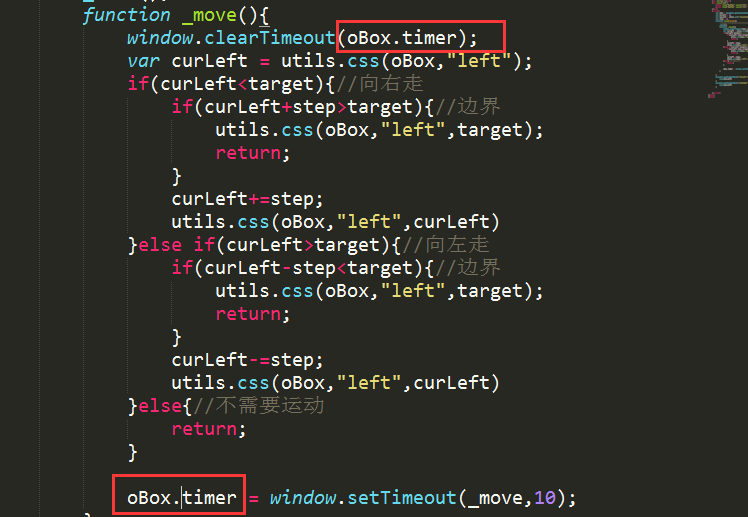
需注意,为确保同一元素在同一时刻仅运行一个动画(即新动画启动前清除旧动画定时器),所有动画接收定时器返回值的变量必须共享。实现方式有两种:一是使用全局变量接收(如前文代码中的var timer = null);二是将值存储在元素的自定义属性上,具体可见下图示意。
动画优化核心规则总结
综上所述,动画优化的四条核心规则如下:
1. 在边界判断中加入步长控制。
2. 及时清除不再使用的定时器。
3. 当外层函数需要传参时,可在内部嵌套一层函数,以此避免作用域链的无限累积。
4. 将定时器的返回值存储于元素的自定义属性中,此举既能防止全局变量冲突,也能支持同一时间多个动画的执行。
以上即为JavaScript反弹动画效果的实现代码详解,希望能为读者提供帮助。如有任何疑问,欢迎留言,小编会及时回复。同时感谢大家对本站网站的支持!
配置 Matter.js 睡眠机制以优化静止物体性能
2026-11-05 15:43:12
JavaScript console.log高级用法:用table、group和time优化调试输出
2026-11-05 08:04:56
JS变量中存储HTML代码时的特殊字符转义方法
2026-11-04 19:04:09
JS怎么安全转换带千分位或货币符号的字符串为数字
2026-11-04 11:54:14
推荐几款稳定的在线JS反混淆工具,支持Obfuscator.io解密
2026-11-04 08:16:21