

JavaScript获取wx.config内部字段解决微信分享
本文介绍如何在前后端分离架构中解决微信分享功能。通过将PHP后台获取的wx.config配置参数封装为独立接口,前端通过Ajax异步调用该接口获取签名等必要字段,并在回调中注入wx.config,从而解除PHP与HTML的耦合,实现更清晰的前端分享逻辑。
微信分享背景与问题
背景 在微信分享开发的时候我们通常的流程是
 <?php
 require_once "jssdk.php";
 $jssdk = new JSSDK("yourAppID", "yourAppSecret");
 $signPackage = $jssdk->GetSignPackage();
?>
 <!DOCTYPE html>
 <html lang="en">
 <head>
 <meta charset="UTF-8">
 <title>微信分享</title>
 </head>
 <body>
 </body>
 <script src="http://res.wx.qq.com/open/js/jweixin-1.0.0.js"></script>
 <script>
 wx.config({
 appId: '<?php echo $signPackage["appId"];?>',
 timestamp: <?php echo $signPackage["timestamp"];?>,
 nonceStr: '<?php echo $signPackage["nonceStr"];?>',
 signature: '<?php echo $signPackage["signature"];?>',
 jsApiList: ['onMenuShareTimeline'
 'onMenuShareAppMessage'
 ]
 });

 wx.ready(function() {

 wx.onMenuShareTimeline({
 title: '', // 分享标题
 link: '', // 分享链接
 imgUrl: '', // 分享图标
 success: function() {
 // 用户确认分享后执行的回调函数
 },
 cancel: function() {
 // 用户取消分享后执行的回调函数
 }
 });

 wx.onMenuShareAppMessage({
 title: '', // 分享标题
 desc: '', // 分享描述
 link: '', // 分享链接
 imgUrl: '', // 分享图标
 type: '', // 分享类型,music、video或link,不填默认为link
 dataUrl: '', // 如果type是music或video,则要提供数据链接,默认为空
 success: function() {
 // 用户确认分享后执行的回调函数
 },
 cancel: function() {
 // 用户取消分享后执行的回调函数
 }
 });

 });
 </script>

 </html>
上述示例代码展示了一个PHP文件,这种写法存在前后端未分离、耦合度过高的问题,且混合编写不够美观。为了实现分享功能,首先需要调用微信JS-SDK API获取配置参数。这些参数必须通过PHP后台语言获取,并将其配置于wx.config中。在调用wx.config之前,需先引入http://res.wx.qq.com/open/js/jweixin-1.0.0.js,随后即可编写分享函数。其依赖关系为:wx.config依赖JS库及config内部的参数,而分享功能又依赖wx.config。因此,核心在于将PHP的配置参数分离出来单独获取。
前后端分离解决方案
解决方案 将获取配置参数的PHP逻辑封装为接口,前端通过Ajax调用该接口,获取参数并转换为对象,再通过回调函数将Ajax获取的参数注入到wx.config中。
代码结构与实现细节
代码结构及功能
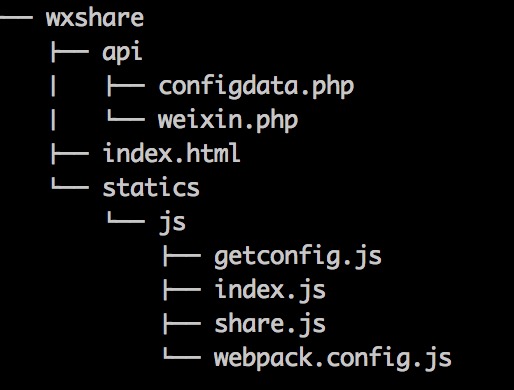
- index.html 页面入口
- weixin.php 服务器端获取配置参数
- configdata.php将配置转为借口输出
- getconfig.js 用ajax获取configdata.php的数据
- share.js 分享回调函
- webpack.config.js webpack配置文件
- index.js 打包后最终html调用js文件
index.html html静态文件
<!DOCTYPE html>
<html lang="en">
<head>
 <meta charset="UTF-8">
 <title>静态页面微信分享测试</title>
</head>
<body>
 <script src="http://res.wx.qq.com/open/js/jweixin-1.0.0.js"></script>
 <script src="statics/js/index.js"></script>
</body>
</html>
configdata.php 后台获取配置的参数 注意url要写上自己被分享的页面url不然会报invalid signature错误
<?php
class JSSDK {
private $appId;
private $appSecret;
public function __construct($appId, $appSecret) {
$this->appId = $appId;
$this->appSecret = $appSecret;
}
public function getSignPackage() {
$jsapiTicket = $this->getJsApiTicket();
$url = "http://$_SERVER[HTTP_HOST]$_SERVER[REQUEST_URI]";
$timestamp = time();
$nonceStr = $this->createNonceStr();
// 这里参数的顺序要按照 key 值 ASCII 码升序排序
$string = "jsapi_ticket=$jsapiTicket&noncestr=$nonceStr×tamp=$timestamp&url=$url";
$signature = sha1($string);
$signPackage = array(
"appId" => $this->appId,
"nonceStr" => $nonceStr,
"timestamp" => $timestamp,
"url" => $url,
"signature" => $signature,
"rawString" => $string
);
return $signPackage;
}
private function createNonceStr($length = 16) {
$chars = "abcdefghijklmnopqrstuvwxyzABCDEFGHIJKLMNOPQRSTUVWXYZ0123456789";
$str = "";
for ($i = 0; $i < $length; $i++) {
$str .= substr($chars, mt_rand(0, strlen($chars) - 1), 1);
}
return $str;
}
private function getJsApiTicket() {
// jsapi_ticket 应该全局存储与更新,以下代码以写入到文件中做示例
$data = json_decode(file_get_contents("jsapi_ticket.json"));
if ($data->expire_time < time()) {
$accessToken = $this->getAccessToken();
$url = "https://api.weixin.qq.com/cgi-bin/ticket/getticket?type=jsapi&access_token=$accessToken";
$res = json_decode($this->httpGet($url));
$ticket = $res->ticket;
if ($ticket) {
$data->expire_time = time() + 7000;
$data->jsapi_ticket = $ticket;
$fp = fopen("jsapi_ticket.json", "w");
fwrite($fp, json_encode($data));
fclose($fp);
}
} else {
$ticket = $data->jsapi_ticket;
}
return $ticket;
}
private function getAccessToken() {
// access_token 应该全局存储与更新,以下代码以写入到文件中做示例
$data = json_decode(file_get_contents("access_token.json"));
if ($data->expire_time < time()) {
$url = "https://api.weixin.qq.com/cgi-bin/token?grant_type=client_credential&appid=$this->appId&secret=$this->appSecret";
$res = json_decode($this->httpGet($url));
$access_token = $res->access_token;
if ($access_token) {
$data->expire_time = time() + 7000;
$data->access_token = $access_token;
$fp = fopen("access_token.json", "w");
fwrite($fp, json_encode($data));
fclose($fp);
}
} else {
$access_token = $data->access_token;
}
return $access_token;
}
private function httpGet($url) {
$curl = curl_init();
curl_setopt($curl, CURLOPT_RETURNTRANSFER, true);
curl_setopt($curl, CURLOPT_TIMEOUT, 500);
curl_setopt($curl, CURLOPT_URL, $url);
$res = curl_exec($curl);
curl_close($curl);
return $res;
}
}
weixin.php 将配置参数格式化输出
 <?php

 require_once "weixin.php";
 $jssdk = new JSSDK(appId, appSecretecret);
 $signPackage = $jssdk->GetSignPackage();

 class Config{
 var $appId;
 var $timestamp;
 var $nonceStr;
 var $signature;
 var $url;
 }

 $config = new Config();

 $config -> appId = $signPackage["appId"];
 $config -> timestamp = $signPackage["timestamp"];
 $config -> nonceStr = $signPackage["nonceStr"];
 $config -> signature = $signPackage["signature"];
 $config -> url = $signPackage["url"];

 echo json_encode($config);
?>
getconfig.js 使用ajax获取接口数据(配置参数)
var getConfig = function(callback) {
 $.ajax({
 url: "http://www.goxueche.com/api/configdata.php",
 type: "get",
 success: function(data) {
 callback(data);
 }
 })
}

module.exports = getConfig;
share.js 分享函数
var getWeixincofig = require("./getconfig.js");
getWeixincofig(shareweixin);


function shareweixin(data) {

 var data = JSON.parse(data);
 console.log(data);

 window.wx.config({
 debug:true,
 appId: data.appId,
 timestamp: data.timestamp,
 nonceStr: data.nonceStr,
 signature: data.signature,
 jsApiList: ['checkJsApi', 'onMenuShareTimeline', 'onMenuShareAppMessage']
 });

 wxShare();
}

function wxShare() {
 //检测api是否生效
 wx.ready(function() {
 wx.checkJsApi({
 jsApiList: [
 'getNetworkType',
 'previewImage'
 ],
 success: function(res) {
 console.log(JSON.stringify(res));
 }
 });
 //分享给好友
 wx.onMenuShareAppMessage({
 title: '趣学车-有温度的互联网驾校',
 desc: '想去学车,就趣学车!',
 link: 'http://www.goxueche.com',
 imgUrl: 'http://www.goxueche.com/....png'
 });

 //分享到朋友圈
 wx.onMenuShareTimeline({
 title: '趣学车-有温度的互联网驾校',
 desc: '想去学车,就趣学车!',
 link: 'http://www.goxueche.com',
 imgUrl: 'http://www.goxueche.com/....png'
 });

 });
}
webpack.config.js
var webpack = require('webpack');
module.exports = {
 entry: {
 index: './share.js',
 },
 output: {
 path: './',
 filename: '[name].js'
 }
};
本文已被整理到了《JavaScript微信开发技巧汇总》,欢迎大家学习阅读。
为大家推荐现在关注度比较高的微信小程序教程一篇:《微信小程序开发教程》小编为大家精心整理的,希望喜欢。
以上就是本文的全部内容,希望对大家的学习有所帮助。
NestJS 是什么?与 Express、Koa 的核心区别及选型建议
2026-11-05 13:46:41
生产环境升级 Node.js 的注意事项与兼容性测试策略
2026-11-05 09:19:24
nvm 常用命令详解:怎么平滑切换和升级 Node.js 版本
2026-11-04 09:02:34
JavaScript和JSP的根本区别:运行环境与执行机制解析
2026-11-03 23:30:18
使用nvm卸载指定版本Node.js并切换默认环境
2026-11-03 23:09:26