TypeScript常见类型及应用示例讲解
本文详细讲解TypeScript中的常见类型,涵盖string、number、boolean等原始类型,数组、any等复杂类型,以及函数参数与返回值的类型注解。重点介绍对象类型、可选属性、联合类型及其类型收窄技巧,帮助开发者掌握类型定义与推断规则,提升代码安全性与可维护性。
常见类型(Everyday Types)
类型声明不仅限于类型注解,还可以出现在多种场景中。理解类型本身及其在不同位置的使用方式,有助于构建更复杂的类型结构。
首先回顾基础且常用的类型,它们是构建更复杂类型体系的基础。
原始类型:
string,number 和 boolean(The primitives)
JavaScript 中有三种广泛使用的原始类型:string,number 和 boolean,TypeScript 为它们分别提供了对应的类型。这些类型的名称与使用 typeof 操作符所得结果一致。
string代表字符串,例如 "Hello, world"number代表数字,例如 42。JavaScript 中没有int或float,所有数值均属于number类型。boolean代表布尔值,仅包含true和false两个值。
类型名 String ,Number 和 Boolean (首字母大写)虽合法,但属于极少使用的特殊内置类型。因此,通常使用 string ,number 或 boolean 。
数组(Array)
声明类似 [1, 2, 3] 的数组类型,需使用语法 number[]。该语法适用于任意类型(例如,string[] 表示字符串数组)。也可能见到 Array<number> 写法,二者等价。泛型章节将介绍 T<U> 语法。
any
TypeScript 提供特殊类型 any。当不希望某值引发类型检查错误时,可将其设为 any 。
若值为 any 类型,可获取其任意属性(转为 any 类型),或像函数一样调用,赋值给任意类型值,或将任意类型值赋给它,以及其他语法正确的操作:
let obj: any = { x: 0 };
// None of the following lines of code will throw compiler errors.
// Using `any` disables all further type checking, and it is assumed
// you know the environment better than TypeScript.
obj.foo();
obj();
obj.bar = 100;
obj = "hello";
const n: number = obj;
当无需编写冗长类型代码,仅需告知 TypeScript 特定代码无误时,any 类型非常实用。
noImplicitAny
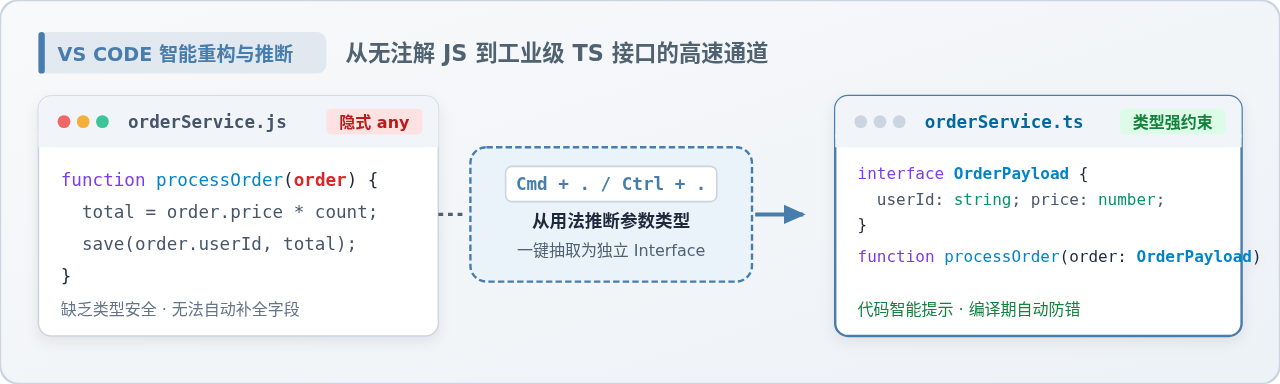
若未指定类型且无法从上下文推断,编译器默认设为 any 类型。
若希望避免此情况(因 TypeScript 对 any 不做类型检查),可启用编译选项 noImplicitAny。当隐式推断为 any 时,TypeScript 将报错。
变量上的类型注解(Type Annotations on Variables)
使用 const、var 或 let 声明变量时,可选择性添加类型注解,显式指定变量类型:
let myName: string = "Alice";TypeScript 不采用“左侧类型声明”形式(如 int x = 0);类型注解通常置于被声明内容之后。
多数情况下无需手动指定,因为 TypeScript 会自动推断类型。例如,变量类型可基于初始值推断:
// No type annotation needed -- 'myName' inferred as type 'string'
let myName = "Alice";
通常无需学习推断规则。初学者建议尽量减少类型注解。TypeScript 仅需少量信息即可完全理解代码行为,这可能会令人惊讶。
函数(Function)
函数是 JavaScript 传递数据的主要方式。TypeScript 允许指定函数输入与输出值的类型。
参数类型注解(Parameter Type Annotations)
声明函数时,可在每个参数后添加类型注解,声明函数接受的参数类型。类型注解位于参数名之后:
// Parameter type annotation
function greet(name: string) {
  console.log("Hello, " + name.toUpperCase() + "!!");
}
参数具备类型注解后,TypeScript 将检查函数实参:
// Would be a runtime error if executed!
greet(42);
// Argument of type 'number' is not assignable to parameter of type 'string'.
即使未对参数做类型注解,TypeScript 仍会检查传入参数数量是否正确。
返回值类型注解(Return Type Annotations)
可添加返回值类型注解。类型注解位于参数列表之后:
function getFavoriteNumber(): number {
  return 26;
}
与变量类型注解类似,无需始终添加返回值类型注解,TypeScript 会基于 return 语句推断返回类型。如示例所示,类型注解有无效果相同,但部分代码库可能显式指定返回值类型,原因包括编写文档、防止意外修改或个人偏好。
匿名函数(Anonymous Functions)
匿名函数与函数声明略有不同:当 TypeScript 知晓匿名函数将被如何调用时,其参数会被自动指定类型。
示例如下:
// No type annotations here, but TypeScript can spot the bug
const names = ["Alice", "Bob", "Eve"];
// Contextual typing for function
names.forEach(function (s) {
  console.log(s.toUppercase());
  // Property 'toUppercase' does not exist on type 'string'. Did you mean 'toUpperCase'?
});
// Contextual typing also applies to arrow functions
names.forEach((s) => {
  console.log(s.toUppercase());
  // Property 'toUppercase' does not exist on type 'string'. Did you mean 'toUpperCase'?
});
尽管参数 s 未添加类型注解,TypeScript 仍根据 forEach 函数类型及传入数组类型,推断出 s 的类型。
此过程称为上下文推断(contextual typing),即从函数出现的上下文中推断其应有类型。
与推断规则类似,无需学习具体机制,只需知晓其存在并帮助省去不必要的注解。后续将看到更多此类示例,了解值出现上下文如何影响其类型。
对象类型(Object Types)
除原始类型外,最常见的是对象类型。定义对象类型只需简单列出其属性及对应类型。
例如:
// The parameter's type annotation is an object type
function printCoord(pt: { x: number; y: number }) {
  console.log("The coordinate's x value is " + pt.x);
  console.log("The coordinate's y value is " + pt.y);
}
printCoord({ x: 3, y: 7 });
此处为参数添加类型,该类型包含两个属性 x 和 y,均为 number 类型。可使用 , 或 ; 分隔属性,最后一个属性分隔符可选。
每个属性类型可选,若未指定,默认使用 any 类型。
可选属性(Optional Properties)
对象类型可将部分或全部属性设为可选,只需在属性名后添加 ? :
function printName(obj: { first: string; last?: string }) {
  // ...
}
// Both OK
printName({ first: "Bob" });
printName({ first: "Alice", last: "Alisson" });
JavaScript 中获取不存在的属性会返回 undefined 而非运行时错误。因此,获取可选属性前需检查是否为 undefined。
function printName(obj: { first: string; last?: string }) {
  // Error - might crash if 'obj.last' wasn't provided!
  console.log(obj.last.toUpperCase());
  // Object is possibly 'undefined'.
  if (obj.last !== undefined) {
    // OK
    console.log(obj.last.toUpperCase());
  }
  // A safe alternative using modern JavaScript syntax:
  console.log(obj.last?.toUpperCase());
}
联合类型(Union Types)
TypeScript 类型系统允许使用一系列操作符,基于已有类型构建新类型。掌握基础类型后,可将其组合使用。
定义一个联合类型(Defining a Union Type)
组合类型的第一种方式是使用联合类型,由两个或多个类型组成,表示值可能是其中任意一种。每种类型均为联合类型的成员(members)。
编写处理字符串或数字的函数:
function printId(id: number | string) {
  console.log("Your ID is: " + id);
}
// OK
printId(101);
// OK
printId("202");
// Error
printId({ myID: 22342 });
// Argument of type '{ myID: number; }' is not assignable to parameter of type 'string | number'.
// Type '{ myID: number; }' is not assignable to type 'number'.
使用联合类型(Working with Union Types)
提供符合联合类型的值很简单,只需提供符合任一联合成员类型的值即可。获得联合类型值后,应如何使用?
TypeScript 要求对联合类型的所有成员均有效的操作。例如,若拥有联合类型 string | number ,不能使用仅存在于 string 上的方法:
function printId(id: number | string) {
  console.log(id.toUpperCase());
    // Property 'toUpperCase' does not exist on type 'string | number'.
    // Property 'toUpperCase' does not exist on type 'number'.
}
解决方案是通过代码收窄联合类型,如同在 JavaScript 中无类型注解时那样操作。当 TypeScript 可根据代码结构推断出更具体类型时,类型收窄即发生。
例如,TypeScript 知道对 string 类型值使用 typeof 会返回字符串 "string" :
function printId(id: number | string) {
  if (typeof id === "string") {
    // In this branch, id is of type 'string'
    console.log(id.toUpperCase());
  } else {
    // Here, id is of type 'number'
    console.log(id);
  }
}
再如使用函数,例如 Array.isArray :
function welcomePeople(x: string[] | string) {
  if (Array.isArray(x)) {
    // Here: 'x' is 'string[]'
    console.log("Hello, " + x.join(" and "));
  } else {
    // Here: 'x' is 'string'
    console.log("Welcome lone traveler " + x);
  }
}
注意在 else 分支无需特殊处理,若 x 不是 string[],则必为 string 。
有时,若联合类型每个成员均具有某属性(例如数字和字符串均有 slice 方法),可直接使用该属性,无需类型收窄:
// Return type is inferred as number[] | string
function getFirstThree(x: number[] | string) {
  return x.slice(0, 3);
}
以上为TypeScript常见类型及应用示例讲解的详细内容,更多关于TypeScript常见类型及应用的资料请关注本站其它相关文章!
JS处理含Emoji或中文的字符串转数组乱码问题
2026-11-05 16:12:28
JS怎么使用展开运算符合并对象
2026-11-05 14:42:18
ES6+环境下判断JS对象为空的简洁写法
2026-11-05 12:12:23
怎么通过replacer函数自定义JS中JSON的格式化输出
2026-11-05 11:19:44
JS正则表达式基础:字面量与RegExp构造函数的区别及常用元字符
2026-11-05 11:16:58