
JS使用navigator.clipboard实现点击复制功能
使用 navigator.clipboard.writeText 方法,配合异步调用和错误处理,即可实现点击复制功能。
Clipboard API 权限与兼容性判断
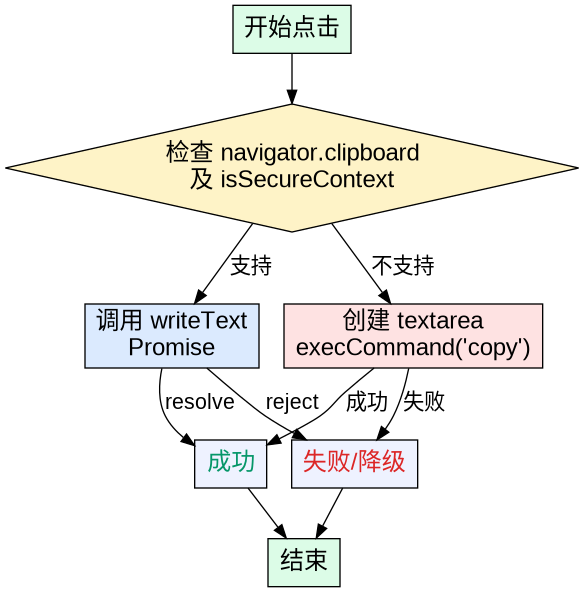
现代浏览器推荐使用 Clipboard API,但需先检查 navigator.clipboard 是否存在。该接口在 HTTPS 或 localhost 环境下可用,普通 HTTP 页面会返回 undefined,此时应降级使用传统的 document.execCommand('copy') 方案。
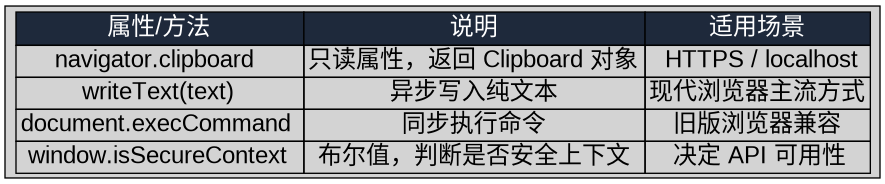
在使用前,建议通过特性检测确认环境支持情况。如果 navigator.clipboard 不可用,代码逻辑需要自动切换到旧版兼容模式,以确保在所有用户环境中都能正常工作。
完整可运行示例程序
以下代码封装了一个 copyToClipboard 函数,优先使用现代 API,失败时回退到传统方法。将代码保存为 HTML 文件并在浏览器中打开即可测试。

<!DOCTYPE html>
<html lang="zh">
<head>
    <meta charset="UTF-8">
    <title>JS 点击复制示例</title>
</head>
<body>
    <button id="copyBtn">点击复制文本</button>
    <script>
        document.getElementById('copyBtn').addEventListener('click', async function() {
            const text = 'Hello, World!';
            try {
                if (navigator.clipboard && window.isSecureContext) {
                    await navigator.clipboard.writeText(text);
                    console.log('复制成功 (现代API)');
                } else {
                    // 降级方案
                    const textArea = document.createElement('textarea');
                    textArea.value = text;
                    textArea.style.position = 'fixed';
                    textArea.style.left = '-9999px';
                    document.body.appendChild(textArea);
                    textArea.focus();
                    textArea.select();
                    try {
                        document.execCommand('copy');
                        console.log('复制成功 (降级方案)');
                    } catch (err) {
                        console.error('复制失败', err);
                    }
                    document.body.removeChild(textArea);
                }
            } catch (err) {
                console.error('复制出错:', err);
            }
        });
    </script>
</body>
</html>
运行上述 HTML 文件,点击按钮后,控制台会打印‘复制成功’。如果是在非安全上下文(如本地未配置 HTTPS 的文件系统路径)中打开,会自动触发降级逻辑。复制的内容即为 ‘Hello, World!’。
该函数接受一个字符串参数,尝试写入剪贴板。如果成功,控制台输出成功信息;如果失败(如权限被拒),则捕获异常并提示用户。
异步调用中的 Promise 处理细节
navigator.clipboard.writeText 返回一个 Promise,必须使用 await 或 .then() 处理结果。如果在同步事件处理器中直接调用而不等待,可能导致后续逻辑执行时机错误。
在实际开发中,建议在按钮点击事件中直接使用 async/await 语法。这样可以确保在复制操作完成后再进行 UI 反馈,例如显示“已复制”的提示框,避免用户重复点击。
JS Base64转File原生实现:atob与Uint8Array详解
2026-11-26 13:50:50
JS日期选择器无法获取选中值或事件不触发的常见原因
2026-11-26 13:50:37
从零构建无障碍访问(A11y)友好的JS日期选择器
2026-11-26 13:50:36
JS获取地址栏参数时中文乱码怎么解决
2026-11-26 13:02:05
用JavaScript为黑白棋盘格添加点击交互与状态切换功能
2026-11-26 10:30:19