
怎么用JS制作带界面的随机点名器完整Demo
本文详细讲解如何使用原生HTML、CSS和JavaScript制作一个带交互界面的随机点名器完整Demo,涵盖界面结构搭建、定时器滚动动画、防重复抽取算法及完整可运行源码。
制作一个带界面的随机点名器,核心机制是在前端通过 JavaScript 的 setInterval 定时器高频改变显示框中的名字,营造出轮播抽取的视觉动效,随后在用户点击“停止”时调用 clearInterval 定格当前结果。本文将基于原生 HTML、CSS 与 JavaScript,从界面布局、事件流转控制、随机抽取算法与防重复处理四个维度完整实现一个开箱即用的随机点名器 Demo。
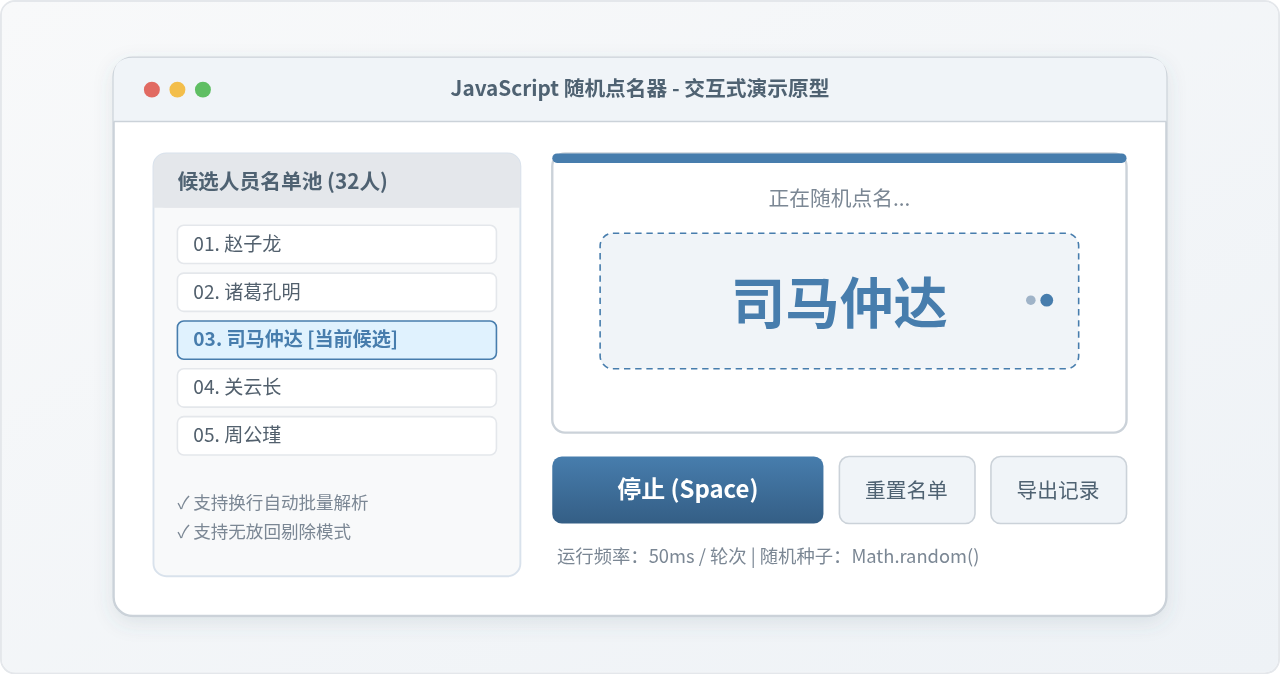
一、界面结构与 DOM 组件划分
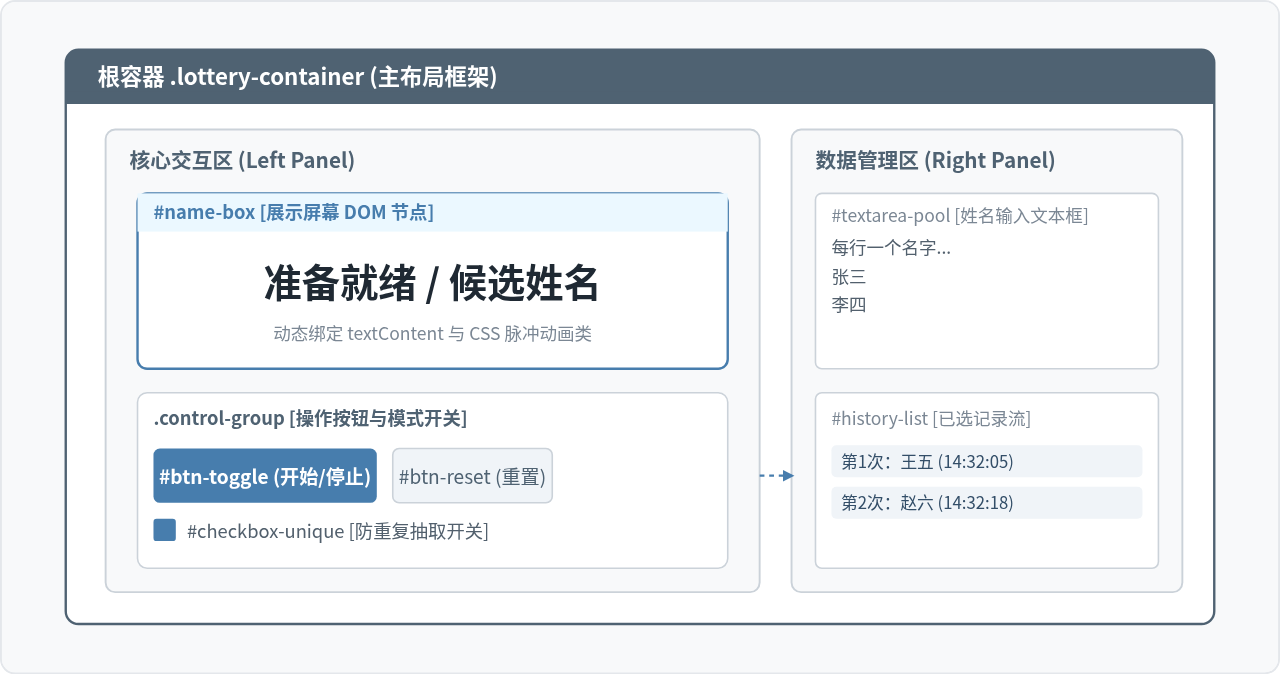
一个实用的点名器不仅要有一个滚动展示区,还必须具备灵活的候选人输入渠道和点名记录区。在编写前端代码前,首先把界面拆分为清晰的模块层级:
- 主展示区(Display Screen):居中放大显示当前滚动的姓名,并在抽取完成时呈现醒目的定格高亮效果。
- 控制操作区(Action Controls):包含“开始/停止”主切换按钮、防重复抽取复选框以及一键重置按钮。
- 候选池配置区(Candidate Editor):提供多行文本框(
<textarea>),允许使用者自由粘贴班级或部门名单,按换行符自动解析。 - 抽取历史记录区(History List):按时间或次序展示已被点中过的人员列表,方便主持人复核。
二、点名器的生命周期与事件响应流程
点名器的本质是一个由用户触发的有限状态机。系统在任意时刻处于两个主状态之一:“静止就绪(Idle)”或“正在点名(Running)”。状态之间的转换依赖点击按钮或敲击空格键。
在编写逻辑时,许多初学者容易犯的一个错误是:连续点击“开始”按钮创建了多个未被销毁的定时器,导致屏幕疯狂刷新且无法用一次“停止”停下来。因此,必须引入一个统一的计时器标识变量 timerId 和布尔状态标志 isRunning,在切换时做严格拦截。
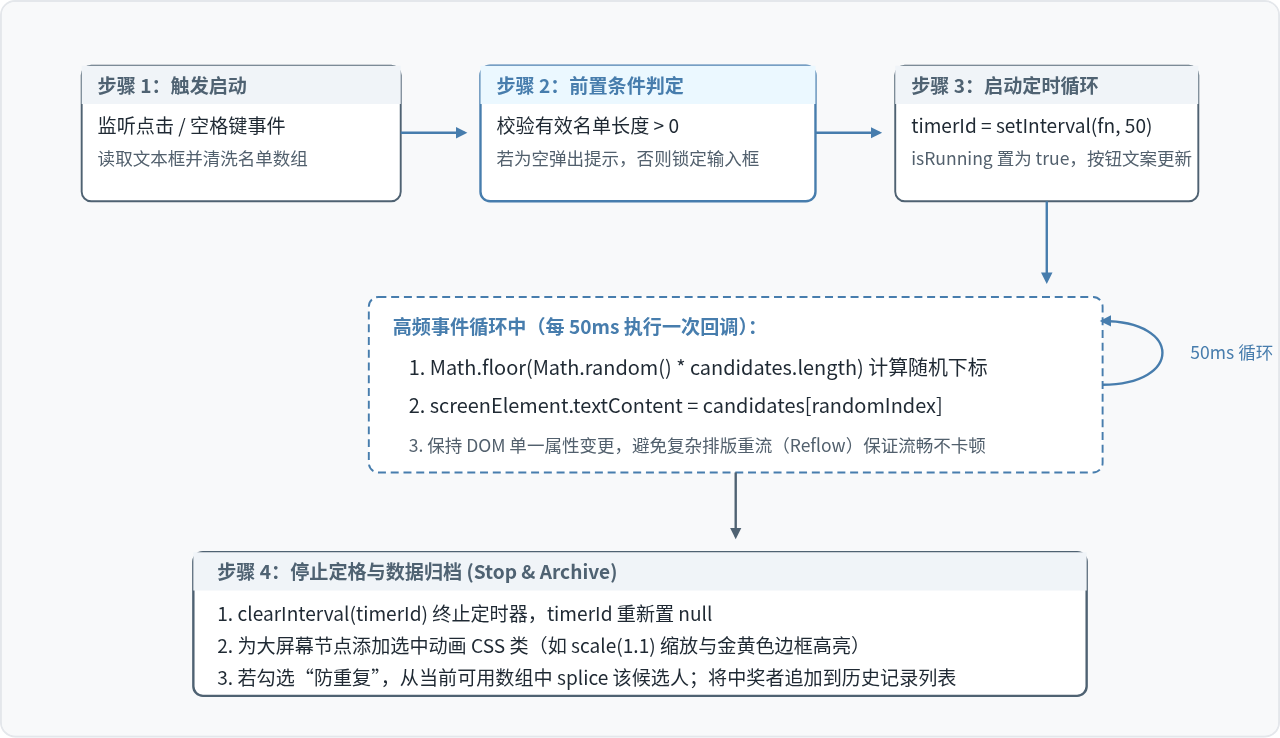
三、核心算法:随机抽取与防重复机制
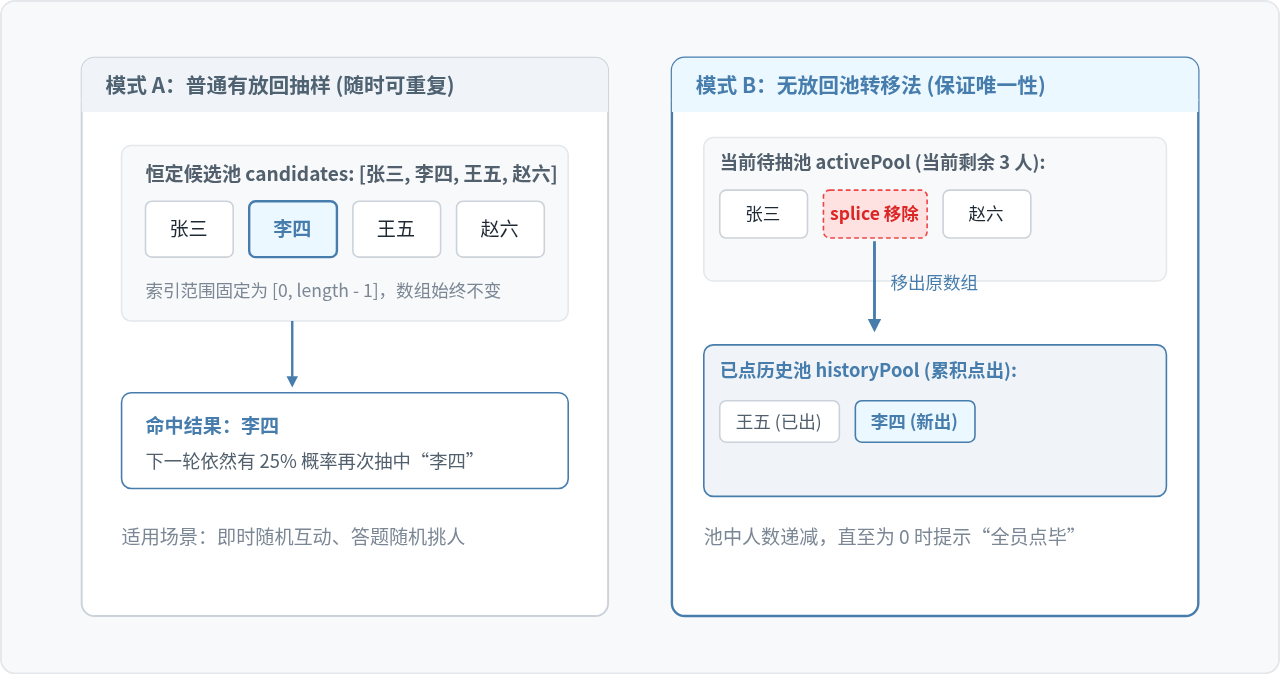
随机点名器中有两套常见的抽取业务场景:普通随机(有放回抽样)和唯一排除(无放回抽样)。在实际教学课堂或年会抽奖中,绝大多数情况下需要确保被抽过的人不会立即再次被抽中,否则会引起争议。
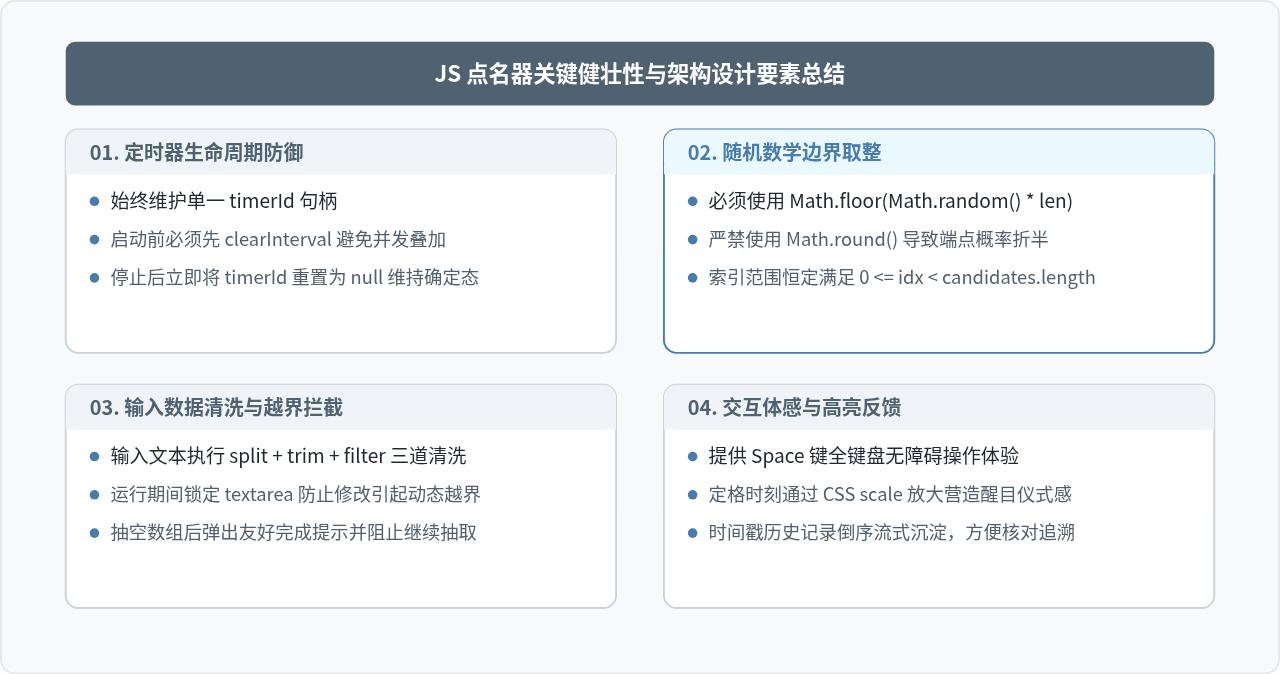
1. 随机索引的数学原理
JavaScript 提供了 Math.random() 方法,该函数返回一个在区间 [0, 1) 内的伪随机浮点数(大于等于 0 且严格小于 1)。为了将其映射到数组的有效索引范围 [0, n - 1],必须执行以下计算:
const randomIndex = Math.floor(Math.random() * candidates.length);这里必须使用 Math.floor()(向下取整)而不是 Math.round()(四舍五入)。因为使用 Math.round() 会导致首尾两个端点(0 和 n-1)的概率只有中间数字的一半,产生不公平分布。
2. 防重复池转移法
要实现“抽完不重复”,最安全稳定的做法不是在抽取后重新比较循环(这在候选人剩余极少时会导致死循环或严重耗时),而是采用数据池转移策略:
- 维护两个数组:
activePool(当前可被点名的候选池)与historyPool(已抽出的记录池)。 - 停止点名时,根据当前选中的
index,使用activePool.splice(index, 1)将其从候选池物理移除,并推入historyPool。 - 当
activePool.length === 0时,代表本轮全员已被点完,主动禁用开始按钮,并提示用户点击“重置”重新灌入名单。
四、完整可运行 Demo 源码实现
下面是一个经过模块化设计的完整网页源码。它将 HTML 结构、CSS 视觉样式以及 JS 行为逻辑整合成单一文件。读者可直接新建一个 lottery.html 文件,将以下代码完整粘贴进去,双击即可在任何现代浏览器中运行体验。
<!DOCTYPE html>
<html lang="zh-CN">
<head>
  <meta charset="UTF-8">
  <title>网页随机点名器 Demo</title>
  <style>
    * {
      box-sizing: border-box;
      margin: 0;
      padding: 0;
    }
    body {
      font-family: -apple-system, BlinkMacSystemFont, "Segoe UI", Roboto, "PingFang SC", sans-serif;
      background: #f4f6f8;
      display: flex;
      justify-content: center;
      padding: 40px 20px;
      color: #333;
    }
    .lottery-wrapper {
      background: #fff;
      width: 100%;
      max-width: 820px;
      padding: 32px;
      border-radius: 12px;
      box-shadow: 0 8px 24px rgba(0,0,0,0.06);
    }
    .header-title {
      font-size: 22px;
      text-align: center;
      color: #2c3e50;
      margin-bottom: 24px;
    }
    .display-screen {
      height: 140px;
      background: #f8fafc;
      border: 2px dashed #cbd5e1;
      border-radius: 8px;
      display: flex;
      align-items: center;
      justify-content: center;
      font-size: 42px;
      font-weight: bold;
      color: #1e293b;
      margin-bottom: 24px;
      transition: all 0.2s ease;
      user-select: none;
    }
    .display-screen.active {
      border-color: #3b82f6;
      background: #eff6ff;
      color: #1d4ed8;
      box-shadow: 0 0 16px rgba(59, 130, 246, 0.2);
    }
    .display-screen.winner {
      border-color: #10b981;
      background: #ecfdf5;
      color: #047857;
      transform: scale(1.02);
    }
    .controls {
      display: flex;
      align-items: center;
      justify-content: center;
      gap: 16px;
      margin-bottom: 30px;
    }
    button {
      padding: 10px 28px;
      font-size: 16px;
      font-weight: 600;
      border: none;
      border-radius: 6px;
      cursor: pointer;
      transition: background 0.2s;
    }
    .btn-main {
      background: #3b82f6;
      color: #fff;
      min-width: 130px;
    }
    .btn-main:hover {
      background: #2563eb;
    }
    .btn-main.running {
      background: #ef4444;
    }
    .btn-main.running:hover {
      background: #dc2626;
    }
    .btn-sub {
      background: #e2e8f0;
      color: #475569;
    }
    .btn-sub:hover {
      background: #cbd5e1;
    }
    .options-bar {
      display: flex;
      align-items: center;
      gap: 8px;
      font-size: 14px;
      color: #64748b;
      cursor: pointer;
    }
    .panel-group {
      display: grid;
      grid-template-columns: 1fr 1fr;
      gap: 20px;
    }
    .panel-block h4 {
      font-size: 14px;
      margin-bottom: 8px;
      color: #475569;
    }
    textarea {
      width: 100%;
      height: 140px;
      padding: 10px;
      border: 1px solid #cbd5e1;
      border-radius: 6px;
      resize: vertical;
      font-family: inherit;
      font-size: 13px;
    }
    .history-box {
      height: 140px;
      border: 1px solid #cbd5e1;
      border-radius: 6px;
      padding: 8px 12px;
      overflow-y: auto;
      background: #fafafa;
      font-size: 13px;
    }
    .history-item {
      padding: 4px 0;
      border-bottom: 1px dashed #e2e8f0;
      color: #334155;
    }
  </style>
</head>
<body>

<div class="lottery-wrapper">
  <h1 class="header-title">课堂与会议随机点名系统</h1>

  <!-- 动态展示屏 -->
  <div id="screen" class="display-screen">准备就绪</div>

  <!-- 控制栏 -->
  <div class="controls">
    <button id="btnToggle" class="btn-main">开始点名</button>
    <button id="btnReset" class="btn-sub">重置名单</button>
    <label class="options-bar">
      <input type="checkbox" id="chkUnique" checked>
      防重复抽取 (无放回)
    </label>
  </div>

  <!-- 数据配置与记录 -->
  <div class="panel-group">
    <div class="panel-block">
      <h4>候选人名单池 (每行一人):</h4>
      <textarea id="txtNames">赵云
关羽
张飞
诸葛亮
司马懿
周瑜
孙策
黄忠</textarea>
    </div>
    <div class="panel-block">
      <h4>已点中记录流:</h4>
      <div id="historyList" class="history-box"></div>
    </div>
  </div>
</div>

<script>
  // 获取关键 DOM 节点
  const screen = document.getElementById('screen');
  const btnToggle = document.getElementById('btnToggle');
  const btnReset = document.getElementById('btnReset');
  const chkUnique = document.getElementById('chkUnique');
  const txtNames = document.getElementById('txtNames');
  const historyList = document.getElementById('historyList');

  // 内部核心运行状态
  let timerId = null;
  let activeCandidates = [];
  let currentPickedIndex = -1;

  // 从文本域初始化候选名单
  function getRawNames() {
    return txtNames.value
      .split('\n')
      .map(name => name.trim())
      .filter(name => name.length > 0);
  }

  function resetPool() {
    activeCandidates = getRawNames();
    screen.textContent = activeCandidates.length > 0 ? '准备就绪' : '名单为空';
    screen.className = 'display-screen';
    historyList.innerHTML = '';
  }

  // 开始循环轮换
  function startLottery() {
    // 首次启动或名单被清空时重新灌入名单
    if (activeCandidates.length === 0) {
      activeCandidates = getRawNames();
    }

    if (activeCandidates.length === 0) {
      alert('请先在文本框中输入至少一个候选人姓名!');
      return;
    }

    // 状态与样式切换
    screen.className = 'display-screen active';
    btnToggle.textContent = '停止 (Space)';
    btnToggle.classList.add('running');
    txtNames.disabled = true;

    // 定时循环更替
    timerId = setInterval(() => {
      currentPickedIndex = Math.floor(Math.random() * activeCandidates.length);
      screen.textContent = activeCandidates[currentPickedIndex];
    }, 50);
  }

  // 停止轮换并结算结果
  function stopLottery() {
    clearInterval(timerId);
    timerId = null;

    btnToggle.textContent = '开始点名';
    btnToggle.classList.remove('running');
    txtNames.disabled = false;

    if (currentPickedIndex >= 0 && currentPickedIndex < activeCandidates.length) {
      const winner = activeCandidates[currentPickedIndex];
      screen.textContent = winner;
      screen.className = 'display-screen winner';

      // 记录到已点记录区
      const item = document.createElement('div');
      item.className = 'history-item';
      const timeStr = new Date().toLocaleTimeString();
      item.textContent = `[${timeStr}] 抽中:${winner}`;
      historyList.prepend(item);

      // 若勾选防重复,从待选池剔除
      if (chkUnique.checked) {
        activeCandidates.splice(currentPickedIndex, 1);
        if (activeCandidates.length === 0) {
          setTimeout(() => {
            alert('所有人选均已被点中一轮,可点击“重置名单”重新开始!');
          }, 200);
        }
      }
    }
  }

  // 点击主控制按钮切换状态
  btnToggle.addEventListener('click', () => {
    if (timerId) {
      stopLottery();
    } else {
      startLottery();
    }
  });

  // 重置按钮监听
  btnReset.addEventListener('click', () => {
    if (timerId) stopLottery();
    resetPool();
  });

  // 空格键快捷操作支持
  window.addEventListener('keydown', (e) => {
    // 若焦点正在 textarea 内输入,不拦截空格键
    if (document.activeElement === txtNames) return;
    if (e.code === 'Space') {
      e.preventDefault();
      btnToggle.click();
    }
  });

  // 初次进入页面自动载入文本框名单
  resetPool();
</script>
</body>
</html>
五、开发中必须注意的边界条件与避坑指南
在将点名器投入实际环境使用时,有几处细节如果不做防御,很容易造成程序崩溃或界面展示异常:
\r、制表符、行尾空格或末尾空行)。如果不经过 .map(s => s.trim()).filter(s => s.length > 0) 过滤,抽取器很容易抽中“空名字”,导致界面出现空白闪烁。
keydown 时,必须先判断 document.activeElement === txtNames。如果用户正在文本框内打字输入带有空格的名字,全局快捷键不能拦截空格事件,否则会导致文本域无法输入空格。
textarea 内容,会导致数组长度瞬间收缩,从而让当前随机计算出来的索引越界(超出 activeCandidates.length 范围返回 undefined)。因此,在进入运行状态时应将输入域 disabled = true 锁定。
六、总结
制作一个实用的带界面的随机点名器,代码量虽然通常在百行左右,但涉及了完整的现代前端开发闭环:从清晰的 DOM 布局到定时器事件控制,从离散数学中的均匀随机数映射到有放回/无放回数据池的动态维护。掌握这套思路后,读者还可以进一步在此 Demo 基础上扩展本地缓存(localStorage 记住历史名单)、抽奖概率权重分配或礼花音效动效等进阶功能。
JS怎么实现长字符串按固定长度自动换行
2026-11-21 08:35:23
JavaScript三元运算符能否包含多条执行语句
2026-11-20 23:17:47
JS中安全删除对象数组元素:避免遍历时的索引陷阱
2026-11-20 23:06:24
JS字符串中怎么插入换行符:\n与模板字符串用法
2026-11-20 22:37:04
JS中怎么创建并初始化指定长度或默认值的数组
2026-11-20 20:24:16