
结合Intersection Observer实现视口内触发JS数字滚动
深入讲解如何使用浏览器原生 Intersection Observer API 监听元素视口可见性,并结合 requestAnimationFrame 与 Ease-Out 缓动算法实现平滑、高性能的数字递增滚动效果。
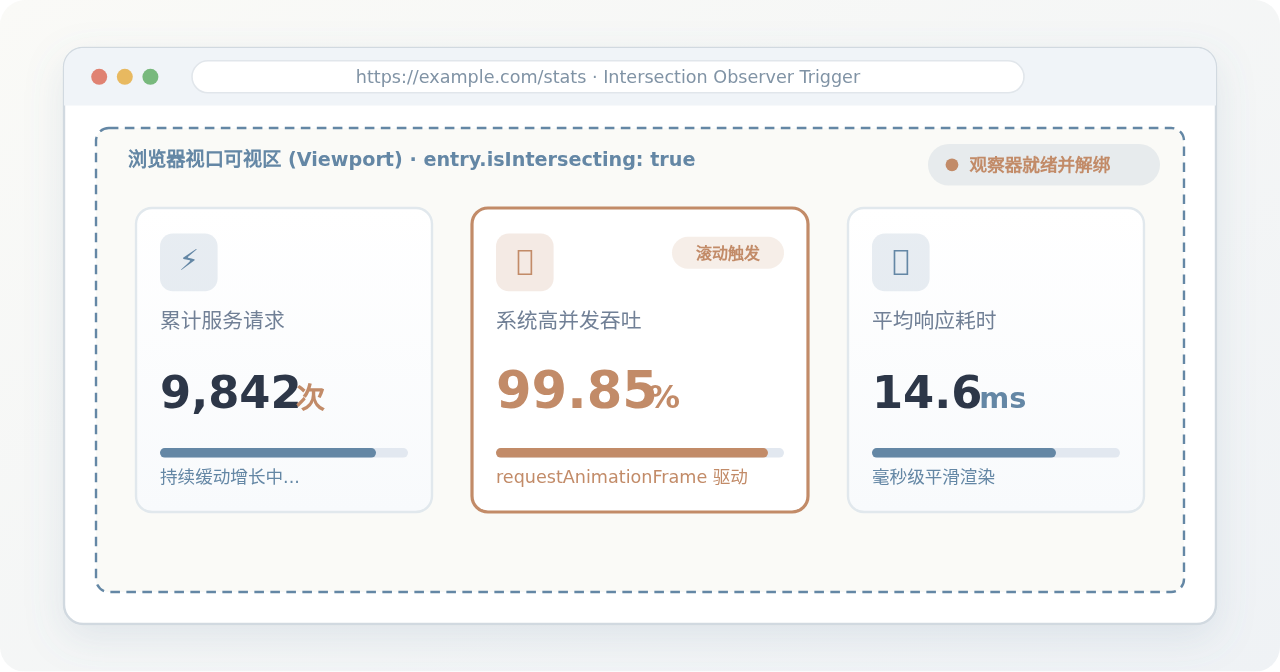
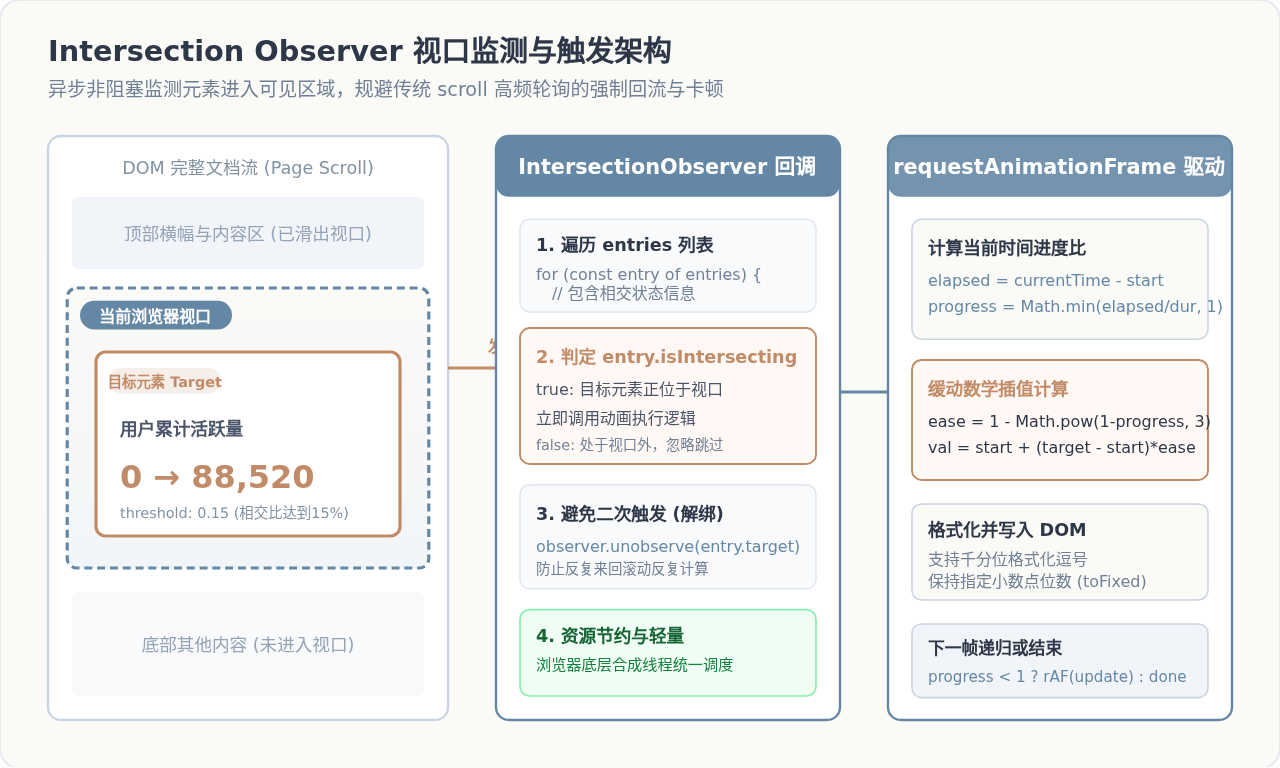
实现视口内数字滚动动画的核心,是在目标元素刚进入浏览器可见区域时,立即触发基于 requestAnimationFrame 的平滑缓动计数,并在首次相交后立即注销监听。采用原生 Intersection Observer API 替代传统 scroll 滚动事件,可以让滚动判定脱离浏览器主线程的高频轮询,避免强制回流与页面掉帧,以极低的系统开销实现优雅生动的展示效果。
一、传统滚动监听的缺陷与Intersection Observer优势
在官网业绩展示页、数据看板或年终总结中,数字由 0 渐进累加到目标数值(例如“已服务企业 12,000+”、“综合满意度 99.8%”)是非常普遍的需求。如果不加控制地在页面加载完成时就立即播放动画,位于页面中下部的统计卡片早在用户滑倒前就已播放完毕;而若采用早期的监听方式,往往存在明显的性能隐患。
在早期方案中,前端开发者通常监听 window.addEventListener('scroll', handler),并在回调中反复调用 el.getBoundingClientRect() 计算元素相对于视口顶部与底部的位置。这种做法存在三个致命问题:
- 主线程高频拥堵:用户滑动滚轮或触控板时,
scroll事件会在短时间内连续触发数十甚至上百次,即便引入节流(throttle),依然要在主线程执行计算。 - 强制同步布局(Reflow):频繁调用
getBoundingClientRect()会强迫浏览器立即计算最新的几何属性,打乱浏览器的批量渲染队列,在内容复杂的网页上极易引发严重掉帧。 - 生命周期清理繁琐:当卡片完成动画后,往往需要手动维护标志位或在复杂状态机中解绑事件,容易发生内存泄漏。
现代浏览器提供的 Intersection Observer API(交叉观察器)则完全颠覆了这一模式。它允许我们注册一个观察器,在底层由浏览器合成线程以异步方式监测目标节点与视口(或指定祖先容器)的交叉几何状态。仅当元素穿过预设的阈值边界时,才将回调放入任务队列执行,对页面主线程的滚动平滑度几乎没有任何负面影响。
二、核心实现步骤与代码构建
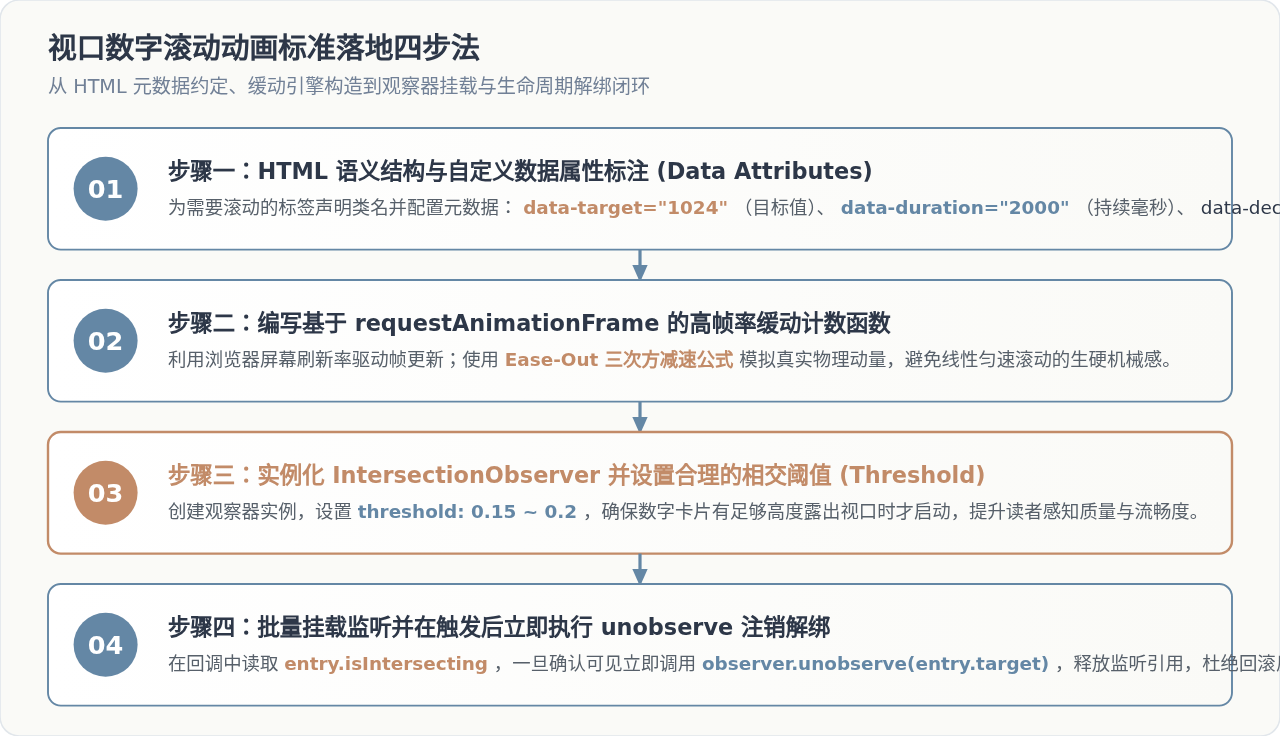
实现一套工业级的视口内数字滚动效果,整体流程可以拆解为四个标准化步骤:HTML 自定义属性约定、缓动计数驱动函数、交叉观察器配置以及挂载与解绑处理。
第 1 步:HTML 结构设计与元数据声明
为了让 JavaScript 逻辑具备良好的通用性与可复用性,建议将目标数值、动画时长和小数精度等参数通过 data-* 属性直接声明在 HTML 标签上:
<!-- 统计卡片示例 -->
<div class="stat-group">
  <div class="stat-card">
    <span class="counter" data-target="9840" data-duration="2000">0</span>
    <span class="unit">次</span>
  </div>
  <div class="stat-card">
    <span class="counter" data-target="99.85" data-duration="2200" data-decimals="2">0.00</span>
    <span class="unit">%</span>
  </div>
</div>
第 2 步:构建基于 requestAnimationFrame 的缓动计数器
数字变化切忌使用 setInterval,因为定时器无法对齐显示器的物理刷新率,容易出现跳帧或撕裂。采用原生的 requestAnimationFrame,让浏览器在每一次屏幕重绘之前计算当前的过渡值:
/**
 * 缓动数字递增动画
 * @param {HTMLElement} el - 目标DOM节点
 * @param {number} target - 最终目标数值
 * @param {number} duration - 动画持续毫秒数
 * @param {number} decimals - 保留的小数位数
 */
function animateValue(el, target, duration = 2000, decimals = 0) {
  let startTimestamp = null;
  const startValue = 0;

  // 三次方减速缓动公式:前快后慢,收尾平稳
  const easeOutCubic = (t) => 1 - Math.pow(1 - t, 3);

  function step(timestamp) {
    if (!startTimestamp) startTimestamp = timestamp;
    const elapsed = timestamp - startTimestamp;
    const progress = Math.min(elapsed / duration, 1);

    // 计算当前经过缓动插值后的数值
    const currentVal = startValue + (target - startValue) * easeOutCubic(progress);

    // 格式化输出:结合保留小数与千分位逗号
    if (decimals > 0) {
      el.textContent = currentVal.toFixed(decimals);
    } else {
      el.textContent = Math.floor(currentVal).toLocaleString('zh-CN');
    }

    // 若未达到动画时长,继续申请下一帧
    if (progress < 1) {
      window.requestAnimationFrame(step);
    } else {
      // 最后一帧精准校正,防止浮点微小偏差
      el.textContent = decimals > 0
        ? target.toFixed(decimals)
        : target.toLocaleString('zh-CN');
    }
  }

  window.requestAnimationFrame(step);
}
第 3 步:初始化观察器并配置触发阈值
实例化 IntersectionObserver 时,回调函数会接收一个 entries 数组。我们需要检查每一项的 entry.isIntersecting 属性,并在判定为进入视口后启动动画,同时调用 observer.unobserve() 注销该元素的监听:
// 观察器配置项
const observerOptions = {
  root: null,        // null 表示以视口(viewport)作为相交根
  rootMargin: '0px', // 外边距偏移量
  threshold: 0.2     // 元素在视口露出的面积比例达到 20% 时触发
};

const counterObserver = new IntersectionObserver((entries, observer) => {
  entries.forEach(entry => {
    if (entry.isIntersecting) {
      const targetElement = entry.target;
      const targetNum = parseFloat(targetElement.getAttribute('data-target') || '0');
      const duration = parseInt(targetElement.getAttribute('data-duration') || '2000', 10);
      const decimals = parseInt(targetElement.getAttribute('data-decimals') || '0', 10);

      // 启动数字滚动动画
      animateValue(targetElement, targetNum, duration, decimals);

      // 关键点:单次触发后立即停止观察该元素,释放资源并防止重复播放
      observer.unobserve(targetElement);
    }
  });
}, observerOptions);
第 4 步:批量挂载与启动监听
通过 document.querySelectorAll('.counter') 获取页面所有计数器节点,逐个调用 counterObserver.observe(el) 进行监听绑定即可:
document.addEventListener('DOMContentLoaded', () => {
  const counterElements = document.querySelectorAll('.counter');
  counterElements.forEach(el => counterObserver.observe(el));
});
三、数字滚动缓动算法与精度处理
数字递增的视觉感受取决于数值在时间轴上的分布规律。如果采用线性匀速算法(即每一毫秒递增恒定数值),用户在最后阶段难以感知数字何时落位,会有明显的机械感。
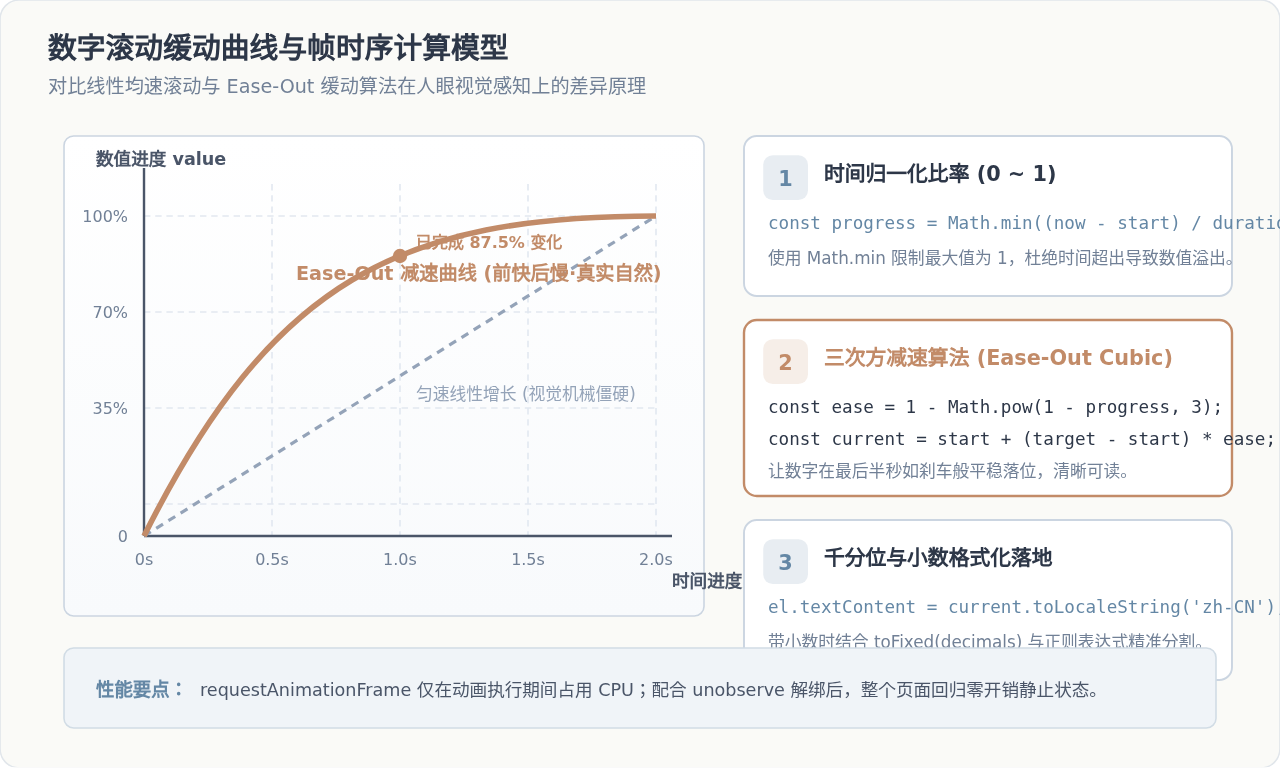
在数学上,我们将动画经过的时间比率归一化为时间进度比:
progress = Math.min((currentTime - startTime) / duration, 1)
采用 Ease-Out Cubic(三次方减速)算法时,输出的系数计算公式为:
ease = 1 - Math.pow(1 - progress, 3)
从曲线走向可以看出,在动画的前半段(前 30% 时间),数值迅速走过 70% 的区间,产生极富冲击力的动效;而在最后阶段,曲线斜率逐渐趋近于 0,数值跳动变慢,让读者的视线可以从容聚焦在最终确定的数据上。
99.85%)时,切勿在每一帧直接对浮点数进行字符串截断。JavaScript 内部 IEEE 754 双精度浮点计算可能会出现类似 0.1 + 0.2 = 0.30000000000000004 的精度溢出。正确的做法是在计算得出 currentVal 后,始终统一通过 currentVal.toFixed(decimals) 输出,确保视图层永远不会出现闪烁或多余杂质字符。
四、完整可运行示例与常见边界问题
下面是一个包含独立样式、DOM 结构与完整逻辑的单文件示例,可以直接保存为 .html 文件在浏览器中打开验证:
<!DOCTYPE html>
<html lang="zh-CN">
<head>
  <meta charset="UTF-8">
  <title>视口数字滚动完整示例</title>
  <style>
    body {
      font-family: sans-serif;
      margin: 0;
      padding: 0;
      background: #F8FAFC;
    }
    .spacer {
      height: 100vh;
      display: flex;
      align-items: center;
      justify-content: center;
      font-size: 20px;
      color: #94A3B8;
      border-bottom: 2px dashed #CBD5E1;
    }
    .stats-section {
      padding: 100px 20px;
      max-width: 900px;
      margin: 0 auto;
      display: grid;
      grid-template-columns: repeat(3, 1fr);
      gap: 24px;
    }
    .card {
      background: #FFF;
      padding: 30px;
      border-radius: 12px;
      text-align: center;
      box-shadow: 0 4px 12px rgba(0,0,0,0.06);
    }
    .num {
      font-size: 44px;
      font-weight: 800;
      color: #6487A5;
      font-family: monospace;
    }
    .label {
      margin-top: 10px;
      font-size: 14px;
      color: #64748B;
    }
  </style>
</head>
<body>
  <div class="spacer">请向下滚动页面,触发下方卡片的相交动画 ↓</div>

  <section class="stats-section">
    <div class="card">
      <div class="num counter" data-target="12850" data-duration="2000">0</div>
      <div class="label">注册企业数(家)</div>
    </div>
    <div class="card">
      <div class="num counter" data-target="99.92" data-duration="2400" data-decimals="2">0.00</div>
      <div class="label">系统服务可用率(%)</div>
    </div>
    <div class="card">
      <div class="num counter" data-target="450" data-duration="1800">0</div>
      <div class="label">核心专利授权(项)</div>
    </div>
  </section>

  <div class="spacer">页面底部内容占位</div>

  <script>
    function animateValue(el, target, duration, decimals) {
      let startTime = null;
      const easeOut = (t) => 1 - Math.pow(1 - t, 3);

      function step(now) {
        if (!startTime) startTime = now;
        const progress = Math.min((now - startTime) / duration, 1);
        const val = target * easeOut(progress);

        el.textContent = decimals > 0
          ? val.toFixed(decimals)
          : Math.floor(val).toLocaleString('zh-CN');

        if (progress < 1) {
          window.requestAnimationFrame(step);
        } else {
          el.textContent = decimals > 0
            ? target.toFixed(decimals)
            : target.toLocaleString('zh-CN');
        }
      }
      window.requestAnimationFrame(step);
    }

    const observer = new IntersectionObserver((entries, obs) => {
      entries.forEach(entry => {
        if (entry.isIntersecting) {
          const el = entry.target;
          const target = parseFloat(el.getAttribute('data-target') || '0');
          const dur = parseInt(el.getAttribute('data-duration') || '2000', 10);
          const dec = parseInt(el.getAttribute('data-decimals') || '0', 10);
          animateValue(el, target, dur, dec);
          obs.unobserve(el);
        }
      });
    }, { threshold: 0.2 });

    document.querySelectorAll('.counter').forEach(el => observer.observe(el));
  </script>
</body>
</html>
五、落地常见边界与避坑自查
1. 首屏卡片直接进入视口
无需额外判断是否触发首屏。IntersectionObserver 在初始创建并 observe 节点时,会对当前已经在视口内的节点立即派发一次事件,自动平滑触发,无需额外手动调用一次初始化。
2. 移动端 iOS 弹性滚动与边距
移动端滑动到最底或最顶时会有“橡皮筋回弹”效果,可能导致边缘元素误判。可通过配置 rootMargin: "0px 0px -40px 0px",使底部上移 40px 作为缓冲线,提高触发准确性。
3. 快速滑过页面时的动画帧取消
如果业务场景需要“滑离视口时重置动画以备下次重播”,则不能执行 unobserve,而是需在 !entry.isIntersecting 时调用 cancelAnimationFrame(frameId),并将数值重置为 0。
4. 浏览器兼容性与垫片处理
现代主流浏览器(Chrome 51+、Safari 12.1+、Firefox 55+、Edge 15+)对 Intersection Observer 的支持度已超过 97%。若需照顾极老旧环境,可直接引入官方 W3C Polyfill。
Vue/React中直接用JS给input赋值无效的原因及解决
2026-11-20 10:45:21
JS alert 阻塞主线程对代码执行顺序的影响
2026-11-20 09:52:23
JS批量删除指定class或属性的HTML元素
2026-11-19 23:41:53
怎么在 Vue 或 React 项目中正确集成 JavaScript 动态背景
2026-11-19 23:17:42
JS动态切换字体样式的最佳实践:classList对比style
2026-11-19 21:18:36