
不使用Canvas:怎么用DOM元素和CSS Grid实现JS俄罗斯方块
深入解析如何在不依赖HTML5 Canvas的前提下,利用现代CSS Grid布局与状态驱动的DOM元素高效实现经典JavaScript俄罗斯方块游戏,涵盖坐标映射、矩阵旋转、碰撞检测与全量DOM复用技术。
一、为什么选择 DOM + CSS Grid:离散状态与像素重绘的解耦
在传统基于 Canvas 的开发模式中,开发者必须承担底层渲染管道的全部管理工作:初始化高分辨率画布以适配视网膜屏幕(DPI 处理)、维护主循环、调用 clearRect 清屏、逐块计算物理像素偏移并绘制矩形。一旦需要为消除行增加渐变发光、震颤动效或修改主题皮肤,往往需要在渲染循环中手动插值编写复杂的绘制逻辑。
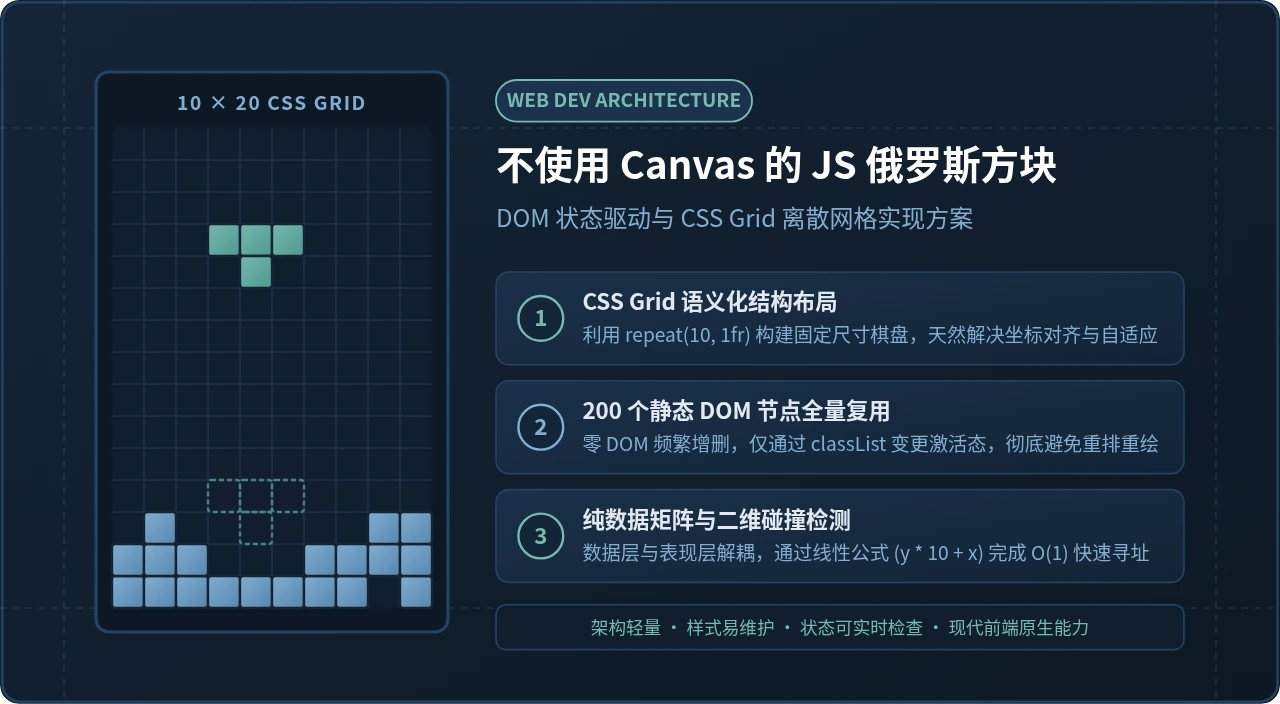
与之相对,俄罗斯方块的活动区域是一个规整的 10×20 矩阵,整个游戏界面只存在两类视觉实体:已固化的静止方块与当前正在下落的活动方块。通过 CSS Grid,我们可以把几何坐标计算完全委托给浏览器的原生布局引擎。每一个格子天然拥有确定的宽高与网格间距,开发者只需要维护一个二维数据状态矩阵,并将其单向映射到 DOM 节点的 CSS 类名上。
appendChild 或重置 innerHTML。在初始化时一次性创建全部 200 个单元格 div 并建立索引缓存,游戏运行期间仅变更 className,浏览器只会触发合成与重绘(Paint),完全不会触发昂贵的文档重排(Reflow)。
二、棋盘布局与坐标体系:CSS Grid 的结构优势
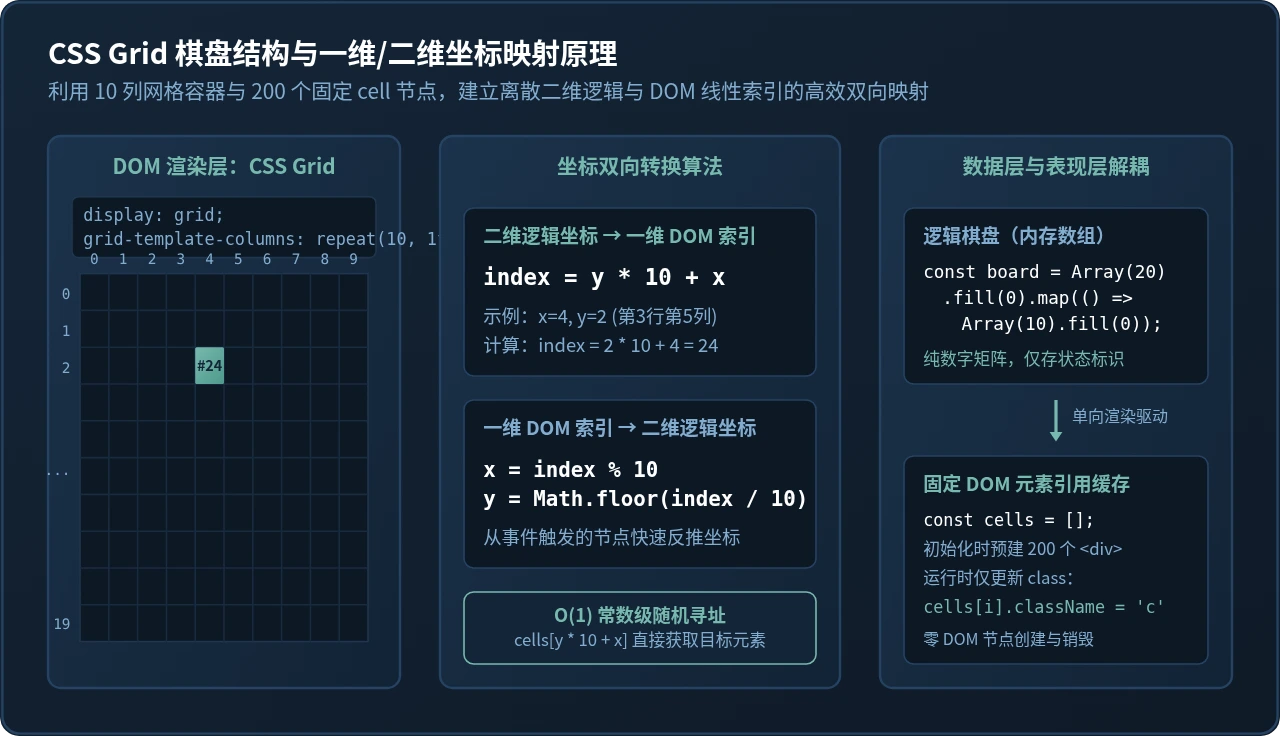
CSS Grid 提供了二维网格布局的原生能力。通过声明 grid-template-columns: repeat(10, 1fr) 与 grid-template-rows: repeat(20, 1fr),容器即可自动将内部子元素按照从左至右、从上至下的流式规则排列整齐。
在数据存储与 DOM 查询之间,我们面临二维游戏坐标 (x, y)(其中 x 范围为 0~9,y 范围为 0~19)与一维扁平 DOM 节点列表之间的转换问题。线性哈希公式为:
// 逻辑坐标转一维 DOM 数组索引
const index = y * 10 + x;

// 从 DOM 索引反推逻辑坐标
const x = index % 10;
const y = Math.floor(index / 10);
借助这一公式,我们在 JavaScript 中持有静态数组 const cells = Array.from(gridElement.children),即可在 O(1) 常数时间内快速读取并操作任意指定坐标的 DOM 节点,无需进行任何 DOM 树遍历选择。
三、方块形态与旋转算法设计
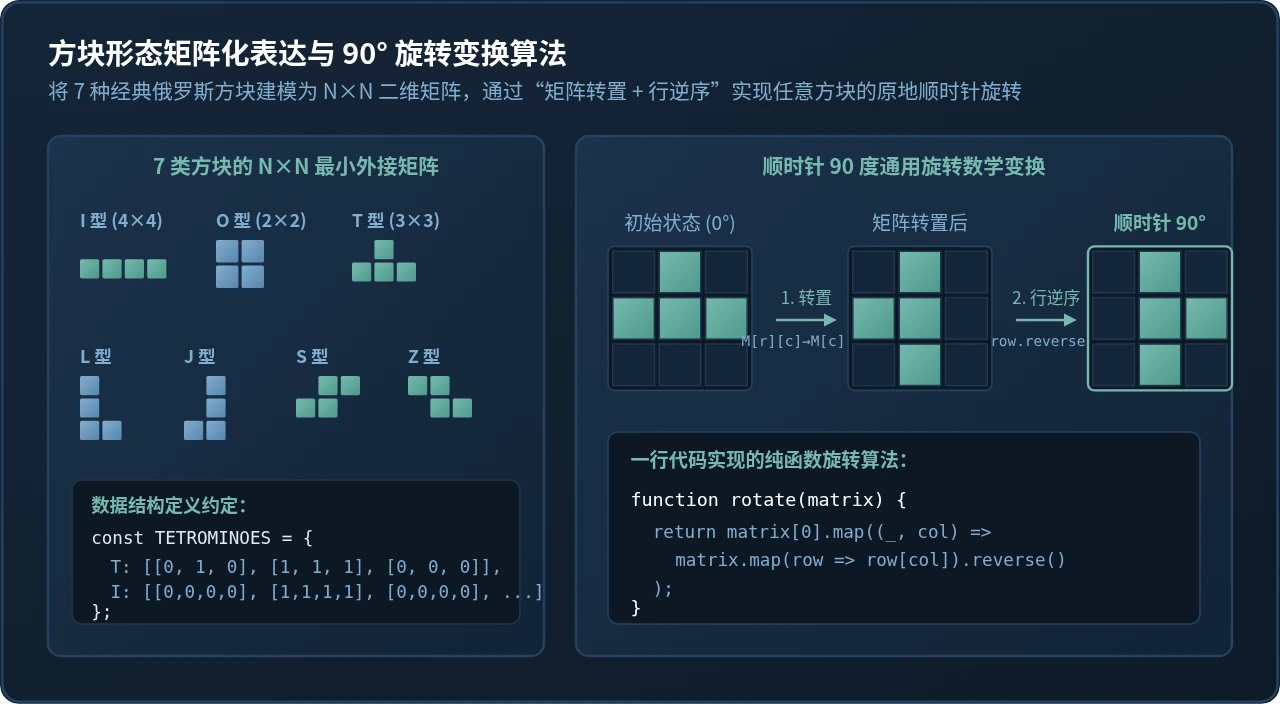
俄罗斯方块包含 7 种经典构型(I、J、L、O、S、T、Z)。在逻辑层,我们将其抽象为大小为 2×2、3×3 或 4×4 的 N×N 二维数字矩阵。其中 1 代表实体方块,0 代表空白。例如 T 型方块可以定义为 3×3 矩阵:
const TETROMINOES = {
  I: [[0, 0, 0, 0], [1, 1, 1, 1], [0, 0, 0, 0], [0, 0, 0, 0]],
  J: [[1, 0, 0], [1, 1, 1], [0, 0, 0]],
  L: [[0, 0, 1], [1, 1, 1], [0, 0, 0]],
  O: [[1, 1], [1, 1]],
  S: [[0, 1, 1], [1, 1, 0], [0, 0, 0]],
  T: [[0, 1, 0], [1, 1, 1], [0, 0, 0]],
  Z: [[1, 1, 0], [0, 1, 1], [0, 0, 0]],
};
顺时针 90 度的线性代数变换
很多初学者在实现旋转时,会为每种方块的 4 个朝向硬编码写出所有排列。这不仅冗长,而且容易出错。在数学上,任意二维矩阵顺时针旋转 90 度等价于两个基础操作的复合:矩阵转置(行与列互换),随后对每一行进行镜像逆序。
这一变换在 JavaScript 中可以用简洁的纯函数表达,不产生任何副作用:
function rotateMatrix(matrix) {
  return matrix[0].map((_, colIndex) =>
    matrix.map(row => row[colIndex]).reverse()
  );
}
四、移动控制与三阶段碰撞检测管道
在离散网格游戏中,物理移动并非连续的像素位移,而是离散坐标跳变。处理玩家输入(键盘方向键)与重力自动下落时,必须遵循“先算后动(Tentative Evaluation)”原则。
当事件触发时,程序先计算出目标候选坐标 (nextX, nextY) 或候选旋转形态 nextMatrix,并将其传入独立的原子碰撞检测函数 collide(board, piece, nextX, nextY)。碰撞函数按序执行三个维度的合法性校验:
- 左右边界校验:计算方块实体单元的全局横坐标
x + nextX是否小于 0 或大于等于 10。 - 底部边界校验:计算方块实体单元的全局纵坐标
y + nextY是否大于等于 20。 - 固定方块重叠校验:检查背景棋盘矩阵
board[y + nextY][x + nextX]是否已被之前的方块占据。
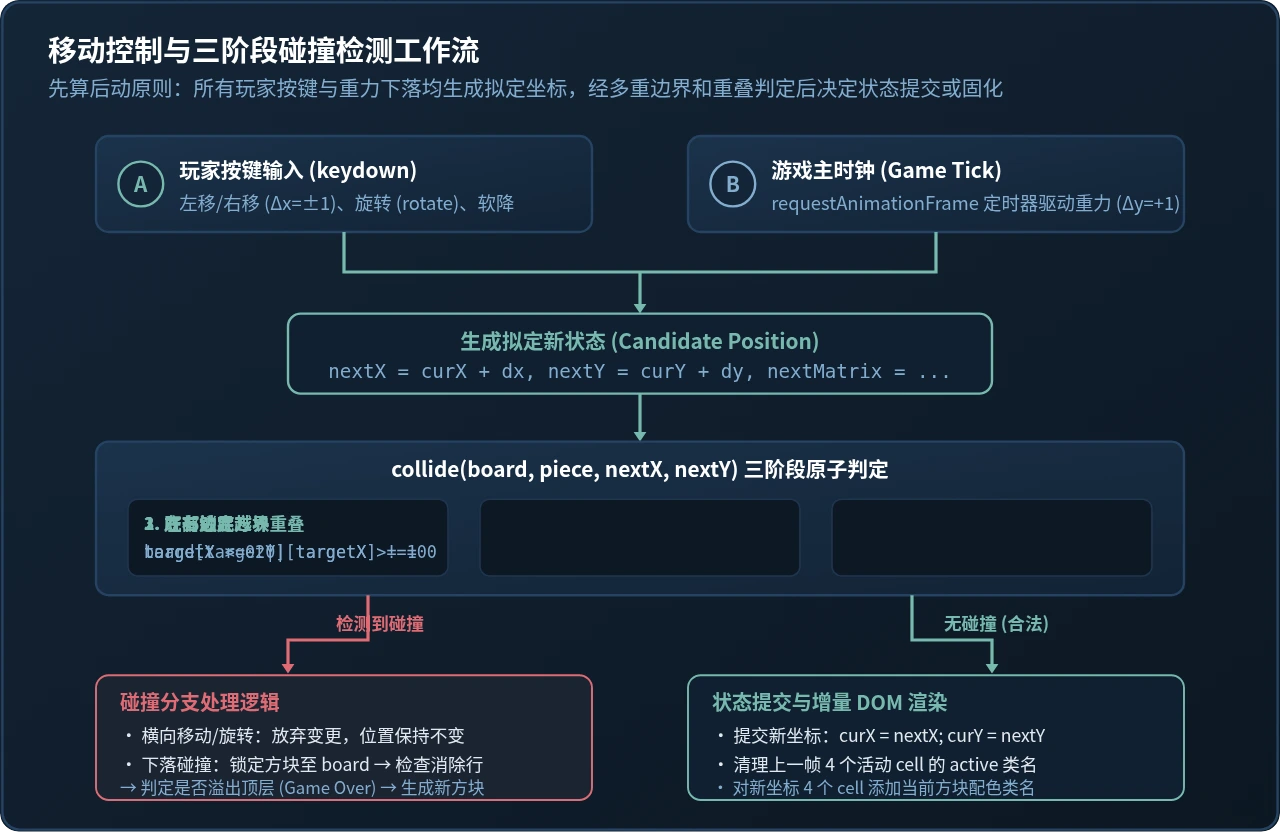
若检测失败,且当前动作是横向平移或旋转,则直接放弃本次操作,现有界面位置保持不变;若当前动作是向下移动且发生碰撞,则说明当前方块已经落到底部或落在了下方的堆叠体上,流程立即进入“方块固化(Locking)与消行检查”。
五、消除行与状态重绘:避免频繁增删 DOM 的性能技巧
当活动方块触底固化后,其占据的 4 个格子状态写入 200 个元素的 board 数组中。紧接着需要进行消行检测:
function sweepLines() {
  let linesCleared = 0;
  for (let r = 19; r >= 0; r--) {
    // 检查当前行是否每一列都有方块
    if (board[r].every(val => val !== 0)) {
      linesCleared++;
      board.splice(r, 1); // 移除满行
      board.unshift(new Array(10).fill(0)); // 顶部补入新的空行
      r++; // 重新检查当前索引行
    }
  }
  return linesCleared;
}div 再重新添加!这样会打乱 CSS Grid 的流式排版顺序,并导致浏览器执行重排计算。正确的做法是仅操作内存中的 board 数组,随后触发统一的单向全量状态同步函数。
状态同步函数非常直观:遍历 200 个格子,根据 board[r][c] 的数值赋予对应的颜色类名。对于正在下落的活动方块,临时在其占据的 4 个 cells 上叠加 active 类名。即使在普通手机浏览器上,该渲染过程仅耗时约 0.2ms,远低于一帧(16.6ms)的时间开销。
六、完整可运行代码实现
下面是一个经过工程化梳理、开箱即用的完整单文件俄罗斯方块。包含自适应 CSS Grid 样式、状态管理与键盘事件处理。读者可将其保存为 index.html 直接在现代浏览器中打开运行。
<!DOCTYPE html>
<html lang="zh-CN">
<head>
  <meta charset="UTF-8">
  <title>CSS Grid 俄罗斯方块</title>
  <style>
    body {
      background: #142537;
      color: #e2e8f0;
      font-family: -apple-system, sans-serif;
      display: flex;
      flex-direction: column;
      align-items: center;
      padding: 20px;
    }
    .game-layout {
      display: flex;
      gap: 24px;
      margin-top: 16px;
    }
    /* 核心 10x20 CSS Grid 棋盘 */
    #grid {
      display: grid;
      grid-template-columns: repeat(10, 24px);
      grid-template-rows: repeat(20, 24px);
      gap: 1px;
      background-color: #1f364f;
      border: 3px solid #264363;
      border-radius: 4px;
      box-shadow: 0 8px 24px rgba(0,0,0,0.5);
    }
    .cell {
      background-color: #0d1825;
      border-radius: 2px;
      transition: background-color 0.05s ease;
    }
    /* 方块样式与类型配色 */
    .cell.T { background-color: #77B9AE; box-shadow: inset 0 0 4px #a5f3fc; }
    .cell.I { background-color: #83ADD0; box-shadow: inset 0 0 4px #bae6fd; }
    .cell.O { background-color: #f6ad55; box-shadow: inset 0 0 4px #fef08a; }
    .cell.L { background-color: #ed8936; box-shadow: inset 0 0 4px #ffedd5; }
    .cell.J { background-color: #4299e1; box-shadow: inset 0 0 4px #dbeafe; }
    .cell.S { background-color: #48bb78; box-shadow: inset 0 0 4px #dcfce7; }
    .cell.Z { background-color: #f56565; box-shadow: inset 0 0 4px #fee2e2; }

    .panel {
      display: flex;
      flex-direction: column;
      gap: 16px;
      min-width: 140px;
    }
    .panel-card {
      background: #1b324b;
      padding: 16px;
      border-radius: 6px;
      border: 1px solid #264363;
    }
    .score {
      font-size: 24px;
      font-weight: bold;
      color: #77B9AE;
    }
    button {
      background: #77B9AE;
      color: #142537;
      border: none;
      padding: 10px 16px;
      font-weight: bold;
      border-radius: 4px;
      cursor: pointer;
    }
  </style>
</head>
<body>
  <h2>CSS Grid 离散网格俄罗斯方块</h2>
  <div class="game-layout">
    <div id="grid"></div>
    <div class="panel">
      <div class="panel-card">
        <div>得分</div>
        <div id="score" class="score">0</div>
      </div>
      <div class="panel-card">
        <div>按键说明</div>
        <div style="font-size: 12px; color: #83ADD0; margin-top: 6px;">
          ← → : 左右平移<br>
          ↑ : 顺时针旋转<br>
          ↓ : 加速下落
        </div>
      </div>
      <button id="start-btn">开始游戏</button>
    </div>
  </div>

  <script>
    const COLS = 10, ROWS = 20;
    const gridEl = document.getElementById('grid');
    const scoreEl = document.getElementById('score');
    const startBtn = document.getElementById('start-btn');

    // 1. 初始化 200 个固定 DOM 单元格
    const cells = [];
    for (let i = 0; i < ROWS * COLS; i++) {
      const cell = document.createElement('div');
      cell.className = 'cell';
      gridEl.appendChild(cell);
      cells.push(cell);
    }

    // 2. 7 种方块定义
    const SHAPES = {
      T: [[0,1,0],[1,1,1],[0,0,0]],
      I: [[0,0,0,0],[1,1,1,1],[0,0,0,0],[0,0,0,0]],
      O: [[1,1],[1,1]],
      L: [[0,0,1],[1,1,1],[0,0,0]],
      J: [[1,0,0],[1,1,1],[0,0,0]],
      S: [[0,1,1],[1,1,0],[0,0,0]],
      Z: [[1,1,0],[0,1,1],[0,0,0]]
    };
    const TYPES = Object.keys(SHAPES);

    let board = Array.from({ length: ROWS }, () => Array(COLS).fill(0));
    let score = 0, timer = null;
    let currentPiece = null;

    function createPiece() {
      const type = TYPES[Math.floor(Math.random() * TYPES.length)];
      return {
        type,
        matrix: SHAPES[type],
        x: Math.floor((COLS - SHAPES[type][0].length) / 2),
        y: 0
      };
    }

    // 顺时针旋转纯函数
    function rotate(matrix) {
      return matrix[0].map((_, c) => matrix.map(r => r[c]).reverse());
    }

    // 碰撞检测管道
    function checkCollision(b, piece, offX, offY, mat = piece.matrix) {
      for (let r = 0; r < mat.length; r++) {
        for (let c = 0; c < mat[r].length; c++) {
          if (mat[r][c] !== 0) {
            const newX = piece.x + c + offX;
            const newY = piece.y + r + offY;
            if (newX < 0 || newX >= COLS || newY >= ROWS) return true;
            if (newY >= 0 && b[newY][newX] !== 0) return true;
          }
        }
      }
      return false;
    }

    // 固定方块到棋盘并检测消行
    function lockPiece() {
      currentPiece.matrix.forEach((row, r) => {
        row.forEach((val, c) => {
          if (val) {
            const y = currentPiece.y + r;
            const x = currentPiece.x + c;
            if (y >= 0) board[y][x] = currentPiece.type;
          }
        });
      });

      // 消除满行
      for (let r = ROWS - 1; r >= 0; r--) {
        if (board[r].every(val => val !== 0)) {
          board.splice(r, 1);
          board.unshift(Array(COLS).fill(0));
          score += 100;
          r++;
        }
      }
      scoreEl.textContent = score;

      currentPiece = createPiece();
      // 触顶结束判定
      if (checkCollision(board, currentPiece, 0, 0)) {
        alert('游戏结束!得分:' + score);
        clearInterval(timer);
        timer = null;
      }
    }

    // 单向高效增量渲染
    function draw() {
      // 清空单元格激活样式
      for (let i = 0; i < cells.length; i++) {
        const r = Math.floor(i / COLS);
        const c = i % COLS;
        cells[i].className = 'cell' + (board[r][c] ? ' ' + board[r][c] : '');
      }
      // 绘制当前正在下落的活动方块
      if (currentPiece) {
        currentPiece.matrix.forEach((row, r) => {
          row.forEach((val, c) => {
            if (val) {
              const targetY = currentPiece.y + r;
              const targetX = currentPiece.x + c;
              if (targetY >= 0 && targetY < ROWS && targetX >= 0 && targetX < COLS) {
                cells[targetY * COLS + targetX].className = 'cell ' + currentPiece.type;
              }
            }
          });
        });
      }
    }

    function drop() {
      if (!checkCollision(board, currentPiece, 0, 1)) {
        currentPiece.y++;
      } else {
        lockPiece();
      }
      draw();
    }

    // 键盘操作响应
    window.addEventListener('keydown', e => {
      if (!timer || !currentPiece) return;
      if (e.key === 'ArrowLeft' && !checkCollision(board, currentPiece, -1, 0)) {
        currentPiece.x--;
      } else if (e.key === 'ArrowRight' && !checkCollision(board, currentPiece, 1, 0)) {
        currentPiece.x++;
      } else if (e.key === 'ArrowDown') {
        drop();
      } else if (e.key === 'ArrowUp') {
        const rotated = rotate(currentPiece.matrix);
        if (!checkCollision(board, currentPiece, 0, 0, rotated)) {
          currentPiece.matrix = rotated;
        }
      }
      draw();
    });

    startBtn.addEventListener('click', () => {
      board = Array.from({ length: ROWS }, () => Array(COLS).fill(0));
      score = 0;
      scoreEl.textContent = '0';
      currentPiece = createPiece();
      if (timer) clearInterval(timer);
      timer = setInterval(drop, 500);
      draw();
    });
  </script>
</body>
</html>
七、总结与技术选型权衡
在很多开发者的传统观念里,“写网页游戏必用 Canvas”。然而,现代 Web 平台的能力边界已经发生了很大变化。对于贪吃蛇、2048、俄罗斯方块、扫雷等离散网格型游戏,DOM + CSS Grid 方案展现出了极佳的工程优势。
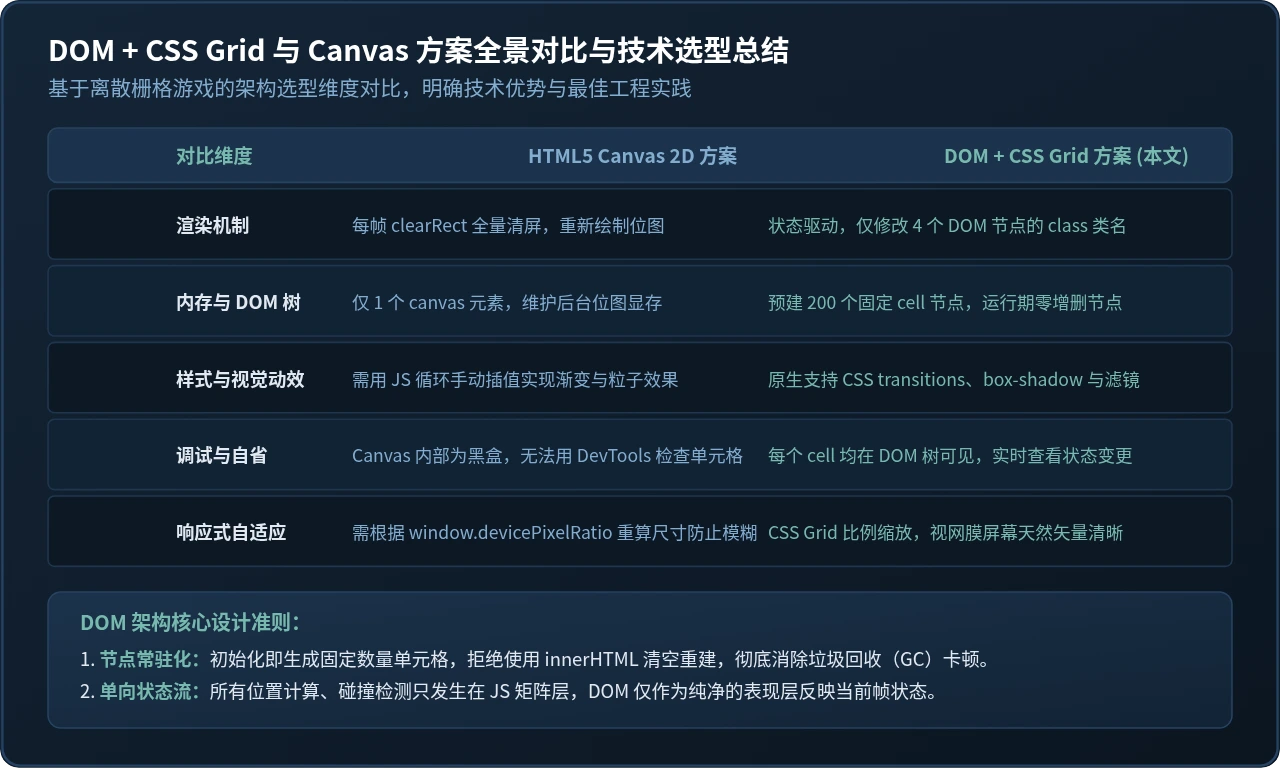
回顾本方案的核心收益:
- 极佳的调试便利性:在 Chrome DevTools 的 Elements 面板中,每个格子清晰可见。配合 DOM 断点或类名审查,可以精准定位状态同步中的偏差。
- 样式解耦与视觉扩展:无需编写任何像素级着色器或绘图 API,通过 CSS 的
box-shadow、border-radius、filter甚至 CSS 变量即可轻松定制现代科技风、霓虹风或复古像素风主题。 - 完全免疫缩放模糊:在高清屏幕或移动端多倍屏上,CSS Grid 由浏览器矢量排版引擎计算布局,天然杜绝了 Canvas 常见的锯齿与模糊问题。
- 性能可预测:固定常驻 200 个轻量 DOM 节点,运行期零垃圾回收(GC)负担。借由单向数据流与类名变更,每帧耗时维持在微秒级别。
这种“将复杂计算留给内存中的纯数据结构,利用浏览器强大的原生布局引擎分摊视图层开销”的架构范式,不仅适用于经典小游戏开发,对于各类后台数据大屏网格、座位选座图以及可视化监控面板的构建,同样具备极高的实用参考价值。
邵山欢JS学习笔记:DOM操作与事件处理要点梳理
2026-11-17 08:37:17
浏览器JS脚本不生效怎么办?常见冲突与报错排查指南
2026-11-16 18:13:43
JS中DOMContentLoaded与window.onload的区别及适用场景
2026-11-16 15:05:11
JS怎么实现元素全屏显示:requestFullscreen基础用法
2026-11-16 13:42:29
JS中this指向丢失导致无法获取当前元素的解决方法
2026-11-16 13:42:21