
将JS图片轮播逻辑封装为可复用的Class类示例
深入讲解如何使用ES6 Class将原生JavaScript图片轮播逻辑封装为可复用组件。涵盖容器作用域限定、参数默认合并、动画节流状态锁、this上下文绑定及资源安全销毁等实战细节。
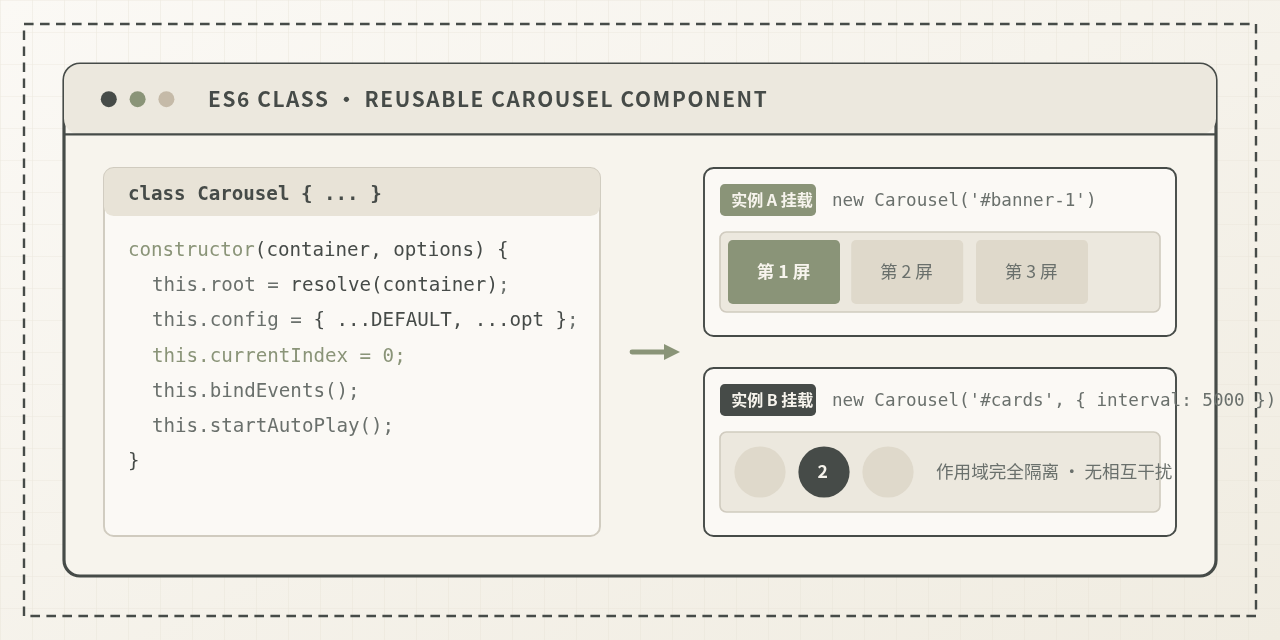
Carousel 类,通过外部传入宿主容器与可选配置项,实现即开即用、实例互不干扰、具备完整销毁机制的可复用前端组件。
一、从过程式脚本到 Class 封装的核心设计
在封装一个可复用的类之前,必须明确“过程式代码”与“组件化类”的本质差异。散落在全局作用域的代码往往具有以下隐患:
- DOM 查询越界:直接使用
document.querySelector('.slide')获取元素,一旦页面出现第二个相同结构的模块,第一个模块获取的实际上是第二个模块的节点,导致状态失真。 - 定时器无归属:全局的
let timer = null在多实例环境下会被后者无情覆盖,造成先前的轮播图定时器失控且永远无法清除。 - API 与事件无法外界干预:外部页面若想通过一个按钮主动触发“跳转到第3张”或在特定时机卸载轮播,过程式脚本通常无法暴露干净的调用契约。
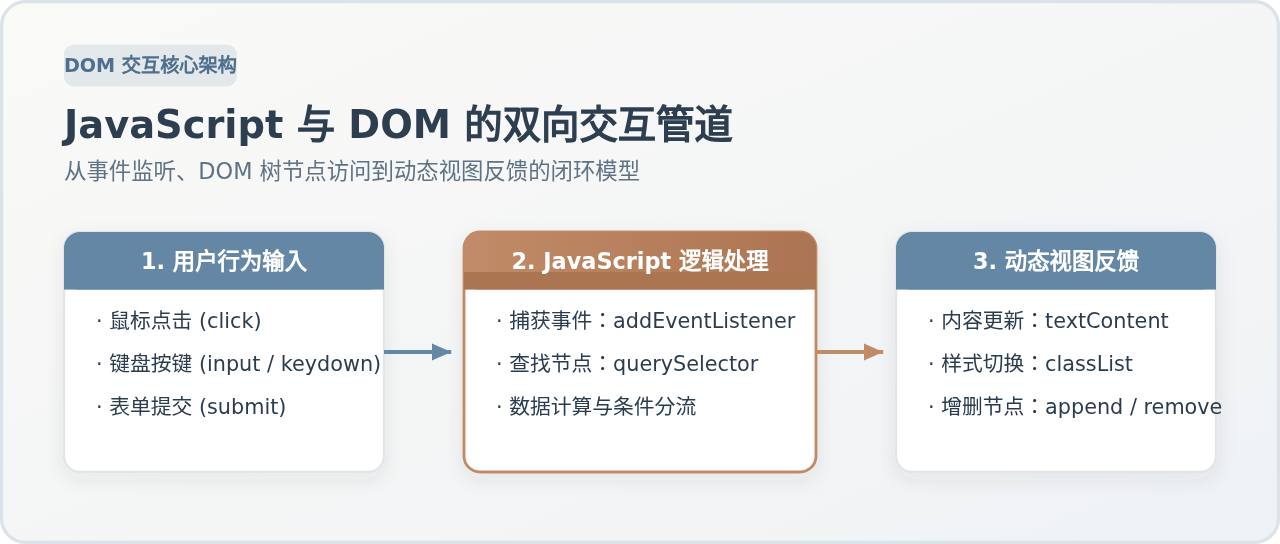
为了解决上述问题,ES6 Class 为我们提供了面向对象的状态内聚机制。Carousel 类的设计原则遵循“单向输入、状态自持、行为内聚”:
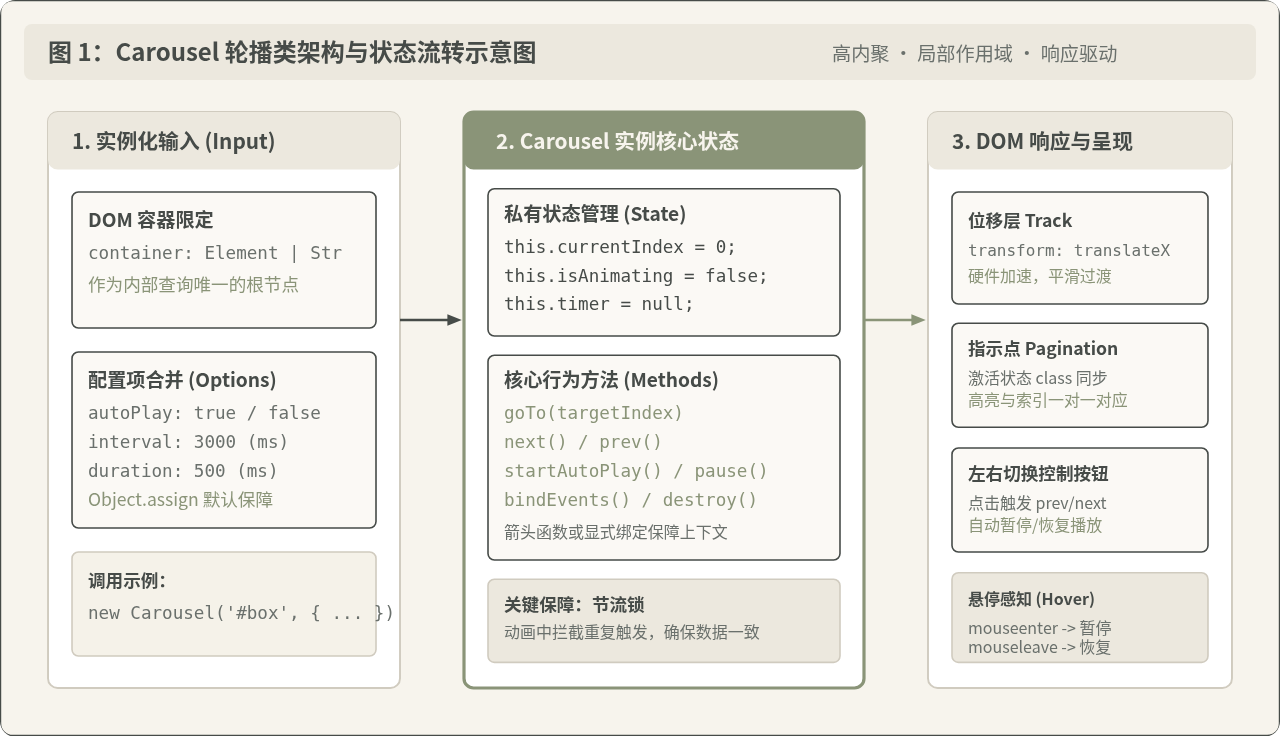
如架构图所示,外部调用者仅需提供挂载目标(DOM 容器或 CSS 选择器)及自定义配置(如轮播间隔、是否自动播放)。类实例在内部独立维护 currentIndex 与 isAnimating 状态锁,所有 DOM 节点查找均限定在传入容器的后代子树中,确保了多实例并存时的绝对安全隔离。
二、分步实现:构建一个高内聚的 Carousel 类
一个合格的可复用类应遵循渐进构建的逻辑:从容器校验与参数兜底开始,到 DOM 节点缓存,再到核心调度算法与事件协同。我们可以将其拆解为清晰的四个步骤。
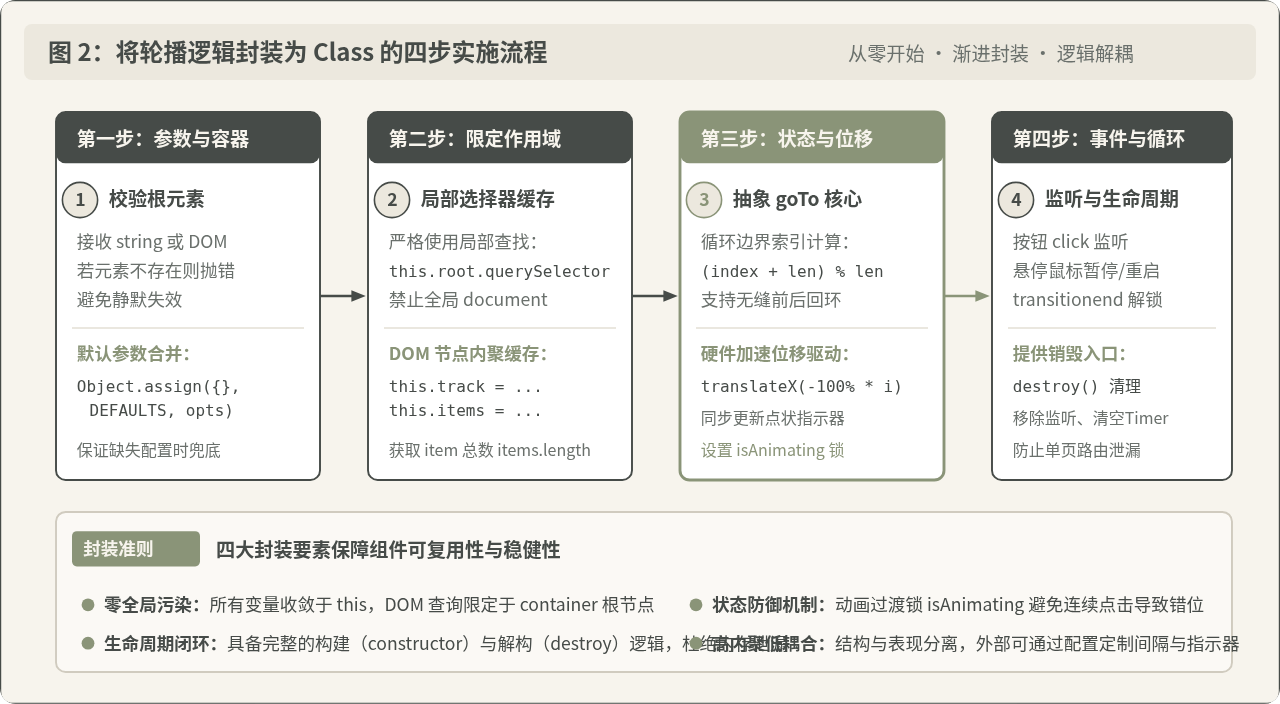
步骤 1:构造函数与配置项防御性合并
构造函数(constructor)是组件的入口。它负责接收外界输入并完成环境准备。在这里,我们需要做好两件事:
- 容器解析与强校验:支持传入 DOM 元素实例或 CSS 选择器字符串;如果未能找到有效的 DOM 节点,立即抛出明确的错误(
Error),而不是让后续代码因null报错而静默瘫痪。 - 默认参数兜底:提供一份经过验证的
DEFAULT_OPTIONS,利用Object.assign浅拷贝合并用户传入的配置,保证即使调用方只传入容器,组件也能以合理的默认值稳定运行。
const DEFAULT_OPTIONS = {
  interval: 3500,     // 自动播放间隔(毫秒)
  duration: 400,     // 动画过渡时间(毫秒)
  autoPlay: true,     // 是否开启自动播放
  pauseOnHover: true // 鼠标悬停是否暂停
};

class Carousel {
  constructor(target, options = {}) {
    // 1. 严格解析并校验宿主容器
    this.container = typeof target === 'string'
      ? document.querySelector(target)
      : target;

    if (!this.container || !(this.container instanceof HTMLElement)) {
      throw new Error(`[Carousel Error] 无效的挂载容器: ${target}`);
    }

    // 2. 合并配置项
    this.options = Object.assign({}, DEFAULT_OPTIONS, options);

    // 3. 声明内部状态
    this.currentIndex = 0;
    this.timer = null;
    this.isAnimating = false;

    // 4. 执行初始化
    this.init();
  }
}
步骤 2:限定查询范围并缓存 DOM 引用
为了杜绝全局选择器污染,所有轮播内部所需的结构节点(滑动轨道、图片项、左右箭头、指示圆点)必须通过 this.container.querySelector 获取。
init() {
  // 仅在当前容器内部查询节点
  this.track = this.container.querySelector('.carousel-track');
  this.items = this.container.querySelectorAll('.carousel-item');
  this.prevBtn = this.container.querySelector('.carousel-btn.prev');
  this.nextBtn = this.container.querySelector('.carousel-btn.next');
  this.dots = this.container.querySelectorAll('.carousel-dot');

  this.total = this.items.length;
  if (this.total <= 1) {
    // 单张或无图片时无需开启轮播逻辑
    return;
  }

  // 绑定事件与启动播放
  this.bindEvents();
  if (this.options.autoPlay) {
    this.start();
  }
}
步骤 3:核心滑动与状态同步(goTo 方法)
轮播图的本质是索引状态的驱动。无论用户点击“上一张”、“下一张”,还是点击“第 N 个指示点”,最终都应当收敛至单一的方法——goTo(targetIndex)。
在计算下一帧索引时,利用取模运算 (targetIndex + this.total) % this.total 可以优雅实现正负方向的环形回滚,避免繁琐的条件分支判断。位移方面,优先使用 CSS3 的 transform: translateX(),相较于修改 left 属性,它不仅触发 GPU 硬件加速,还能规避页面重排(Reflow)。
goTo(index) {
  // 动画正在进行中时拦截后续触发,防止竞态冲突
  if (this.isAnimating) return;

  // 边界环形回绕计算
  const nextIndex = (index + this.total) % this.total;
  if (nextIndex === this.currentIndex) return;

  this.isAnimating = true;
  this.currentIndex = nextIndex;

  // 驱动轨道产生 CSS 位移
  const offsetPercent = -100 * this.currentIndex;
  this.track.style.transition = `transform ${this.options.duration}ms ease-in-out`;
  this.track.style.transform = `translateX(${offsetPercent}%)`;

  // 同步指示器状态
  this.updateIndicators();
}

updateIndicators() {
  if (!this.dots || this.dots.length === 0) return;
  this.dots.forEach((dot, idx) => {
    if (idx === this.currentIndex) {
      dot.classList.add('active');
    } else {
      dot.classList.remove('active');
    }
  });
}
步骤 4:定时器管控与悬停暂停
自动播放由一个简单的 setInterval 维护,但在用户将鼠标悬停在轮播区域阅读内容或点击按钮时,为了提升交互体验,必须及时暂停定时器,并在鼠标移出时精准恢复。
start() {
  if (this.timer) return;
  this.timer = setInterval(() => {
    this.next();
  }, this.options.interval);
}

pause() {
  if (this.timer) {
    clearInterval(this.timer);
    this.timer = null;
  }
}

next() {
  this.goTo(this.currentIndex + 1);
}

prev() {
  this.goTo(this.currentIndex - 1);
}
三、高频踩坑点与常见认知辨析
在实现轮播类的过程中,开发者常常遇到一些“看似简单却隐藏暗礁”的问题。我们针对三个最容易混淆的说法进行客观剖析:
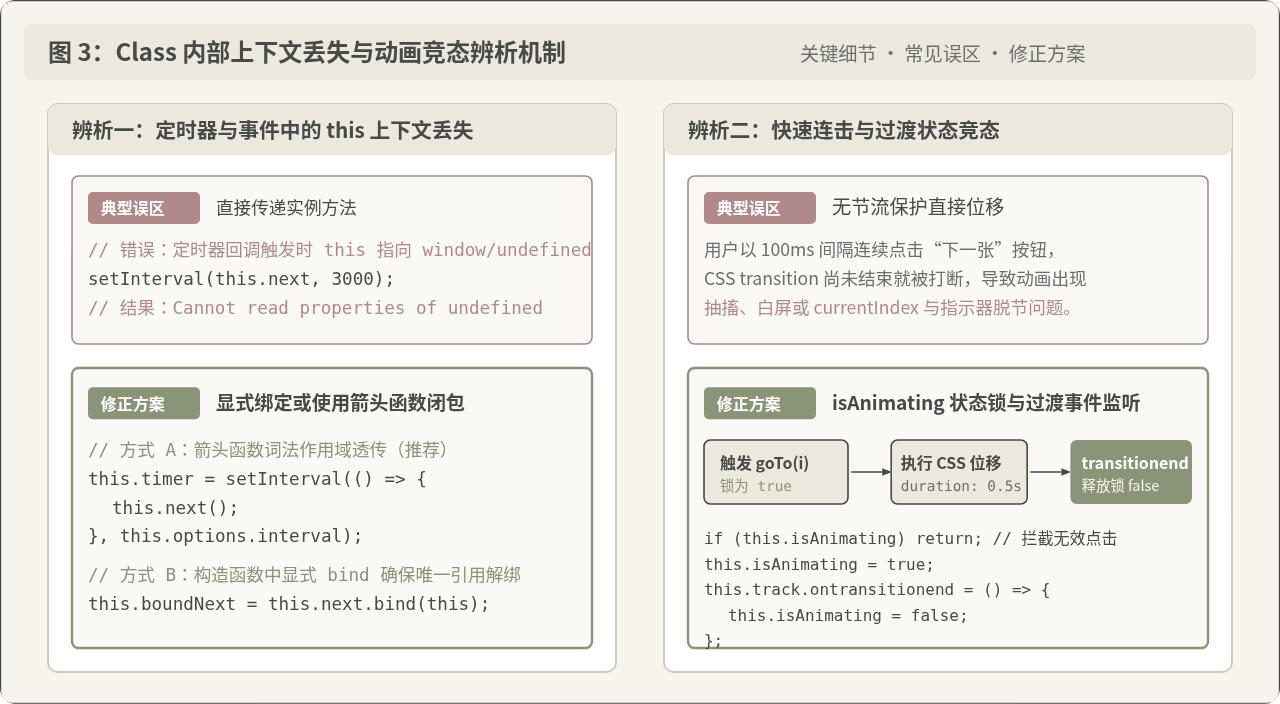
辨析一:“自动播放只需要在 Class 内部写 setInterval(this.next, 3000)”
为什么看似合理:在很多开发者的直觉中,this.next 已经是类定义好的实例方法,直接作为回调函数传给定时器最简练。
问题在哪里:在 JavaScript 事件循环机制中,当 setInterval 的回调被宏任务队列触发执行时,调用上下文已经发生脱落。若未做绑定,函数内的 this 会指向 window(非严格模式)或 undefined(ES6 模块或严格模式),从而抛出 Cannot read property 'currentIndex' of undefined 报错。
修正方式:推荐使用箭头函数 () => this.next(),通过词法作用域将外部类实例的 this 自动透传;或者在构造函数中显式进行 this.next = this.next.bind(this)。
辨析二:“只要 CSS 写了 transition,快速连击按钮不会有问题”
为什么看似合理:CSS 规范中,多次更改 transform 属性,浏览器会自动在当前过渡位置进行插值运算并继续过渡。
问题在哪里:JavaScript 的 this.currentIndex 是同步累加的,而 CSS 动画是异步持续进行的。如果用户在 300 毫秒内狂点 5 次按钮,currentIndex 瞬间递增了 5,但此时 CSS 动画还在响应第 1 次,导致动画插值突变、指示器与图片不匹配,甚至触发视觉抽搐或瞬移。
修正方式:引入布尔锁 this.isAnimating = true。当位移开始时上锁,拦截所有的重入点击;在轨道的 transitionend 事件触发后才重置 this.isAnimating = false 解锁。
辨析三:“组件封装只需要提供 init,不需要考虑 destroy”
为什么看似合理:传统的多页面应用中,每次页面刷新或跳转整个宿主环境都会推倒重来,定时器和事件监听器随之消亡,因而似乎“不需要销毁”。
问题在哪里:在现代单页应用(Vue、React、SPA)或动态弹窗场景中,轮播所在 DOM 被销毁后,挂载在 window 或父级上的定时器仍会在后台不断轮询调用 this.next(),导致严重不可逆的内存泄漏与控制台红字报错。
修正方式:在类中提供对称的 destroy() 方法,负责显式 clearInterval、解绑 DOM 监听事件,并将缓存的 DOM 引用置空。
四、完整可运行源码与多实例独立验证
下面给出一套结构独立、开箱即用的完整示例代码。该代码包含 HTML、核心 CSS 以及完整的 Carousel 类实现,并在页面底部演示了如何使用不同配置同时实例化两个独立的轮播区域。
<!DOCTYPE html>
<html lang="zh-CN">
<head>
<meta charset="UTF-8">
<title>可复用轮播图类多实例示例</title>
<style>
/* 基础轮播组件样式 */
.carousel-container {
position: relative;
width: 100%;
max-width: 640px;
height: 320px;
margin: 20px auto;
overflow: hidden;
border-radius: 8px;
box-shadow: 0 4px 12px rgba(0,0,0,0.1);
user-select: none;
}
.carousel-track {
display: flex;
width: 100%;
height: 100%;
transition: transform 0.4s ease;
}
.carousel-item {
flex: 0 0 100%;
width: 100%;
height: 100%;
display: flex;
align-items: center;
justify-content: center;
font-size: 24px;
color: #fff;
}
/* 控制按钮 */
.carousel-btn {
position: absolute;
top: 50%;
transform: translateY(-50%);
width: 36px;
height: 36px;
background: rgba(0, 0, 0, 0.4);
color: #fff;
border: none;
border-radius: 50%;
cursor: pointer;
display: flex;
align-items: center;
justify-content: center;
transition: background 0.2s;
}
.carousel-btn:hover { background: rgba(0, 0, 0, 0.7); }
.carousel-btn.prev { left: 12px; }
.carousel-btn.next { right: 12px; }
/* 指示圆点 */
.carousel-pagination {
position: absolute;
bottom: 12px;
left: 50%;
transform: translateX(-50%);
display: flex;
gap: 8px;
}
.carousel-dot {
width: 10px;
height: 10px;
border-radius: 50%;
background: rgba(255, 255, 255, 0.5);
cursor: pointer;
transition: all 0.25s;
}
.carousel-dot.active {
background: #8A9478;
width: 24px;
border-radius: 5px;
}
</style>
</head>
<body>
<!-- 轮播图实例 A:基础轮播 -->
<div id="carousel-a" class="carousel-container">
<div class="carousel-track">
<div class="carousel-item" style="background:#5B6B63;">Slide 1</div>
<div class="carousel-item" style="background:#7A8B7B;">Slide 2</div>
<div class="carousel-item" style="background:#A3B19B;">Slide 3</div>
</div>
<button class="carousel-btn prev"><</button>
<button class="carousel-btn next">></button>
<div class="carousel-pagination">
<span class="carousel-dot active"></span>
<span class="carousel-dot"></span>
<span class="carousel-dot"></span>
</div>
</div>
<!-- 轮播图实例 B:不同配速与样式的并存测试 -->
<div id="carousel-b" class="carousel-container" style="max-width: 480px; height: 240px;">
<div class="carousel-track">
<div class="carousel-item" style="background:#4A5568;">Card 1</div>
<div class="carousel-item" style="background:#718096;">Card 2</div>
</div>
<button class="carousel-btn prev"><</button>
<button class="carousel-btn next">></button>
<div class="carousel-pagination">
<span class="carousel-dot active"></span>
<span class="carousel-dot"></span>
</div>
</div>
<script>
/**
* Reusable Carousel Class
*/
class Carousel {
static DEFAULTS = {
interval: 3000,
duration: 400,
autoPlay: true,
pauseOnHover: true
};
constructor(target, options = {}) {
this.container = typeof target === 'string'
? document.querySelector(target)
: target;
if (!this.container || !(this.container instanceof HTMLElement)) {
throw new Error(`[Carousel] 找不到目标容器: ${target}`);
}
this.options = Object.assign({}, Carousel.DEFAULTS, options);
// 内部状态
this.currentIndex = 0;
this.timer = null;
this.isAnimating = false;
// 预绑定解耦监听句柄,方便 destroy 移除
this._onNextClick = () => this.next();
this._onPrevClick = () => this.prev();
this._onMouseEnter = () => this.options.pauseOnHover && this.pause();
this._onMouseLeave = () => this.options.pauseOnHover && this.start();
this._onTransitionEnd = () => { this.isAnimating = false; };
this.init();
}
init() {
// DOM 查询全部严格限定在 this.container 内部
this.track = this.container.querySelector('.carousel-track');
this.items = this.container.querySelectorAll('.carousel-item');
this.prevBtn = this.container.querySelector('.carousel-btn.prev');
this.nextBtn = this.container.querySelector('.carousel-btn.next');
this.dots = Array.from(this.container.querySelectorAll('.carousel-dot'));
this.total = this.items.length;
if (this.total <= 1) return;
this.bindEvents();
if (this.options.autoPlay) {
this.start();
}
}
bindEvents() {
// 1. 左右按钮交互
if (this.nextBtn) this.nextBtn.addEventListener('click', this._onNextClick);
if (this.prevBtn) this.prevBtn.addEventListener('click', this._onPrevClick);
// 2. 指示器点击代理
this.dots.forEach((dot, index) => {
dot.addEventListener('click', () => this.goTo(index));
});
// 3. 悬停暂停与移出恢复
this.container.addEventListener('mouseenter', this._onMouseEnter);
this.container.addEventListener('mouseleave', this._onMouseLeave);
// 4. 动画过渡结束状态解锁
if (this.track) {
this.track.addEventListener('transitionend', this._onTransitionEnd);
}
}
goTo(index) {
if (this.isAnimating) return;
const target = (index + this.total) % this.total;
if (target === this.currentIndex) return;
this.isAnimating = true;
this.currentIndex = target;
// CSS 位移
if (this.track) {
this.track.style.transition = `transform ${this.options.duration}ms ease`;
this.track.style.transform = `translateX(${-100 * this.currentIndex}%)`;
}
// 同步指示器
this.dots.forEach((dot, idx) => {
dot.classList.toggle('active', idx === this.currentIndex);
});
}
next() {
this.goTo(this.currentIndex + 1);
}
prev() {
this.goTo(this.currentIndex - 1);
}
start() {
if (this.timer) return;
this.timer = setInterval(() => {
this.next();
}, this.options.interval);
}
pause() {
if (this.timer) {
clearInterval(this.timer);
this.timer = null;
}
}
destroy() {
this.pause();
// 移除事件监听
if (this.nextBtn) this.nextBtn.removeEventListener('click', this._onNextClick);
if (this.prevBtn) this.prevBtn.removeEventListener('click', this._onPrevClick);
this.container.removeEventListener('mouseenter', this._onMouseEnter);
this.container.removeEventListener('mouseleave', this._onMouseLeave);
if (this.track) {
this.track.removeEventListener('transitionend', this._onTransitionEnd);
}
// 释放节点引用
this.container = null;
this.track = null;
this.items = null;
this.dots = null;
}
}
// ==========================================
// 实例化调用与多实例验证
// ==========================================
// 实例 1:标准速度 3 秒自动轮播
const carousel1 = new Carousel('#carousel-a', {
interval: 3000,
duration: 400
});
// 实例 2:5 秒较慢轮播,悬停不暂停
const carousel2 = new Carousel('#carousel-b', {
interval: 5000,
duration: 300,
pauseOnHover: false
});
</script>
</body>
</html>五、复用性检查清单与生产级演进
通过 Class 完成初步封装后,可以在实际项目中对照以下检查清单,评估该组件是否达到了高质量的复用标准:
| 评估维度 | 规范要求 | 实际达成效果 |
|---|---|---|
| 作用域独立性 | 禁止使用全局 document.querySelector 查询内部元素 |
各实例内部变量与 DOM 互不干扰,支持同一页面无限次挂载 |
| 调用安全兜底 | 非法容器传入时抛错拦截,缺省参数安全合并 | 防止因容器不存在导致控制台静默白屏,降低调试成本 |
| 交互状态锁 | 基于 transitionend 实现节流防御 |
高速连续点击时不会发生位移穿透与抽搐跳帧 |
| 生命周期闭环 | 提供标准 destroy() 释放资源 |
单页应用组件卸载时彻底清空定时器,防止内存泄漏 |
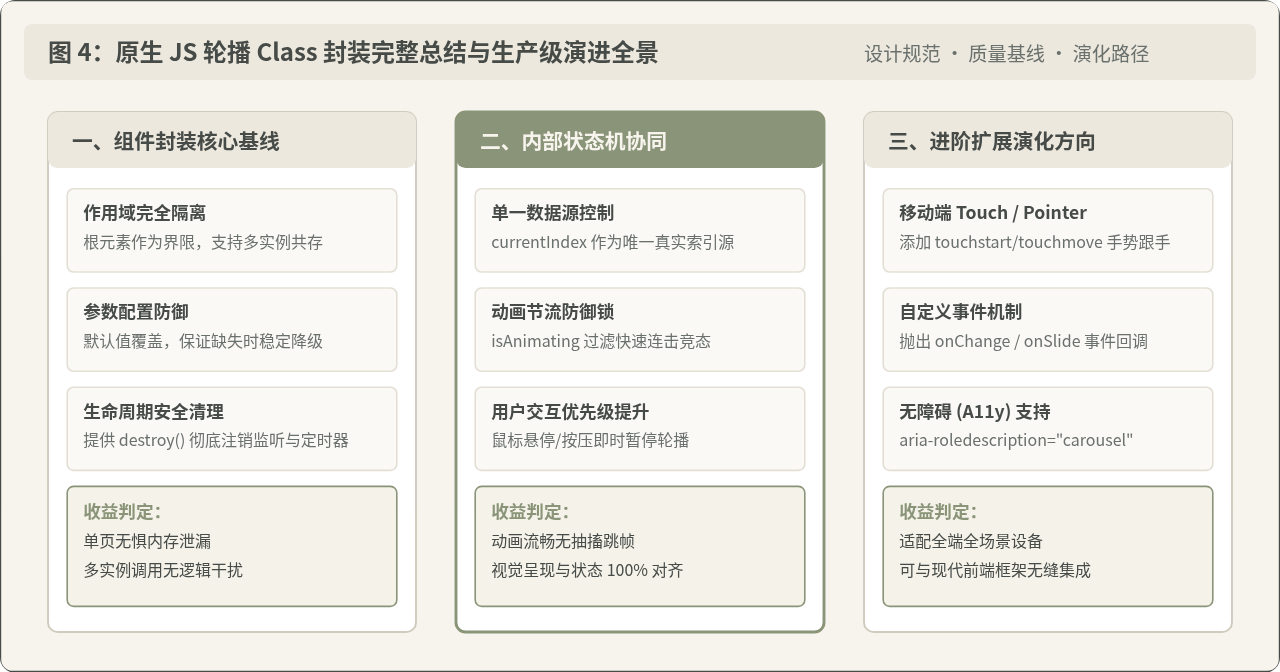
当业务需求向生产级更深层次演进时,还可以基于该 Carousel 类扩展以下能力:
- 移动端手势触控:在容器上监听
touchstart、touchmove与touchend事件,计算横向滑动差值(deltaX),让轨道跟随手指位移,并在释放时判断滑动阈值执行prev()或next()。 - 自定义事件分发:在
goTo(index)的关键节点,通过this.container.dispatchEvent(new CustomEvent('carouselChange', { detail: { current: target } }))向外通知索引变动,让外部业务代码以松耦合方式监听状态。 - 无障碍(A11y)兼容:为容器添加
role="region"和aria-roledescription="carousel",并在指示器圆点上加入aria-label="第 N 张",保障读屏软件与键盘导航的可用性。
通过遵循高内聚、局部作用域、防御性参数与生命周期管理的封装规范,原生 JavaScript 构建的组件不仅体积精简、运行高效,而且能自然融入任何技术栈的大型项目中。
JavaScript配合CSS object-fit保持缩略图比例不失真
2026-11-17 09:15:59
JavaScript事件流详解:捕获、目标与冒泡阶段的执行顺序
2026-11-16 18:13:44
JS代码触发点击事件无效?排查元素隐藏与监听器绑定问题
2026-11-16 15:05:04
JS获取window.open返回的窗口引用并操作其DOM内容
2026-11-16 14:27:25
JS设置scrollTop滚动到底部失效怎么解决
2026-11-16 13:42:00