
使用Intl.DateTimeFormat格式化JS当前时间的方法
详细讲解在JavaScript中使用原生Intl.DateTimeFormat格式化当前时间的方法,涵盖基础调用、配置选项控制、formatToParts自定义拼接、时区设置与性能优化实践。
Intl.DateTimeFormat 对象。通过将 new Date() 传入格式化器实例,无需加载任何第三方库,即可依据指定的语言环境规则与配置选项,快速输出本地化日期时间字符串,或通过分词解析构建自定义的日期时间格式。
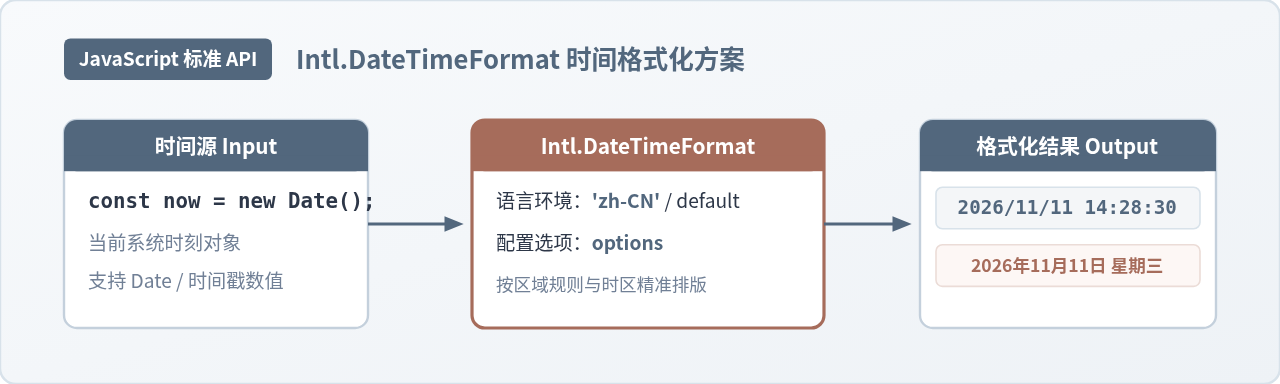
一、格式化当前时间的基本流程
JavaScript 原生的 Date 对象只负责记录毫秒级的时间戳,并不自带具备国际化能力的排版逻辑。过去开发者常常通过调用 getFullYear()、getMonth()、getDate() 等方法逐项拼接字符串,再配合补零函数。这种方式不仅代码冗长,而且无法根据用户的地区与语言习惯动态调整顺序。
Intl.DateTimeFormat 属于 ECMAScript 国际化 API 规范的一部分。它接收两个主要参数:语言代码(locales)与格式化选项(options)。基本格式化步骤非常明确:首先获取代表当前时刻的 Date 实例,随后创建格式化器,并执行 .format() 方法。
// 1. 获取当前系统时间
const now = new Date();

// 2. 建立中文语言环境(zh-CN)的格式化器
const formatter = new Intl.DateTimeFormat('zh-CN');

// 3. 执行格式化
const result = formatter.format(now);
console.log(result);
// 默认简短输出示例: "2026/11/11"
如果不需要指定特定语种,可以将首个参数传入 undefined,格式化器将自动采用用户操作系统的默认语言设置。但在生产服务端(如 Node.js 接口层)或多语言前端应用中,明确传入 'zh-CN' 或 'en-US' 等 BCP 47 语言标签是保持输出稳定的更佳做法。
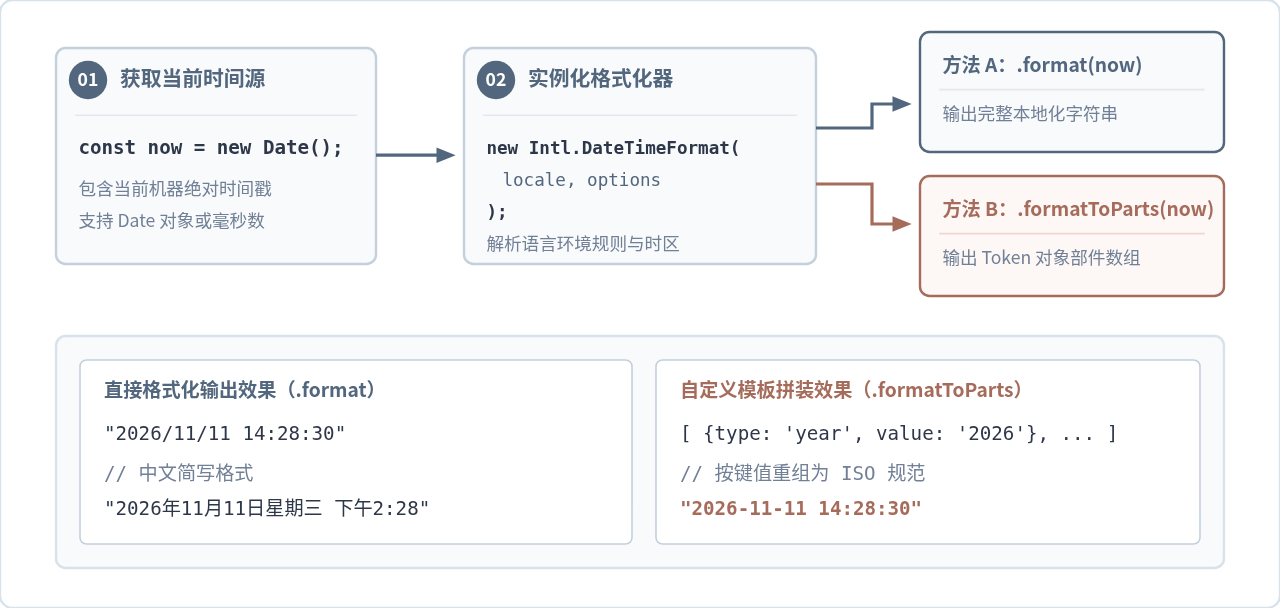
二、通过 options 参数精细控制显示字段
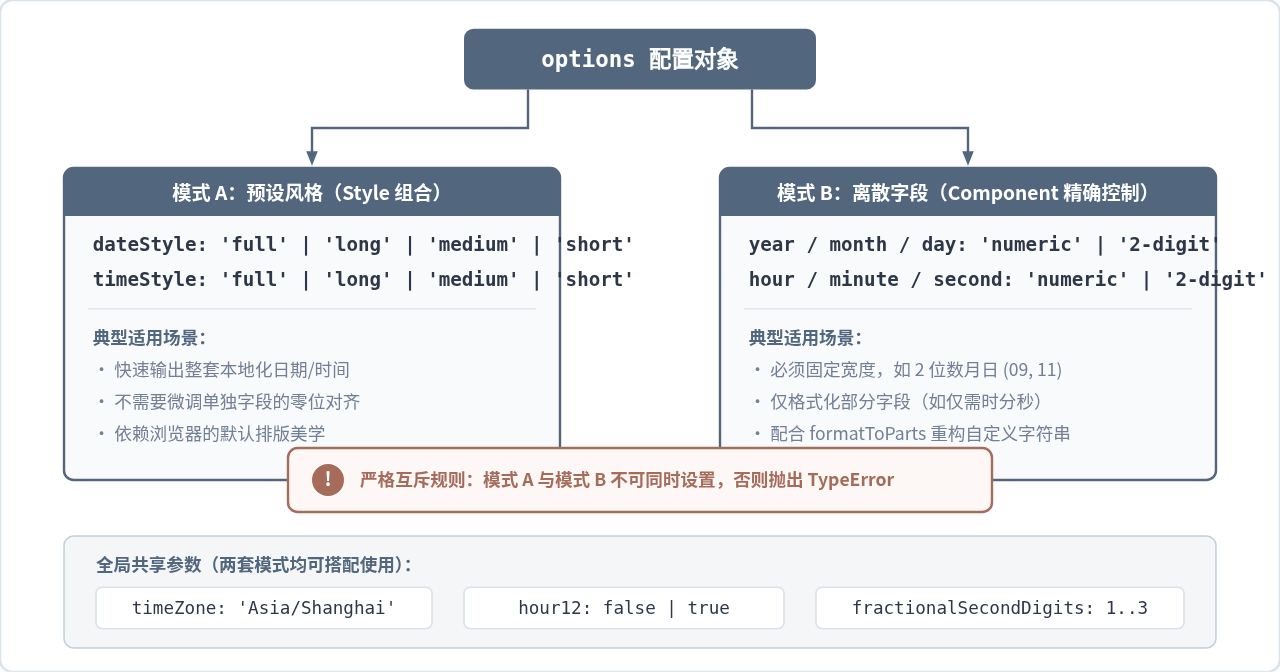
默认不带 options 参数时,Intl.DateTimeFormat 通常仅输出日期部分。若需要将当前时间中的时、分、秒、星期等完整呈现,可以通过传入配置对象进行微调。配置参数主要分为两套互斥的模式:预设风格模式与离散字段模式。
1. 预设风格模式(Style 组合)
该模式通过 dateStyle 和 timeStyle 两个参数统筹控制整体输出长短。两者的可选值均为 'full'、'long'、'medium' 和 'short'。这种配置的优势在于无需逐个指定年月日,格式化器会自动根据所选区域规范排版:
const now = new Date();

// 完整日期与中等长度时间
const fullFormatter = new Intl.DateTimeFormat('zh-CN', {
  dateStyle: 'full',
  timeStyle: 'medium'
});

console.log(fullFormatter.format(now));
// 输出示例: "2026年11月11日星期三 14:28:30"
2. 离散字段微调模式(Component 模式)
当业务对每个时间字段的长度有明确要求(例如月份与日期必须始终保持 2 位数以对齐表格)时,应直接对各时间组成部分单独设定:
const exactFormatter = new Intl.DateTimeFormat('zh-CN', {
  year: 'numeric',      // 完整四位年份,如 "2026"
  month: '2-digit',     // 补零两位月份,如 "11"
  day: '2-digit',       // 补零两位日期,如 "11"
  hour: '2-digit',      // 补零两位小时,如 "14"
  minute: '2-digit',    // 补零两位分钟,如 "28"
  second: '2-digit',    // 补零两位秒数,如 "30"
  hour12: false         // 强制采用 24 小时制
});

console.log(exactFormatter.format(new Date()));
// 输出示例: "2026/11/11 14:28:30"dateStyle / timeStyle 与单独的日期字段(如 year、month、day)严禁混用。如果在一个配置对象中同时写入了 dateStyle: 'short' 和 year: 'numeric',引擎会立即抛出 TypeError: Cannot set dateStyle when a date field is set 异常。
三、使用 formatToParts 拼接自定义时间模板
直接调用 .format() 生成的字符串受区域习惯影响深远。例如在 zh-CN 区域下,字段间默认可能使用斜杠 / 分隔,或者在时间后附加汉字。如果在日志记录或数据存储中,明确需要生成类似 2026-11-11 14:28:30(破折号分隔且无汉字)的固定格式,formatToParts() 是最稳妥的解决方案。
formatToParts(date) 不会直接返回拼好的字符串,而是返回一个由描述性对象组成的数组。每个对象都明确标注了该段字符的属性类别(如 year、month、literal 等):
const now = new Date();
const partsFormatter = new Intl.DateTimeFormat('en-US', {
  year: 'numeric',
  month: '2-digit',
  day: '2-digit',
  hour: '2-digit',
  minute: '2-digit',
  second: '2-digit',
  hour12: false
});

const parts = partsFormatter.formatToParts(now);
console.log(parts);
// 输出示例:
// [
//   { type: 'month', value: '11' },
//   { type: 'literal', value: '/' },
//   { type: 'day', value: '11' },
//   { type: 'literal', value: '/' },
//   { type: 'year', value: '2026' },
//   { type: 'literal', value: ', ' },
//   { type: 'hour', value: '14' },
//   { type: 'literal', value: ':' },
//   { type: 'minute', value: '28' },
//   { type: 'literal', value: ':' },
//   { type: 'second', value: '30' }
// ]
基于这个结构,我们可以编写一个通用的当前时间格式化工具函数,抽取所需字段并以任意自定义分隔符拼装:
function getCurrentStandardTime(date = new Date()) {
  const formatter = new Intl.DateTimeFormat('en-US', {
    year: 'numeric',
    month: '2-digit',
    day: '2-digit',
    hour: '2-digit',
    minute: '2-digit',
    second: '2-digit',
    hour12: false
  });

  // 将 parts 数组转换为以 type 为键的对象映射
  const partMap = {};
  for (const { type, value } of formatter.formatToParts(date)) {
    partMap[type] = value;
  }

  // 自由组合为所需模板
  return `${partMap.year}-${partMap.month}-${partMap.day} ${partMap.hour}:${partMap.minute}:${partMap.second}`;
}

console.log(getCurrentStandardTime());
// 输出示例: "2026-11-11 14:28:30"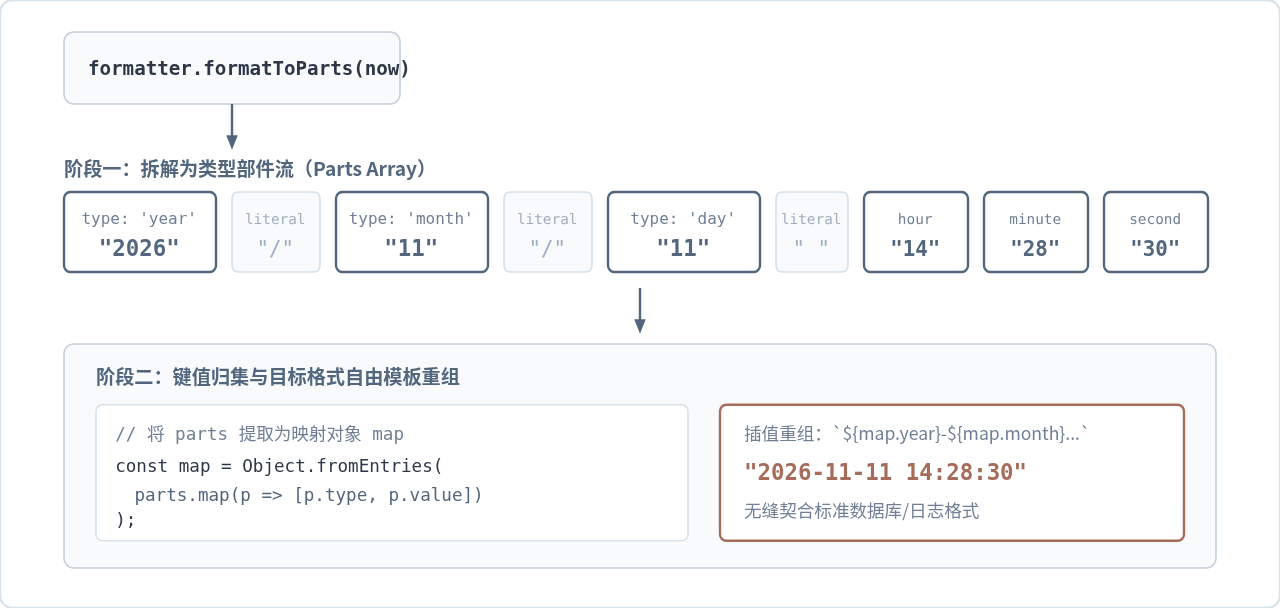
四、时区绑定与跨地域时间展示
在涉及云服务器或跨国业务时,直接格式化当前时间往往会遇到“时区漂移”问题。例如部署在 Linux 容器内的 Node.js 应用默认运行在 UTC 时区,如果直接读取系统时间并格式化,生成的小时数将比北京时间(UTC+8)慢 8 个小时。
Intl.DateTimeFormat 原生支持通过 timeZone 选项绑定 IANA 时区标识,强制计算指定时区的当前时间,而无需手动加减毫秒数:
const now = new Date();

// 无论机器处于何种时区,均强制以中国标准时间(北京时间)输出
const beijingFormatter = new Intl.DateTimeFormat('zh-CN', {
  dateStyle: 'medium',
  timeStyle: 'medium',
  timeZone: 'Asia/Shanghai'
});

// 显式以协调世界时(UTC)输出
const utcFormatter = new Intl.DateTimeFormat('zh-CN', {
  dateStyle: 'medium',
  timeStyle: 'medium',
  timeZone: 'UTC'
});

console.log('北京时间:', beijingFormatter.format(now)); // 2026年11月11日 14:28:30
console.log('UTC 时间:', utcFormatter.format(now)); // 2026年11月11日 06:28:30需要注意,timeZone 属性必须是合法的 IANA 时区字符串(如 'Asia/Shanghai'、'America/New_York' 或 'UTC')。如果传入非法字符串(例如拼写错误的 'Beijing'),JavaScript 引擎将抛出 RangeError: Invalid time zone specified。
五、实例复用与性能优化实践
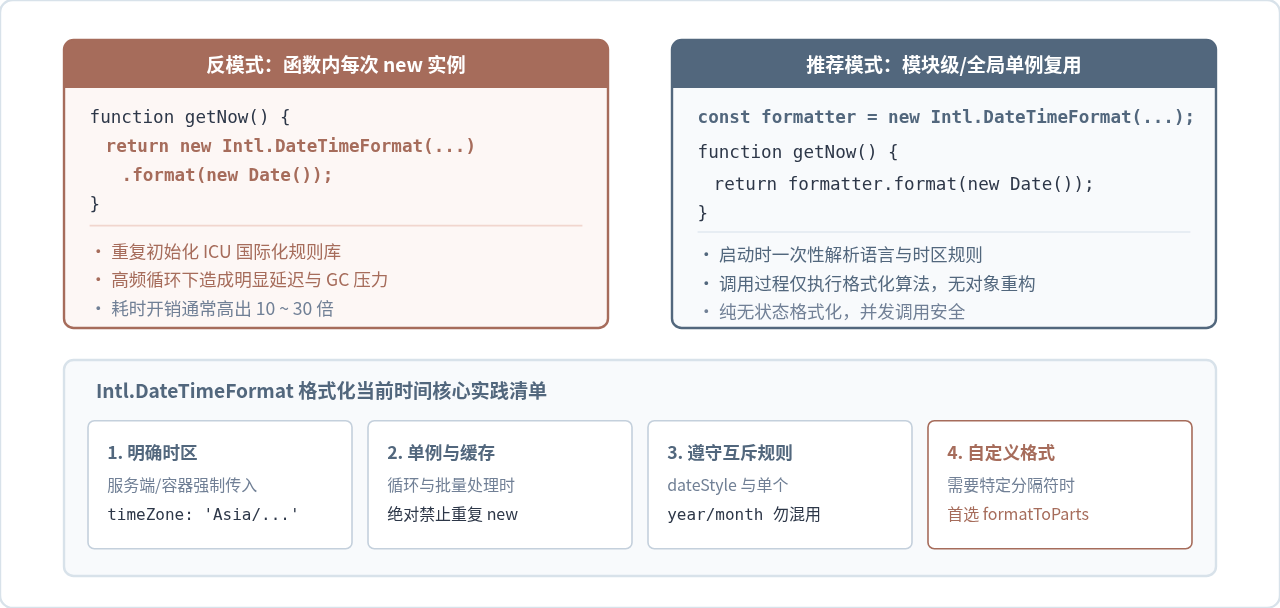
在日常开发中,很多初学者习惯将 new Intl.DateTimeFormat(...) 写在常用函数体内部。如果该函数在批量数据渲染或每秒定时器中高频触发,会引发不可忽视的性能损耗。
Intl.DateTimeFormat 在实例化阶段会执行相对繁重的任务:解析并校验 BCP 47 语言标签、加载内部 ICU 区域规则表、比对时区规则与回退策略。相比之下,实际调用 .format(date) 仅仅是将时间戳映射到既定规则中,执行速度极快。
// 【不推荐】:每次格式化都重新创建实例
function badGetTime() {
  return new Intl.DateTimeFormat('zh-CN', { timeStyle: 'medium' }).format(new Date());
}

// 【推荐】:在模块作用域创建单例并反复重用
const timeFormatter = new Intl.DateTimeFormat('zh-CN', {
  timeStyle: 'medium',
  timeZone: 'Asia/Shanghai'
});

function goodGetTime() {
  return timeFormatter.format(new Date());
}
Intl.DateTimeFormat 实例本身是无状态的(Stateless),在多处并发调用 .format() 或 .formatToParts() 是完全安全的。因此,将格式化器提升为模块顶层常量或维护在一个轻量级的单例缓存池中,是生产代码中的标准实践。
六、环境支持与常见问题排查
Intl.DateTimeFormat 早已纳入 ECMAScript 国际化核心标准。当前所有主流浏览器(Chrome、Firefox、Safari、Edge)以及 Node.js 环境(v13.0.0 起已默认完整集成 Full ICU)均提供全功能支持,无需任何 Polyfill 填充库。
在实际使用中,如果遇到输出结果与预期不符,可对照以下清单排查:
- 格式不带前导零:检查是否误用了
'numeric'代替'2-digit'。numeric可能会将 9 月渲染为9,而2-digit才会保证输出为09。 - 时间制式错乱:某些地区(如
en-US)默认倾向 12 小时制并输出 AM/PM。如需强制 24 小时制,务必在 options 中显式声明hour12: false。 - 时区偏差 8 小时:检查服务器运行环境的默认时区设置。最佳防护是在 options 中显式传入
timeZone: 'Asia/Shanghai',消除对宿主操作系统的时区依赖。 - 参数冲突抛错:确认是否在配置中混入了
dateStyle与year、month等独立字段。这两套模式不可并存。
掌握了 Intl.DateTimeFormat 的基础调用、配置规则、零件分解与复用机制后,即可在各类 JavaScript 运行环境中高效、标准地完成当前时间的格式化任务。
Discord可发现服务器将开放网页展示,12月中旬起分批展示新消息
2026-11-10 16:16:43
JavaScript禁用怎么解除怎么把数据格式化成展示文本
2026-11-08 23:33:06
javascript下载安装手机版怎么写团队里所有人都看得懂
2026-11-08 13:58:00
Video.js 报错 MEDIA_ERR_SRC_NOT_SUPPORTED 怎么解决
2026-11-06 21:24:26
JavaScript逻辑运算优先级陷阱及类型转换常见Bug解析
2026-11-06 18:16:40