

JavaScript Cookie与Session详解:KOA实战、配置差异与应用场景
本文深入解析JavaScript中Cookie与Session的工作原理及核心区别。重点介绍在KOA框架下如何配置Cookie的有效期、作用域及中文处理,并演示Session的安装与挂载。通过对比两者的存储位置、安全性及数据容量,明确简单数据与敏感信息的最佳存储方案,帮助开发者优化Web应用状态管理。
1. Cookie
1.1 什么是Cookie
Cookie是解决HTTP无状态特性的一种方案。
服务端与客户端经过三次握手建立连接,数据传输完毕后连接关闭。在后续请求中,服务端无法判断请求是否来自同一用户。当后续请求依赖之前请求的数据时,客户端必须先将之前的数据保存并放入后续请求体中。Cookie正是解决此问题的方案:服务端在响应客户端请求时,将Cookie放入响应头传递至客户端;在之后的请求中,客户端会自动携带该Cookie,服务端验证Cookie后做出响应。
1.2 在KOA中使用Cookie
router.get('/getCurrentUserInfo',async ctx=>{
 ctx.cookies.set('userInfo',999);
 ctx.body =  'success';
});
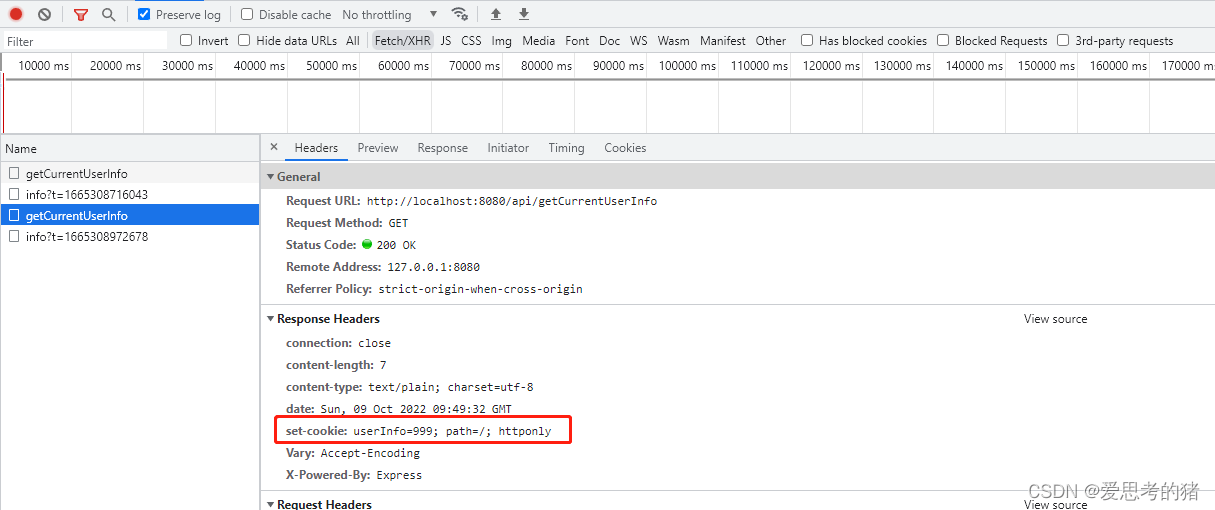
可以看到响应头里面包含set-cookie的字段
如果要设置中文的值需要处理下格式
  const str = new Buffer('hello cookie!').toString();
  ctx.cookies.set('userInfo',str);
ctx.cookies.set(name,value,conifg)还接受第三个参数config,用来配置cookie的作用范围和作用时间
ctx.cookies.set(u_id,111111,{
expires: new Date(),
maxAge: 1000 * 3600 * 4,
domain: '/',
path: '/',
httpOnly: false,
secure: false,
overWrite: false,
})
1.3 expires和maxAge
expires和maxAge都用来设置cookie的有效时间,expires是指定一个日期与客户端本地的时间进行比较,maxAge类似倒计时,cookie在设置后的若干毫秒内有效。本地的时间是可以被修改的,而同一台服务器的时间总是相同的,因此maxAge比expires更加稳定可靠。
// 使用expires
const expiresDate = new Date(Date.now() + 1000 * 3600 * 2);  // 2小时候后过期
ctx.cookie.set('u_id':11111,{
expires: expiresDate
});
// 使用maxAge
ctx.cookie.set('u_id':11111,{
expires: new Date(1000 * 3600 * 2);
});
1.4 浏览器端设置和删除Cookie
在浏览器中直接通过document.cookie设置cookie的时候也可以配置domain、path、secure等属性但是无法设置httpOnly。
//设置cookie
const expiresDate = new Date(Date.now() + 1000 * 3600 * 4); // 4小时候过期
document.cookie = `userName=张三;path='/';expires=${expiresDate.toGMTString()}`;
//删除cookie
const expiresDate = new Date();
document.cookie = `userName=张三;path='/';expires=${expiresDate.toGMTString()}`;
要注意使用的是GMT字符串格式的时间
2. Session
2.1 什么是Session
Session的工作原理和Cookie非常类似,在Cookie中存放一个sessionID,真实的数据存放在服务器端,客户端每次发送请求的时候带上sessionID,服务端根据sessionID进行数据的响应。
2.2 koa中使用Session
安装和挂载
yarn add koa-session --save;
Session的设置和获取
const kao = require('koa');
const session  = require('koa-session');
const app = new Koa();
const CONFIG = {
  key: 'koa.sess', /** (string) cookie key (default is koa.sess) */
  /** (number || 'session') maxAge in ms (default is 1 days) */
  /** 'session' will result in a cookie that expires when session/browser is closed */
  /** Warning: If a session cookie is stolen, this cookie will never expire */
  maxAge: 1000 * 3600 * 4,
  autoCommit: true, /** (boolean) automatically commit headers (default true) */
  overwrite: true, /** (boolean) can overwrite or not (default true) */
  httpOnly: true, /** (boolean) httpOnly or not (default true) */
  signed: true, /** (boolean) signed or not (default true) */
  rolling: false, /** (boolean) Force a session identifier cookie to be set on every response. The expiration is reset to the original maxAge, resetting the expiration countdown. (default is false) */
  renew: false, /** (boolean) renew session when session is nearly expired, so we can always keep user logged in. (default is false)*/
  secure: false, /** (boolean) secure cookie*/
  sameSite: null, /** (string) session cookie sameSite options (default null, don't set it) */
};
app.use(session(CONFIG, app));
// or if you prefer all default config, just use => app.use(session(app));
app.listen(3000,()=>{});
3. Cookie和Session的区别
- Cookie存储在客户端,Session存储在服务端,Session比Cookie更安全
- Cookie的存储数据的格式只能是字符串,且最多只能存储4kb左右的数据,Session能存储大量的数据且支持多样的数据格式如JSON
- Session 由于存储在服务端,当Session多的时候会对服务器产生压力,影响服务器性能。
4. Cookie和Session的使用场景
- 对于简单而且不敏感的数据通常使用Cookie保存,如购物车信息、用户在站点的行为记录等
- 对于复杂且敏感的数据使用Session保存,如用户的账号信息等
到此这篇关于JavaScript Cookie与Session的使用及区别深入探究的文章就介绍到这了,更多相关JS Cookie与Session内容请搜索本站以前的文章或继续浏览下面的相关文章希望大家以后多多支持本站!
Node.js中使用path模块获取文件名
2026-11-05 15:15:15
Node.js中url模块与querystring模块处理查询字符串的区别
2026-11-05 15:04:45
JavaScript(JS)主要用来做什么
2026-11-05 10:10:47
怎么修改Node.js和npm的全局安装路径与缓存目录
2026-11-04 19:48:28
NW.js 常见问题排查:Node 模块加载失败与版本兼容解决
2026-11-04 11:22:45