

原生JS与Canvas实现贪吃蛇游戏
作者:窗边听雨时间:2026-10-23 20:19:46浏览:174
本文通过原生JavaScript和Canvas技术实现贪吃蛇游戏。文章详细解析了HTML页面布局、Node节点类、Stage舞台类及Worm蛇类的核心代码,展示了如何构建游戏界面、处理蛇身移动、食物生成及碰撞检测等关键逻辑,为学习前端游戏开发提供参考。
贪吃蛇游戏实现概述
本文通过具体代码实例,展示如何利用Canvas技术实现贪吃蛇游戏,供读者参考学习。
首先展示最终运行的游戏效果。
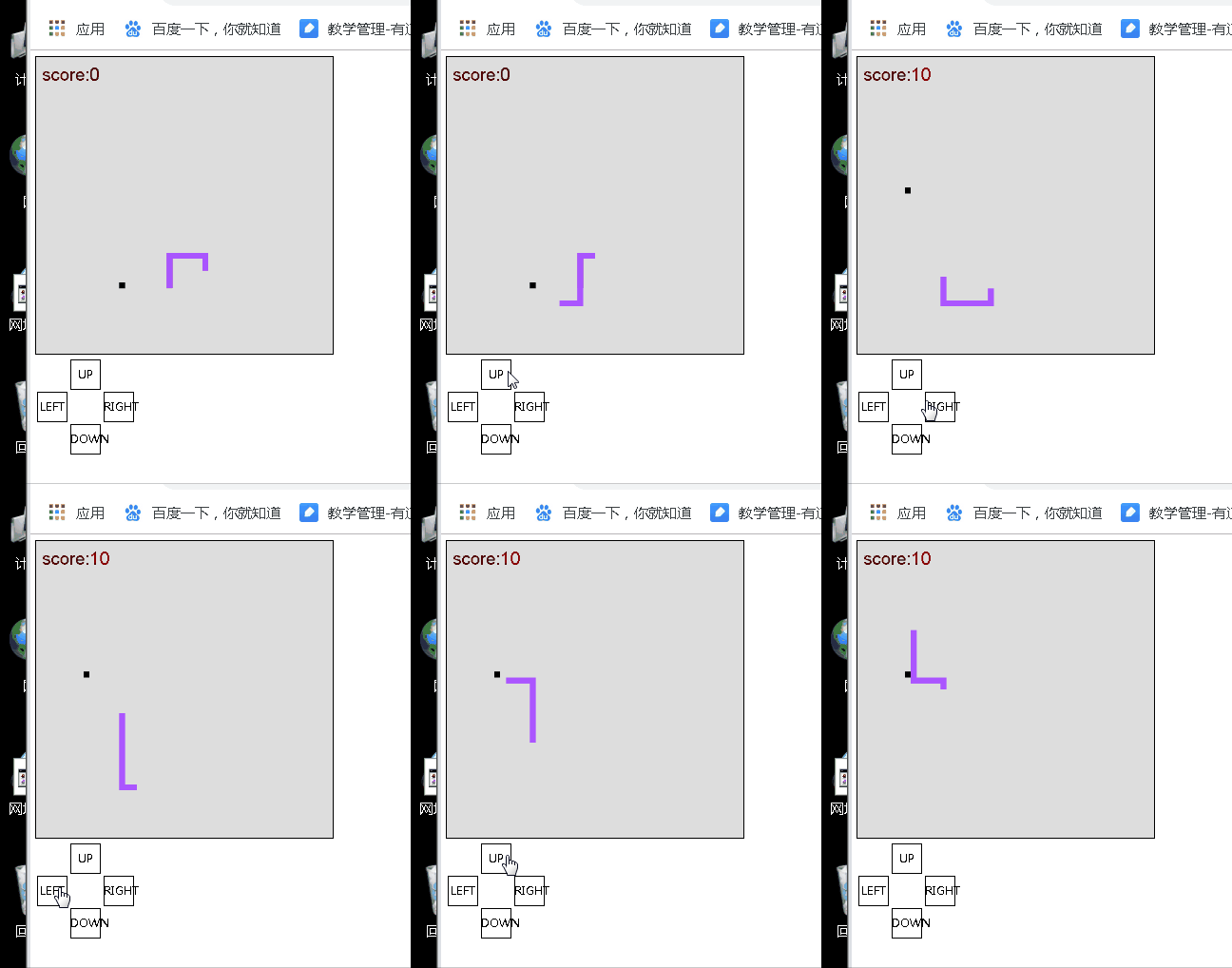
接下来展示实现该效果所需的完整源代码。
页面布局与HTML结构
页面布局部分由worm.html文件定义。
<!DOCTYPE html>
<html>
 <head>
 <meta charset="utf-8">
 <title>贪吃蛇</title>
 <style type="text/css">
 canvas{
 border: 1px solid black;
 }
 div{
 width: 50px; height: 50px;
 border: 1px solid black; cursor: pointer;
 text-align: center; line-height: 50px;
 }
 </style>
 <script type="text/javascript" src="Node.js" ></script>
 <script type="text/javascript" src="Worm.js" ></script>
 <script src="Stage.js" type="text/javascript" charset="utf-8"></script>
 <script type="text/javascript">
 function load () {
 //创建一个舞台 调用print方法打印
 stage=new Stage();
 //获取ctx
 var mCanvas=document.getElementById("mCanvas");
 ctx=mCanvas.getContext('2d');
 stage.print(ctx);
 startPrint();
 }

 function changeDir(dir){
 DIR=dir;
 }
 var task;
 var stage;
 var ctx;
 function startPrint () {
 task=window.setInterval(function () {
  stage.worm.step();
  stage.print(ctx);
 }, SPEED);
 }
 function endPrint () {
 window.clearInterval(task);
 }

 </script>
 </head>
 <body onload="load()">
 <canvas id="mCanvas" width="500" height="500">
 </canvas>

 <table>
 <tr>
 <td></td>
 <td>
  <div onclick="changeDir(UP)">UP</div>
 </td>
 <td></td>
 </tr>
 <tr>
 <td>
  <div onclick="changeDir(LEFT)">LEFT</div>
 </td>
 <td></td>
 <td>
  <div onclick="changeDir(RIGHT)">RIGHT</div>
 </td>
 </tr>
 <tr>
 <td></td>
 <td>
  <div onclick="changeDir(DOWN)">DOWN</div>
 </td>
 <td></td>
 </tr>
 </table>

 </body>
</html>
核心类与JavaScript逻辑
节点类的JavaScript代码保存在Node.js文件中。
/* 节点类 */
function Node (x, y) {
 this.x=x;
 this.y=y;
 this.equals=function (i, j) {
 return this.x==i && this.y==j;
 };

}
舞台类的JavaScript代码保存在Stage.js文件中。
/** 舞台类 */
function Stage () {
 this.width=50;
 this.height=50;
 this.worm=new Worm();

 /* 在canvas中绘制舞台的内容 */
 this.print=function (ctx) {
 for(i=0; i<this.width; i++){
 for(j=0; j<this.height; j++){
 //如果当前节点是蛇身子的一部分
 //那么换一种颜色绘制
 if(this.worm.contains(i,j)){
  ctx.fillStyle="#ab55ff";
  ctx.fillRect(i*10, j*10, 10, 10);
 }else if(this.worm.food.equals(i, j)){
  ctx.fillStyle="#000000";
  ctx.fillRect(i*10, j*10, 10, 10);
 }else{
  ctx.fillStyle="#dddddd";
  ctx.fillRect(i*10, j*10, 10, 10);
 }
 }
 }
 //在舞台的左上角绘制分数
 ctx.font="30px Arial";
 ctx.fillStyle="#880000";
 ctx.fillText("score:"+SCORE, 10,40);
 };
}
蛇类的JavaScript代码保存在Worm.js文件中。
/** 蛇类 */
var UP=0;
var DOWN=1;
var LEFT=2;
var RIGHT=3;

var DIR=UP;

var SCORE=0;
var SPEED=300;
//蛇类初始化的形状
function Worm () {
 this.nodes=[];
 this.nodes[this.nodes.length]=new Node(20,10);
 this.nodes[this.nodes.length]=new Node(20,11);
 this.nodes[this.nodes.length]=new Node(20,12);
 this.nodes[this.nodes.length]=new Node(20,13);
 this.nodes[this.nodes.length]=new Node(20,14);
 this.nodes[this.nodes.length]=new Node(20,15);
 this.nodes[this.nodes.length]=new Node(21,15);
 this.nodes[this.nodes.length]=new Node(22,15);
 this.nodes[this.nodes.length]=new Node(23,15);
 this.nodes[this.nodes.length]=new Node(24,15);
 this.nodes[this.nodes.length]=new Node(24,16);
 this.nodes[this.nodes.length]=new Node(24,17);
 this.nodes[this.nodes.length]=new Node(24,18);
 this.nodes[this.nodes.length]=new Node(24,19);

 /* 蛇会走一步 */
 this.step=function () {
 //计算出头结点 把头节点添加到nodes数组中
 var oldHead=this.nodes[0];
 var newHead;
 switch (DIR){
 case UP:
 if(oldHead.y-1<0){
  newHead=new Node(oldHead.x, 49);
 }else{
  newHead=new Node(oldHead.x, oldHead.y-1);
 }
 break;
 case DOWN:
 if(oldHead.y+1>49){
  newHead=new Node(oldHead.x, 0);
 }else{
  newHead=new Node(oldHead.x, oldHead.y+1);
 }
 break;
 case LEFT:
 if(oldHead.x-1<0){
  newHead=new Node(49, oldHead.y);
 }else{
  newHead=new Node(oldHead.x-1, oldHead.y);
 }
 break;
 case RIGHT:
 if(oldHead.x+1>49){
  newHead=new Node(0, oldHead.y);
 }else{
  newHead=new Node(oldHead.x+1, oldHead.y);
 }
 break;
 }
 this.nodes.unshift(newHead);

 if(!this.food.equals(newHead.x, newHead.y)){
 //把尾节点删掉 (在没有吃到食物的时候)
 this.nodes.pop();
 }else{
 //吃到了食物 重新生成食物
 this.food=this.randomFood();
 SCORE+=10;
 SPEED-=50;
 endPrint();
 startPrint();
 }
 };

 /* 判断i,j节点是否是当前蛇身子的一部分 */
 this.contains=function (i, j) {
 for(k=0; k<this.nodes.length; k++){
 var node=this.nodes[k];
 if(node.x==i && node.y==j){
 return true;
 }
 }
 return false;
 };

 //声明生成食物的方法
 this.randomFood=function () {
 var x;
 var y;
 do{
 x=Math.floor(Math.random()*50);
 y=Math.floor(Math.random()*50);
 }while(this.contains(x, y));
 return new Node(x, y);
 };

 //声明食物
 this.food=this.randomFood();

}
以上内容为本文的全部介绍,希望能为读者的学习提供有益帮助,同时也欢迎继续支持本站。
作者最新文章
anime.js 快速入门:怎么引入库并编写第一个 DOM 动画
2026-11-05 14:22:43
在线JS解密后变量名仍乱码?结合浏览器DevTools调试还原
2026-11-04 20:26:01
怎么在浏览器中运行JavaScript代码并查看输出结果
2026-11-04 09:07:33
JS 获取屏幕分辨率:window.screen.width 与 height 用法
2026-11-04 08:52:48
为什么推荐用DOMContentLoaded代替window.onload初始化JS
2026-11-04 08:42:33