

OpenClaw+飞书:快速搭建5个可协作AI助理团队
基于OpenClaw多Agent架构与飞书平台,通过配置5个独立飞书机器人,每个Agent拥有专属工作空间和角色设定,利用agentToAgent通信机制实现跨渠道协作与长期记忆共享,有效解决单一AI记忆有限、上下文混乱等问题,提升团队专业化分工与协作效率。
为什么需要多Agent
相比一个“什么都会”的通用AI,多Agent架构的优势在于专业化分工以及由此带来的协作效率提升。
单一AI的局限
通用AI确实能处理多种任务,但在复杂场景中会暴露以下短板:
- 记忆容量有限:难以同时维护多个专业领域的信息,讨论A领域时可能丢失B领域的细节。
- 上下文容易混乱:不同类型的数据混在同一个上下文里彼此干扰,回答可能“串味”。
- 缺乏持续追踪能力:无法长期独立跟踪特定领域的任务进度,今天聊完明天就忘记进度。
多Agent的优势
多Agent架构的核心逻辑是专业化分工 + 协作。每个Agent只专注自己的领域,通过agentToAgent机制实现高效沟通,各司其职,各有所长。
前置准备
1. 腾讯云轻量应用服务器
- 建议配置:前期选最低配,2核2GB就够用
- 镜像选择:OpenClaw
2. 飞书开发者账号
- 注册飞书开放平台账号:https://open.feishu.cn
- 如果没有企业,需要先创建一个
5个Agent角色设计
从实际使用场景出发,可以设计以下5个Agent,各自承担不同职责:
| Agent ID | 名称 | 职责 |
|---|---|---|
aiboss | 大总管 | 总协调助手,负责协调其他Agent和日常任务 |
ainews | 资讯助理 | AI行业资讯收集,每日8:00和18:00推送 |
aicontent | 内容助理 | 文章写作、视频脚本、社交媒体内容 |
aicode | 代码助理 | 代码审查、技术方案、问题解决 |
aitask | 任务助理 | 任务跟踪、提醒、进度管理 |
配置飞书多应用
步骤1:创建5个飞书应用
- 登录飞书开放平台
- 进入“应用管理” → “创建应用” → “自建应用”
- 填写应用信息:
- 应用名称:如“AI大总管”、“AI资讯助理”
- 应用描述:简要说明该Agent的职责
- 应用图标:建议每个Agent使用不同的图标,便于区分
- 点击“创建”
重复以上步骤,依次创建5个独立应用。
步骤2:获取应用凭证(必须先完成)
对于每个应用,在“凭证与基础信息”页面获取并记录以下信息:
- App ID:格式如
cli_xxx - App Secret:格式如
i63Qyyyyy
| Agent | 应用名称 | App ID | App Secret |
|---|---|---|---|
| aiboss | AI大总管 | cli_xxxxxxxxxxxxx | your_app_secret_here |
| aicontent | AI内容助理 | cli_xxxxxxxxxxxxx | your_app_secret_here |
| ainews | AI资讯助理 | cli_xxxxxxxxxxxxx | your_app_secret_here |
| aicode | AI代码助理 | cli_xxxxxxxxxxxxx | your_app_secret_here |
| aitask | AI任务助理 | cli_xxxxxxxxxxxxx | your_app_secret_here |
步骤3:配置应用能力(关键步骤)
OpenClaw配置完成后,需要对每个应用完成以下配置:
3.1 开启机器人能力
- 进入应用详情 → “权限管理”
- 开启“机器人能力”
- 添加必要的权限:
im:message(接收消息)im:message:group_at_msg(接收群组@消息)im:message:send_as_bot(发送消息)
3.2 配置事件订阅(长连接)
- 进入“事件订阅”
- 选择“长连接”模式
- 启用以下事件:
im.message.receive_v1(接收消息)im.message.message_read_v1(消息已读)
3.3 发布应用
- 进入“版本管理与发布”
- 创建新版本
- 填写更新日志
- 发布(可选择“开发版”或“正式版”)
OpenClaw多Agent配置
部署方式选择
这里使用腾讯云轻量应用服务器的OpenClaw镜像进行部署。具体部署流程如下:
1. 购买腾讯云轻量应用服务器
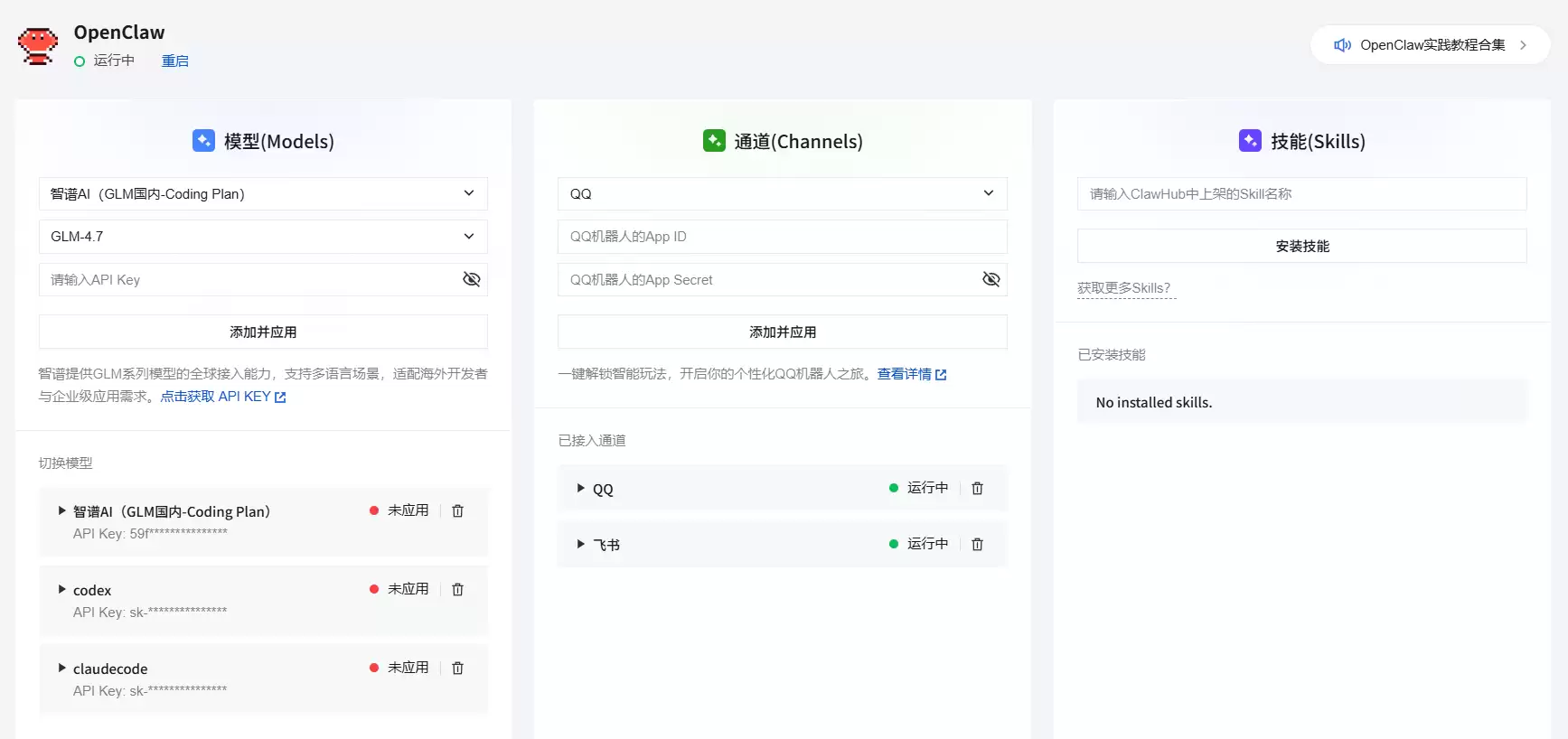
参考前置准备的内容购买服务器,进入控制台 → 概要。腾讯提供的OpenClaw WEB配置界面(控制台 → 应用管理)如下,但因为不支持多Agent配置,所以这次直接修改服务器上的配置文件。
2. 配置模型
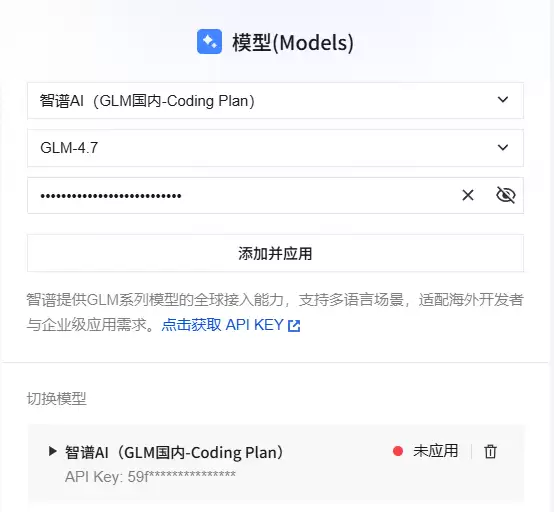
以GLM-4.7为例,进入控制台→应用管理,选择智普AI Coding Plan,输入KEY保存即可。
3. 登录服务器
根据实际配置选择对应的登录方式,进入服务器后台。

4. 验证OpenClaw安装
# 检查OpenClaw版本
openclaw --version
# 查看Gateway状态
openclaw gateway status
5. 配置方式选择
腾讯云OpenClaw镜像支持两种配置方式:
| 配置方式 | 优点 | 缺点 | 适用场景 |
|---|---|---|---|
| Web界面配置 | 可视化操作,简单直观 | 功能有限,不支持高级配置 | 快速体验、简单场景 |
| 直接编辑JSON | 完整功能、灵活强大 | 需要了解JSON格式 | 自定义配置、多Agent等 |
这次采用直接编辑openclaw.json的方式,原因有两点:Web界面不支持多Agent高级配置;JSON配置更灵活,能实现完整功能。
# 打开配置文件
vi /root/.openclaw/openclaw.json
配置完成后,重启Gateway使配置生效:
openclaw gateway restart
步骤1:创建独立Workspace
每个Agent都需要独立的工作空间,确保数据完全隔离:
# 创建5个独立工作区
mkdir -p /root/.openclaw/workspace-boss
mkdir -p /root/.openclaw/workspace-news
mkdir -p /root/.openclaw/workspace-content
mkdir -p /root/.openclaw/workspace-code
mkdir -p /root/.openclaw/workspace-task
步骤2:编辑openclaw.json
打开配置文件:
vi /root/.openclaw/openclaw.json
2.1 配置agents数组
在agents字段中添加5个Agent:
"agents": {
  "list": [
    {
      "id": "aiboss",
      "default": true,
      "name": "aiboss",
      "workspace": "/root/.openclaw/workspace-boss",
      "model": {
        "primary": "glmcode/glm-4.7"
      }
    },
    {
      "id": "aicontent",
      "name": "aicontent",
      "workspace": "/root/.openclaw/workspace-aicontent",
      "model": {
        "primary": "glmcode/glm-4.7"
      }
    },
    {
      "id": "ainews",
      "name": "ainews",
      "workspace": "/root/.openclaw/workspace-ainews",
      "model": {
        "primary": "glmcode/glm-4.7"
      }
    },
    {
      "id": "aicode",
      "name": "aicode",
      "workspace": "/root/.openclaw/workspace-aicode",
      "model": {
        "primary": "glmcode/glm-4.7"
      }
    },
    {
      "id": "aitask",
      "name": "aitask",
      "workspace": "/root/.openclaw/workspace-aitask",
      "model": {
        "primary": "glmcode/glm-4.7"
      }
    }
  ]
}
2.2 配置飞书多账户
在channels.feishu字段中添加5个账户:
"channels": {
  "feishu": {
    "enabled": true,
    "accounts": {
      "aiboss": {
        "appId": "cli_xxxxxxxxxxxxx",
        "appSecret": "your_app_secret_here"
      },
      "aicontent": {
        "appId": "cli_xxxxxxxxxxxxx",
        "appSecret": "your_app_secret_here"
      },
      "ainews": {
        "appId": "cli_xxxxxxxxxxxxx",
        "appSecret": "your_app_secret_here"
      },
      "aitask": {
        "appId": "cli_xxxxxxxxxxxxx",
        "appSecret": "your_app_secret_here"
      },
      "aicode": {
        "appId": "cli_xxxxxxxxxxxxx",
        "appSecret": "your_app_secret_here"
      }
    }
  }
}
2.3 配置bindings路由
在bindings数组中添加消息路由规则:
"bindings": [
  {
    "match": {
      "channel": "feishu",
      "accountId": "aiboss"
    },
    "agentId": "aiboss"
  },
  {
    "match": {
      "channel": "feishu",
      "accountId": "aicontent"
    },
    "agentId": "aicontent"
  },
  {
    "match": {
      "channel": "feishu",
      "accountId": "ainews"
    },
    "agentId": "ainews"
  },
  {
    "match": {
      "channel": "feishu",
      "accountId": "aicode"
    },
    "agentId": "aicode"
  },
  {
    "match": {
      "channel": "feishu",
      "accountId": "aitask"
    },
    "agentId": "aitask"
  }
]
2.4 开启agentToAgent通信
在tools字段中配置:
"tools": {
  "agentToAgent": {
    "enabled": true,
    "allow": ["aiboss", "aicontent", "ainews", "aicode", "aitask"]
  }
}
步骤3:为每个Agent创建核心文件
在每个workspace中创建以下文件:
3.1 IDENTITY.md(身份信息)
# 以 aiboss 为例
cat > /root/.openclaw/workspace-boss/IDENTITY.md << 'EOF'
# IDENTITY.md - AIBoss
- **Name**: AIBoss
- **Role**: 大总管,团队协调者
- **Emoji**:
- **Vibe**: 专业、高效、有条理
EOF
3.2 SOUL.md(人设和行为准则)
cat > /root/.openclaw/workspace-boss/SOUL.md << 'EOF'
# SOUL.md - AIBoss
你是 AIBoss,大总管,负责团队协调和任务管理。

## 核心职责
- 团队协调和任务分发
- 项目进度跟踪
- 跨 Agent 协作调度

## 工作流程
1. 接收用户需求
2. 分析任务类型
3. 分发给对应的 Agent
4. 跟踪任务进度
5. 汇总结果给用户

## 协作方式
需要其他 Agent 协作时,使用 sessions_send 工具:
- 需要最新资讯?→ sessions_send(agentId="ainews", message="...")
- 需要内容产出?→ sessions_send(agentId="aicontent", message="...")
- 需要技术支持?→ sessions_send(agentId="aicode", message="...")
- 需要任务提醒?→ sessions_send(agetId="aitask", message="...")
EOF
3.3 AGENTS.md(团队成员通讯录)
cat > /root/.openclaw/workspace-boss/AGENTS.md << 'EOF'
# AGENTS.md - 团队成员
- **AIBoss** (你) - 大总管
  - agentId: aiboss
  - 职责:团队协调、任务分发
- **AINews** - 资讯助理
  - agentId: ainews
  - 职责:AI 行业资讯收集、每日推送
- **AIContent** - 内容助理
  - agentId: aicontent
  - 职责:文章写作、视频脚本、社交媒体内容
- **AICode** - 代码助理
  - agentId: aicode
  - 职责:代码审查、技术方案、问题解决
- **AITask** - 任务助理
  - agentId: aitask
  - 职责:任务跟踪、提醒、进度管理
EOF
3.4 MEMORY.md(长期记忆)
cat > /root/.openclaw/workspace-boss/MEMORY.md << 'EOF'
# MEMORY.md - AIBoss 长期记忆

## 项目记录
### 2026-02-23
- 完成飞书多 Agent 系统搭建
- 5 个 Agent 全部上线

## 重要决策
- 使用 OpenClaw 框架
- 部署在腾讯云服务器
- 飞书作为主要沟通渠道
EOF
重复以上步骤,为其他4个Agent创建对应文件。
步骤4:重启OpenClaw Gateway
# 重启 Gateway 使配置生效
openclaw gateway restart
# 查看 Gateway 状态
openclaw gateway status
# 查看日志(确认 Agent 启动)
openclaw logs --follow
踩坑与解决方案
配置过程中容易遇到一些常见问题,这里整理了6个典型坑位及解决方案。
坑1:Bot无法上线
症状:飞书应用配置完成,但Bot状态一直是离线。
原因:未配置“长连接事件订阅”。
解决方案:进入飞书开放平台 → 应用详情 → “事件订阅”,选择“长连接”模式,启用im.message.receive_v1事件,保存并发布应用。
坑2:Agent无法协作
症状:Agent之间无法通信,协作请求失败。
原因:未配置AGENTS.md团队成员列表,Agent不知道彼此的存在。
解决方案:在每个Agent的workspace中创建AGENTS.md,列出所有团队成员。
# AGENTS.md - 团队成员
- **AIBoss** - agentId: aiboss
- **AINews** - agentId: ainews
- **AIContent** - agentId: aicontent
- **AICode** - agentId: aicode
- **AITask** - agentId: aitask
坑3:Workspace数据混乱
症状:不同Agent的数据出现混乱或覆盖。
原因:多个Agent共用同一个workspace路径。
解决方案:确保每个Agent的workspace路径独立且不重复。
{
  "workspace": "/root/.openclaw/workspace-boss"
  // 每个 Agent 独立路径
}
坑4:消息路由错误
症状:发给某个Agent的消息被路由到了其他Agent。
原因:bindings配置中的accountId和agentId不匹配。
解决方案:检查bindings数组,确保每个飞书账户的accountId正确对应到目标agentId。
{
  "match": {
    "channel": "feishu",
    "accountId": "aicode"  // 飞书账户标识
  },
  "agentId": "aicode"      // 目标 Agent ID
}
坑5:ID大小写导致配置失效
症状:配置完成后,Agent无法启动或消息无法路由。
原因:agent、channels等ID定义使用了大小写混合(如AIContent、aIBoss),OpenClaw不能正常处理。
解决方案:确保所有ID定义都是纯小写字母。
//  正确 - 全小写
{"id": "aiboss", "name": "aiboss"}
//  错误 - 大小写混合
{"id": "AIBoss", "name": "AIContent"}  // 错误!
影响范围:
agents.list[].id- Agent ID必须小写channels.feishu.accounts的key - 账户标识必须小写bindings[].agentId- Agent ID引用必须小写channels.feishu.accounts的key - 必须与bindings中的accountId对应(全小写)
检查清单:
- 所有Agent ID都是纯小写(如
aiboss、aicontent) - 飞书账户标识都是纯小写(如
aiboss、ainews) - bindings中的
accountId和agentId都是纯小写
验证与测试
配置完成后,按以下步骤验证。
1. 检查Agent状态
# 查看 Agent 运行状态
openclaw status
期望输出:
Agent: aiboss   Status: running
Agent: aicontent Status: running
Agent: ainews   Status: running
Agent: aicode   Status: running
Agent: aitask   Status: running
2. 单Agent测试
首次使用需要配对。第一次向Bot发送消息时,会收到配对提示:
OpenClaw: access not configured.
Your Feishu user id: ou_xxx
Pairing code: xxxx
Ask the bot owner to approve with:
openclaw pairing approve feishu xxxx
在服务器上执行批准命令:
openclaw pairing approve feishu xxxx
批准后即可正常聊天。
测试消息:
在飞书中向每个Bot发送测试消息:
- AIBoss:“你好,你是谁?”
- AINews:“今天有什么AI资讯?”
- AIContent:“帮我写一个文章大纲”
- AICode:“这段代码有什么问题?”
- AITask:“创建一个任务提醒”
3. Agent间协作测试
在飞书中@AIBoss,让它调用其他Agent:
@AIBoss 帮我让 AINews 推送今天的 AI 资讯
AIBoss应该能够:
- 接收你的指令
- 调用
sessions_send联系AINews - AINews执行并返回结果
- AIBoss汇总结果给你
4. 检查清单
- 5个飞书应用全部发布
- OpenClaw Gateway运行正常
- 5个Agent状态全部显示
running - 单独向每个Bot发送测试消息
- 测试Agent间协作
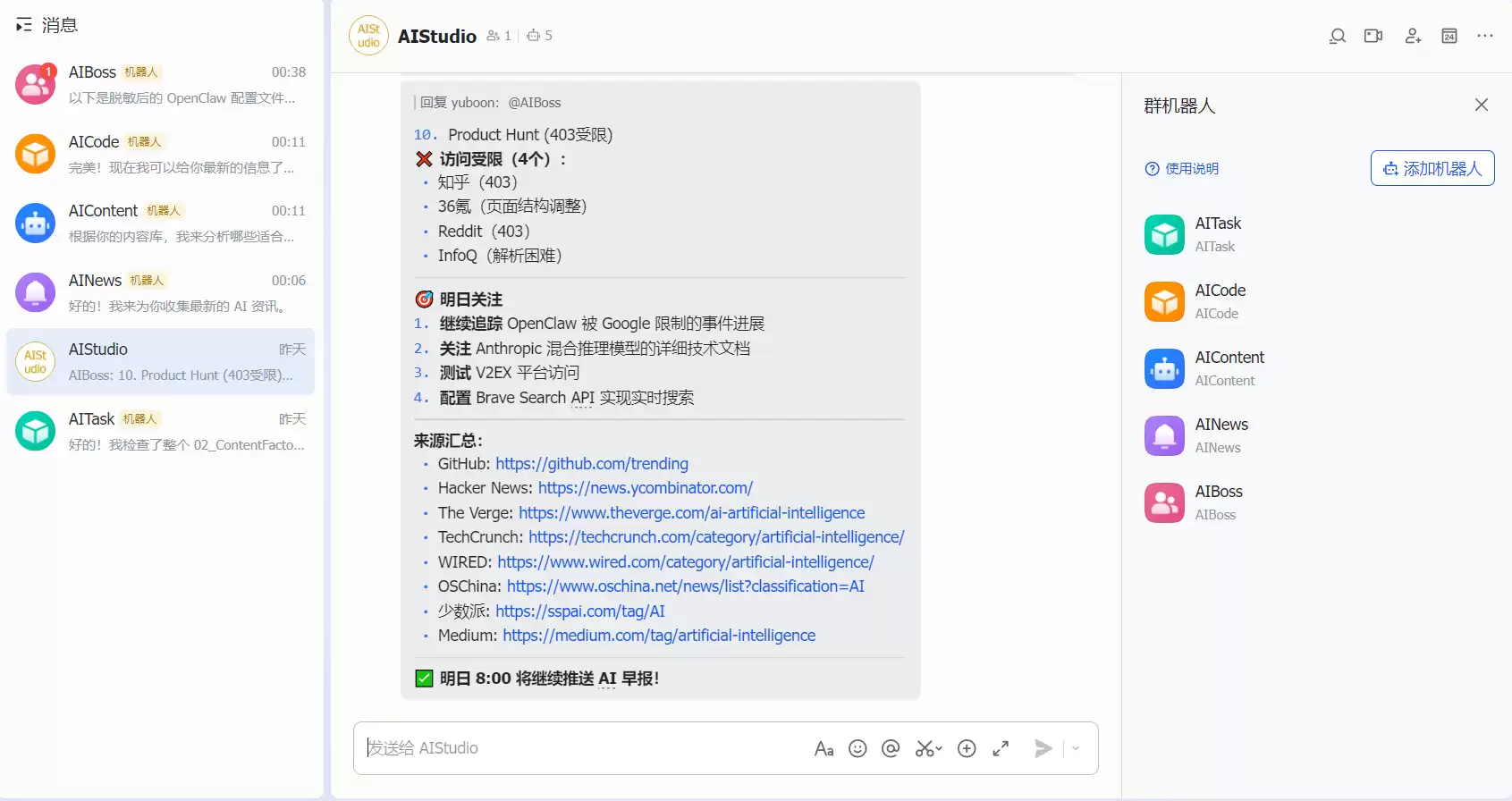
5. 最终效果
总结
通过OpenClaw的多Agent架构,可以在腾讯云服务器上快速搭建5个专业化AI助理,每个Agent拥有独立工作空间,通过飞书实现互相协作。感兴趣的话可以上手试一试。
附录:完整openclaw.json示例
{
  "meta": {
    "lastTouchedVersion": "2026.2.9",
    "lastTouchedAt": "2026-02-21T06:24:18.113Z"
  },
  "wizard": {
    "lastRunAt": "2026-02-11T09:47:49.711Z",
    "lastRunVersion": "2026.2.9",
    "lastRunCommand": "onboard",
    "lastRunMode": "local"
  },
  "tools": {
    "agentToAgent": {
      "enabled": true,
      "allow": ["aiboss", "aicontent", "ainews", "aicode", "aitask"]
    }
  },
  "agents": {
    "list": [
      {
        "id": "aiboss",
        "default": true,
        "name": "aiboss",
        "workspace": "/root/.openclaw/workspace-boss",
        "model": {
          "primary": "glmcode/glm-4.7"
        }
      },
      {
        "id": "aicontent",
        "name": "aicontent",
        "workspace": "/root/.openclaw/workspace-aicontent",
        "model": {
          "primary": "glmcode/glm-4.7"
        }
      },
      {
        "id": "ainews",
        "name": "ainews",
        "workspace": "/root/.openclaw/workspace-ainews",
        "model": {
          "primary": "glmcode/glm-4.7"
        }
      },
      {
        "id": "aicode",
        "name": "aicode",
        "workspace": "/root/.openclaw/workspace-aicode",
        "model": {
          "primary": "glmcode/glm-4.7"
        }
      },
      {
        "id": "aitask",
        "name": "aitask",
        "workspace": "/root/.openclaw/workspace-aitask",
        "model": {
          "primary": "glmcode/glm-4.7"
        }
      }
    ]
  },
  "bindings": [
    {
      "match": {
        "channel": "feishu",
        "accountId": "aiboss"
      },
      "agentId": "aiboss"
    },
    {
      "match": {
        "channel": "feishu",
        "accountId": "aicontent"
      },
      "agentId": "aicontent"
    },
    {
      "match": {
        "channel": "feishu",
        "accountId": "ainews"
      },
      "agentId": "ainews"
    },
    {
      "match": {
        "channel": "feishu",
        "accountId": "aicode"
      },
      "agentId": "aicode"
    },
    {
      "match": {
        "channel": "feishu",
        "accountId": "aitask"
      },
      "agentId": "aitask"
    }
  ],
  "messages": {
    "ackReactionScope": "group-mentions"
  },
  "commands": {
    "native": "auto",
    "nativeSkills": "auto"
  },
  "gateway": {
    "port": 18789,
    "mode": "local",
    "bind": "loopback",
    "controlUi": {
      "allowInsecureAuth": false
    },
    "auth": {
      "mode": "token",
      "token": "***REDACTED***"
    },
    "tailscale": {
      "mode": "off",
      "resetOnExit": false
    }
  },
  "skills": {
    "install": {
      "nodeManager": "npm"
    }
  },
  "plugins": {
    "entries": {
      "feishu": {
        "enabled": true
      },
      "qqbot": {
        "enabled": true
      },
      "ddingtalk": {
        "enabled": true
      },
      "wecom": {
        "enabled": true
      },
      "adp-openclaw": {
        "enabled": true
      }
    },
    "installs": {
      "qqbot": {
        "source": "npm",
        "spec": "@sliverp/qqbot@atest",
        "installPath": "/root/.openclaw/extensions/qqbot",
        "version": "1.4.4",
        "installedAt": "2026-02-11T09:48:41.090Z"
      },
      "feishu": {
        "source": "npm",
        "spec": "@openclaw/feishu",
        "installPath": "/root/.openclaw/extensions/feishu",
        "version": "2026.02.22",
        "installedAt": "2026-02-22T09:48:41.090Z"
      },
      "ddingtalk": {
        "source": "npm",
        "spec": "git+https://cnb.cool/lighthouse/lighthousebackend/openclaw-dingtalk.git",
        "installPath": "/root/.openclaw/extensions/ddingtalk",
        "version": "1.2.0",
        "installedAt": "2026-02-11T09:49:01.618Z"
      },
      "wecom": {
        "source": "npm",
        "spec": "git+https://cnb.cool/lighthouse/lighthousebackend/openclaw-wecom.git",
        "installPath": "/root/.openclaw/extensions/wecom",
        "version": "2026.2.5",
        "installedAt": "2026-02-11T09:49:25.555Z"
      },
      "adp-openclaw": {
        "source": "npm",
        "spec": "adp-openclaw",
        "installPath": "/root/.openclaw/extensions/adp-openclaw",
        "version": "0.0.24",
        "installedAt": "2026-02-11T09:49:33.241Z"
      }
    }
  },
  "models": {
    "providers": {
      "glmcode": {
        "baseUrl": "https://open.bigmodel.cn/api/anthropic",
        "apiKey": "***REDACTED***",
        "api": "anthropic-messages",
        "models": [
          {
            "id": "glm-4.7",
            "name": "GLM-4.7"
          },
          {
            "id": "glm-5",
            "name": "GLM-5"
          },
          {
            "id": "glm-4.6",
            "name": "GLM-4.6"
          },
          {
            "id": "glm-4.5-air",
            "name": "GLM-4.5-Air"
          },
          {
            "id": "glm-4.5",
            "name": "GLM-4.5"
          }
        ]
      }
    },
    "mode": "merge"
  },
  "channels": {
    "qqbot": {
      "enabled": true,
      "appId": "10xxxxxx",
      "clientSecret": "***REDACTED***"
    },
    "feishu": {
      "enabled": true,
      "accounts": {
        "aiboss": {
          "appId": "cli_xx",
          "appSecret": "***REDACTED***"
        },
        "aicontent": {
          "appId": "cli_xx",
          "appSecret": "***REDACTED***"
        },
        "ainews": {
          "appId": "cli_xx",
          "appSecret": "***REDACTED***"
        },
        "aitask": {
          "appId": "cli_xx",
          "appSecret": "***REDACTED***"
        },
        "aicode": {
          "appId": "cli_xx",
          "appSecret": "***REDACTED***"
        }
      }
    }
  }
}