

JS使用Canvas绘制随机验证码的实现方法
本文介绍如何利用HTML5 Canvas元素和JavaScript生成随机验证码。通过获取Canvas上下文,结合随机颜色生成与随机坐标定位函数,实现数字的随机绘制。代码包含完整的HTML结构、JS逻辑及辅助函数,可直接参考使用。
JS使用Canvas绘制随机验证码的实现方法
本文分享使用JavaScript生成随机验证码的完整代码示例,供读者参考学习。
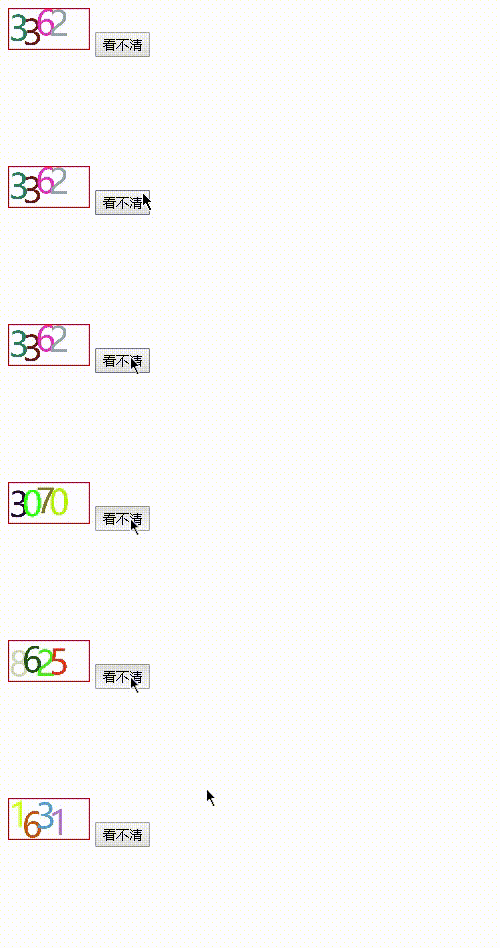
各类网站中验证码应用广泛,本文将演示如何使用JavaScript生成一个随机验证码。
实现该功能需要借助Canvas元素进行图形绘制。
Canvas基础知识介绍
Canvas基础知识介绍
HTML5中的canvas元素允许开发者使用JavaScript在网页上绘制图像。画布是一个矩形区域,用户可以精确控制其中的每个像素。Canvas提供了多种绘制路径、矩形、圆形、字符以及添加图像的方法。
实现思路分析
实现思路分析
生成的验证码需包含随机数字,且每个数字的位置也应是随机的。
HTML结构部分
HTML结构部分
<canvas id="canvas" style="border: 1px solid red; width: 80px; height: 40px;">
</canvas>
JavaScript逻辑部分
JavaScript逻辑部分
function getVerification() { //二维码
 var ctx = document.getElementById("canvas").getContext("2d");
 // 清空画布
 ctx.clearRect(0,0, 400, 400);
 // 设置字体
 ctx.font = "128px bold 黑体";
 // 设置垂直对齐方式
 ctx.textBaseline = "top";
 // 设置颜色
 ctx.fillStyle = randomColor();
 // 绘制文字(参数:要写的字,x坐标,y坐标)
 ctx.fillText(getRandomNum(10), 0, getRandomNum(50));
 ctx.fillStyle = randomColor();
 ctx.fillText(getRandomNum(10), 50, getRandomNum(50));
 ctx.fillStyle = randomColor();
 ctx.fillText(getRandomNum(10), 100, getRandomNum(50));
 ctx.fillStyle = randomColor();
 ctx.fillText(getRandomNum(10), 150, getRandomNum(50));
}
通过ctx.fillStyle = randomColor()设置随机颜色,每绘制一个数字便更换一次颜色。randomColor()函数用于生成随机十六进制颜色码,具体实现如下:
function randomColor() {
 var colorValue = "0,1,2,3,4,5,6,7,8,9,a,b,c,d,e,f";
 var colorArray = colorValue.split(",");
 var color = "#";
 for (var i = 0; i < 6; i++) {
 color += colorArray[Math.floor(Math.random() * 16)];
 }
 return color;
}
使用getRandomNum()函数获取随机显示的数字以及每个数字在y轴方向的随机位置。验证码中的每个数字均独立获取,通过传入参数n来定义随机数的范围。具体代码如下:
function getRandomNum(n){
 return parseInt(Math.random() * n);
}
完整代码示例如下:
<!DOCTYPE html>
<html lang="en">
<head>
 <meta charset="UTF-8">
 <meta name="viewport" content="width=device-width, initial-scale=1.0">
 <title>2</title>
</head>

<body>
 <canvas id="canvas" style="border: 1px solid red; width: 80px; height: 40px;"></canvas>
 <span id="yanzhengma"></span><button onclick="getVerification()">看不清</button>
 <script>
 function randomColor() {
 var colorValue = "0,1,2,3,4,5,6,7,8,9,a,b,c,d,e,f";
 var colorArray = colorValue.split(",");
 var color = "#";
 for (var i = 0; i < 6; i++) {
 color += colorArray[Math.floor(Math.random() * 16)];
 }
 return color;
 }
 function getRandomNum(n){
 return parseInt(Math.random() * n);
 }
 function getVerification() {
 var ctx = document.getElementById("canvas").getContext("2d");
 ctx.clearRect(0,0, 400, 400);
 // 设置字体
 ctx.font = "128px bold 黑体";
 // 设置垂直对齐方式
 ctx.textBaseline = "top";
 // 设置颜色
 ctx.fillStyle = randomColor();
 // 绘制文字(参数:要写的字,x坐标,y坐标)
 ctx.fillText(getRandomNum(10), 0, getRandomNum(50));
 ctx.fillStyle = randomColor();
 ctx.fillText(getRandomNum(10), 50, getRandomNum(50));
 ctx.fillStyle = randomColor();
 ctx.fillText(getRandomNum(10), 100, getRandomNum(50));
 ctx.fillStyle = randomColor();
 ctx.fillText(getRandomNum(10), 150, getRandomNum(50));
 }
 getVerification();
 </script>
</body>
</html>
以上内容为本文的全部介绍,希望对读者的学习有所帮助,欢迎支持本站。
JS怎么实现页面强制刷新
2026-11-05 14:53:38
点击JS链接直接运行不下载?前端实现.js文件强制下载的三种方法
2026-11-05 12:12:23
怎么封装一个通用的JS创建元素辅助函数
2026-11-05 11:41:41
Swiper.js 怎么监听滑动结束并获取当前索引
2026-11-05 10:57:15
HTML、CSS和JS的关系:Web前端三件套怎么协作
2026-11-04 15:41:40