

JavaScript数组join()方法详解与IE兼容处理
本文深入解析JavaScript中数组的join()方法,介绍其将数组元素转换为字符串并指定分隔符的语法与返回值。重点讨论了当数组包含null或undefined时的处理规则,以及IE7及更早版本中该方法的兼容性问题与错误行为,并提供相应的测试代码参考。
JavaScript数组join()方法详解与IE兼容处理
本文通过具体实例详细解析JavaScript数组中join()方法的使用方式,旨在为开发者提供实用的参考与学习素材。
join()方法定义与语法
关于join()方法
- 定义与功能: join()方法的核心作用是将数组内的所有元素连接成一个字符串。 在连接过程中,元素之间会插入指定的分隔符。
- 基本语法:arrayObject.join(separator)
- 参数说明: separator为可选参数,用于指定元素之间的分隔符。 注意事项: 1. 若调用join()时不传入任何参数,或传入undefined,默认使用逗号(,)作为分隔符。 2. 在IE7及更早版本的浏览器中,该方法存在兼容性问题,会错误地将字符串“undefined”作为分隔符使用。 3. 若数组中的某一项值为null或undefined,在调用join()、toLocaleString()、toString()或valueOf()方法时,这些值在返回结果中均表现为空字符串。
- 返回值: 该方法返回一个新字符串,该字符串由数组中的所有项组成。
代码示例与运行结果
具体代码示例如下:
Array.prototype.copyJoin = function() {
  var string = '';
  for(var i = 0; i < this.length; i++) {
    // 将数组中各项值为null 或undefined的项改为空字符串。
    if(this[i] == null || this[i] == undefined) {
      this[i] = '';
    }
    // 对数组进行操作
    if(arguments.length == 1 && arguments[0] != undefined) { //指定使用的分隔符
      string += (i < this.length - 1) ? this[i] + arguments[0] : this[i];
    }
    else { // 默认使用的分隔符————逗号
      // if(i < this.length - 1) {
      //   string += this[i] + ',';
      // }
      // else {
      //   string += this[i];
      // }
      string += (i < this.length - 1) ? this[i] + ',' : this[i];
    }
  }
  return string;
}
// 不传任何值或者传入undefined
var arr = [1, 2, 3, 4, 5, 6];
console.log(arr.copyJoin()); // 1,2,3,4,5,6
console.log(arr.copyJoin().length); // 11
console.log(arr.copyJoin(undefined)); // 1,2,3,4,5,6
console.log(arr.copyJoin(undefined).length); // 11
// 传入参数
console.log(arr.copyJoin('||')); // 1||2||3||4||5||6
console.log(arr.copyJoin('||').length);  // 16
// 数组中的某一项是null或undefined
var arr2 = [1, undefined, 2, undefined, 3, 4, 5, 6, 7, null, 8, null, 9];
console.log(arr2.copyJoin()); // 1,,2,,3,4,5,6,7,,8,,9
console.log(arr2.copyJoin().length); // 21
console.log(arr2.copyJoin(undefined)); // 1,,2,,3,4,5,6,7,,8,,9
console.log(arr2.copyJoin(undefined).length); // 21
代码运行后的输出结果:
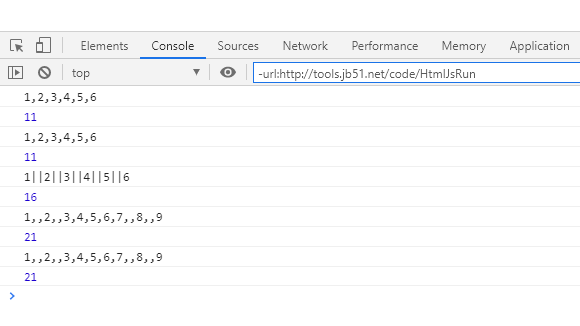
上述代码在IE8及以上版本的浏览器中表现一致,但在IE7及更早版本中存在差异(注:IE7中不存在copyJoin()方法):
arr.join(undefined)); // 1undefined2undefined3undefined4undefined5undefined6
arr.join(undefined).length); // 51
arr2.join(undefined)); // 1undefinedundefined2undefinedundefined3undefined4undefined5undefined6undefined7undefinedundefined8undefinedundefined9
arr2.join(undefined).length); // 117
感兴趣的用户可以通过在线HTML/CSS/JavaScript代码运行工具:http://tools.jb51.net/code/HtmlJsRun来测试上述代码的实际运行效果。
如需进一步了解JavaScript相关知识,建议参考本站专题:《JavaScript数组操作技巧总结》、《JavaScript遍历算法与技巧总结》、《javascript面向对象入门教程》、《JavaScript数学运算用法总结》、《JavaScript数据结构与算法技巧总结》以及《JavaScript错误与调试技巧总结》。
希望本文的阐述能对各位JavaScript程序员的开发工作有所帮助。
JS处理含Emoji或中文的字符串转数组乱码问题
2026-11-05 16:12:28
JS怎么使用展开运算符合并对象
2026-11-05 14:42:18
ES6+环境下判断JS对象为空的简洁写法
2026-11-05 12:12:23
怎么通过replacer函数自定义JS中JSON的格式化输出
2026-11-05 11:19:44
JS正则表达式基础:字面量与RegExp构造函数的区别及常用元字符
2026-11-05 11:16:58