

Layui Table 复选框选中行数据获取方法
作者:阿沐时间:2026-10-23 11:04:08浏览:624
本文介绍如何在 Layui 表格中通过复选框获取选中行的数据。利用 table.checkStatus 方法,无需遍历表格即可直接获取全选或部分选中的行数据对象,适用于项目提交等场景。
Layui Table 复选框选中行数据获取方法
项目需求中,允许用户通过复选框勾选特定的项目进行提交,具体效果如下表所示。
<table class="layui-table" lay-data="{url:'******', id:'test3'}" lay-filter="test3">

  <thead>
  <tr>
    <th lay-data="{type:'checkbox'}">ID</th>
    <th lay-data="{field:'id', width:80}">ID</th>
    <th lay-data="{field:'t1'}">测试项</th>
    <th lay-data="{field:'t2', edit: 'text'}">标定参数</th>
    <th lay-data="{field:'t3'}">标定值</th>
  </tr>
  </thead>
</table>
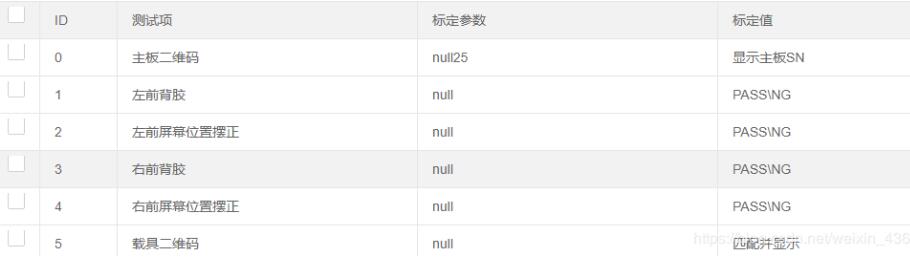
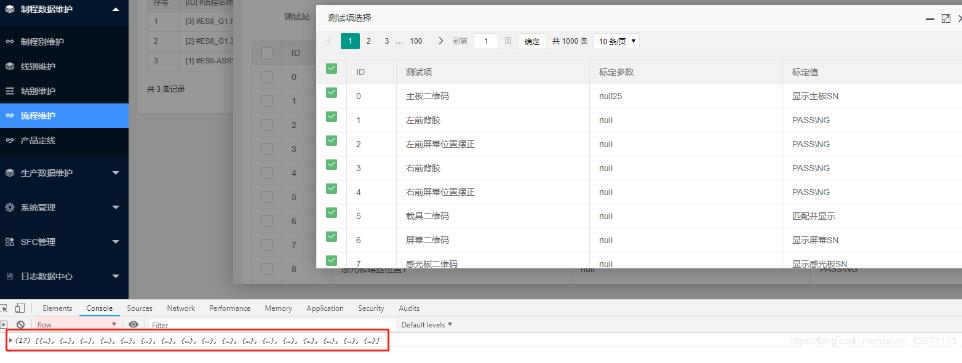
我们可以在获取表中所有行数据的基础上,实现全选或部分选中的功能,无需通过遍历复选框的方式来获取数据。
table.on('checkbox(test3)', function(obj){
      var checkStatus = table.checkStatus('test3');
      console.log(checkStatus.data)//选中行数据
      console.log(checkStatus.data.length)

      })

$('.ttes').click(function () {
      var index = parent.layer.getFrameIndex(window.name);
      var checkStatus = table.checkStatus('test3');
      console.log(checkStatus.data)//选中行数据
      var items = checkStatus.data;
以上关于 Layui 表格复选框选中行数据获取的示例内容到此结束,希望能为读者提供参考,并欢迎大家继续支持本站。
作者最新文章
为什么叫JavaScript:语言命名由来及与Java的历史渊源
2026-11-05 11:37:48
JS获取当前时间年月日时分秒并格式化为YYYY-MM-DD HH:mm:ss
2026-11-04 21:25:21
不同语言间JS与Java/Python加密结果不一致怎么办
2026-11-04 18:27:23
Mock.js 拦截 Axios 和 Fetch 请求的原理与配置方法
2026-11-04 08:13:59
JS怎么获取当前日期并格式化为YYYY-MM-DD
2026-11-03 18:47:03