

详解JS判断页面是在手机端还是在PC端打开的方法
作者:微光时间:2026-10-23 06:49:12浏览:448
本文介绍如何利用JavaScript的Navigator对象及正则表达式,在统一入口index.html中自动识别设备类型。通过解析UserAgent字符串,实现PC端与移动端页面的自动跳转与适配,提供冗余代码与正则优化两种方案,确保不同设备访问时的最佳体验。
项目目录与统一入口思路
我们的目标是实现PC端与移动端文件共用同一个入口,并能根据访问设备自动适配显示不同的内容。首先查看项目的目录结构:
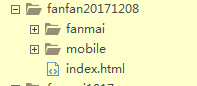
在index.html文件中,通过JavaScript控制逻辑来选择加载对应设备文件夹下的文件。这里主要利用Navigator对象,该对象包含了浏览器的相关信息。index.html的实现非常简洁,具体代码如下:
基于Navigator对象的JS判断实现
<!DOCTYPE html>
<html>
	<head>
		<meta charset="UTF-8">
		<meta name="viewport" content="initial-scale=1, maximum-scale=1, user-scalable=no" />
		<script type="text/javascript">
			function browserRedirect() {
	  var sUserAgent = navigator.userAgent.toLowerCase();
	  var bIsIpad = sUserAgent.match(/ipad/i) == "ipad";
	  var bIsIphoneOs = sUserAgent.match(/iphone os/i) == "iphone os";
	  var bIsMidp = sUserAgent.match(/midp/i) == "midp";
	  var bIsUc7 = sUserAgent.match(/rv:1.2.3.4/i) == "rv:1.2.3.4";
	  var bIsUc = sUserAgent.match(/ucweb/i) == "ucweb";
	  var bIsAndroid = sUserAgent.match(/android/i) == "android";
	  var bIsCE = sUserAgent.match(/windows ce/i) == "windows ce";
	  var bIsWM = sUserAgent.match(/windows mobile/i) == "windows mobile";
	  if (bIsIpad || bIsIphoneOs || bIsMidp || bIsUc7 || bIsUc || bIsAndroid || bIsCE || bIsWM) {
	  //跳转移动端页面
	  window.location.href="http://f.jcngame.com/fanfan20171208/mobile/index.html" rel="external nofollow" rel="external nofollow" ;
	  } else {
	  //跳转pc端页面
	  window.location.href="http://f.jcngame.com/fanfan20171208//fanmai/index.html" rel="external nofollow" rel="external nofollow" ;
	  }
	 }
			browserRedirect();
		</script>
	</head>
	<body>

	</body>
</html>
补充说明,考虑到之前的代码可能存在冗余,现在使用正则表达式进行了优化,代码如下:
使用正则表达式优化判断逻辑
<script type="text/javascript">
	function browserRedirect() {
  var sUserAgent = navigator.userAgent.toLowerCase();
  if (/ipad|iphone|midp|rv:1.2.3.4|ucweb|android|windows ce|windows mobile/.test(sUserAgent)) {
  //跳转移动端页面
  window.location.href="http://f.jcngame.com/fanfan20171208/mobile/index.html" rel="external nofollow" rel="external nofollow" ;
  } else {
  //跳转pc端页面
  window.location.href="http://f.jcngame.com/fanfan20171208//fanmai/index.html" rel="external nofollow" rel="external nofollow" ;
  }
 }
	browserRedirect();
</script>


以上介绍了利用JS判断页面是在手机端还是在PC端打开的方法详解整合,希望对大家有所帮助。如果大家有任何疑问请留言,小编会及时回复。在此也非常感谢大家对本站网站的支持!
作者最新文章
JavaScript零基础入门:从环境搭建到运行第一段代码
2026-11-05 15:29:58
HTML链接中javascript:void(0)的作用及现代替代方案
2026-11-05 10:07:47
在线调试 JS 时怎么引入 jQuery 或 Vue 等第三方库
2026-11-05 08:53:56
原生JavaScript实现简易颜色选择器原理与代码
2026-11-03 23:22:19
JS原生表单序列化:FormData与URLSearchParams用法详解
2026-11-03 23:13:21