

JavaScript实现邮箱后缀自动提示与键盘交互功能
本文详细讲解如何使用原生JavaScript实现邮箱输入框的后缀自动提示功能。内容涵盖基础提示逻辑、针对包含@符号的输入优化前缀匹配、通过CSS实现鼠标悬停与点击交互、处理特殊字符转义以防止XSS攻击,以及利用键盘上下键和回车键进行高效选择。同时包含焦点管理与用户体验优化的完整代码示例。
基础邮箱提示功能实现
首先进行基础功能的实现。
功能需求说明
- 根据以下需求实现如图所示的邮箱输入提示效果,注意仅需实现列出的功能点。
- 当用户未输入任何字符时,提示框应当隐藏。
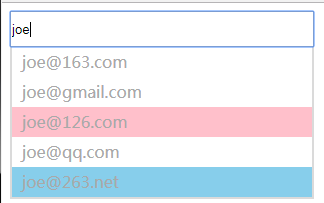
- 当用户输入字符后,显示提示框,并将用户输入的内容自动拼接邮箱后缀进行展示。
- 暂不考虑示意图中红色和蓝色背景色的逻辑处理。
- 注意去除用户输入内容的前后空格。
输入优化与后缀匹配逻辑
进行代码优化与完善。
功能需求说明
如果输入内容为 abc@1,此时出现的提示框内容可能为:
- abc@1@163.com
- abc@1@gmail.com
- abc@1@126.com
- ……
显然,上述提示框内容不符合用户需求,需要进行优化:
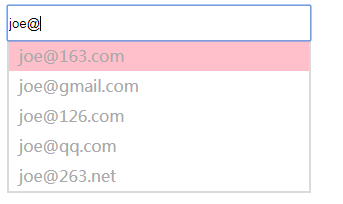
当用户输入内容包含 @ 符号时,选取 @ 符号前面的字符与后缀进行拼接。
功能需求说明
此时的提示效果有所改善,但如果用户已输入 @1,说明其大概率要输入 163 或 126,我们需要使提示更符合用户预期。满足以下需求:
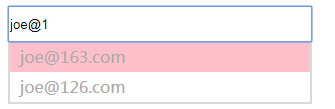
当用户输入了 @ 及部分后缀时,仅从 postfixList 中选取符合用户输入预期的后缀,以前缀匹配为判断标准。
当用户输入不满足任何前缀匹配时,则显示全部提示列表。
测试用例验证
- 输入 a@1 -> 出现提示框,提示 a@163.com, a@126.com
- 输入 a@g -> 出现提示框,提示 a@gmail.com
- 输入 a@2 -> 出现提示框,提示 a@263.net
- 输入 a@qq -> 出现提示框,提示 a@qq.com
- 输入 a@163. -> 出现提示框,提示 a@163.com
- 输入 a@126.com -> 出现提示框,提示 a@126.com
- 输入 a@qq.com (两个空格) -> 出现提示框,提示 a@qq.com
- 输入 a@qq.comm -> 出现提示框,显示全部提示 代码1
<!DOCTYPE html>
<html>

<head>
 <meta charset="utf-8" />
 <title>邮箱后缀提示1-完成基本提示</title>

</head>

<body>
 <div class="wrapper">
  <input type="text" id="input-email">
  <ul class="email-sug" id="email-sug-wrapper">

  </ul>
 </div>
 <script>
  var postfixList = ["163.com", "gmail.com", "126.com", "qq.com", "263.net"];
  var txt = document.getElementById("input-email");
  var sug = document.getElementById("email-sug-wrapper");

  // keys.addEventListener("keyup",function(){
  //  console.log("event handle1");
  // })
  // keys.addEventListener("keypress",function(){
  //  console.log("event handle2");
  // })
  // keys.addEventListener("keydown",function(){
  //  console.log("event handle3");
  // })
  // keys.addEventListener("input",function(){
  //  console.log("event handle4");
  // })

  //经过查看各个效果,oninput效果最符合需求。
  txt.oninput = function () {
   console.log("event handle4");
   judge();
   add();

  }
  function getText() {
   var inputText = txt.value.trim();
   return inputText;
  }
  //判断是否生成新的数组
  function postlist() {
   var userinput = getText();
   var newpostlist = new Array();
   if (userinput.search('@') != 0) {
    var len = userinput.search('@');
    //用来拼接的用户输入内容 = 只使用@之后的字符串
    var x = userinput.substring(len + 1, userinput.length); //取@之后的部分
    for (var i = 0; i < postfixList.length; i++) {
     if (postfixList[i].search(x) == 0) {
      newpostlist.push(postfixList[i]);
     }
    }
    //若@后面没有字符或者新数组newpostlist为空,就返回原来的postfixlist
    if (x === '' || newpostlist == '') {
     return postfixList;
    }
    return newpostlist;
   } else {
    return postfixList;
   }
  }
  //根据输入内容和匹配来生成提示数组
  function promptContent() {
   var x = getText();
   var tips = new Array();
   if (x.indexOf("@") != -1) {
    var p = x.slice(0, x.indexOf("@"));
    for (i = 0; i < postlist().length; i++) {
     tips[i] = p + "@" + postlist()[i];
    }
   } else {
    for (i = 0; i < postfixList.length; i++) {
     tips[i] = x + "@" + postfixList[i];
    }
   }
   return tips;
  }
  //添加提示数组进入li
  function add() {
   var sug = document.getElementById("email-sug-wrapper");
   var tips = promptContent();
   while (sug.hasChildNodes()) {
    sug.removeChild(sug.firstChild);
   }
   //将之前的列表清除掉,然后重新生成新的列表
   for (i = 0; i < tips.length; i++) {
    var tip_li = document.createElement("li");
    tip_li.innerHTML = tips[i];
    sug.appendChild(tip_li);
   }
  }

  function judge() {
   //判空,是“”没有内容,不能为“ ”
   if (getText() == "") {
    hide();
   } else {
    display();
   }

  }

  function hide() {
   sug.style.display = "none";
  }

  function display() {
   sug.style.display = "block";
  }
 </script>
</body>

</html>
交互功能与XSS防护
新需求的代码实现
功能需求说明
此前仅完成了提示展示,但未实现提示与输入的交互,现在完成以下需求:
- 使用CSS实现:鼠标滑过提示框的某一项时,该项背景色发生变化,以标识鼠标经过该DOM节点。
- 如果鼠标点击某项提示,则该提示内容填入输入框,同时提示框消失。
- 在上一步骤结束后,在输入框中任意再输入字符或删除字符,则重新开始出现提示框。
功能需求说明
尝试在输入框中输入<b>,观察提示框发生的变化。
阅读相关文档
Web安全之XSS攻防
javascript对HTML字符转义与反转义
设计思路
需要在两个地方进行处理:一是在生成提示内容时,对特殊字符进行转义编码;二是在将鼠标点击的提示框内容转回输入框时进行解码。
代码2
<!DOCTYPE html>
<html>

<head>
 <meta charset="utf-8" />
 <title>邮箱后缀提示2-添加样式和监听鼠标点击和转码内容</title>
 <style>
 #input-email{
  width: 300px;
  height: 30px;
 }
 .email-sug{
  width: 300px;
  list-style: none;
  padding: 0px;
  margin: 0px;
  border: 2px solid rgba(134, 132, 132,0.3);
  border-top:none;
  display: none;
  /* 初始不显示,避免边框出现 */
 }
 .email-sug li{
  width: 300px;
  height: 30px;
  background-color: #ffffff;
  color: darkgrey;
  line-height: 30px;
 }
 .email-sug li:hover{
  background-color:pink;
 }
 </style>
</head>

<body>
 <div class="wrapper">
  <input type="text" id="input-email">
  <ul class="email-sug" id="email-sug-wrapper">

  </ul>
 </div>
 <script>
  var postfixList = ["163.com", "gmail.com", "126.com", "qq.com", "263.net"];
  var txt = document.getElementById("input-email");
  var sug = document.getElementById("email-sug-wrapper");
  sug.addEventListener("click",function(ev){
   //采用事件代理,监听父级点击事件,通过target获取当前li
   var ev=ev||window.event;
   var target=ev.target||ev.srcElement;
   if(target.nodeName.toLowerCase()=="li"){
    hide();
    return txt.value=htmlDecode( target.innerHTML); //解码
    //return txt.value= target.innerHTML;
   }

  })
  txt.oninput = function () {
   console.log("event handle4");
   judge();
   add();

  }

  function getText() {
   var inputText = txt.value.trim();
   return inputText;
  }
  //判断是否生成新的数组
  function postlist() {
   var userinput = getText();
   var newpostlist = new Array();
   if (userinput.search('@') != 0) {
    var len = userinput.search('@');
    //用来拼接的用户输入内容 = 只使用@之后的字符串
    var x = userinput.substring(len + 1, userinput.length); //取@之后的部分
    for (var i = 0; i < postfixList.length; i++) {
     if (postfixList[i].search(x) == 0) {
      newpostlist.push(postfixList[i]);
     }
    }
    //若@后面没有字符或者新数组newpostlist为空,就返回原来的postfixlist
    if (x === '' || newpostlist == '') {
     return postfixList;
    }
    return newpostlist;
   } else {
    return postfixList;
   }
  }
  //根据输入内容和匹配来生成提示数组
  function promptContent() {
   var x = htmlEncode(getText()) //转码;
   // var x=getText();
   var tips = new Array();
   if (x.indexOf("@") != -1) {
    var p = x.slice(0, x.indexOf("@"));
    for (i = 0; i < postlist().length; i++) {
     tips[i] = p + "@" + postlist()[i];
    }
   } else {
    for (i = 0; i < postfixList.length; i++) {
     tips[i] = x + "@" + postfixList[i];
    }
   }
   return tips;
  }
  //添加提示数组进入li
  function add() {
   var sug = document.getElementById("email-sug-wrapper");
   var tips = promptContent();
   while (sug.hasChildNodes()) {
    sug.removeChild(sug.firstChild);
   }
   //将之前的列表清除掉,然后重新生成新的列表
   for (i = 0; i < tips.length; i++) {
    var tip_li = document.createElement("li");
    tip_li.innerHTML = tips[i];
    sug.appendChild(tip_li);
   }
  }

  function judge() {
   //判空,是“”没有内容,不能为“ ”
   if (getText() == "") {
    hide();
   } else {
    display();
   }

  }

  function hide() {
   sug.style.display = "none";
  }

  function display() {
   sug.style.display = "block";
  }

  /*1.用浏览器内部转换器实现html转码*/
  function htmlEncode(html){
   //1.首先动态创建一个容器标签元素,如DIV
   var temp = document.createElement ("div");
   //2.然后将要转换的字符串设置为这个元素的innerText(ie支持)或者textContent(火狐,google支持)
   (temp.textContent != undefined ) ? (temp.textContent = html) : (temp.innerText = html);
   //3.最后返回这个元素的innerHTML,即得到经过HTML编码转换的字符串了
   var output = temp.innerHTML;
   temp = null;
   return output;
  }
  /*2.用浏览器内部转换器实现html解码*/
  function htmlDecode(text){
   //1.首先动态创建一个容器标签元素,如DIV
   var temp = document.createElement("div");
   //2.然后将要转换的字符串设置为这个元素的innerHTML(ie,火狐,google都支持)
   temp.innerHTML = text;
   //3.最后返回这个元素的innerText(ie支持)或者textContent(火狐,google支持),即得到经过HTML解码的字符串了。
   var output = temp.innerText || temp.textContent;
   temp = null;
   return output;
  }
 </script>
</body>

</html>
键盘导航与焦点管理
增加键盘交互功能
功能需求说明
为提示框添加三个按键的功能,分别是回车键和上下键,使得可以通过键盘操作进行提示框的选择。
- 当有提示框显示时,默认第一项为被选中状态,使用与鼠标滑过不同的背景色来标识。
- 当有输入框时,按上键,可以向上移动选中状态;如果按键前被选中的提示是第一项,则选中状态移到最下面一项。
- 当有输入框时,按下键,可以向下移动选中状态;如果按键前被选中的提示是最后一项,则选中状态移到第一项。
- 当有输入框时,按回车键,则将当前被选中状态的提示内容放入输入框中,并隐藏提示框。
- 当没有输入框时,这三个键盘按键无响应。
- 当用户输入发生改变时,选中状态重新切回到第一项提示。
优化用户体验
功能需求说明
当我们进入页面,或者点击鼠标进行提示选择后,输入框的焦点会丢失,因此需要优化用户体验:
一进入页面就将焦点放在输入框中。
用户点击鼠标进行提示选择后,焦点依然在输入框中。
用户按ESC键时,对用户输入进行全选。
代码3
<!DOCTYPE html>
<html>

<head>
 <meta charset="utf-8" />
 <title>邮箱后缀提示3-添加键盘响应及输入框焦点优化</title>
 <style>
  #input-email{
  width: 300px;
  height: 30px;
 }
 .email-sug{
  width: 300px;
  list-style: none;
  padding: 0px;
  margin: 0px;
  border: 2px solid rgba(134, 132, 132,0.3);
  border-top:none;
  display: none;
  /* 初始不显示,避免边框出现 */
 }
 .email-sug li{
  width: 300px;
  height: 30px;
  background-color: #ffffff;
  color: darkgrey;
  line-height: 30px;
  overflow: hidden;
  padding-left: 10px;
  box-sizing: border-box;
 }
 .email-sug li:hover{
  background-color:skyblue;
 }
 .email-sug li.active{
  background-color:pink;
 }
 </style>
</head>

<body>
 <div class="wrapper">
  <input type="text" id="input-email" autofocus="autofocus">
  <ul class="email-sug" id="email-sug-wrapper">

  </ul>
 </div>
 <script>
  var postfixList = ["163.com", "gmail.com", "126.com", "qq.com", "263.net"];
  var txt = document.getElementById("input-email");
  var sug = document.getElementById("email-sug-wrapper");
  var nowSelectTipIndex = 0;

  //获取输入文本
  txt.oninput = function (e) {
   console.log("event handle4");
   //按下的是内容,则重置选中状态,坐标清零,避免光标位置已经计算存入。
   if (!(e.keyCode == 40 || e.keyCode == 38 || e.keyCode == 13)) {
    nowSelectTipIndex = 0;
   }
   judge();
   add();
  }
  //点击事件响应
  sug.addEventListener("click", function (ev) {
   //采用事件代理,监听父级点击事件,通过target获取当前li
   var ev = ev || window.event;
   var target = ev.target || ev.srcElement;
   if (target.nodeName.toLowerCase() == "li") {
    hide();
    txt.focus(); //写在return之前,不然无效
    return txt.value = htmlDecode(target.innerHTML); //解码
    //return txt.value= target.innerHTML;
   }
  })
  //键盘事件响应
  document.addEventListener("keydown", function (e) {
   var e = e || window.event;
   var key = e.which || e.keyCode;
   var list = document.getElementsByTagName("li");
   //向下键
   if (key == 40) {
    for (i = 0; i < list.length; i++) {
     list[i].setAttribute("class", "");
    }
    nowSelectTipIndex++;
    if (nowSelectTipIndex + 1 > list.length) {
     nowSelectTipIndex = 0;
    }
    list[nowSelectTipIndex].setAttribute("class", "active");
   }
   //向上键
   if (key == 38) {
    for (i = 0; i < list.length; i++) {
     list[i].setAttribute("class", "");
    }
    nowSelectTipIndex--;
    if (nowSelectTipIndex < 0) {
     nowSelectTipIndex = list.length - 1;
    }
    list[nowSelectTipIndex].setAttribute("class", "active");
   }
   //回车键
   if (key == 13) {
    var x = document.getElementsByClassName("active");
    txt.value = htmlDecode(x[0].innerHTML); //用textcontent会去除html标签例如<b>。。
    hide();
   }
   if (key == 27) {
    txt.setSelectionRange(0, -1); //ESC全选上文本框内容
    hide();
   }

  })
  //获取输入内容,并去除首尾空格
  function getText() {
   var inputText = txt.value.trim();
   return inputText;
  }
  //判断是否生成新的数组
  function postlist() {
   var userinput = getText();
   var newpostlist = new Array();
   if (userinput.search('@') != 0) {
    var len = userinput.search('@');
    //用来拼接的用户输入内容 = 只使用@之后的字符串
    var x = userinput.substring(len + 1, userinput.length); //取@之后的部分
    for (var i = 0; i < postfixList.length; i++) {
     if (postfixList[i].search(x) == 0) {
      newpostlist.push(postfixList[i]);
     }
    }
    //若@后面没有字符或者新数组newpostlist为空,就返回原来的postfixlist
    if (x === '' || newpostlist == '') {
     return postfixList;
    }
    return newpostlist;
   } else {
    return postfixList;
   }
  }
  //根据输入内容和匹配来生成提示数组
  function promptContent() {
   var x = htmlEncode(getText()); //转码;
   // var x=getText();
   var tips = new Array();
   if (x.indexOf("@") != -1) {
    var p = x.slice(0, x.indexOf("@"));
    for (i = 0; i < postlist().length; i++) {
     tips[i] = p + "@" + postlist()[i];
    }
   } else {
    for (i = 0; i < postfixList.length; i++) {
     tips[i] = x + "@" + postfixList[i];
    }
   }
   return tips;
  }
  //添加提示数组进入li
  function add() {
   var sug = document.getElementById("email-sug-wrapper");
   var tips = promptContent();
   while (sug.hasChildNodes()) {
    sug.removeChild(sug.firstChild);
   }
   //将之前的列表清除掉,然后重新生成新的列表
   for (i = 0; i < tips.length; i++) {
    var tip_li = document.createElement("li");
    tip_li.innerHTML = tips[i];
    sug.appendChild(tip_li);
   }
   //初始选择第一项为选中状态,加类名变粉色(需要生成li之后再调用)。
   var list = document.getElementsByTagName("li");
   list[0].setAttribute("class", "active");
  }

  function judge() {
   //判空,是“”没有内容,不能为“ ”
   if (getText() == "") {
    hide();
   } else {
    display();
   }

  }
  //控制提示列表隐藏
  function hide() {
   sug.style.display = "none";
  }
  //控制提示列表显示
  function display() {
   sug.style.display = "block";
  }

  /*1.用浏览器内部转换器实现html转码*/
  function htmlEncode(html) {
   //1.首先动态创建一个容器标签元素,如DIV
   var temp = document.createElement("div");
   //2.然后将要转换的字符串设置为这个元素的innerText(ie支持)或者textContent(火狐,google支持)
   (temp.textContent != undefined) ? (temp.textContent = html) : (temp.innerText = html);
   //3.最后返回这个元素的innerHTML,即得到经过HTML编码转换的字符串了
   var output = temp.innerHTML;
   temp = null;
   return output;
  }
  /*2.用浏览器内部转换器实现html解码*/
  function htmlDecode(text) {
   //1.首先动态创建一个容器标签元素,如DIV
   var temp = document.createElement("div");
   //2.然后将要转换的字符串设置为这个元素的innerHTML(ie,火狐,google都支持)
   temp.innerHTML = text;
   //3.最后返回这个元素的innerText(ie支持)或者textContent(火狐,google支持),即得到经过HTML解码的字符串了。
   var output = temp.innerText || temp.textContent;
   temp = null;
   return output;
  }
 </script>
</body>

</html>
最终效果如图:
以上就是本文的全部内容,希望对大家的学习有所帮助,也希望大家多多支持本站。
JavaScript零基础入门:从环境搭建到运行第一段代码
2026-11-05 15:29:58
HTML链接中javascript:void(0)的作用及现代替代方案
2026-11-05 10:07:47
在线调试 JS 时怎么引入 jQuery 或 Vue 等第三方库
2026-11-05 08:53:56
原生JavaScript实现简易颜色选择器原理与代码
2026-11-03 23:22:19
JS原生表单序列化:FormData与URLSearchParams用法详解
2026-11-03 23:13:21