

原生JS实现大文件上传进度条及PHP后端配置
作者:墨池时间:2026-10-22 09:09:55浏览:157
本文介绍如何使用原生JavaScript结合FormData对象实现大文件上传时的进度条显示,并详细列出PHP服务器端所需的php.ini配置参数,包括upload_max_filesize、post_max_size和memory_limit的设置建议,确保上传功能正常运行。
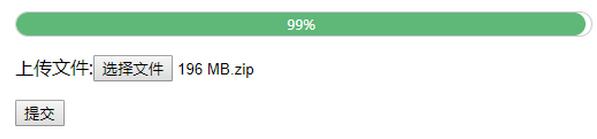
原生JS大文件上传进度条实现
本文讲解如何利用原生JavaScript实现大文件上传时的进度条显示,并配合PHP后端代码完成文件处理,供读者参考学习。
PHP服务器端配置
首先需要调整PHP配置文件php.ini中的相关大小限制,具体修改如下:
在php.ini中设置以下参数:upload_max_filesize = 8M,post_max_size = 10M,memory_limit = 20M。
<!DOCTYPE html>
<html>
<head>
 <title>原生JS大文件显示进度条</title>
 <meta charset="UTF-8">
 <style type="text/css">
 #parent{position: relative;width: 500px;height:20px;border:1px solid #ccc;display: none;border-radius:20px}
 #child{position: absolute;width:0%;height:20px;background: #5FB878;display: none;line-height: 20px;color: #ffffff;font-size: 12px;border-radius:20px}
 </style>
 <script type="text/javascript">
 function $(id){
  return document.getElementById(id);
 }
 </script>
</head>
<body>
 <form action="" method="post">
 <div id="parent">
  <div id="child"></div>
 </div>
 <p>上传文件:<input type="file" name="file"></p>
 <p><input type="submit" value="提交" id="submit"></p>
 </form>
 <script type="text/javascript">
 var oForm = document.getElementsByTagName('form')[0];
 var oSubmit = $('submit');
 //如果多个人同时提交这个表单的时候,由于是异步的请求,互不影响
 oSubmit.onclick = function(){
  try{
  var xhr = new XMLHttpRequest();
  }catch(e){
  var xhr = new ActiveXObject("Msxml2.XMLHTTP");
  }
  xhr.upload.onprogress = function(e){
  var ev = e || window.event;
  var percent = Math.floor((ev.loaded / ev.total)*100);
  // console.log(percent);
  //将百分比显示到进度条
  $('parent').style.display = 'block';
  $('child').style.display = 'block';
  //将上传进度的百分比显示到child里面
  $('child').style.width = percent+'%';
  $('child').style.textAlign = 'center';
  $('child').innerHTML = percent+'%';
  //判断如果百分比到达100%时候,隐藏掉
  if(percent==100){
   $('parent').style.display = 'none';
   $('child').style.display = 'none';
  }
  }
  xhr.open('post','progress.php',true);
  var form = new FormData(oForm);
  xhr.send(form);
  xhr.onreadystatechange = function(){
  if(xhr.readyState==4 && xhr.status==200){
   eval("var obj ="+xhr.responseText);
   if(obj.status){
   alert('上传成功');
   }else{
   alert('上传失败');
   }
  }
  }
  //阻止表单提交
  return false;
 }
 </script>
</body>
</html>
<?php
 //开始上传
 //注意:文件是windows系统的文件,采用的gbk编码,php文件使用的是utf-8编码
 //我们不能直接修改文件的编码,只能临时修改一下php的编码
 $dst_file = $_FILES['file']['name'];
 $dst_file = iconv('utf-8', 'gbk', $dst_file);
 if(move_uploaded_file($_FILES['file']['tmp_name'],$dst_file)){
 $data['status'] = 1;
 }else{
 $data['status'] = 0;
 }
 echo json_encode($data);
如需了解更多相关内容,可参考专题《ajax上传技术汇总》、《javascript文件上传操作汇总》及《jQuery上传操作汇总》。
以上就是本文的全部内容,希望能为您的学习提供帮助,欢迎继续支持本站。
作者最新文章
macOS卸载Node.js指南:区分Homebrew与pkg安装包的处理方式
2026-11-05 11:28:12
JS逆向入门:浏览器Console调试与Node.js环境搭建指南
2026-11-05 10:57:15
Node.js 大版本升级需要注意哪些破坏性变更
2026-11-03 20:35:44
Node.js官网LTS版与Current版有什么区别
2026-11-03 19:33:49
Windows彻底卸载Node.js:清理AppData残留与PATH环境变量
2026-11-03 19:15:35