

使用Canvas绘制移动端百分比仪表盘
作者:窗边听雨时间:2026-10-22 06:03:55浏览:215
本文介绍如何利用Canvas绘制适用于移动端的百分比仪表盘,替代传统图片方案。通过封装为方法形式,便于在项目中直接调用,提升开发效率与界面灵活性。
Canvas移动端仪表盘实现
本文分享一种利用Canvas实现适用于移动端的百分比仪表盘的方法,供读者参考。
近期工作中,动态百分比仪表盘的需求频繁出现,初期通常采用图片样式来实现。
随着项目数量增加,决定使用Canvas绘制一个简易仪表盘,以便后续项目中直接复用。
当前版本以方法形式编写,未来若有时间,计划优化为插件形式。
实现过程相对简单,以下直接提供代码及执行过程中的三张截图。
<!doctype html>
<html lang="en">
<head>
  <meta charset="utf-8">
  <meta http-equiv="Pragma" content="no-cache">
  <meta name="viewport" content="width=device-width, initial-scale=1.0, user-scalable=no"/>
  <meta name="format-detection" content="telephone=no"/>
  <meta name="apple-mobile-web-app-capable" content="yes"/>
  <meta name="apple-mobile-web-app-status-bar-style" content="black"/>
  <title>canvas绘制简易百分比仪表盘dashboard(建议最好用于移动端)</title>
  <style type="text/css">
    div{margin:1rem;background:#eee;padding:.3rem; position:relative }
    div canvas{background:#cacaca;
      -webkit-transform: rotateZ(-270deg);
      transform:rotateZ(-270deg);
      -webkit-animation:ani01 1s ease 0s both;
      animation:ani01 1s ease 0s both;
    }

    @-webkit-keyframes ani01 {
      0%{
        -webkit-transform:scale(.5,.5) rotateZ(-270deg);
        transform:scale(.5,.5) rotateZ(-270deg);
      }
      100%{
        -webkit-transform:scale(1,1) rotateZ(-90deg);
        transform:scale(1,1) rotateZ(-90deg);
      }
    }
    @keyframes ani01 {
      0%{
        -webkit-transform:scale(.5,.5) rotateZ(-270deg);
        transform:scale(.5,.5) rotateZ(-270deg);
      }
      100%{
        -webkit-transform:scale(1,1) rotateZ(-90deg);
        transform:scale(1,1) rotateZ(-90deg);
      }
    }
  </style>
</head>
<body>

<div>
  <canvas id="myCanvas1" data-percent="80">
    您的浏览器不支持canvas标签。
  </canvas>
  <span style="display:block;position:absolute;top:.94rem;left:.3rem;width:2rem;text-align:center;font-size:.5rem;font-family:microsoft Yahei" id="dushu" >0</span>
</div>

<script type="text/javascript" src="../js/flexible.js"></script>
<script type="text/javascript">
  var pper=0;
  var pper_interal;
  var dushu=document.getElementById('dushu');

  var aaa=drawCanvanPercent('myCanvas1','rem',2,'#0e9cfa',0.2,'#fff');

  function drawCanvanPercent(ele_id,dw,cir_r,cir_color,line_w,fill_color){
    if(dw=="rem"){
      cir_r=cir_r*(window.screen.width/10);
      line_w=line_w*(window.screen.width/10);
    }
    var canvas = document.getElementById(ele_id);
    var circle = {
      r : cir_r/2,   //圆的半径
      per : canvas.getAttribute('data-percent'),   //百分比分子
      color : cir_color,   //圆的颜色
      lineWidth : line_w   //圆的颜色
    };
    canvas.width=canvas.height=circle.r*2;
    canvas.style.borderRadius="50%";
    if(canvas.getContext){
      var ctx2 = canvas.getContext("2d");
      ctx2.fillStyle = fill_color;
      ctx2.arc(circle.r, circle.r, circle.r-circle.lineWidth/2, 0, Math.PI*2, false);
      ctx2.fill();
      var ctx = canvas.getContext("2d");
      pper_interal= setInterval(function () {
        drawMove(ctx,circle);
      }, 10);
    }
  }

  function drawMove(ctx,circle){
    if(pper>=circle.per){
      pper=circle.per;
      clearTimeout(pper_interal);
    }else{
      pper++;
    }
    dushu.innerText=pper+'%';
    ctx.beginPath();
    ctx.strokeStyle = circle.color;
    ctx.lineWidth=circle.lineWidth;
    ctx.arc(circle.r, circle.r, circle.r, 0, Math.PI*(pper/100)*360/180, false);
    ctx.stroke();
  }
  </script>

</body>
</html>
具体截图如下:
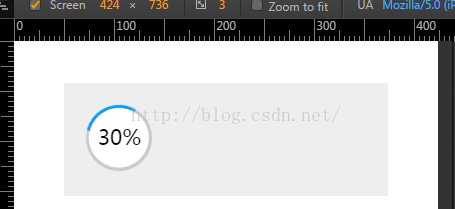
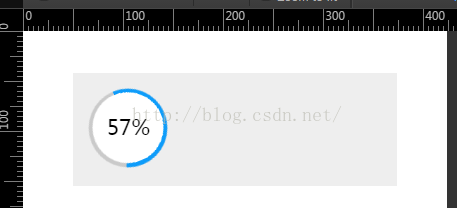
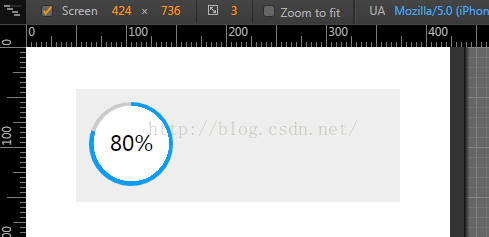
建议:切勿因实现简单而忽略动手实践,多动手、多思考,方能取得进步。
以上就是本文的全部内容,希望能为读者提供学习帮助,并欢迎大家多多支持本站。
作者最新文章
anime.js 快速入门:怎么引入库并编写第一个 DOM 动画
2026-11-05 14:22:43
在线JS解密后变量名仍乱码?结合浏览器DevTools调试还原
2026-11-04 20:26:01
怎么在浏览器中运行JavaScript代码并查看输出结果
2026-11-04 09:07:33
JS 获取屏幕分辨率:window.screen.width 与 height 用法
2026-11-04 08:52:48
为什么推荐用DOMContentLoaded代替window.onload初始化JS
2026-11-04 08:42:33