

Bootstrap Table 冻结列在 IE 浏览器中的兼容性问题及修复方案
本文针对 Bootstrap Table 插件自带的 fixed-columns 扩展在 IE 浏览器中冻结列内容无法显示的 Bug 提供解决方案。通过修改源码,将原本分离的 thead 和 tbody 合并至同一表格结构中,并调整列遍历逻辑,实现了在 IE8、IE10 及 IE11 下的完美兼容。文章详细列出了修改要点、文件结构及具体调用参数,包括 fixedColumns 和 fixedNumber 的使用注意事项。
Bootstrap Table 冻结列在 IE 浏览器中的兼容性问题及修复方案
前言:近期在项目开发中,我们需要实现表格的冻结列功能。所谓“冻结列”,是指在表格列数较多时,固定显示前几列,而后续列可以横向滚动。遗憾的是,Bootstrap Table 内置的 fixed column 功能存在一个 Bug,导致在部分浏览器中表现异常。经过与同事的探讨,我们找到了解决方法,特此整理成文。
问题起因与现象回顾
一、起因回顾
最近的项目需求涉及一个动态生成列的表格,当列数量超过一定阈值时,会出现横向滚动条,且需要固定前几列,类似于 Excel 的冻结窗格功能。查阅官方文档后,我们找到了相关扩展:http://issues.wenzhixin.net.cn/bootstrap-table/index.html#extensions/fixed-columns.html。在谷歌浏览器中,该功能表现如下:
第一列固定
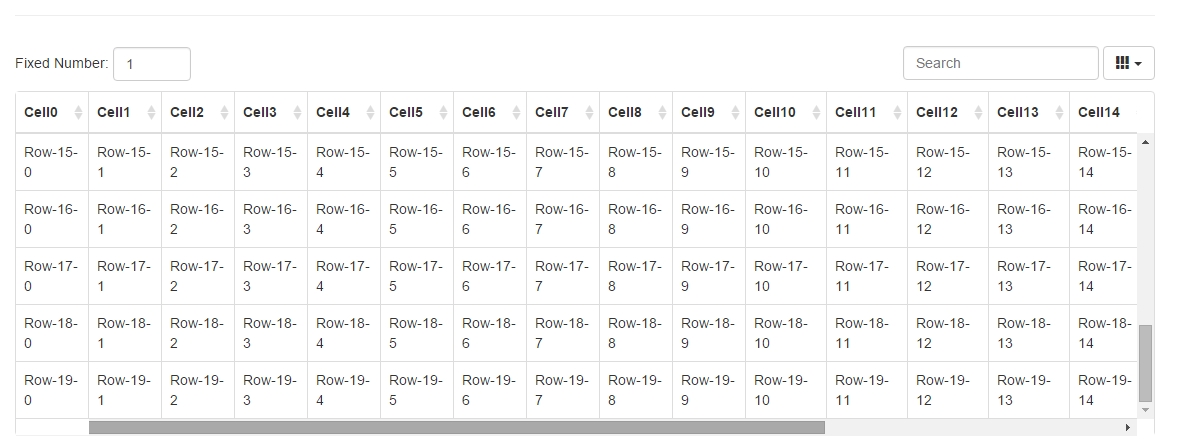
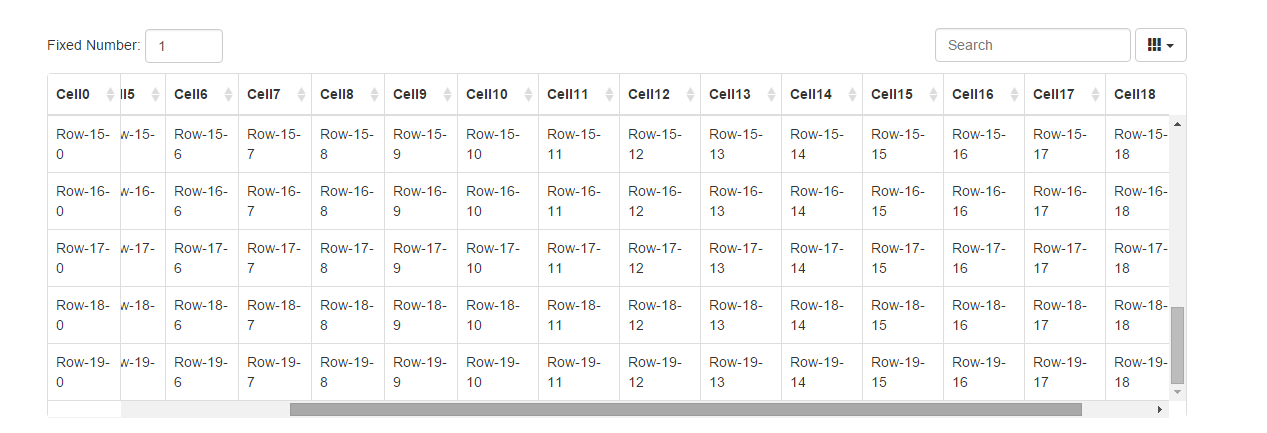
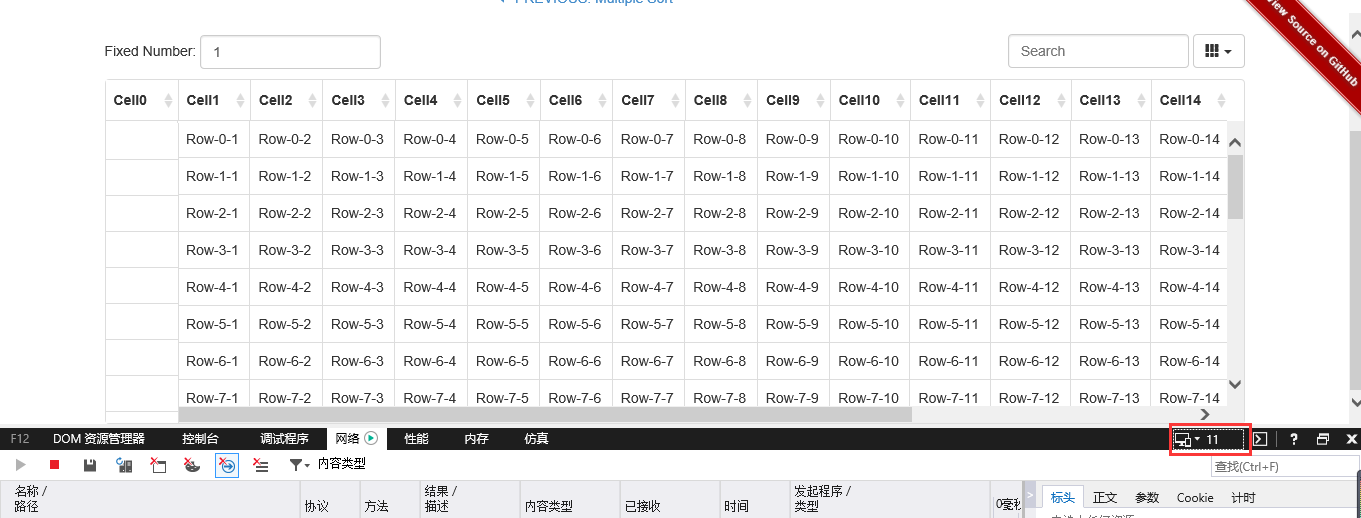
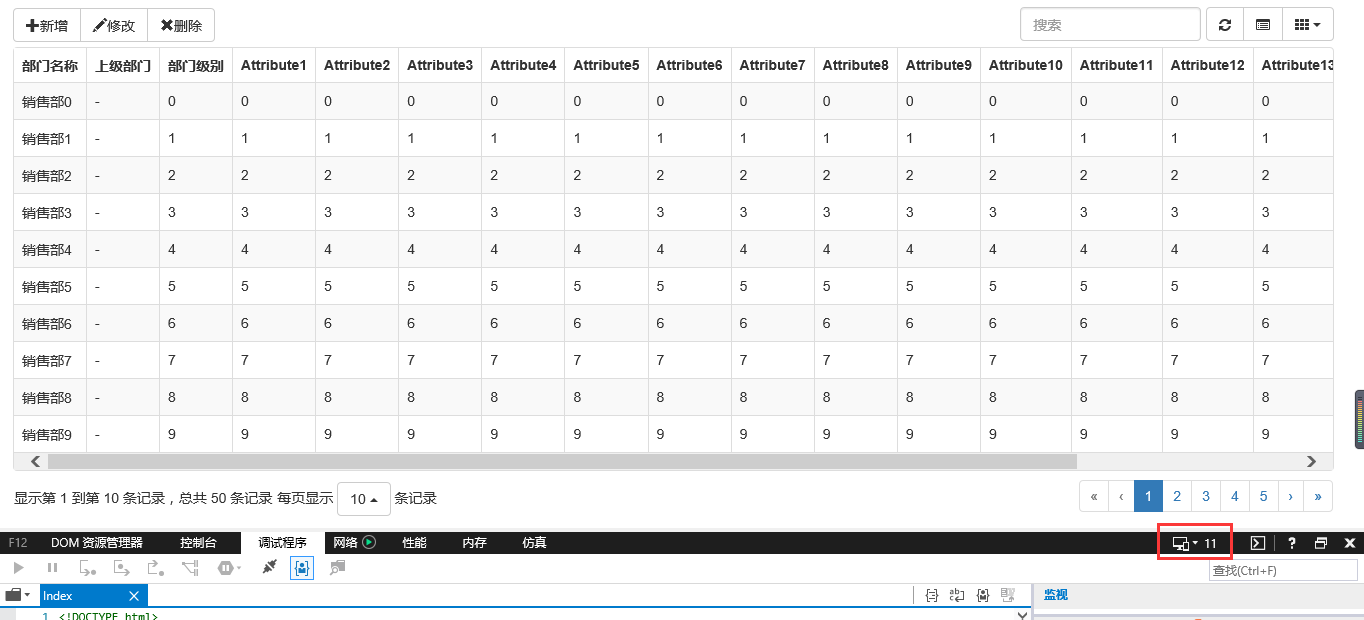
看似问题已完美解决,但实际情况并非如此。上述效果仅在谷歌浏览器中正常,我们来看看在 Internet Explorer (IE) 环境下的表现。
IE11效果:
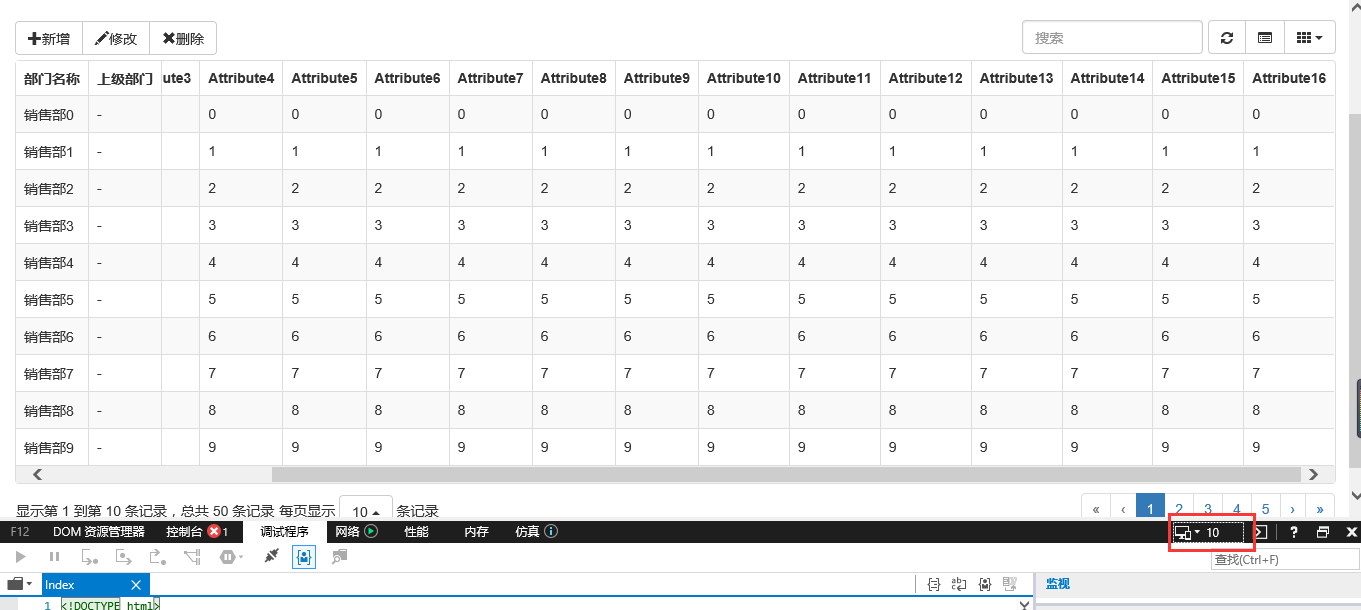
IE10效果:
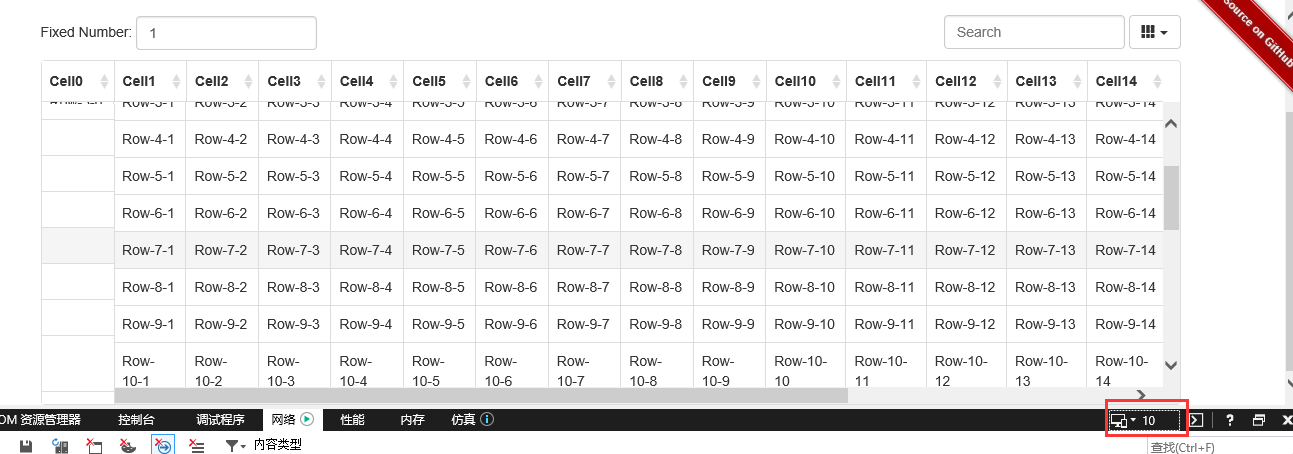
显然,无论 IE 内核版本如何,冻结列中的内容均无法显示。这给开发带来了很大困扰。
源码修改与解决方案
二、解决方案
得益于开源社区的力量,我们查看了该页面的源代码,并找到了冻结列相关的 JS 源码。
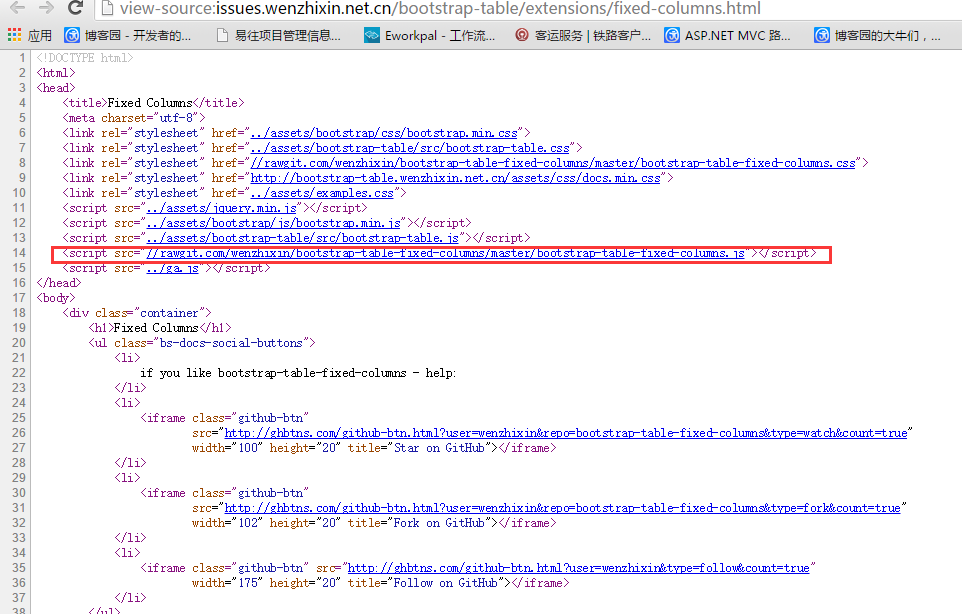
点击链接即可查看该 JS 的完整源码。既然找到了源码,我们就可以尝试修改代码以修复这个 Bug。
我们在 bootstrap-table 目录下的 extensions 文件夹中,新建一个名为 fixed-column 的文件夹。
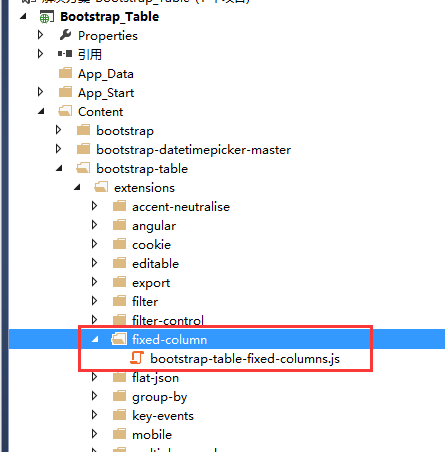
以下是修改后的源码:
(function ($) {
 'use strict';
 $.extend($.fn.bootstrapTable.defaults, {
  fixedColumns: false,
  fixedNumber: 1
 });
 var BootstrapTable = $.fn.bootstrapTable.Constructor,
  _initHeader = BootstrapTable.prototype.initHeader,
  _initBody = BootstrapTable.prototype.initBody,
  _resetView = BootstrapTable.prototype.resetView;
 BootstrapTable.prototype.initFixedColumns = function () {
  this.$fixedBody = $([
   '<div class="fixed-table-column" style="position: absolute; background-color: #fff; border-right:1px solid #ddd;">',
   '<table>',
   '<thead></thead>',
   '<tbody></tbody>',
   '</table>',
   '</div>'].join(''));
  this.timeoutHeaderColumns_ = 0;
  this.timeoutBodyColumns_ = 0;
  this.$fixedBody.find('table').attr('class', this.$el.attr('class'));
  this.$fixedHeaderColumns = this.$fixedBody.find('thead');
  this.$fixedBodyColumns = this.$fixedBody.find('tbody');
  this.$tableBody.before(this.$fixedBody);
 };
 BootstrapTable.prototype.initHeader = function () {
  _initHeader.apply(this, Array.prototype.slice.apply(arguments));
  if (!this.options.fixedColumns) {
   return;
  }
  this.initFixedColumns();
  var $tr = this.$header.find('tr:eq(0)').clone(),
   $ths = $tr.clone().find('th');
  $tr.html('');
  for (var i = 0; i < this.options.fixedNumber; i++) {
   $tr.append($ths.eq(i).clone());
  }
  this.$fixedHeaderColumns.html('').append($tr);
 };
 BootstrapTable.prototype.initBody = function () {
  _initBody.apply(this, Array.prototype.slice.apply(arguments));
  if (!this.options.fixedColumns) {
   return;
  }
  var that = this;
  this.$fixedBodyColumns.html('');
  this.$body.find('> tr[data-index]').each(function () {
   var $tr = $(this).clone(),
    $tds = $tr.clone().find('td');
   $tr.html('');
   for (var i = 0; i < that.options.fixedNumber; i++) {
    $tr.append($tds.eq(i).clone());
   }
   that.$fixedBodyColumns.append($tr);
  });
 };
 BootstrapTable.prototype.resetView = function () {
  _resetView.apply(this, Array.prototype.slice.apply(arguments));
  if (!this.options.fixedColumns) {
   return;
  }
  clearTimeout(this.timeoutHeaderColumns_);
  this.timeoutHeaderColumns_ = setTimeout($.proxy(this.fitHeaderColumns, this), this.$el.is(':hidden') ? 100 : 0);
  clearTimeout(this.timeoutBodyColumns_);
  this.timeoutBodyColumns_ = setTimeout($.proxy(this.fitBodyColumns, this), this.$el.is(':hidden') ? 100 : 0);
 };
 BootstrapTable.prototype.fitHeaderColumns = function () {
  var that = this,
   visibleFields = this.getVisibleFields(),
   headerWidth = 0;
  this.$body.find('tr:first-child:not(.no-records-found) > *').each(function (i) {
   var $this = $(this),
    index = i;
   if (i >= that.options.fixedNumber) {
    return false;
   }
   if (that.options.detailView && !that.options.cardView) {
    index = i - 1;
   }
   that.$fixedBody.find('thead th[data-field="' + visibleFields[index] + '"]')
    .find('.fht-cell').width($this.innerWidth() - 1);
   headerWidth += $this.outerWidth();
  });
  this.$fixedBody.width(headerWidth - 1).show();
 };
 BootstrapTable.prototype.fitBodyColumns = function () {
  var that = this,
   top = -(parseInt(this.$el.css('margin-top')) - 2),
   height = this.$tableBody.height() - 2;
  if (!this.$body.find('> tr[data-index]').length) {
   this.$fixedBody.hide();
   return;
  }
  this.$body.find('> tr').each(function (i) {
   that.$fixedBody.find('tbody tr:eq(' + i + ')').height($(this).height() - 1);
  });
  //// events
  this.$tableBody.on('scroll', function () {
   that.$fixedBody.find('table').css('top', -$(this).scrollTop());
  });
  this.$body.find('> tr[data-index]').off('hover').hover(function () {
   var index = $(this).data('index');
   that.$fixedBody.find('tr[data-index="' + index + '"]').addClass('hover');
  }, function () {
   var index = $(this).data('index');
   that.$fixedBody.find('tr[data-index="' + index + '"]').removeClass('hover');
  });
  this.$fixedBody.find('tr[data-index]').off('hover').hover(function () {
   var index = $(this).data('index');
   that.$body.find('tr[data-index="' + index + '"]').addClass('hover');
  }, function () {
   var index = $(this).data('index');
   that.$body.find('> tr[data-index="' + index + '"]').removeClass('hover');
  });
 };
})(jQuery);
.fixed-table-container thead th .th-inner, .fixed-table-container tbody td .th-inner {
   line-height: 18px;
  }
  .fixed-table-pagination .pagination a {
   padding: 5px 10px;
  }
  .fixed-table-toolbar .bars, .fixed-table-toolbar .search, .fixed-table-toolbar .columns {
   margin-top: 5px;
   margin-bottom: 5px;
  }
主要修改点如下:
1)原代码将 thead 和 tbody 分别封装为独立的表格,修改后我们将 thead 和 tbody 合并到了同一个 table 元素中;
2)依次遍历冻结列,并将其放入固定的 tbody 中;
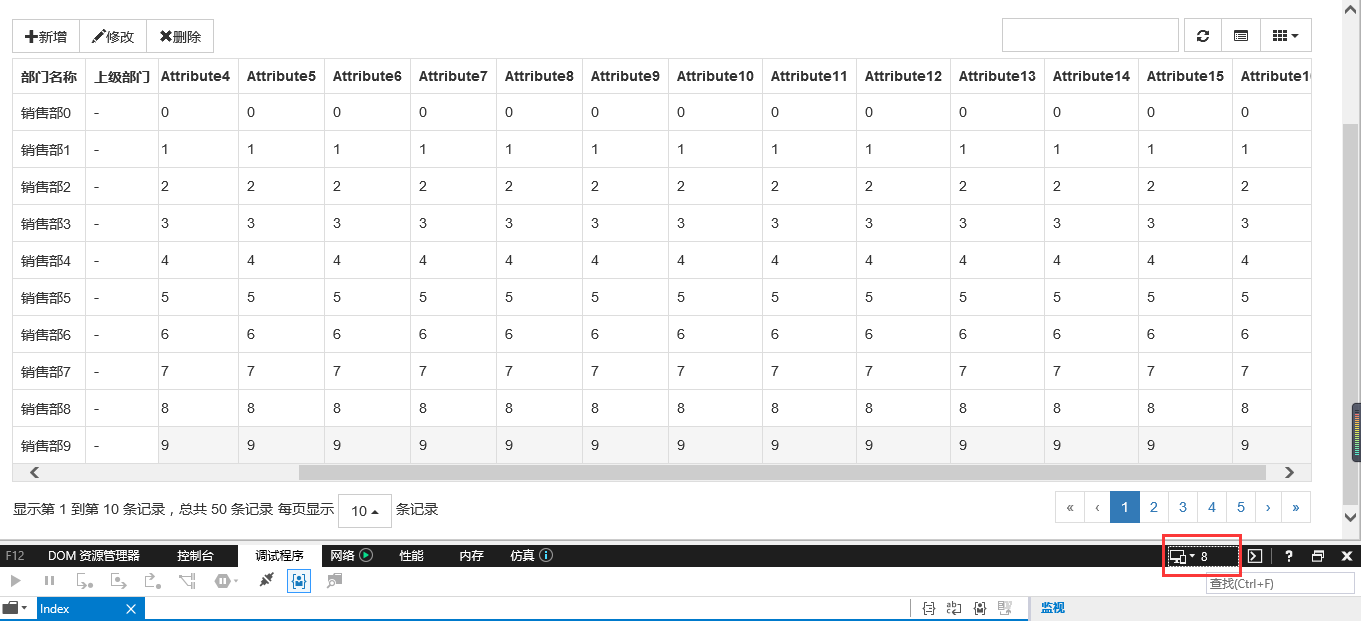
仅修改了少量代码,便完美解决了 IE 浏览器的兼容性问题。我们先来看看修改后的效果:
IE11
IE10
IE8
功能使用指南
接下来介绍如何使用该功能。
1、引用所需的 JS 和对应的 CSS 文件
<script src="~/Content/bootstrap-table/extensions/fixed-column/js/bootstrap-table-fixed-columns.js"></script>
<link href="~/Content/bootstrap-table/extensions/fixed-column/css/bootstrap-table-fixed-columns.css" rel="external nofollow" rel="stylesheet" />
2、JS 调用方式如下
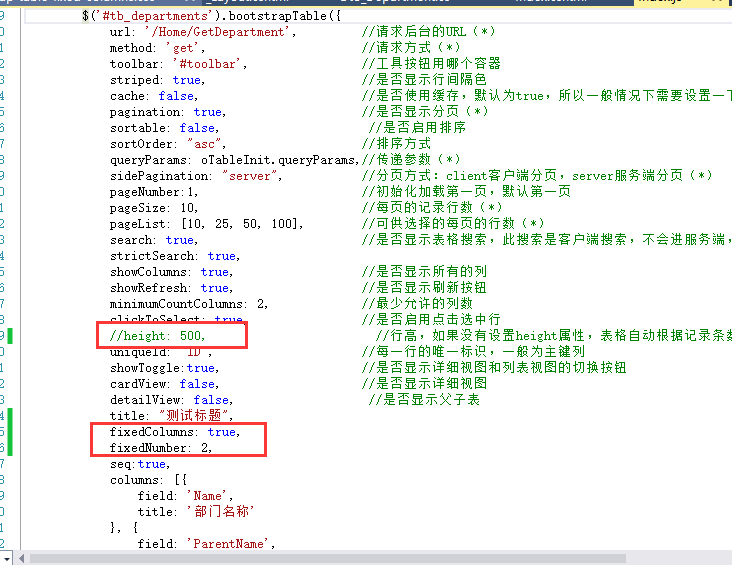
只需添加 fixedColumns 和 fixedNumber 两个参数即可,分别表示是否启用冻结列以及冻结列的数量。需要注意的是,在调用时不能指定表格的 height 属性,否则会导致冻结显示异常。
以上介绍的是 Bootstrap Table 冻结列功能在 IE 浏览器中的兼容性问题解决方案,希望对大家有所帮助。如有任何疑问,欢迎留言,小编会及时回复。感谢大家对本站的支持!
网页开发三者分工:HTML结构、CSS样式与JavaScript交互怎么协作
2026-11-05 12:51:22
JS解析URL参数时怎么处理中文乱码和特殊字符
2026-11-05 12:47:23
js-cookie 存储 JSON 对象:自动序列化与反序列化技巧
2026-11-05 12:36:26
marked.js 快速上手:安装与基础 Markdown 转 HTML 示例
2026-11-05 09:32:53
Phaser.js 与 PixiJS、Cocos Creator 的技术选型对比
2026-11-05 08:36:30