10个经典JavaScript小项目源码:从Todo List到计算器
精选10个适合进阶练习的经典JavaScript原生小项目源码与架构解析,从Todo List与计算器到异步天气查询与Canvas画板,涵盖DOM操作、事件流、状态管理及Web API的实际应用。
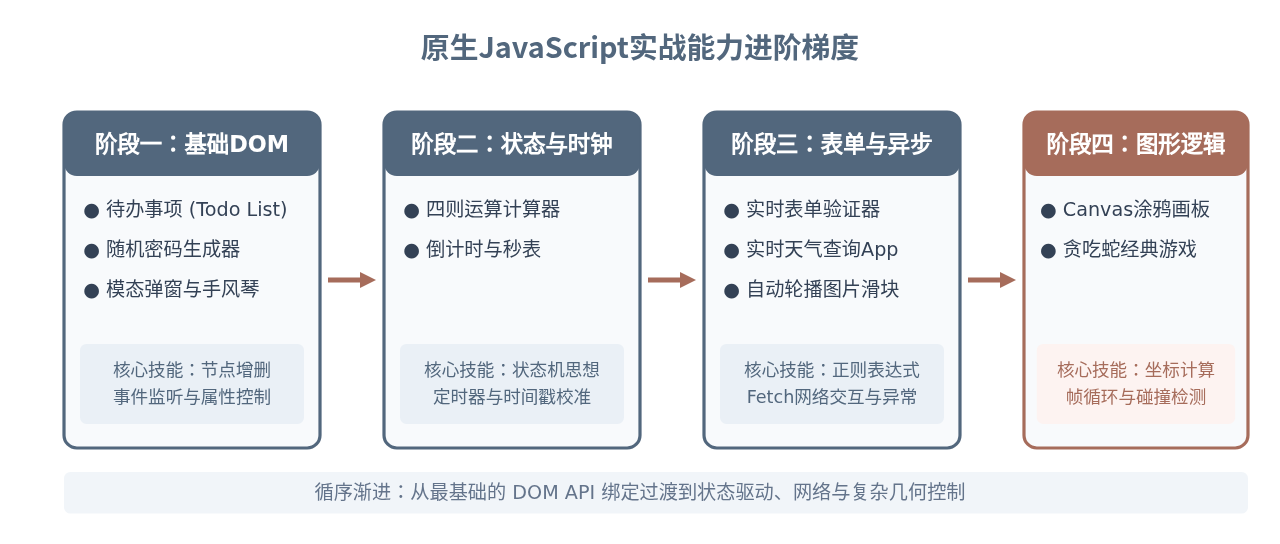
很多开发者在学完变量、循环、函数等JavaScript基础语法后,往往会停滞在“看得懂语法但写不出完整功能”的阶段。解决这个瓶颈最有效的方法,是用原生JavaScript(Vanilla JS)实现一批覆盖不同知识点的小项目。本文梳理了10个从易到难、涵盖DOM操作、事件模型、时间控制、异步网络请求与Canvas图形渲染的经典项目源码与实现逻辑,帮助你建立扎实的代码组织与调试能力。
项目一:待办事项清单(Todo List)
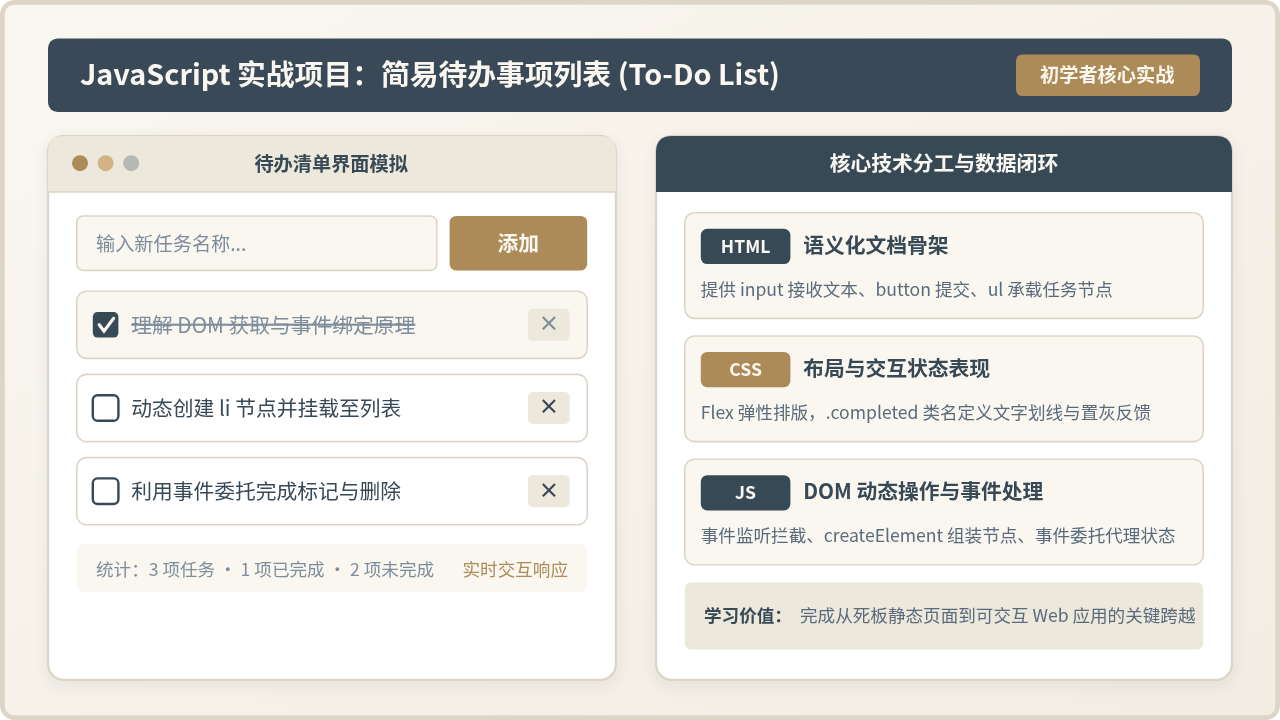
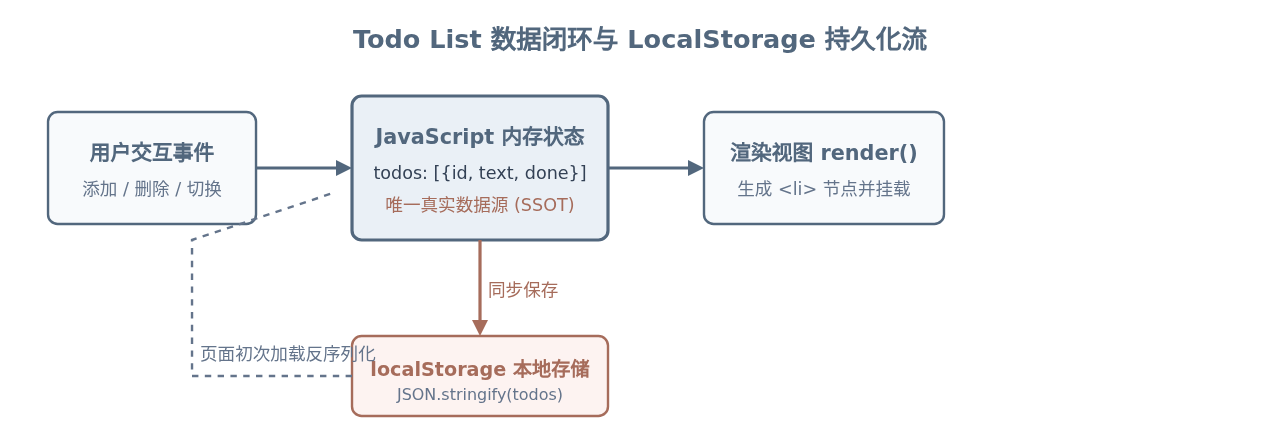
Todo List 是前端开发的“Hello World”。它看似简单,但完整实现它需要兼顾数据驱动视图、DOM事件委托以及浏览器的 localStorage 永久存储。
JSON.stringify 与 JSON.parse 实现本地持久化。
核心代码实现
// 数据状态
let todos = JSON.parse(localStorage.getItem('my_todos')) || [];
const inputEl = document.querySelector('#todo-input');
const listEl = document.querySelector('#todo-list');
const addBtn = document.querySelector('#add-btn');
// 保存并重新渲染
function saveAndRender() {
localStorage.setItem('my_todos', JSON.stringify(todos));
render();
}
function render() {
listEl.innerHTML = '';
todos.forEach((item, index) => {
const li = document.createElement('li');
li.className = item.completed ? 'completed' : '';
li.innerHTML = `
<span class="toggle-check" data-index="${index}">${item.completed ? '☑' : '☐'}</span>
<span class="text">${escapeHtml(item.text)}</span>
<button class="del-btn" data-index="${index}">删除</button>
`;
listEl.appendChild(li);
});
}
// 事件委托:避免为每个按钮重复绑定监听
listEl.addEventListener('click', (e) => {
const index = e.target.dataset.index;
if (index === undefined) return;
if (e.target.classList.contains('del-btn')) {
todos.splice(Number(index), 1);
saveAndRender();
} else if (e.target.classList.contains('toggle-check')) {
todos[index].completed = !todos[index].completed;
saveAndRender();
}
});
addBtn.addEventListener('click', () => {
const text = inputEl.value.trim();
if (!text) return;
todos.push({ text, completed: false });
inputEl.value = '';
saveAndRender();
});
function escapeHtml(str) {
return str.replace(/&/g, '&').replace(/</g, '<').replace(/>/g, '>');
}
// 初始渲染
render();innerHTML 或用 li.remove() 删除节点,这容易导致页面显示的节点与存储在 LocalStorage 中的数据脱节。必须坚持“只修改数组,随后统一调用 render()”的原则。此外,向 HTML 模板插值时务必进行字符转义,防止 XSS 攻击。
项目二:简易四则运算计算器(Calculator)
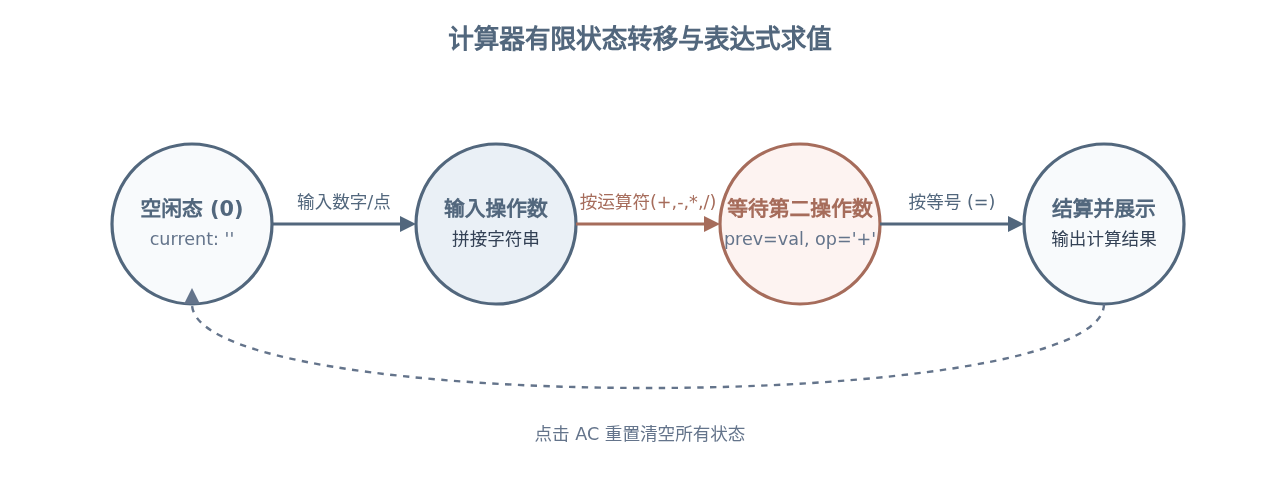
很多初学者实现计算器会直接使用 eval(),这既存在安全隐患,也无法精确掌控输入状态。高质量的做法是建立有限状态机(State Machine),管理“当前输入数”、“前置操作数”与“运算符”。
核心代码实现
class Calculator {
  constructor(displayElement) {
    this.displayElement = displayElement;
    this.clear();
  }

  clear() {
    this.currentOperand = '0';
    this.previousOperand = '';
    this.operation = undefined;
    this.updateDisplay();
  }

  appendNumber(number) {
    // 阻止重复输入小数点
    if (number === '.' && this.currentOperand.includes('.')) return;
    if (this.currentOperand === '0' && number !== '.') {
      this.currentOperand = number.toString();
    } else {
      this.currentOperand = this.currentOperand.toString() + number.toString();
    }
    this.updateDisplay();
  }

  chooseOperation(operation) {
    if (this.currentOperand === '') return;
    if (this.previousOperand !== '') {
      this.compute();
    }
    this.operation = operation;
    this.previousOperand = this.currentOperand;
    this.currentOperand = '';
  }

  compute() {
    let result;
    const prev = parseFloat(this.previousOperand);
    const current = parseFloat(this.currentOperand);
    if (isNaN(prev) || isNaN(current)) return;

    switch (this.operation) {
      case '+': result = prev + current; break;
      case '-': result = prev - current; break;
      case '×': result = prev * current; break;
      case '÷':
        if (current === 0) {
          alert('除数不能为0');
          this.clear();
          return;
        }
        result = prev / current;
        break;
      default: return;
    }
    // 解决 0.1 + 0.2 = 0.30000000000000004 精度问题
    this.currentOperand = Math.round(result * 1e12) / 1e12;
    this.operation = undefined;
    this.previousOperand = '';
    this.updateDisplay();
  }

  updateDisplay() {
    this.displayElement.innerText = this.currentOperand || '0';
  }
}
项目三:高精度倒计时器与秒表(Stopwatch & Timer)
很多人实现秒表时直接在 setInterval(..., 1000) 里进行 seconds++。但浏览器在切换标签页、省电模式或主线程繁忙时会延缓定时器,导致累计误差越来越大。正确的做法是通过时间戳差值(Timestamp Delta)来校准时间。
核心代码实现
let startTime = 0;
let elapsedTime = 0;
let timerInterval = null;
const timeDisplay = document.querySelector('#time-display');

function formatTime(ms) {
  const totalSeconds = Math.floor(ms / 1000);
  const minutes = Math.floor(totalSeconds / 60);
  const seconds = totalSeconds % 60;
  const centiseconds = Math.floor((ms % 1000) / 10);
  return `${String(minutes).padStart(2, '0')}:${String(seconds).padStart(2, '0')}.${String(centiseconds).padStart(2, '0')}`;
}

function startTimer() {
  if (timerInterval) return;
  // 关键:以实际系统时间为基准,消除累积时钟漂移
  startTime = Date.now() - elapsedTime;
  timerInterval = setInterval(() => {
    elapsedTime = Date.now() - startTime;
    timeDisplay.innerText = formatTime(elapsedTime);
  }, 10);
}

function pauseTimer() {
  clearInterval(timerInterval);
  timerInterval = null;
}

function resetTimer() {
  pauseTimer();
  elapsedTime = 0;
  timeDisplay.innerText = '00:00.00';
}
项目四:安全随机密码生成器(Password Generator)
该项目用于练习字符池过滤、随机数洗牌以及浏览器现代剪贴板 API(navigator.clipboard.writeText)。
核心代码实现
const CHAR_SETS = {
  uppercase: 'ABCDEFGHIJKLMNOPQRSTUVWXYZ',
  lowercase: 'abcdefghijklmnopqrstuvwxyz',
  numbers: '0123456789',
  symbols: '!@#$%^&*()_+~|}{[]:;?><,./-='
};

function generatePassword(length = 16, options = { upper: true, lower: true, nums: true, syms: true }) {
  let charPool = '';
  let guaranteedChars = [];

  if (options.upper) {
    charPool += CHAR_SETS.uppercase;
    guaranteedChars.push(getRandomChar(CHAR_SETS.uppercase));
  }
  if (options.lower) {
    charPool += CHAR_SETS.lowercase;
    guaranteedChars.push(getRandomChar(CHAR_SETS.lowercase));
  }
  if (options.nums) {
    charPool += CHAR_SETS.numbers;
    guaranteedChars.push(getRandomChar(CHAR_SETS.numbers));
  }
  if (options.syms) {
    charPool += CHAR_SETS.symbols;
    guaranteedChars.push(getRandomChar(CHAR_SETS.symbols));
  }

  if (!charPool) return '';

  const passwordArr = [...guaranteedChars];
  for (let i = passwordArr.length; i < length; i++) {
    passwordArr.push(getRandomChar(charPool));
  }

  // 数组随机乱序(Fisher-Yates Shuffle 洗牌算法)
  for (let i = passwordArr.length - 1; i > 0; i--) {
    const j = Math.floor(Math.random() * (i + 1));
    [passwordArr[i], passwordArr[j]] = [passwordArr[j], passwordArr[i]];
  }

  return passwordArr.join('');
}

function getRandomChar(str) {
  return str.charAt(Math.floor(Math.random() * str.length));
}

// 复制到剪贴板
async function copyPassword(text) {
  try {
    await navigator.clipboard.writeText(text);
    alert('密码已成功复制到剪贴板!');
  } catch (err) {
    alert('复制失败,请手动选取复制');
  }
}
项目五:实时表单验证器(Form Validator)
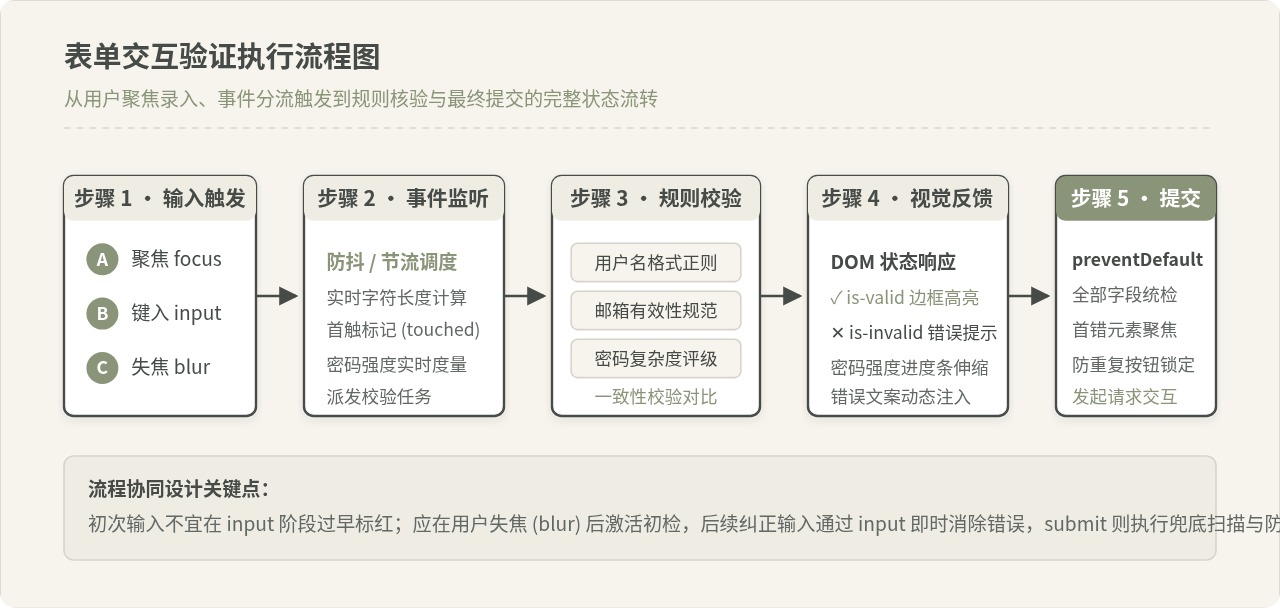
表单验证用于掌握正则表达式、失焦(blur)与实时输入(input)事件协同、以及 CSS 动态样式反馈。
核心代码实现
const form = document.querySelector('#register-form');
const username = document.querySelector('#username');
const email = document.querySelector('#email');
const password = document.querySelector('#password');

function showError(input, message) {
  const formControl = input.parentElement;
  formControl.className = 'form-control error';
  const small = formControl.querySelector('small');
  small.innerText = message;
}

function showSuccess(input) {
  const formControl = input.parentElement;
  formControl.className = 'form-control success';
}

function checkEmail(input) {
  const re = /^[a-zA-Z0-9_.+-]+@[a-zA-Z0-9-]+\.[a-zA-Z0-9-.]+$/;
  if (!re.test(input.value.trim())) {
    showError(input, '请输入合法的邮箱格式');
    return false;
  }
  showSuccess(input);
  return true;
}

function checkRequired(inputArr) {
  let isAllValid = true;
  inputArr.forEach(input => {
    if (input.value.trim() === '') {
      showError(input, `${input.dataset.name || '此项'}不能为空`);
      isAllValid = false;
    } else {
      showSuccess(input);
    }
  });
  return isAllValid;
}

// 离开焦点时即时校验
email.addEventListener('blur', () => checkEmail(email));

form.addEventListener('submit', (e) => {
  e.preventDefault();
  const validRequired = checkRequired([username, email, password]);
  const validEmail = checkEmail(email);

  if (validRequired && validEmail) {
    alert('表单验证通过,准备提交!');
  }
});
项目六:无缝平移图片轮播器(Image Carousel)
轮播器训练 CSS transform: translateX() 与 JS 索引边界判断的配合,以及鼠标悬停停止自动轮播与移出恢复播放的控制。
核心代码实现
const track = document.querySelector('.carousel-track');
const slides = Array.from(track.children);
const nextBtn = document.querySelector('#next-btn');
const prevBtn = document.querySelector('#prev-btn');
let currentIndex = 0;
let autoPlayTimer = null;

function moveToSlide(index) {
  if (index < 0) {
    currentIndex = slides.length - 1;
  } else if (index >= slides.length) {
    currentIndex = 0;
  } else {
    currentIndex = index;
  }
  track.style.transform = `translateX(-${currentIndex * 100}%)`;
}

nextBtn.addEventListener('click', () => moveToSlide(currentIndex + 1));
prevBtn.addEventListener('click', () => moveToSlide(currentIndex - 1));

// 自动轮播与悬停暂停
function startAutoPlay() {
  autoPlayTimer = setInterval(() => moveToSlide(currentIndex + 1), 3000);
}
function stopAutoPlay() {
  clearInterval(autoPlayTimer);
}

track.addEventListener('mouseenter', stopAutoPlay);
track.addEventListener('mouseleave', startAutoPlay);
startAutoPlay();
项目七:模态弹窗与手风琴折叠面板(Modal & Accordion)
模态弹窗与折叠面板的核心是 CSS 类名切换(classList.toggle)以及利用遮罩层冒泡阻断和键盘 Escape 事件监听。
核心代码实现
// 手风琴折叠交互
const accordionHeaders = document.querySelectorAll('.accordion-header');

accordionHeaders.forEach(header => {
  header.addEventListener('click', () => {
    const body = header.nextElementSibling;
    const isOpen = header.classList.contains('active');

    // 排他折叠:关闭其他面板
    document.querySelectorAll('.accordion-header').forEach(h => {
      h.classList.remove('active');
      h.nextElementSibling.style.maxHeight = null;
    });

    if (!isOpen) {
      header.classList.add('active');
      body.style.maxHeight = body.scrollHeight + 'px';
    }
  });
});

// 模态弹窗交互
const modal = document.querySelector('#demo-modal');
const openModalBtn = document.querySelector('#open-modal');
const closeModalBtn = document.querySelector('#close-modal');

function toggleModal(show) {
  modal.style.display = show ? 'flex' : 'none';
}

openModalBtn.addEventListener('click', () => toggleModal(true));
closeModalBtn.addEventListener('click', () => toggleModal(false));

// 点击弹窗外部阴影关闭
window.addEventListener('click', (e) => {
  if (e.target === modal) toggleModal(false);
});

// ESC 按键便捷关闭
window.addEventListener('keydown', (e) => {
  if (e.key === 'Escape' && modal.style.display === 'flex') {
    toggleModal(false);
  }
});
项目八:实时天气查询卡片(Fetch API 与异步交互)
前端核心技能之一是使用 async/await 处理异步网络请求,妥善管理加载中状态(Loading State)、异常捕获(Error Handling)并更新视图。
核心代码实现
const cityInput = document.querySelector('#city-input');
const searchBtn = document.querySelector('#search-btn');
const weatherCard = document.querySelector('#weather-card');
async function fetchWeather(city) {
// 视图进入加载状态
weatherCard.innerHTML = '<p class="loading">正在查询天气数据...</p>';
try {
// 采用公开规范的地理编码或天气接口示例
const apiUrl = `https://api.open-meteo.com/v1/forecast?latitude=39.9042&longitude=116.4074¤t_weather=true`;
const response = await fetch(apiUrl);
if (!response.ok) {
throw new Error(`网络响应错误: 状态码 ${response.status}`);
}
const data = await response.json();
displayWeather(data.current_weather);
} catch (error) {
weatherCard.innerHTML = `
<div class="error-msg">
<p>查询失败: ${error.message}</p>
<button onclick="fetchWeather('北京')">重试</button>
</div>
`;
}
}
function displayWeather(weather) {
weatherCard.innerHTML = `
<div class="weather-info">
<h3>当前温度: ${weather.temperature} °C</h3>
<p>风速: ${weather.windspeed} km/h</p>
<p>观测时间: ${weather.time}</p>
</div>
`;
}
searchBtn.addEventListener('click', () => {
const city = cityInput.value.trim();
if (city) fetchWeather(city);
});项目九:Canvas 涂鸦白板(Drawing Board)
通过 HTML5 <canvas> 元素与 2D 渲染上下文,监听鼠标的 mousedown、mousemove、mouseup 事件实现轨迹连续绘制与橡皮擦功能。
核心代码实现
const canvas = document.querySelector('#canvas');
const ctx = canvas.getContext('2d');
const colorPicker = document.querySelector('#color');
const strokeSize = document.querySelector('#size');
const clearBtn = document.querySelector('#clear');

let isDrawing = false;
let lastX = 0;
let lastY = 0;

function draw(e) {
  if (!isDrawing) return;

  ctx.strokeStyle = colorPicker.value;
  ctx.lineWidth = strokeSize.value;
  ctx.lineCap = 'round';
  ctx.lineJoin = 'round';

  ctx.beginPath();
  ctx.moveTo(lastX, lastY);
  ctx.lineTo(e.offsetX, e.offsetY);
  ctx.stroke();

  [lastX, lastY] = [e.offsetX, e.offsetY];
}

canvas.addEventListener('mousedown', (e) => {
  isDrawing = true;
  [lastX, lastY] = [e.offsetX, e.offsetY];
});

canvas.addEventListener('mousemove', draw);
canvas.addEventListener('mouseup', () => isDrawing = false);
canvas.addEventListener('mouseleave', () => isDrawing = false);

clearBtn.addEventListener('click', () => {
  ctx.clearRect(0, 0, canvas.width, canvas.height);
});
项目十:经典贪吃蛇游戏(Snake Game)
游戏是综合检验逻辑控制的最佳项目。贪吃蛇涉及二维网格坐标转换、键盘监听防掉头、游戏主循环更新以及边界自撞碰撞检测。
核心代码实现
const gameCanvas = document.querySelector('#gameCanvas');
const gCtx = gameCanvas.getContext('2d');
const GRID_SIZE = 20;
const TILE_COUNT = gameCanvas.width / GRID_SIZE;

let snake = [{ x: 10, y: 10 }];
let food = { x: 5, y: 5 };
let dx = 0;
let dy = 0;
let score = 0;
let gameLoopId = null;

function update() {
  const head = { x: snake[0].x + dx, y: snake[0].y + dy };

  // 撞墙或撞自身检测
  if (
    head.x < 0 || head.x >= TILE_COUNT ||
    head.y < 0 || head.y >= TILE_COUNT ||
    snake.some(segment => segment.x === head.x && segment.y === head.y)
  ) {
    clearInterval(gameLoopId);
    alert(`游戏结束!最终得分: ${score}`);
    return;
  }

  snake.unshift(head);

  // 吃到食物
  if (head.x === food.x && head.y === food.y) {
    score += 10;
    spawnFood();
  } else {
    snake.pop(); // 没吃到食物时移除尾部
  }

  drawGame();
}

function drawGame() {
  // 清屏
  gCtx.fillStyle = '#1E293B';
  gCtx.fillRect(0, 0, gameCanvas.width, gameCanvas.height);

  // 绘制食物
  gCtx.fillStyle = '#A66C5B';
  gCtx.fillRect(food.x * GRID_SIZE, food.y * GRID_SIZE, GRID_SIZE - 2, GRID_SIZE - 2);

  // 绘制蛇身
  gCtx.fillStyle = '#52677D';
  snake.forEach(segment => {
    gCtx.fillRect(segment.x * GRID_SIZE, segment.y * GRID_SIZE, GRID_SIZE - 2, GRID_SIZE - 2);
  });
}

function spawnFood() {
  food = {
    x: Math.floor(Math.random() * TILE_COUNT),
    y: Math.floor(Math.random() * TILE_COUNT)
  };
}

window.addEventListener('keydown', (e) => {
  if (e.key === 'ArrowUp' && dy === 0) { dx = 0; dy = -1; }
  else if (e.key === 'ArrowDown' && dy === 0) { dx = 0; dy = 1; }
  else if (e.key === 'ArrowLeft' && dx === 0) { dx = -1; dy = 0; }
  else if (e.key === 'ArrowRight' && dx === 0) { dx = 1; dy = 0; }
});

function startGame() {
  snake = [{ x: 10, y: 10 }];
  dx = 1; dy = 0;
  score = 0;
  spawnFood();
  if (gameLoopId) clearInterval(gameLoopId);
  gameLoopId = setInterval(update, 120);
}
startGame();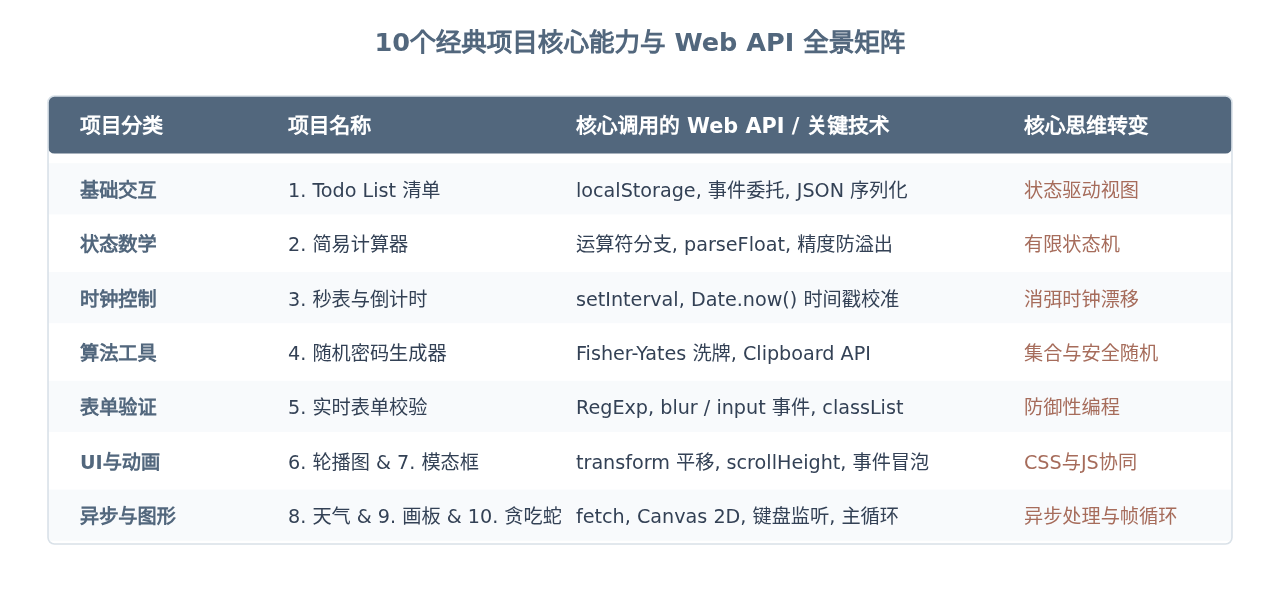
学习建议与进阶拓展
动手实现这10个项目时,建议遵循以下三个步骤:
- 先做最小可行版本(MVP):不要一开始就追求华丽的 CSS 阴影或复杂特效。优先用最简 HTML 结构把 JS 数据流与交互逻辑跑通。
- 加入异常边界防护:比如计算器处理“除以零”、Todo List 拦截“空文本提交”、表单过滤“非法字符”、异步请求增加“断网重试提示”。
- 重构与模块化:在能够熟练编写原生 JavaScript 之后,尝试将通用方法(如防抖、节流、时间格式化、请求封装)提取为独立工具函数,这能为你后续深入学习 Vue、React 或 Node.js 打下扎实的工程化基础。
D3.js 处理大规模数据点的性能优化策略
2026-11-05 15:37:25
JS实现网页摄像头实时扫码:结合getUserMedia与jsQR教程
2026-11-05 15:27:28
D3.js v5 迁移到 v7 的 API 变更与注意事项
2026-11-05 11:57:17
使用 animate.js 实现多元素协同的序列动画
2026-11-04 22:27:53
JS拖拽排序时怎么添加平滑动画效果?FLIP技术实战
2026-11-04 10:12:22