前端JavaScript调用百度AI开放平台OCR接口实例
本文详细介绍在前端使用JavaScript调用百度AI开放平台通用文字识别(OCR)接口的完整流程,包含图片Base64预处理、请求封装、数据解析及开发中的跨域与安全避坑指南。
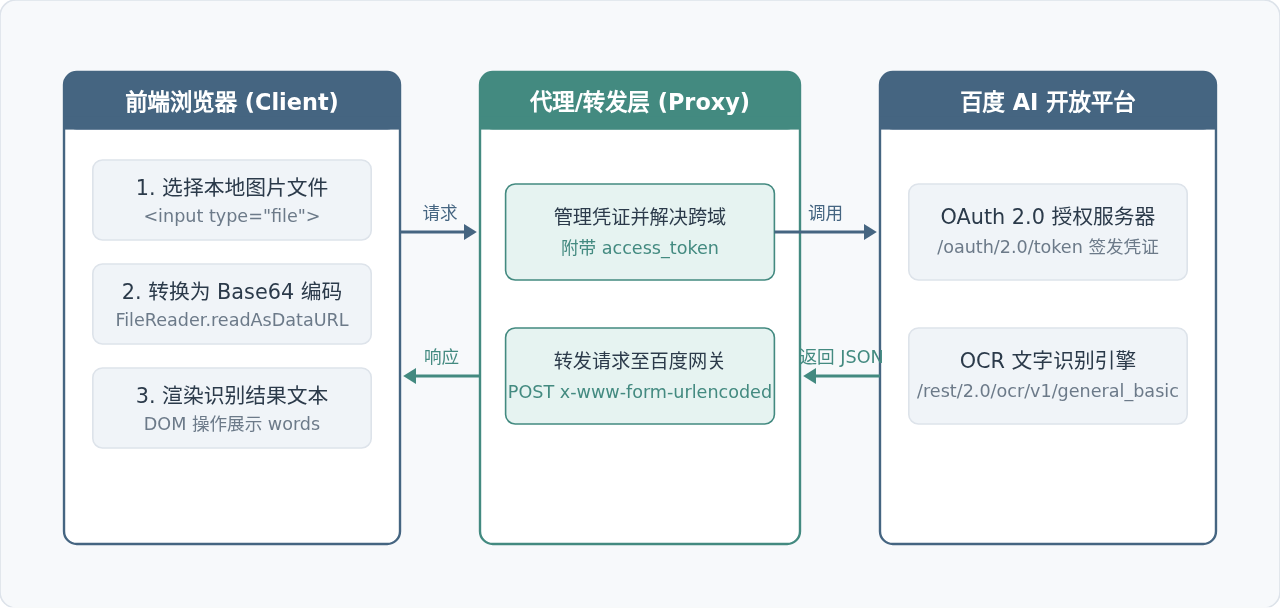
前端直接调用百度AI开放平台的文字识别(OCR)服务,核心链路包含三步:在前端获取有效的访问凭证 access_token、通过浏览器 FileReader API 将本地图像转换为 Base64 编码并进行 URL 编码组装,最后利用 fetch 发送 HTTP POST 请求解析识别文本。本文将以通用文字识别(标准版)接口为例,提供完整的代码实现、数据结构说明以及在实际项目中必须处理的跨域限制与密钥保护策略。
一、整体调用架构与交互流程
在浏览器环境中发起 OCR 识别时,前端与云端服务的交互过程涉及凭证鉴权、本地二进制文件转码以及结构化数据交换。理解各层之间的数据流动,有助于在排查网络请求和数据格式错误时迅速定位问题。
二、前置准备与鉴权机制(Access Token)
调用百度 OCR 接口前,必须先在百度智能云控制台创建文字识别应用,获取 API Key 与 Secret Key。百度开放平台采用标准的 OAuth 2.0 鉴权机制,所有 OCR 接口调用均要求在 URL 查询参数中附带有效 access_token。
向鉴权服务获取 Token 的 HTTP 请求地址为:
POST https://aip.baidubce.com/oauth/2.0/token?grant_type=client_credentials&client_id={API_KEY}&client_secret={SECRET_KEY}接口成功返回结构如下:
{
  "access_token": "24.c1884...7894.2592000.1700000000.282335-...",
  "expires_in": 2592000,
  "refresh_token": "25.d9021...",
  "scope": "brain_all_scope ..."
}access_token 的有效期长达 30 天(2592000 秒)。在本地调试测试时,可以直接通过 Postman 或控制台预先获取一个有效的 Token 字符串填入前端代码;生产环境中应当由后端服务统一获取并缓存在 Redis 等存储中,定期自动刷新。
三、前端图片选择与 Base64 编码预处理
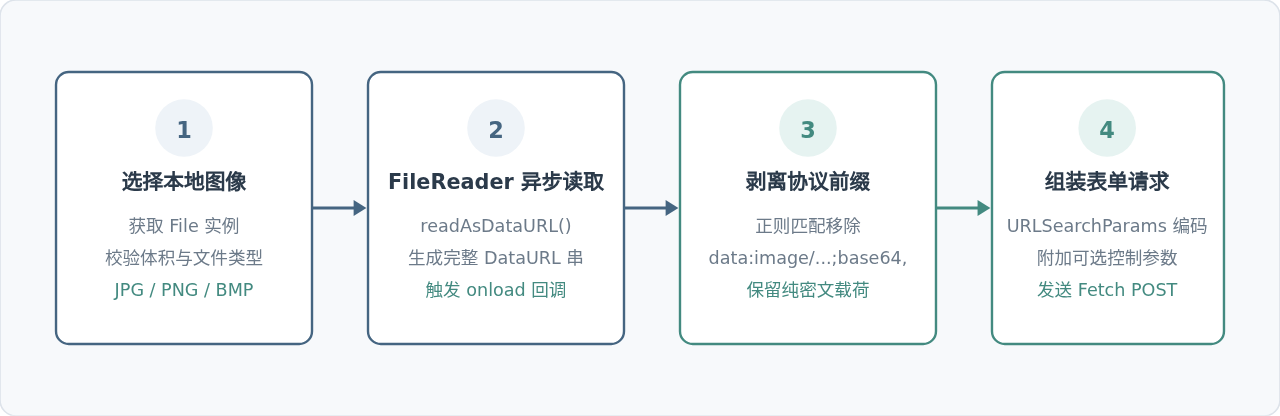
百度 OCR 接口接收两种图像输入方式:网络图片 URL 或者经过 Base64 编码的二进制图像字符串。在前端本地选择图片的场景下,必须将 File 对象转换成 Base64 字符串,并处理掉浏览器附带的协议头。
代码实现:图片转纯净 Base64 字符串
浏览器 FileReader.readAsDataURL() 返回的字符串形如 data:image/jpeg;base64,/9j/4AAQSkZJRg...。百度接口要求传入的是不包含 data:image/xxx;base64, 这一前缀的纯 Base64 内容,因此必须通过字符串分割或正则替换处理:
/**
 * 将 File 对象转换为纯净 Base64 字符串
 * @param {File} file 本地文件对象
 * @returns {Promise<string>}
 */
function fileToBase64(file) {
  return new Promise((resolve, reject) => {
    const reader = new FileReader();
    reader.readAsDataURL(file);
    reader.onload = () => {
      // 提取逗号后面的纯 Base64 内容
      const base64Data = reader.result.split(',')[1];
      if (base64Data) {
        resolve(base64Data);
      } else {
        reject(new Error('图片转码失败,未识别到 Base64 数据'));
      }
    };
    reader.onerror = (error) => reject(error);
  });
}
四、完整调用实例与代码实现
下面是一个可以在前端直接运行的独立 HTML 页面实例。页面提供文件选择框、触发按钮、调用状态提示以及结果展示面板。
<!DOCTYPE html>
<html lang="zh-CN">
<head>
  <meta charset="UTF-8">
  <title>百度 OCR 接口调用示例</title>
  <style>
    body { font-family: sans-serif; padding: 20px; max-width: 600px; margin: auto; }
    .preview { max-width: 100%; max-height: 260px; margin-top: 10px; display: none; }
    .btn { background: #456581; color: #fff; padding: 10px 18px; border: none; border-radius: 4px; cursor: pointer; }
    .btn:disabled { background: #999; cursor: not-allowed; }
    #resultBox { margin-top: 15px; padding: 12px; background: #f8f9fa; border: 1px solid #ddd; border-radius: 4px; min-height: 80px; white-space: pre-wrap; }
  </style>
</head>
<body>
  <h3>上传图片识别文字</h3>
  <input type="file" id="imageInput" accept="image/jpeg,image/png,image/bmp" />
  <br />
  <img id="previewImage" class="preview" alt="图片预览" />
  <div style="margin-top: 15px;">
    <button id="ocrBtn" class="btn" disabled>开始文字识别</button>
  </div>
  <h4 style="margin-top:20px;">识别结果:</h4>
  <div id="resultBox">请先上传图片并点击开始识别...</div>

  <script>
    // 替换为您实际获取的 Access Token(测试使用)
    const ACCESS_TOKEN = 'YOUR_VALID_ACCESS_TOKEN';

    // 如果直接请求百度域名存在跨域限制,请配置反向代理或本地代理地址
    // 百度官方地址:https://aip.baidubce.com/rest/2.0/ocr/v1/general_basic
    const OCR_API_URL = '/api/baidu-ocr/rest/2.0/ocr/v1/general_basic';

    const imageInput = document.getElementById('imageInput');
    const previewImage = document.getElementById('previewImage');
    const ocrBtn = document.getElementById('ocrBtn');
    const resultBox = document.getElementById('resultBox');

    let currentFile = null;

    imageInput.addEventListener('change', (e) => {
      const file = e.target.files[0];
      if (!file) return;

      currentFile = file;
      ocrBtn.disabled = false;

      // 本地图片预览
      const previewUrl = URL.createObjectURL(file);
      previewImage.src = previewUrl;
      previewImage.style.display = 'block';
      resultBox.textContent = '图片已加载,等待识别...';
    });

    ocrBtn.addEventListener('click', async () => {
      if (!currentFile) return;

      try {
        ocrBtn.disabled = true;
        resultBox.textContent = '正在识别中,请稍候...';

        // 1. 转为纯 Base64
        const base64Content = await fileToBase64(currentFile);

        // 2. 组装请求参数(必须为 urlencoded 格式)
        const requestParams = new URLSearchParams();
        requestParams.append('image', base64Content);
        requestParams.append('detect_direction', 'false'); // 是否检测图像朝向

        // 3. 发起 POST 请求
        const response = await fetch(`${OCR_API_URL}?access_token=${ACCESS_TOKEN}`, {
          method: 'POST',
          headers: {
            'Content-Type': 'application/x-www-form-urlencoded'
          },
          body: requestParams
        });

        if (!response.ok) {
          throw new Error(`HTTP 异常状态码: ${response.status}`);
        }

        const data = await response.json();

        // 4. 解析结果
        if (data.error_code) {
          resultBox.textContent = `识别出错 [${data.error_code}]: ${data.error_msg}`;
        } else if (data.words_result) {
          const lines = data.words_result.map(item => item.words);
          resultBox.textContent = lines.length > 0 ? lines.join('\n') : '未检测到任何文字内容';
        } else {
          resultBox.textContent = '未返回有效的文字识别内容';
        }
      } catch (err) {
        resultBox.textContent = `请求失败: ${err.message}`;
      } finally {
        ocrBtn.disabled = false;
      }
    });

    function fileToBase64(file) {
      return new Promise((resolve, reject) => {
        const reader = new FileReader();
        reader.readAsDataURL(file);
        reader.onload = () => {
          const res = reader.result.split(',')[1];
          res ? resolve(res) : reject(new Error('解析 Base64 失败'));
        };
        reader.onerror = reject;
      });
    }
  </script>
</body>
</html>
五、请求载荷与响应数据结构解析
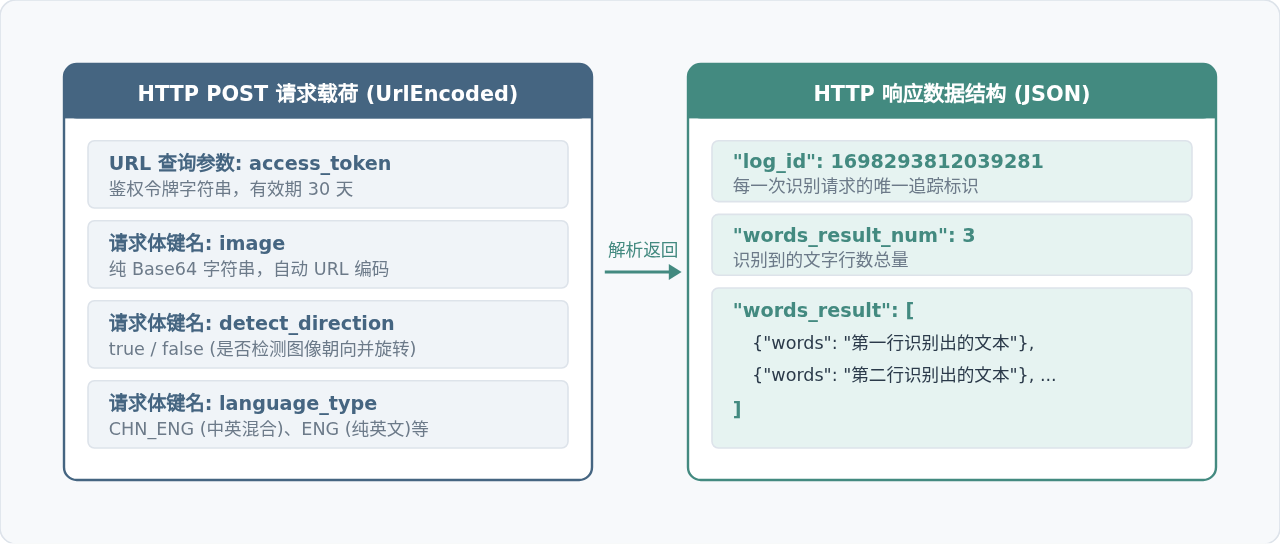
百度 OCR 接口与常见 REST 接口最大的不同在于其传参规范:HTTP 请求体必须声明 Content-Type: application/x-www-form-urlencoded,而非 application/json。如果错误使用 JSON 格式直接序列化,接口将报 error_code: 216201 (image format error)。
核心字段说明
| 字段名 | 类型 | 位置 | 说明 |
|---|---|---|---|
access_token |
string | Query 参数 | OAuth 鉴权令牌,必填。 |
image |
string | Body 表单 | 图像 Base64 编码数据。与 url 参数二选一。 |
words_result |
array | Response 属性 | 识别结果数组,每一项代表一行文本对象 { words: "..." }。 |
error_code |
number | Response 属性 | 仅在发生异常时返回,如 110(Token失效)、216100(参数缺失)。 |
六、关键问题:跨域解决与生产环境安全防护
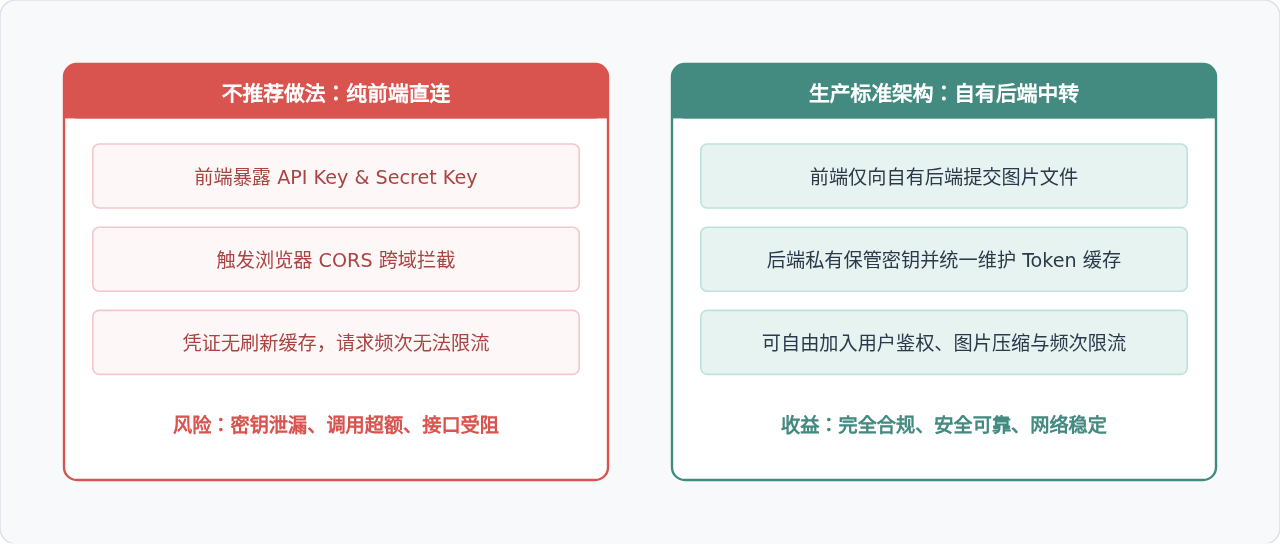
在实际开发和上线过程中,单纯在前端直接调用百度官方域名往往会遇到两个根本性障碍:浏览器的跨域同源策略限制(CORS)与敏感凭证泄漏风险。
1. 跨域问题(CORS)的原因与解决
百度 AI 开放平台的接口服务器并没有针对普通前端页面域配置开放的 Access-Control-Allow-Origin: * 响应头。因此,若在本地 http://localhost:3000 或第三方网页中直接请求 https://aip.baidubce.com,浏览器网络面板会直接报跨域错误。
- 本地开发阶段解决:如果使用 Vite、Webpack 或 Vue CLI,可以在工程配置文件中配置
proxy开发代理,将/api/baidu-ocr转发至百度云接口域名。 - 生产环境解决:在 Nginx 中配置反向代理规则,或者通过自有业务服务端实现中转接口。
2. 密钥安全隔离原则
API Key 与 Secret Key 直接写在前端 JS 文件中!任何人通过浏览器“检查源代码”或抓包都可以轻易提取出您的密钥,造成账户额度被恶意盗刷甚至云资源被越权操作。
七、总结
通过本文的实例,我们梳理了前端 JavaScript 调用百度 AI 开放平台 OCR 接口的全部要点:利用 FileReader 完成本地图片到纯净 Base64 字符串的转化;借助 URLSearchParams 构造 application/x-www-form-urlencoded 格式的请求载荷;通过 fetch 发送附带 access_token 的请求并解析 words_result 数组中的识别文本。在开发演示时,可以通过代理转发和有效 Token 快速验证功能;而在面向生产交付时,应当将鉴权与接口转发收敛至自有后端服务,确保应用在安全和跨域层面均满足生产标准。
全栈开发中JavaScript与Java怎么协作?前后端技术栈配合解析
2026-11-04 11:08:24
Node.js官网访问慢?国内镜像加速下载方案
2026-11-03 18:57:24
Node.js 连接 MySQL 数据库实现增删改查操作
2026-11-03 14:31:14
Windows系统安装Node.js:下载、配置与环境验证
2026-11-03 14:15:56
Linux (Ubuntu/CentOS) 环境下安装Node.js的常用方法
2026-11-03 10:18:39