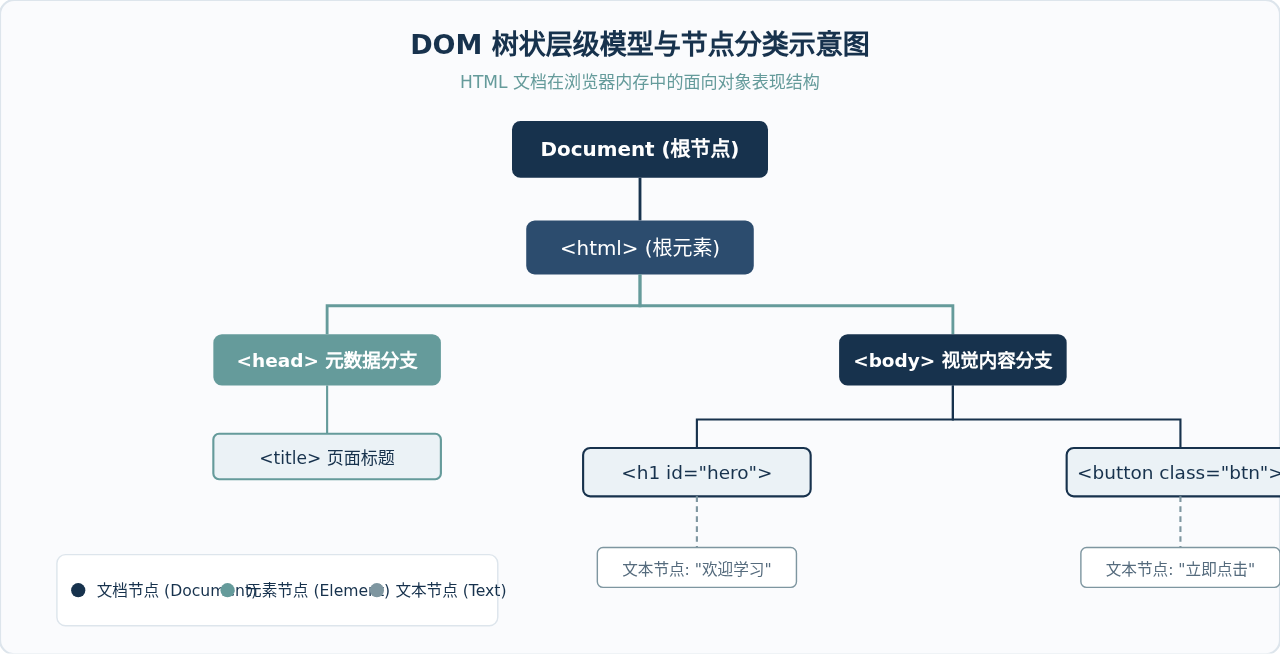
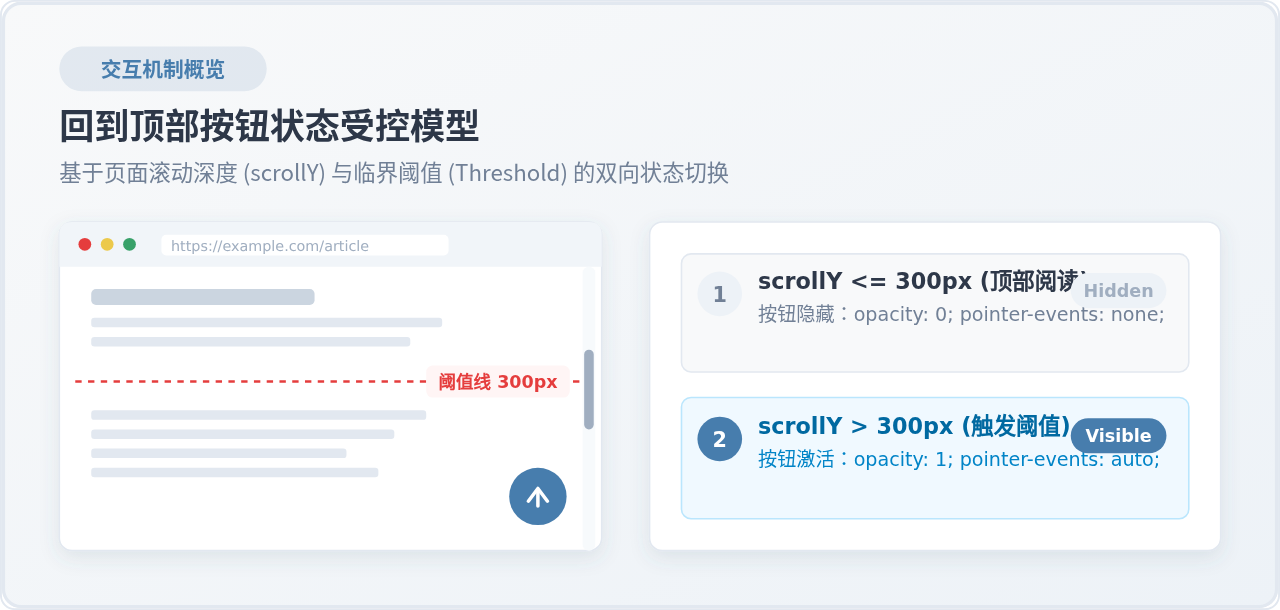
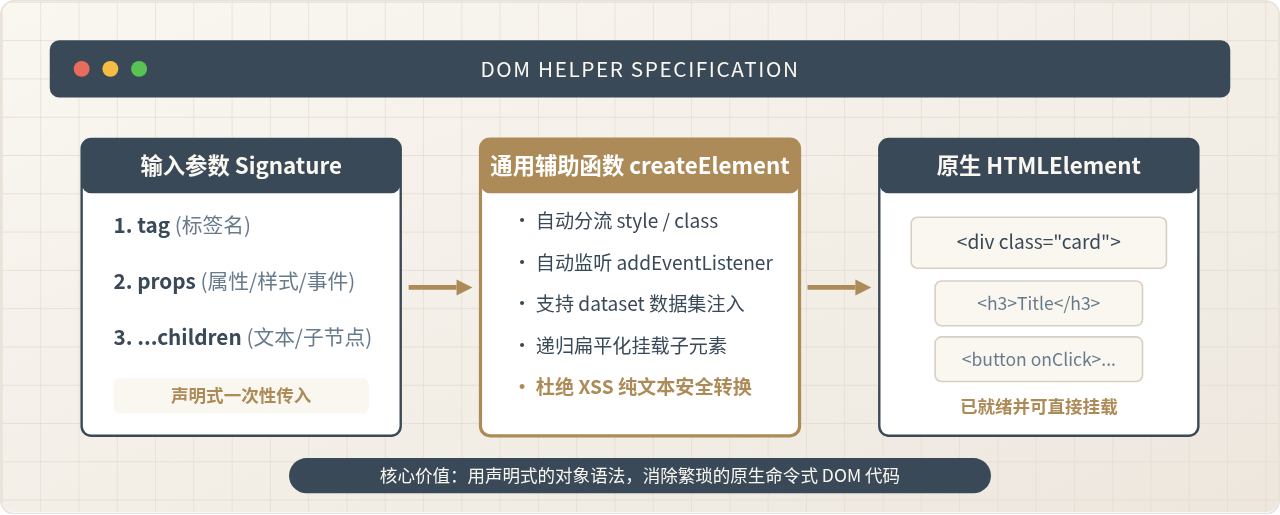
原生JavaScript实现网页轮播图与滚动动画教程
本教程详细讲解如何使用原生JavaScript实现高性能无缝轮播图与平滑滚动动画,涵盖DOM结构设计、无缝首尾衔接原理、触摸滑动兼容及requestAnimationFrame动画调优。
构建网页动态视觉效果时,轮播图与页面平滑滚动是最常见的两类交互需求。许多初学者或项目开发者往往习惯直接引入庞大的第三方插件,但在轻量化展示、性能敏感或定制化场景下,依赖外部库不仅增加了包体积,还可能因为复杂的内部机制导致样式覆盖困难与调试成本增加。通过原生JavaScript,仅需掌握DOM几何关系、CSS3 Transform过渡属性以及 requestAnimationFrame 调度机制,就能构建出具备无缝循环、触控流畅且帧率稳定的轮播图与滚动动画组件。
一、无缝轮播的核心力学:视口、轨道与克隆障眼法
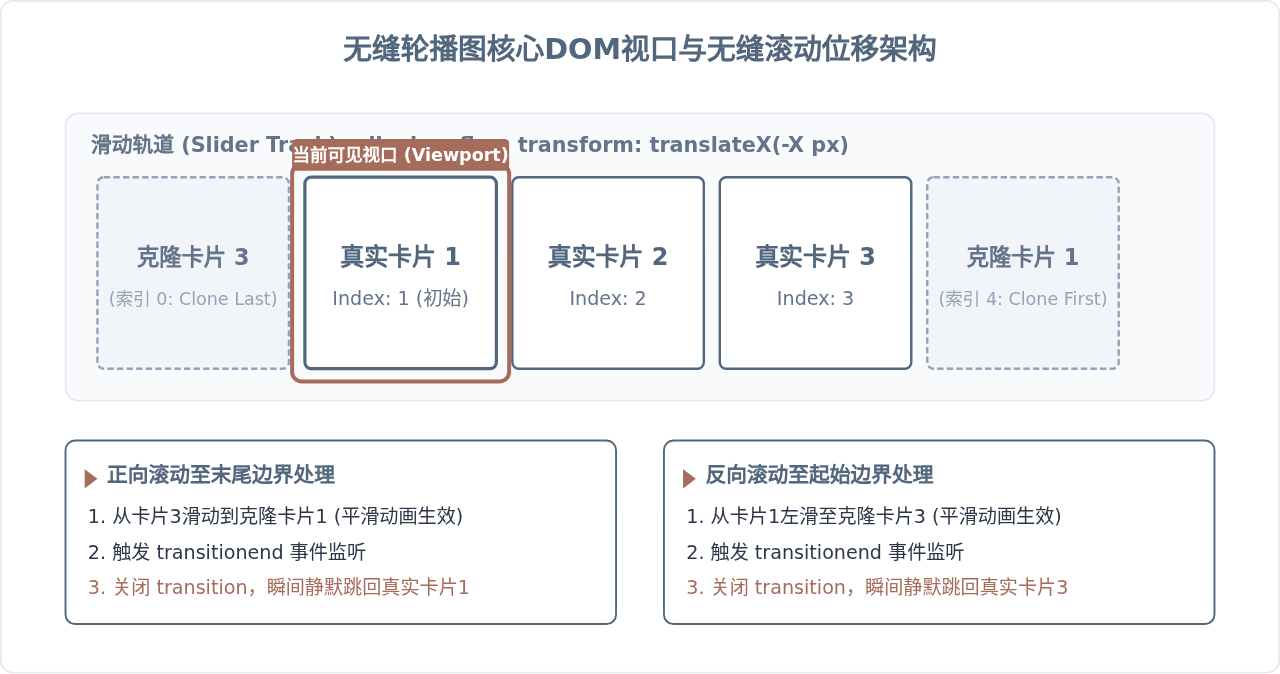
轮播图的物理本质可以概括为一个“固定视口(Viewport)”与一个“长条形滑动轨道(Track)”的相对位移。视口通过 overflow: hidden 裁剪溢出内容,轨道内部横向排列多个卡片。当轨道通过 transform: translateX(-Npx) 发生位移时,不同的卡片便依次呈现在视口中心。
普通轮播在到达末尾一张图片时,往往需要生硬地“倒退”滑回第一张,这种回退破坏了视觉连续性。真正的“无缝轮播”依赖于克隆节点的技巧:在真实的卡片列表首尾各克隆一个替身节点。在最后一张真实图片右侧克隆第一张图片,在第一张真实图片左侧克隆最后一张图片。当画面滑动到克隆的伪首节点时,利用过渡结束事件(transitionend)在一瞬间取消过渡动画,并将轨道瞬移回真实的对应索引,由于两张图片内容完全相同,人眼完全无法察觉这一跳跃,从而实现了视觉上的无限循环。
二、从零构建无缝轮播图的分步实现
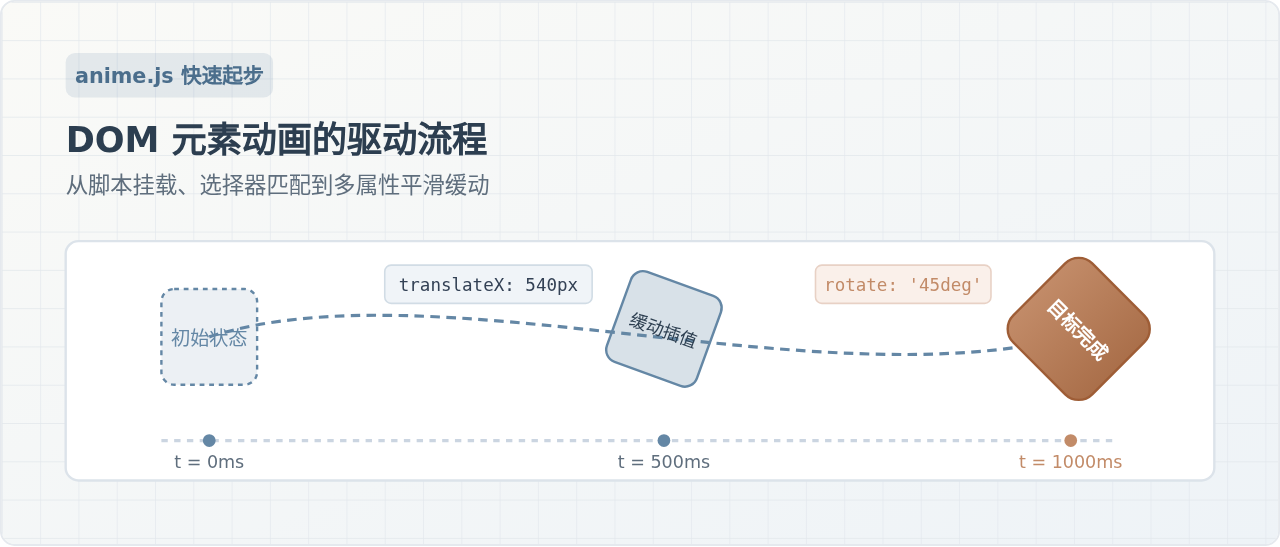
实现一个健壮的原生轮播图,需遵循结构搭设、动态克隆、坐标驱动、静默复位和状态节流五个标准步骤。以下图示清晰归纳了完整的实现时序:
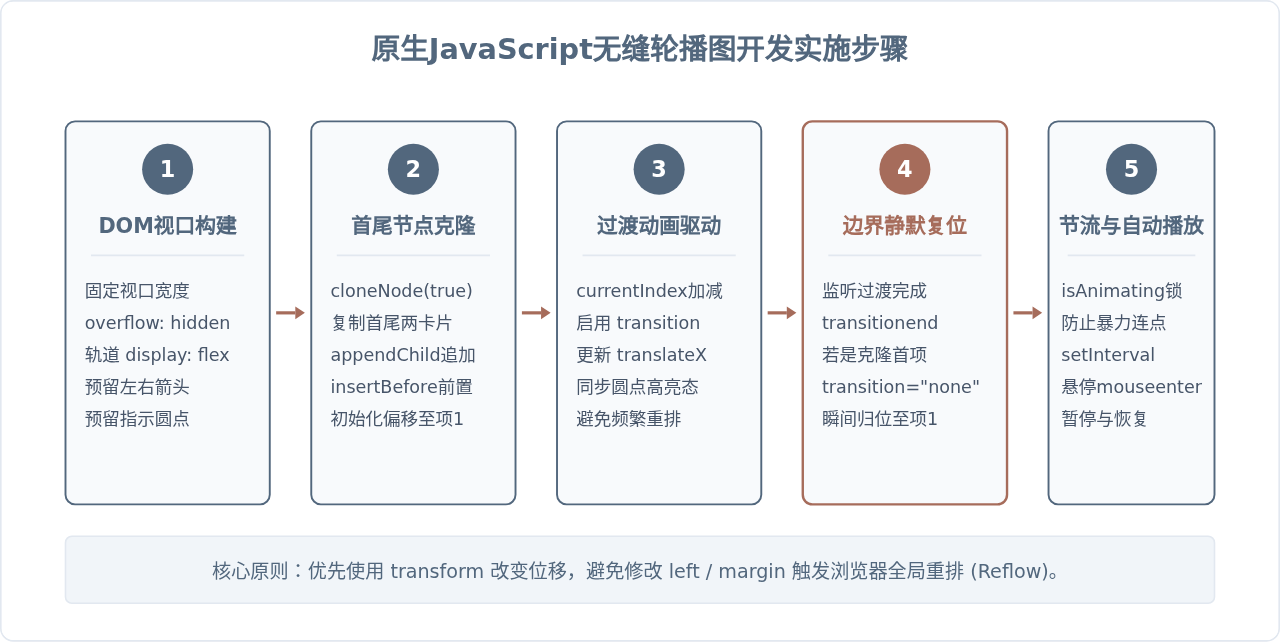
1. 搭建结构与样式
HTML结构由视口容器、滑动轨道、轮播项、导航按钮及指示点构成:
<div class="carousel-container" id="carousel">
<div class="carousel-track" id="track">
<div class="carousel-item" style="background:#52677D;">幻灯片 1</div>
<div class="carousel-item" style="background:#A66C5B;">幻灯片 2</div>
<div class="carousel-item" style="background:#3B4252;">幻灯片 3</div>
</div>
<button class="btn btn-prev" id="prevBtn"><</button>
<button class="btn btn-next" id="nextBtn">></button>
<div class="carousel-dots" id="dots"></div>
</div>CSS需要特别注意视口的隐藏溢出与轨道的Flex布局。为了保证硬件加速并避免页面重排,我们使用 transform: translateX() 来驱动轨道移动:
.carousel-container {
  position: relative;
  width: 600px;
  height: 340px;
  margin: 20px auto;
  overflow: hidden;
  border-radius: 8px;
}
.carousel-track {
  display: flex;
  height: 100%;
  width: 100%;
  will-change: transform;
}
.carousel-item {
  flex-shrink: 0;
  width: 100%;
  height: 100%;
  display: flex;
  align-items: center;
  justify-content: center;
  color: #ffffff;
  font-size: 24px;
}
.btn {
  position: absolute;
  top: 50%;
  transform: translateY(-50%);
  background: rgba(0,0,0,0.3);
  color: white;
  border: none;
  width: 40px;
  height: 40px;
  cursor: pointer;
  border-radius: 50%;
}
.btn-prev { left: 10px; }
.btn-next { right: 10px; }
.carousel-dots {
  position: absolute;
  bottom: 12px;
  left: 50%;
  transform: translateX(-50%);
  display: flex;
  gap: 8px;
}
.dot {
  width: 10px;
  height: 10px;
  border-radius: 50%;
  background: rgba(255,255,255,0.5);
  cursor: pointer;
}
.dot.active {
  background: #A66C5B;
}
2. 原生JavaScript逻辑组装
以下为完整的逻辑封装。关键点在于 isAnimating 状态锁以及 transitionend 事件中的静默重置:
class SeamlessCarousel {
  constructor(containerId) {
    this.container = document.getElementById(containerId);
    this.track = this.container.querySelector('.carousel-track');
    this.items = Array.from(this.track.children);
    this.prevBtn = this.container.querySelector('#prevBtn');
    this.nextBtn = this.container.querySelector('#nextBtn');
    this.dotsContainer = this.container.querySelector('#dots');

    this.realCount = this.items.length;
    this.currentIndex = 1; // 由于首项前插入了克隆尾项,真实第1项索引为1
    this.itemWidth = this.container.offsetWidth;
    this.isAnimating = false;
    this.timer = null;

    this.init();
  }

  init() {
    // 1. 克隆节点
    const firstClone = this.items[0].cloneNode(true);
    const lastClone = this.items[this.realCount - 1].cloneNode(true);
    this.track.appendChild(firstClone);
    this.track.insertBefore(lastClone, this.items[0]);

    // 2. 初始化轨道位置
    this.track.style.transform = `translateX(-${this.currentIndex * this.itemWidth}px)`;

    // 3. 生成圆点
    this.renderDots();

    // 4. 事件绑定
    this.bindEvents();

    // 5. 启动自动轮播
    this.startAutoPlay();
  }

  renderDots() {
    this.dotsContainer.innerHTML = '';
    for (let i = 0; i < this.realCount; i++) {
      const dot = document.createElement('div');
      dot.classList.add('dot');
      if (i === 0) dot.classList.add('active');
      dot.addEventListener('click', () => this.goToRealIndex(i));
      this.dotsContainer.appendChild(dot);
    }
  }

  updateDots() {
    // 映射当前真实索引:1映射到0,realCount映射到realCount-1
    let activeIdx = this.currentIndex - 1;
    if (this.currentIndex === 0) activeIdx = this.realCount - 1;
    if (this.currentIndex === this.realCount + 1) activeIdx = 0;

    const dots = this.dotsContainer.querySelectorAll('.dot');
    dots.forEach((dot, idx) => {
      dot.classList.toggle('active', idx === activeIdx);
    });
  }

  moveTo(index, duration = 400) {
    if (this.isAnimating) return;
    this.isAnimating = true;
    this.currentIndex = index;

    this.track.style.transition = `transform ${duration}ms ease-in-out`;
    this.track.style.transform = `translateX(-${this.currentIndex * this.itemWidth}px)`;
    this.updateDots();
  }

  bindEvents() {
    this.nextBtn.addEventListener('click', () => {
      this.moveTo(this.currentIndex + 1);
    });

    this.prevBtn.addEventListener('click', () => {
      this.moveTo(this.currentIndex - 1);
    });

    // 核心:过渡完成后检测是否处于克隆边界
    this.track.addEventListener('transitionend', () => {
      this.isAnimating = false;

      // 若滑到了末尾追加的克隆第1项
      if (this.currentIndex >= this.realCount + 1) {
        this.track.style.transition = 'none';
        this.currentIndex = 1;
        this.track.style.transform = `translateX(-${this.currentIndex * this.itemWidth}px)`;
      }

      // 若滑到了开头前置的克隆末项
      if (this.currentIndex <= 0) {
        this.track.style.transition = 'none';
        this.currentIndex = this.realCount;
        this.track.style.transform = `translateX(-${this.currentIndex * this.itemWidth}px)`;
      }
    });

    // 鼠标悬停暂停
    this.container.addEventListener('mouseenter', () => this.stopAutoPlay());
    this.container.addEventListener('mouseleave', () => this.startAutoPlay());
  }

  goToRealIndex(realIdx) {
    this.moveTo(realIdx + 1);
  }

  startAutoPlay() {
    if (this.timer) return;
    this.timer = setInterval(() => {
      this.moveTo(this.currentIndex + 1);
    }, 3000);
  }

  stopAutoPlay() {
    clearInterval(this.timer);
    this.timer = null;
  }
}

// 实例化
const carousel = new SeamlessCarousel('carousel');
三、页面平滑滚动动画的实现与帧率优化
除了轮播图,现代网页中诸如“回到顶部”、“锚点导航平滑定位”以及“视差滚动”也是极其普遍的动画需求。很多开发者在实现这类位移时,常常随意在 setInterval 中累加 window.scrollBy。然而,定时器的触发时机与显示器的垂直同步信号(V-Sync)完全脱节,极易产生画面撕裂与丢帧卡顿。
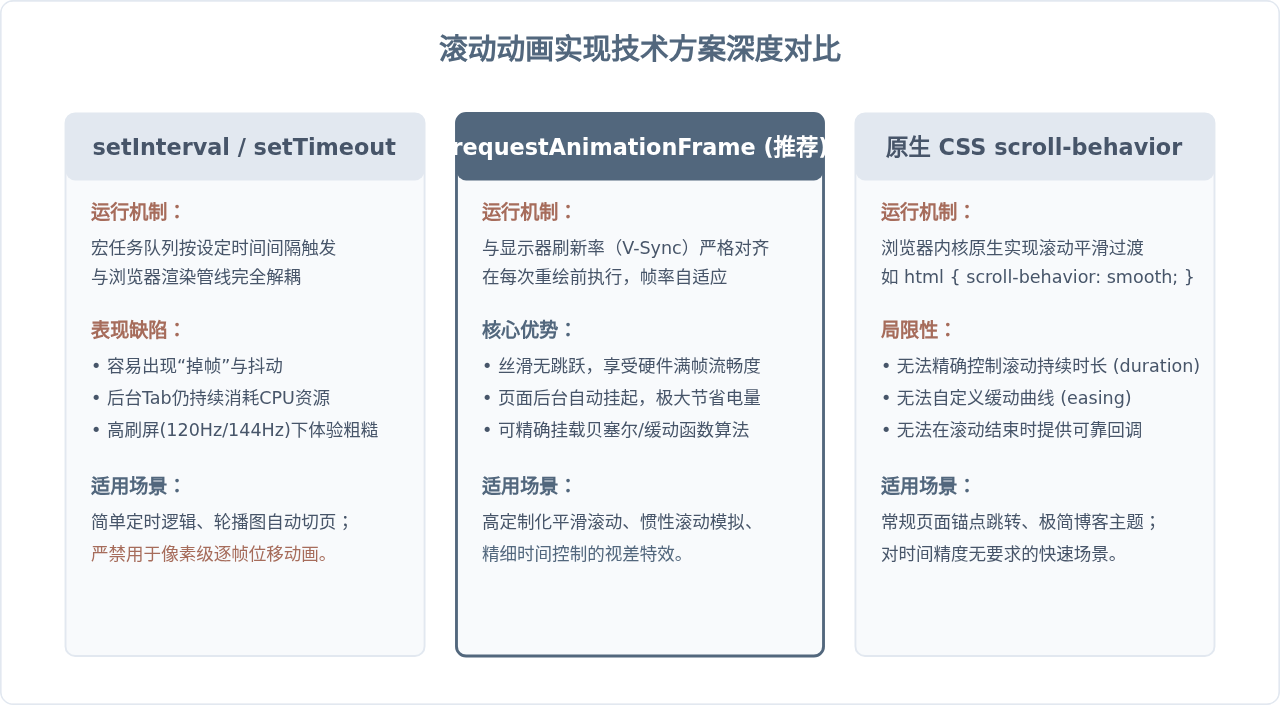
基于 requestAnimationFrame 的精确平滑滚动封装
为了在 JavaScript 中实现可控时长、带平滑缓动曲线(如经典缓出曲线 easeOutCubic)的滚动,我们可以使用如下轻量级函数:
/**
 * 原生JS平滑滚动函数
 * @param {number} targetPosition 目标滚动Y坐标
 * @param {number} duration 滚动动画持续时间(毫秒)
 * @param {function} callback 滚动完成后的回调函数
 */
function smoothScrollTo(targetPosition, duration = 500, callback = null) {
  const startPosition = window.pageYOffset || document.documentElement.scrollTop;
  const distance = targetPosition - startPosition;
  let startTime = null;

  // 经典三次缓出曲线 (Ease-Out Cubic)
  // 参数 t 为时间进度 (0 到 1)
  function easeOutCubic(t) {
    return --t * t * t + 1;
  }

  function animationStep(currentTime) {
    if (!startTime) startTime = currentTime;
    const timeElapsed = currentTime - startTime;
    const progress = Math.min(timeElapsed / duration, 1);
    const easeProgress = easeOutCubic(progress);

    // 逐帧计算并设置位移
    window.scrollTo(0, startPosition + distance * easeProgress);

    if (timeElapsed < duration) {
      window.requestAnimationFrame(animationStep);
    } else {
      // 确保准确达到目标终点
      window.scrollTo(0, targetPosition);
      if (typeof callback === 'function') {
        callback();
      }
    }
  }

  window.requestAnimationFrame(animationStep);
}

// 使用示例:平滑回到顶部,耗时 600ms
// smoothScrollTo(0, 600, () => console.log('已滚动至顶部'));
四、工程化避坑要点与架构全景总结
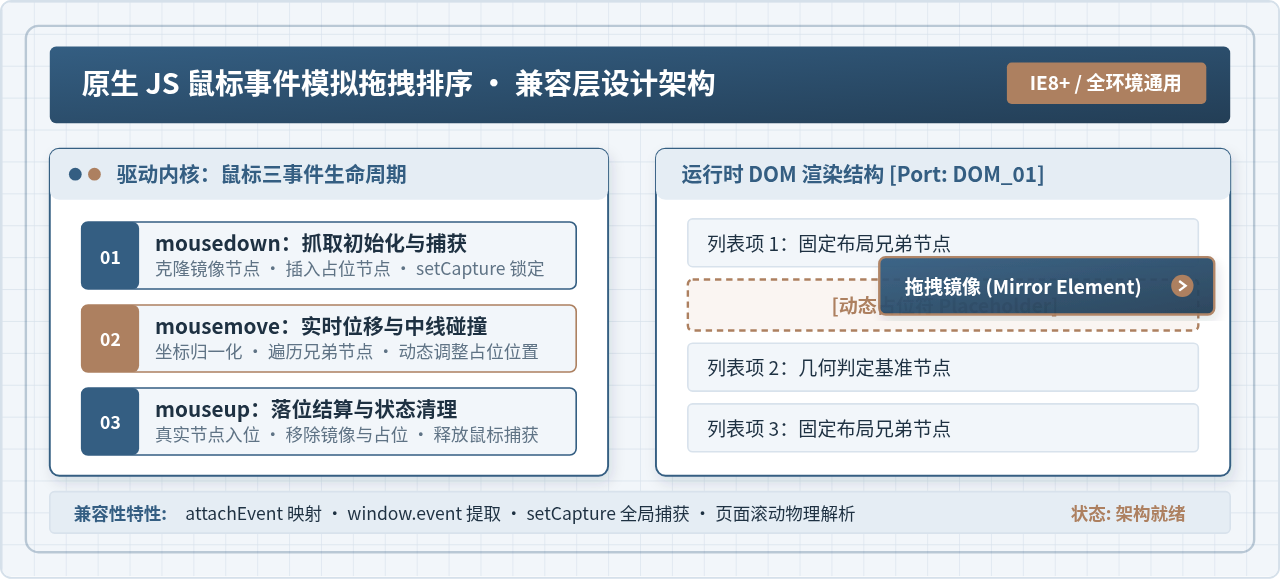
在实际生产环境中,原生编写轮播与滚动动画不仅要实现基本功能,还需处理异常边界与极端交互场景。以下全景图概括了工业级组件的生命周期与防御机制:
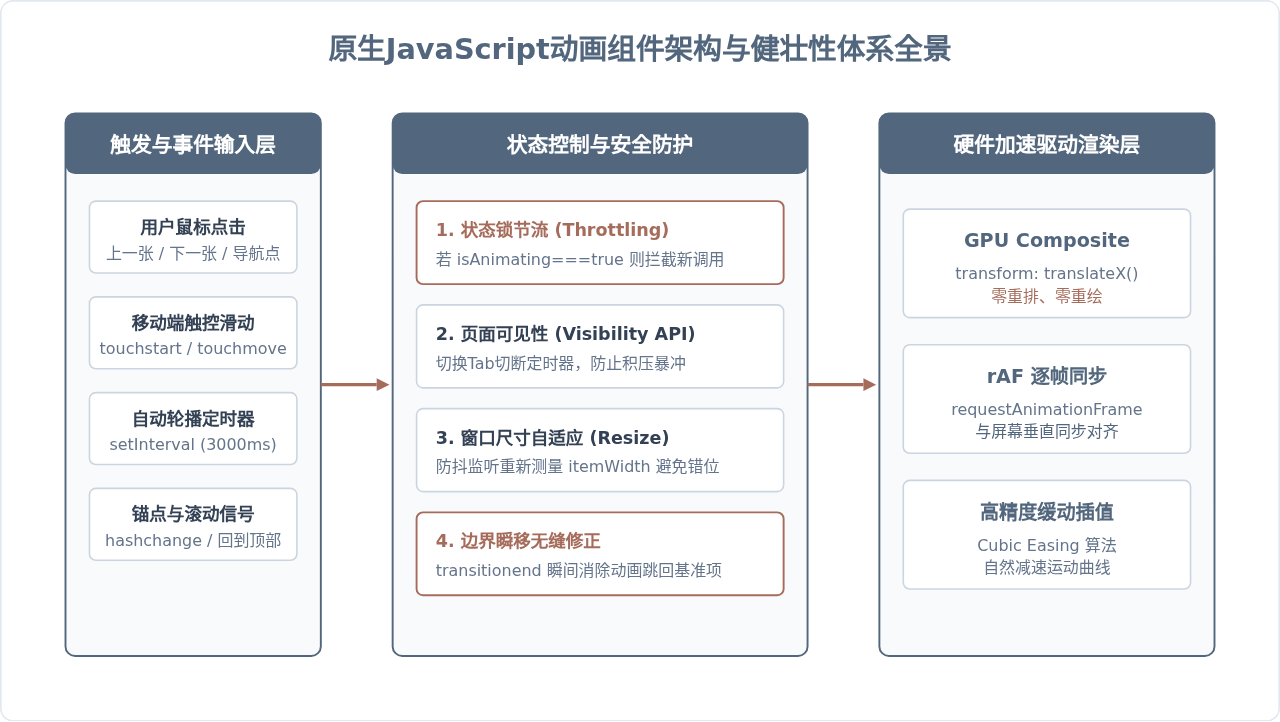
常见问题与关键避坑说明
- 快速连续点击导致的漂移或空白:如果用户在过渡尚未结束时高频点击按钮,动画会反复叠加导致轨道坐标错乱。务必在实例中维护
isAnimating状态变量,在moveTo开头直接if (this.isAnimating) return;,并在transitionend事件触发后才将其重置为false。 - 后台页面切换导致的“连环狂滚”:使用
setInterval时,当用户切到其他浏览器标签页,浏览器会降低后台定时器的调用频率,但定时回调可能产生排队积压;当用户重新切回页面时,这些积压事件在瞬间爆发执行,出现轮播图疯狂滑动的现象。解决方法是监听document.addEventListener('visibilitychange', ...),当document.hidden === true时暂停自动播放,切回时恢复。 - 浏览器缩放与视口尺寸适配:当页面发生缩放或响应式断点切换时,视口容器的实际像素宽度会改变。应对
window.addEventListener('resize')添加防抖处理,重新计算this.itemWidth = this.container.offsetWidth,并同步将transform重新对齐到当前索引对应的新像素位移处。
原生JavaScript实现轮播图与滚动动画的本质,是理解浏览器的渲染周期与位移计算机制。轮播图通过首尾克隆和 transitionend 的无缝瞬移解决了视觉断层;而滚动动画借助 requestAnimationFrame 将物理插值交还给浏览器重绘流水线。掌握这套底层思维,不仅能够脱离冗余外部依赖,更能编写出高性能、无掉帧且具备极高可靠性的前端交互特效。
js-cookie 安装与基础用法:set、get、remove 详解
2026-11-05 16:35:06
适合JavaScript初学者的实战项目:制作简易待办事项列表
2026-11-05 16:17:07
JS打开新标签页时怎么通过URL传递参数
2026-11-05 12:21:08
sigma.js 自定义节点样式:设置颜色、大小及标签显示的技巧
2026-11-05 09:55:00
JS 生成的统计图怎么导出为 PNG 图片或 PDF 文件?
2026-11-05 09:37:58