

Iview DatePicker 限制选择当前月份及以后的月份
作者:阿沐时间:2026-10-31 17:04:21浏览:617
本文介绍如何在Iview框架中使用DatePicker组件,通过配置options4中的disabledDate函数,实现禁用当前月份之前的历史日期,仅允许用户选择当前月份及未来的时间。
Iview DatePicker 实现禁用历史月份并允许选择下月
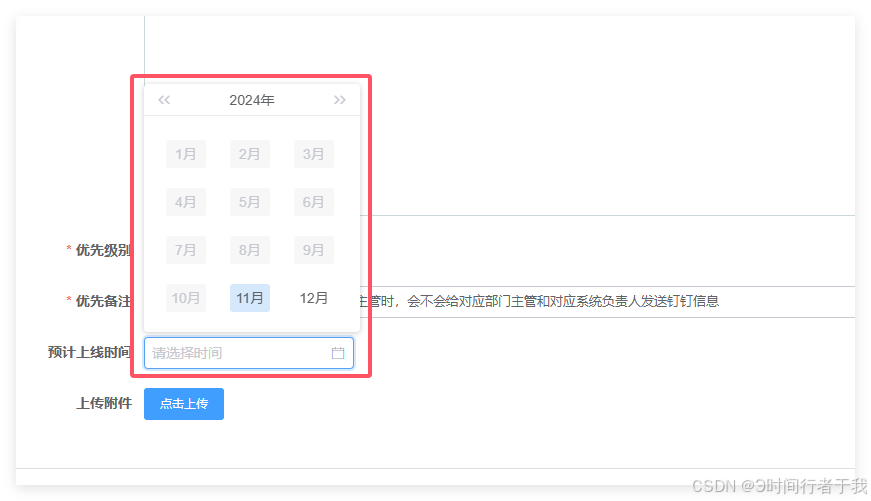
HTML 结构代码
<DatePicker type="month" :options="options4" :value="dialogForm.estimatedStartTimeWithCreate" @on-change="monthTime($event, 'loadDateStart')" placeholder="请选择时间" class="itemMonth" style="width: 210px"></DatePicker>JavaScript 逻辑代码
data() {
    return {
    dialogForm: {
        estimatedStartTimeWithCreate: '', // 绑定的日期值
      },
		options4: {
	        disabledDate(date) {
	          const disabledDay = new Date()
	          return date && date.valueOf() < disabledDay.setMonth(disabledDay.getMonth() - 1)
	        }
      }
   }
},
methods: {
	monthTime(val) {
      console.log('monthTime:', val)
      this.dialogForm.estimatedStartTimeWithCreate = val
    }
}
至此关于 Iview DatePicker 限制仅可选当前月及未来月份的介绍结束,更多相关 Iview DatePicker 仅允许选择当前月份内容请搜索本站以前的文章或继续浏览下面的相关文章希望大家以后多多支持本站!
作者最新文章
为什么叫JavaScript:语言命名由来及与Java的历史渊源
2026-11-05 11:37:48
JS获取当前时间年月日时分秒并格式化为YYYY-MM-DD HH:mm:ss
2026-11-04 21:25:21
不同语言间JS与Java/Python加密结果不一致怎么办
2026-11-04 18:27:23
Mock.js 拦截 Axios 和 Fetch 请求的原理与配置方法
2026-11-04 08:13:59
JS怎么获取当前日期并格式化为YYYY-MM-DD
2026-11-03 18:47:03