

微信小程序实现全方向(顶/底/左/右/中)自定义弹窗
作者:阿沐时间:2026-10-31 08:30:49浏览:346
本文详细介绍如何在微信小程序中实现支持顶部、底部、左侧、右侧及中间位置的自定义弹窗组件。通过整合WXML结构、WXSS样式与JS逻辑控制,提供一套简洁且类型齐全的代码方案,帮助开发者快速集成多种布局的弹窗功能。
微信小程序全方向自定义弹窗实现
在微信小程序开发中,实现支持顶部、底部、左侧、右侧以及中间位置的自定义弹窗功能。
该方案提供了基础的弹窗实现逻辑,具体的代码细节与实现过程请查阅后续代码部分。
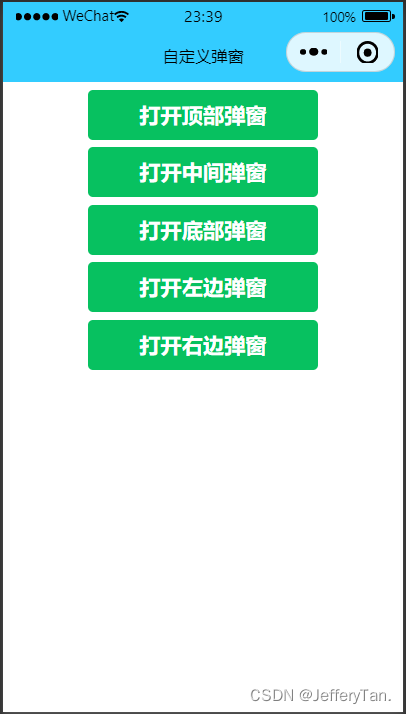
顶部弹出窗的效果示例如下:
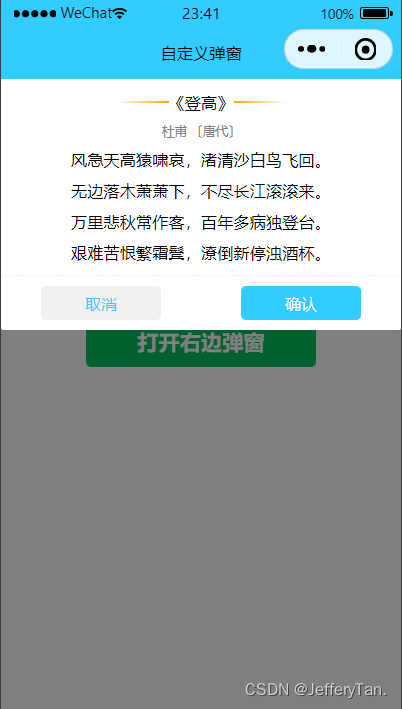
中间弹出窗的效果示例如下:
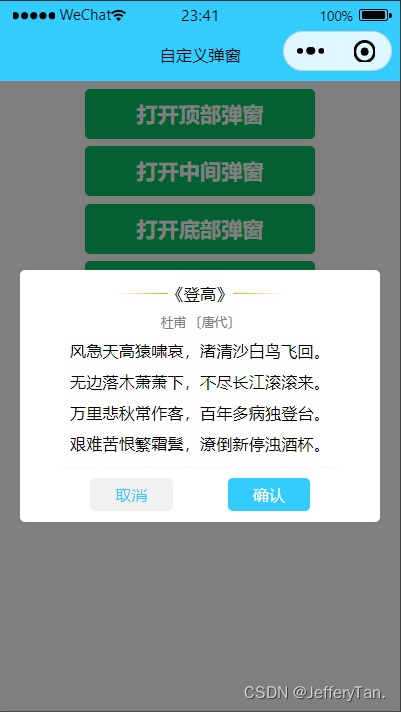
底部弹出窗的效果示例如下:
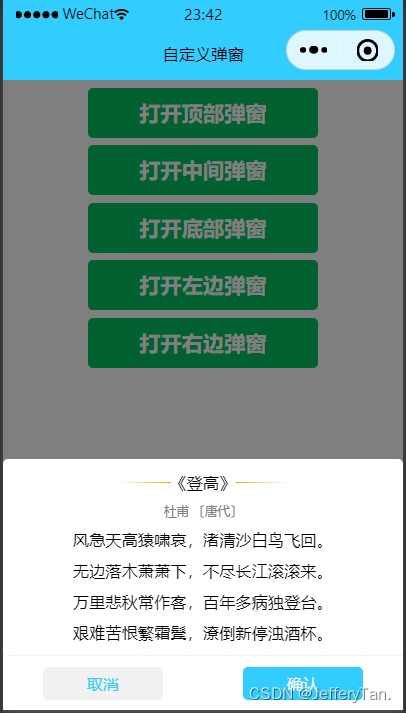
左侧弹出窗的效果示例如下:
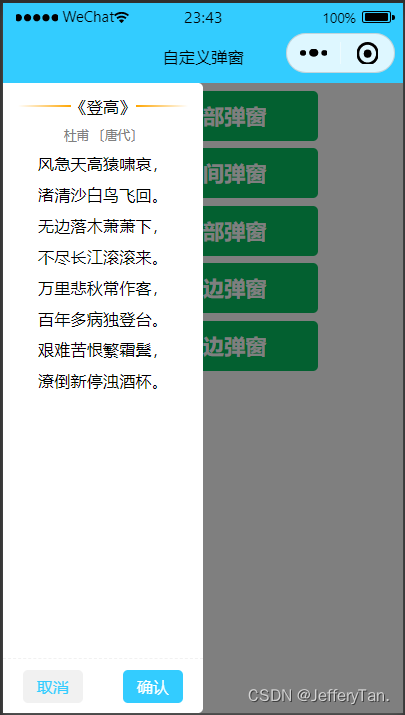
右侧弹出窗的效果示例如下:
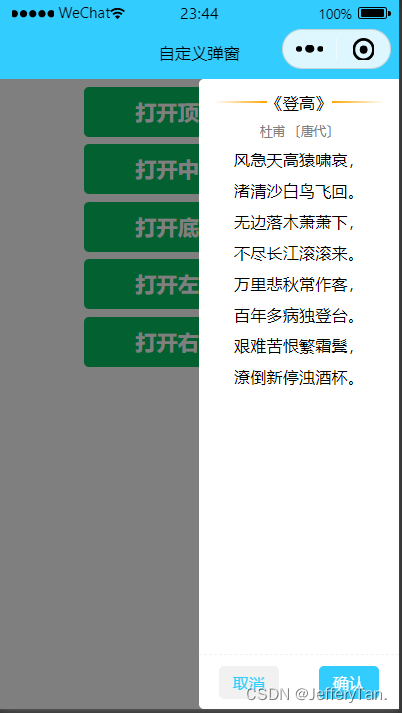
相关的WXML结构代码如下:
<button type="primary" bindtap="openPopup" data-index="0">打开顶部弹窗</button>
<button type="primary" bindtap="openPopup" data-index="1">打开中间弹窗</button>
<button type="primary" bindtap="openPopup" data-index="2">打开底部弹窗</button>
<button type="primary" bindtap="openPopup" data-index="3">打开左边弹窗</button>
<button type="primary" bindtap="openPopup" data-index="4">打开右边弹窗</button>
<!-- 顶部弹窗 -->
<view class="popup-box" wx:if="{{showIndex=='0'}}" bindtap="closePopup"></view>
<view class="info-top" wx:if="{{showIndex=='0'}}">
  <view class="row-info">
    <view>
      <text class="line left-line"></text>
      <text>《登高》</text>
      <text class="line right-line"></text>
    </view>
    <view class="row-author">杜甫 〔唐代〕</view>
    <view>风急天高猿啸哀,渚清沙白鸟飞回。</view>
    <view>无边落木萧萧下,不尽长江滚滚来。</view>
    <view>万里悲秋常作客,百年多病独登台。</view>
    <view>艰难苦恨繁霜鬓,潦倒新停浊酒杯。</view>
  </view>
  <view class="row-btn">
    <view class="left-btn" bindtap="closePopup">取消</view>
    <view class="right-btn">确认</view>
  </view>
</view>
<!-- 中间弹窗 -->
<view class="popup-box" wx:if="{{showIndex=='1'}}" bindtap="closePopup"></view>
<view class="info-center" style="top:{{height*0.3}}px;height:{{height*0.4}}px;"
wx:if="{{showIndex=='1'}}">
  <view>
    <view class="row-info">
      <view>
        <text class="line left-line"></text>
        <text>《登高》</text>
        <text class="line right-line"></text>
      </view>
      <view class="row-author">杜甫 〔唐代〕</view>
      <view>风急天高猿啸哀,渚清沙白鸟飞回。</view>
      <view>无边落木萧萧下,不尽长江滚滚来。</view>
      <view>万里悲秋常作客,百年多病独登台。</view>
      <view>艰难苦恨繁霜鬓,潦倒新停浊酒杯。</view>
    </view>
    <view class="row-btn">
      <view class="left-btn" bindtap="closePopup">取消</view>
      <view class="right-btn">确认</view>
    </view>
  </view>
</view>
<!-- 底部弹窗 -->
<view class="popup-box" wx:if="{{showIndex=='2'}}" bindtap="closePopup"></view>
<view class="info-bottom" wx:if="{{showIndex=='2'}}">
  <view class="row-info">
    <view>
      <text class="line left-line"></text>
      <text>《登高》</text>
      <text class="line right-line"></text>
    </view>
    <view class="row-author">杜甫 〔唐代〕</view>
    <view>风急天高猿啸哀,渚清沙白鸟飞回。</view>
    <view>无边落木萧萧下,不尽长江滚滚来。</view>
    <view>万里悲秋常作客,百年多病独登台。</view>
    <view>艰难苦恨繁霜鬓,潦倒新停浊酒杯。</view>
  </view>
  <view class="row-btn">
    <view class="left-btn" bindtap="closePopup">取消</view>
    <view class="right-btn">确认</view>
  </view>
</view>

<!-- 左边弹窗 -->
<view class="popup-box" wx:if="{{showIndex=='3'}}" bindtap="closePopup"></view>
<view class="info-left" wx:if="{{showIndex=='3'}}">
  <view class="row-info">
    <view>
      <text class="line left-line"></text>
      <text>《登高》</text>
      <text class="line right-line"></text>
    </view>
    <view class="row-author">杜甫 〔唐代〕</view>
    <view>风急天高猿啸哀,</view>
    <view>渚清沙白鸟飞回。</view>
    <view>无边落木萧萧下,</view>
    <view>不尽长江滚滚来。</view>
    <view>万里悲秋常作客,</view>
    <view>百年多病独登台。</view>
    <view>艰难苦恨繁霜鬓,</view>
    <view>潦倒新停浊酒杯。</view>
  </view>
  <view class="row-btn fixed">
    <view class="left-btn" bindtap="closePopup">取消</view>
    <view class="right-btn">确认</view>
  </view>
</view>
<!-- 右边弹窗 -->
<view class="popup-box" wx:if="{{showIndex=='4'}}" bindtap="closePopup"></view>
<view class="info-right" wx:if="{{showIndex=='4'}}">
  <view class="row-info">
    <view>
      <text class="line left-line"></text>
      <text>《登高》</text>
      <text class="line right-line"></text>
    </view>
    <view class="row-author">杜甫 〔唐代〕</view>
    <view>风急天高猿啸哀,</view>
    <view>渚清沙白鸟飞回。</view>
    <view>无边落木萧萧下,</view>
    <view>不尽长江滚滚来。</view>
    <view>万里悲秋常作客,</view>
    <view>百年多病独登台。</view>
    <view>艰难苦恨繁霜鬓,</view>
    <view>潦倒新停浊酒杯。</view>
  </view>
  <view class="row-btn fixed">
    <view class="left-btn" bindtap="closePopup">取消</view>
    <view class="right-btn">确认</view>
  </view>
</view>
配套的WXSS样式代码如下:
/* 蒙层 */
.popup-box{
  position: absolute;
  z-index: 99;
  top: 0;
  background-color: rgba(0, 0, 0, 0.5);
  width: 100%;
  height: 100%;
}
/* 上 */
.info-top{
  position: fixed;
  z-index: 999;
  width: 100%;
  top: 0;
  background-color: white;
  border-bottom-left-radius: 5rpx;
  border-bottom-right-radius: 5rpx;
}
/* 中 */
.info-center{
  position: fixed;
  z-index: 999;
  background-color: white;
  display: flex;
  align-items: center;
  justify-content: center;
  border-radius: 10rpx;
  width: 90%;
  margin-left: 5%;
  margin-right: 5%;
}
/* 下 */
.info-bottom{
  position: fixed;
  z-index: 999;
  width: 100%;
  bottom: 0;
  background-color: white;
  border-top-left-radius: 10rpx;
  border-top-right-radius: 10rpx;
}
/* 左 */
.info-left{
  position: fixed;
  z-index: 999;
  width: 50%;
  height: 100%;
  top: 0;
  background-color: white;
  border-top-right-radius: 10rpx;
  border-bottom-right-radius: 10rpx;
}
/* 右 */
.info-right{
  position: fixed;
  z-index: 999;
  width: 50%;
  height: 100%;
  right: 0;
  top: 0;
  background-color: white;
  border-top-left-radius: 10rpx;
  border-bottom-left-radius: 10rpx;
}
/* 自定义内容(根据自己需求更改,可删除) */
button{
  margin: 15rpx 0;
}
.row-info{
  display: flex;
  flex-direction: column;
  align-items: center;
  margin: 15rpx;
  font-size: 32rpx;
}
.row-info view{
  padding: 10rpx 0;
}
.row-info view:first-child{
  display: flex;
  flex-direction: row;
  align-items: center;
}
.line{
  width: 100rpx;
  height: 1rpx;
}
.left-line{
  background-image: linear-gradient(to left,orange,white);
}
.right-line{
  background-image: linear-gradient(to right,orange,white);
}
.row-author{
  font-size: 24rpx;
  color: gray;
}
.row-btn{
  display: flex;
  flex-direction: row;
  align-items: center;
  border-top: 1rpx dashed #f1f1f1;
}
.row-btn view{
  flex: 1;
  text-align: center;
  margin: 20rpx 10%;
  padding: 12rpx 0;
  font-size: 32rpx;
  border-radius: 10rpx;
}
.left-btn{
  background-color: #f1f1f1;
  color: #33ccff;
}
.right-btn{
  background-color: #33ccff;
  color: white;
}
.fixed{
  position: fixed;
  bottom: 0;
  width: 50%;
}
控制弹窗显示的JS逻辑代码如下:
Page({
  /**
   * 页面的初始数据
   */
  data: {
    showIndex:null,//打开弹窗的对应下标
    height:'',//屏幕高度
  },
  // 打开弹窗
  openPopup(e){
    var index = e.currentTarget.dataset.index;
    this.setData({
      showIndex:index
    })
  },
  //关闭弹窗
  closePopup(){
    this.setData({
      showIndex:null
    })
  },
  /**
   * 生命周期函数--监听页面初次渲染完成
   */
  onReady() {
    var that = this;
    // 动态获取屏幕高度
    wx.getSystemInfo({
      success: (result) => {
        that.setData({
          height: result.windowHeight
        });
      },
    })
  },
})
上述代码结构简洁且覆盖了常见弹窗类型。由于作者水平有限,代码仅供参考,如有错误或不足,欢迎通过QQ交流指正。
总结
至此,关于微信小程序中自定义顶部、底部、中间、左侧及右侧弹窗的介绍已完成。如需了解更多相关内容,建议搜索本站往期文章或继续浏览后续文章,感谢大家的支持!
作者最新文章
为什么叫JavaScript:语言命名由来及与Java的历史渊源
2026-11-05 11:37:48
JS获取当前时间年月日时分秒并格式化为YYYY-MM-DD HH:mm:ss
2026-11-04 21:25:21
不同语言间JS与Java/Python加密结果不一致怎么办
2026-11-04 18:27:23
Mock.js 拦截 Axios 和 Fetch 请求的原理与配置方法
2026-11-04 08:13:59
JS怎么获取当前日期并格式化为YYYY-MM-DD
2026-11-03 18:47:03