

JavaScript 发布-订阅模式实例详解
作者:青柠时间:2026-10-31 05:15:45浏览:276
本文详细解析 JavaScript 中的发布-订阅模式,涵盖核心概念、基础代码实现及针对特定事件过滤的改进方案。通过缓存数组管理订阅者,利用 key 区分不同事件类型,并实现取消订阅功能。最后结合网站登录场景,展示如何在实际项目中应用该模式解耦模块间通信。
一、核心概述
发布-订阅模式的核心结构主要包含三个部分:用于存储回调函数的缓存数组、负责注册回调的订阅操作,以及触发回调执行的发布操作。
| 缓存数组 | 一个数组[] |
| 订阅 | 往数组里面压入函数fn |
| 发布 | 里面循环遍历数组,然后执行数组中的函数。 |
二、简单代码实现及改进
(1)基础实现
  var subpub = {};
  subpub.cache = [];
  subpub.subscribe = function(fn){
       this.cache.push(fn)
  }
  subpub.publish = function(){
  for(var i in this.cache){
         this.cache[i].apply(this,arguments)
       }
  }
   //test
   subpub.subscribe(function(price,square){
         console.log("price:"+price)
         console.log(square)
   })
   subpub.publish(200,102);
   subpub.publish(300,153)
(2)改进方案:针对订阅者无需接收所有发布事件的需求,引入 key 参数进行事件分类。
 var subpub = {};
        subpub.cache = {}; //是一个数组对象
        subpub.subscribe = function (key, fn) {
            if (!this.cache[key]) { //订阅的事情在缓存里面没有,则添加到缓存
                this.cache[key] = [];
            }
            this.cache[key].push(fn);
        }
        subpub.publish = function () {
            //传入参数的第一个是指订阅的类型
            var key =  Array.prototype.splice.apply(arguments,[0,1]);
            for (var i in this.cache[key]) {
                this.cache[key][i].apply(this, arguments)
            }
        }
        //test
        subpub.subscribe('lowPrice',function (price, square) { //A订阅价格低于300的
            console.log("price:" + price)
            console.log(square)
        })
        subpub.subscribe('highPrice',function (price, square) { //B订阅价格高于300的
            console.log("price:" + price)
            console.log(square)
        })
        subpub.publish('lowPrice',200, 102);
        subpub.publish('highPrice',400, 153)
取消订阅的事件处理
subpub.subscribe('lowPrice', fn1 = function (price, square) { //A订阅价格低于300的
            console.log(square)
        })
        subpub.subscribe('lowPrice', fn11 = function (price, square) { //A订阅价格低于300的
            console.log("price1:" + price)
            console.log(square)
        })
        subpub.subscribe('highPrice', fn2 = function (price, square) { //B订阅价格高于300的
            console.log("price:" + price)
            console.log(square)
        })
        //取消订阅的事件
        subpub.remove = function (key, fn) {
            if (!this.cache[key]) { //如果key对应的消息没有被订阅,则直接返回
                return false
            }
            if(!fn){  //如果没有传入fn,则移除key对应的所有消息
                this.cache[key] && (this.cache[key].length=0)
            } else {
                this.cache[key] = this.cache[key].filter(function (cur, index) {
                    return cur !== fn
                })
            }
        }
        subpub.remove('lowPrice',fn1)
        subpub.publish('lowPrice', 200, 102);
在取消订阅时,需要区分不同的情况。上述实现中使用了 filter 函数来过滤并移除需要取消订阅的具体事件回调。
三、现实项目需求
以网站登录场景为例:用户登录后,需要在多个地方显示客户信息。为了避免在用户登录后依次调用各个模块的刷新或其他相关函数,应采用监听登录这一单一操作的方式,通过发布-订阅机制通知所有相关模块。
  //封装一下
        var event = {
            cache: {},
            subscribe: function (key, fn) {
                if (!this.cache[key]) { //订阅的事情在缓存里面没有,则添加到缓存
                    this.cache[key] = [];
                }
                this.cache[key].push(fn);
            },
            publish: function () {
                //传入参数的第一个是指订阅的类型
                var key = Array.prototype.splice.apply(arguments, [0, 1]);
                for (var i in this.cache[key]) {
                    this.cache[key][i].apply(this, arguments)
                }
            },
            remove: function (key, fn) {
                if (!this.cache[key]) { //如果key对应的消息没有被订阅,则直接返回
                    return false
                }
                if (!fn) { //如果没有传入fn,则移除key对应的所有消息
                    this.cache[key] && (this.cache[key].length = 0)
                } else {
                    this.cache[key] = this.cache[key].filter(function (cur, index) {
                        return cur !== fn
                    })
                }
            }
        };
        var eventForPub = function (obj) {
            for (var i in event) {
                obj[i] = event[i]
            }
        }
        var login = {};
        eventForPub(login)
        var headItem = (function () {
            login.subscribe('login', function (data) {
                headItem.setAvatar(data.avatar)
            })
            return {
                setAvatar: function (data) {
                    console.log("头部显示客户信息")
                }
            }
        })();
        var buyItem = (function () {
            login.subscribe('login', function (data) {
                buyItem.setAvatar(data.avatar)
            })
            return {
                setAvatar: function (data) {
                    console.log("购物车显示客户信息")
                }
            }
        })();
        var data={avatar:'qqqq'}
        login.publish('login',data);
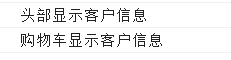
运行结果如下:
更多设计模式相关知识点,还可以参考本站文章:
https://www.jb51.net/article/252965.htm
https://www.jb51.net/article/27973.htm
作者最新文章
ES6模块化中js文件怎么用import和export交互
2026-11-05 17:00:48
JS读取本地文件时报错或无响应的常见原因
2026-11-05 16:32:31
let、const与var的区别:JavaScript变量声明最佳实践
2026-11-05 14:16:38
JS中直接定义静态二维数组的字面量写法
2026-11-05 14:16:08
JS 怎么查找字符串中所有匹配项的位置
2026-11-05 14:15:53