

JS实现带数字显示的环形进度条
作者:拾光时间:2026-10-21 21:27:25浏览:508
本文介绍如何使用 JavaScript 和 CSS 实现一个带有动态数字递增效果的环形进度条。通过定时器控制进度条的填充过程,并同步显示当前百分比数值,适用于需要直观展示加载进度的前端场景。
JS实现带数字显示的环形进度条
最终呈现的效果如下图所示:
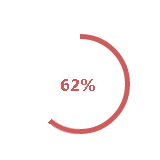
具体实现代码如下:
<!DOCTYPE HTML PUBLIC "-//W3C//DTD HTML 4.01 Transitional//EN">
<html>
<link>
<meta name="page-view-size" content="640*530">
<meta http-equiv="Content-Type" content="text/html; charset=utf-8">
</head>
<style>
 .wapper{
  position:absolute;
  left:100px;
  top:100px;
  box-sizing:border-box;
 }
 .text{
  position:absolute;
  left:30px;
  top:40px;
  font-family:"Microsoft YaHei";
  font-weight:bold;
  color:indianred;
 }
 .rect{
  position:absolute;
  width:50px;
  height:100px;
  overflow:hidden;
 }
 .right{
  left:50px;
 }
 .circle{
  position:absolute;
  width:100px;
  height:100px;
  border-radius:50%;
  box-sizing:border-box;
  border:5px solid indianred;
 }
 .circle_right{
  left:-50px;
  clip:rect(0px 50px 100px 0px);
  animation:roll 5s linear 0s 1 forwards;
 }
 .circle_left{
  clip:rect(0px 100px 100px 50px);
  animation:roll 5s linear 5s 1 forwards;
 }
 @keyframes roll{
  0%{transform:rotate(0deg)}
  100%{ transform:rotate(180deg)}
 }
</style>
<body leftmargin="0" topmargin="0">
<div class="wapper">
 <div class="rect right"><div class="circle circle_right"></div></div>
 <div class="rect left"><div class="circle circle_left"></div></div>
 <div class="text"><span id="num">1</span><span>%</span></div>
</div>
</body>
<script type="text/javascript">
 window.onload=function(){
  var $num=document.getElementById('num');
  (function(){
   var i=1,timer;
   add();
   function add(){
    var timer=setTimeout(function(){
     add();
    },100);
    $num.innerHTML=i;
    i<100?i++:clearTimeout(timer)
   }
  })();
 }
</script>
</html>
以上就是本文的全部内容,希望本文的内容对大家的学习或者工作能带来一定的帮助,同时也希望多多支持本站!
作者最新文章
JS处理含Emoji或中文的字符串转数组乱码问题
2026-11-05 16:12:28
JS怎么使用展开运算符合并对象
2026-11-05 14:42:18
ES6+环境下判断JS对象为空的简洁写法
2026-11-05 12:12:23
怎么通过replacer函数自定义JS中JSON的格式化输出
2026-11-05 11:19:44
JS正则表达式基础:字面量与RegExp构造函数的区别及常用元字符
2026-11-05 11:16:58