

JavaScript HTML5 Canvas 中删除指定矩形区域的方法
作者:交互手记时间:2026-10-29 20:57:52浏览:634
本文介绍在 HTML5 Canvas 中删除指定矩形区域的方法。通过调用 clearRect 函数,可以清除画布上特定坐标和尺寸的像素区域。示例代码展示了如何在 Canvas 中绘制矩形并清除其中一部分,适用于需要局部擦除或透明化处理的场景。
Canvas 删除矩形区域方法概述
本文介绍在 HTML5 Canvas 中删除指定矩形区域的方法,供读者参考。
运行效果截图如下:
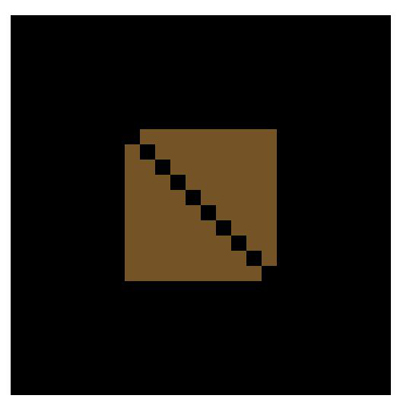
附注:图中黑色小方块即为被删除的矩形区域。
具体实现代码如下:
index.html 文件内容如下:
HTML 结构实现
<!DOCTYPE html>
<html>
 <head>
  <meta http-equiv="Content-type" content="text/html;charset=UTF-8" />
  <title>canvas中删除一块区域</title>
  <style type="text/css">
   #canvas {
    background:black; margin-top:100px; margin-left:200px;
   }
  </style>
 </head>
 <body>
  <canvas id="canvas" width="500px" height="500px" ></canvas>
 </body>
 <script type="text/javascript" src="canvas.js"></script>
 <script type="text/javascript">
  cache = {};
  var offsetX = 50,
   offsetY = 20;
  cache.context = dyl.createContext('canvas');
  dyl.rect(dyl.createColor(), 150, 150, 200, 200, 0.5);
  for(var i=0; i<10; i++) {
   dyl.clearRect(150 + i*20, 150 + i*20, 20, 20);
  }
 </script>
</html>
canvas.js 文件内容如下:
JavaScript 逻辑实现
(function() {
  var dyl = {cache: {}};
  dyl.setContext = function(context) {
    dyl.cache._context = context;
    return context;
  };
  dyl.getDom = function(id) {
    return document.getElementById(id);
  };
  dyl._getContext = function() {
    return dyl.cache._context;
  };
  dyl.save = function() {
    var context = dyl._getContext();
    context ? context.save() : void(0);
  };
  dyl.restore = function() {
    var context = dyl._getContext();
    context ? context.restore() : void(0);
  };
  dyl.createContext = function(canvasID) {
    var canvas = this.getDom(canvasID);
    if(!canvas) {
      return null;
    }
    return dyl.setContext(canvas.getContext("2d"));
  };
  dyl.createColor = function() {
    var color = "rgb(";
    color += Math.round(Math.random()*255);
    color += ",";
    color += Math.round(Math.random()*255);
    color += ",";
    color += Math.round(Math.random()*255);
    color += ")";
    return color;
  };
  dyl.addImg = function(img, x, y) {
    var context = dyl._getContext();
    if(!img || !context) {
      return;
    }
    if(typeof img === "string") {
      var oImg = new Image();
      oImg.src = img;
      oImg.onload = function() {
        context.drawImage(oImg, x, y);
      }
      return;
    }
    context.drawImage(img, x, y);
  };
  dyl.rect = function(color, x, y, width, height, alpha) {
    var context = dyl._getContext();
    if(!context) {
      return;
    }
    context.save();
    context.fillStyle = color;
    context.globalAlpha = alpha ? alpha : 1;
    context.fillRect(x, y, width, height);
    context.restore();
  };
  dyl.circle = function(color, x, y, r, alpha) {
    var context = dyl._getContext();
    context.save();
    context.fillStyle = color;
    context.beginPath();
    context.globalAlpha = alpha ? alpha : 1;
    context.arc(x, y, r, 0, 2*Math.PI);
    context.fill();
    context.stroke();
  };
  dyl.clearRect = function(x, y, width, height) {
    var context = dyl._getContext();
    if(!context) {
      return;
    }
    context.clearRect(x, y, width, height);
  };
  dyl.scale = function(x, y) {
    var context = dyl._getContext();
    if(!context) {
      return;
    }
    x = x ? x : 1;
    y = y ? y : 1;
    context.scale(x, y);
  };
  if(!window.dyl) {
    window.dyl = dyl;
  }
})();
希望本文所述内容对 JavaScript 程序设计有所帮助。
作者最新文章
JS怎么实现页面强制刷新
2026-11-05 14:53:38
点击JS链接直接运行不下载?前端实现.js文件强制下载的三种方法
2026-11-05 12:12:23
怎么封装一个通用的JS创建元素辅助函数
2026-11-05 11:41:41
Swiper.js 怎么监听滑动结束并获取当前索引
2026-11-05 10:57:15
HTML、CSS和JS的关系:Web前端三件套怎么协作
2026-11-04 15:41:40