

JS实现新浪博客风格左侧管理菜单
作者:青柠时间:2026-10-29 15:55:19浏览:605
本文分享一段JavaScript实现的左侧管理菜单代码,风格参考新浪博客。该菜单包含多个子项,适用于后台管理系统设计。文中提供了在线演示地址及完整HTML/CSS/JS代码,建议将引用的图片资源下载至本地以确保长期可用。
新浪博客风格左侧菜单实现
本文详细介绍如何使用JavaScript实现类似新浪博客左侧的Blog管理菜单效果,并提供相关代码供参考。
该菜单设计灵感源自新浪博客左侧栏,经过适当调整后可广泛应用于各类后台管理系统中。需要注意的是,示例中引用的图片资源来自新浪,建议在实际使用时将图片下载至本地服务器,以防原站链接失效导致显示异常。
具体运行效果如下图所示:
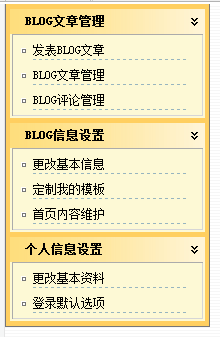
如需查看实际运行效果,可访问以下在线演示地址:
http://demo.jb51.net/js/2015/js-sina-blog-left-menu-style-codes/
实现该菜单的具体代码如下:
<html>
<head>
<meta http-equiv="Content-Type" content="text/html; charset=gb2312">
<title>新浪博客左侧的管理菜单</title>
<style type="text/css">
<!--
body{margin:0;padding:0;background:url("images/bg.gif")}
body, td{font-size:12px}
.menu_box_pad{background:#fdf9d5;padding:0 2px 2px 2px}
.menu_box{border-top:1px solid #ababab;border-left:1px solid #ababab;border-right:1px solid #d6d6d6;border-bottom:1px solid #d6d6d6}
.menu_box th{background:url('images/menu_list_icon.gif') no-repeat center;line-height:22px;width:10px}
.menu_box td{background:url('images/menu_list_split.gif') no-repeat left bottom;line-height:20px}
.menu_box a{text-decoration:none;color:#000}
.menu_box a:hover{text-decoration:underline}
.hand{cursor:hand;cursor:pointer}
.ctrl_menu{border-left:1px solid #767676;border-bottom:1px solid #767676;border-right:1px solid #767676;background:#ffcf60}
.ctrl_menu_title{padding-left:15px;font-weight:bold;line-height:25px}
.ctrl_menu_title_bg{background:url('images/menu_title_bg.gif')}
.top_bg{background:url("images/top_bg.gif")}
.logo_bg{background:url("images/logo_bg.gif")}
#top_nav_menu {color:#fff}
#top_nav_menu a{text-decoration:none;color:#fff}
#top_nav_menu a:hover{text-decoration:underline;color:#ff6}
-->
</style>
<script>
function $(_sId){
 return document.getElementById(_sId);
}
function exist(_sId){
 var oObj = $(_sId);
 return oObj != null ? oObj : false;
}
function dw(_sTxt){
 document.write(_sTxt);
}
function hide(_sId){
 $(_sId).style.display = $(_sId).style.display == "none" ? "" : "none";
}
function onlyShow(_sId, _iNum, _sPic, _sTxt1, _sTxt2){
 var i = 0;
 var oCurr = exist(_sId + i);
 while(oCurr){
  oCurr.style.display = "none";
  $(_sPic + i).src = _sTxt2;
  i++;
  oCurr = exist(_sId + i)
 }
 $(_sId + _iNum).style.display = "";
 $(_sPic + _iNum).src = _sTxt1;
}
function swapShow(_sId){
 var i = 0;
 var oCurr = exist(_sId + i);
 while(oCurr){
  hide(_sId + i);
  i++;
  oCurr = exist(_sId + i)
 }
}
function seekKey(_sKey){
 var i = 0;
 while(exist(_sKey + i)){
  i++;
 }
 return i;
}
function swapPic(_sId,_sAttr,_sTxt1, _sTxt2) {
 $(_sId)[_sAttr] = $(_sId)[_sAttr].indexOf(_sTxt1) > -1 ? _sTxt2 : _sTxt1;
}
function swap(_sId,_sAttr,_sTxt1, _sTxt2) {
 $(_sId)[_sAttr] = $(_sId)[_sAttr] == _sTxt1 ? _sTxt2 : _sTxt1;
}
function moveGif(_sId){
 swap(_sId,'className','marginLeft2','');
}
function moveStart(_sId){
 __tmp__time = setInterval("moveGif('" + _sId + "')",200);
}
function moveStop(_sId){
 clearInterval(__tmp__time);
 $(_sId).className = "marginLeft2";
}
function switchShow(){
 hide('left');
 swapPic('arrow','src','images/control_switch_up.gif','images/control_switch_down.gif');
 swapShow('hideLeft');
 swapShow('hideBody');
}
function scroll_to_top()
{
 document.body.scrollTop=0;
}
function mainFrameRedirect(url)
{
 oo = document.getElementById("mainFrame");
 oo.url = url;
}
</script>
</head>
<body>
  <table align="left" width="220" border="0" cellspacing="0" cellpadding="0">
   <tr>
    <td height="50" align="left" valign="top">
   <!-- 控制面板菜单 -->
  <table width="205" border="0" cellspacing="0" cellpadding="0" class="ctrl_menu">
   <tr height="5"><td></td></tr>
   <tr>
   <td align="center">
   <!-- BLOG文章 -->
   <table width="195" border="0" cellspacing="0" cellpadding="0" class="ctrl_menu_title_bg">
  <tr class="hand" onClick="hide('hideMenuFunc3')">
  <td width="174" class="ctrl_menu_title">BLOG文章管理</td>
  <td width="21"><image id='MenuFunc3' src="images/menu_title_down.gif"></td>
  </tr>
  <tr id="hideMenuFunc3">
  <td align="left" colspan="2" class="menu_box_pad">
  <table width="100%" border="0" cellspacing="5" cellpadding="0" class="menu_box">
   <tr>
   <th> </th>
   <td><a href="#" target="mainFrame" onClick="scroll_to_top()">发表BLOG文章</a></td>
   </tr>
   <tr>
   <th> </th>
   <td><a href="#" target="mainFrame" onClick="scroll_to_top()">BLOG文章管理</a></td>
   </tr>
   <tr>
   <th> </th>
   <td><a href="#" target="mainFrame" onClick="scroll_to_top()">BLOG评论管理</a></td>
   </tr>
  </table>    </td>
  </tr>
  </table>
   <!-- /BLOG文章 -->   </td>
   </tr>
   <tr height="5"><td></td></tr>
   <tr>
   <td align="center">
   <!-- BLOG信息 -->
   <table width="195" border="0" cellspacing="0" cellpadding="0" class="ctrl_menu_title_bg">
  <tr class="hand" onClick="hide('hideMenuFunc2')">
  <td width="174" class="ctrl_menu_title">BLOG信息设置</td>
  <td width="21"><image id='MenuFunc2' src="images/menu_title_down.gif"></td>
  </tr>
  <tr id="hideMenuFunc2">
  <td align="left" colspan="2" class="menu_box_pad" >
 <table width="100%" border="0" cellspacing="5" cellpadding="0" class="menu_box">
    <tr>
    <th> </th>
    <td><a href="#" target="mainFrame" onClick="scroll_to_top()">更改基本信息</a></td>
    </tr>
    <tr>
    <th> </th>
    <td><a href="#" target="mainFrame" onClick="scroll_to_top()">定制我的模板</a></td>
    </tr>
    <tr>
    <th> </th>
    <td><a href="#" target="mainFrame" onClick="scroll_to_top()">首页内容维护</a></td>
    </tr>
   </table></td>
  </tr>
  </table>
<!-- /BLOG信息 --></td>
   </tr>
   <tr height="5"><td></td></tr>
   <tr>
   <td align="center">
   <!-- 个人信息 -->
   <table width="195" border="0" cellspacing="0" cellpadding="0" class="ctrl_menu_title_bg">
  <tr class="hand" onClick="hide('hideMenuFunc1')">
  <td width="174" class="ctrl_menu_title">个人信息设置</td>
  <td width="21"><image id='MenuFunc1' src="images/menu_title_down.gif"></td>
  </tr>
  <tr id="hideMenuFunc1" style="display:none">
  <td align="left" colspan="2" class="menu_box_pad">
 <table width="100%" border="0" cellspacing="5" cellpadding="0" class="menu_box">
   <tr>
   <th> </th>
   <td><a target="mainFrame" href="#" onClick="scroll_to_top()">更改基本资料</a></td>
   </tr>
   <tr>
   <th> </th>
   <td><a target="mainFrame" href="#" onClick="scroll_to_top()">登录默认选项</a></td>
   </tr>
   </table>    </td>
  </tr>
  </table>
   <!-- /个人信息 -->   </td>
   </tr>
   <tr height="5"><td></td></tr>
   </table>
</body>
</html>
希望上述内容能对您的JavaScript编程工作提供有益帮助。
作者最新文章
ES6模块化中js文件怎么用import和export交互
2026-11-05 17:00:48
JS读取本地文件时报错或无响应的常见原因
2026-11-05 16:32:31
let、const与var的区别:JavaScript变量声明最佳实践
2026-11-05 14:16:38
JS中直接定义静态二维数组的字面量写法
2026-11-05 14:16:08
JS 怎么查找字符串中所有匹配项的位置
2026-11-05 14:15:53