

JavaScript日期处理函数性能优化:正则缓存策略
本文对比了优化前后的JavaScript日期处理函数性能。通过引入正则匹配结果的缓存机制,避免重复计算,显著提升了toDate和dateFormat函数的执行效率。优化后,万次执行耗时从600多毫秒降低至160毫秒以内,展示了缓存策略在提升前端脚本性能方面的实际价值。
JavaScript日期处理函数性能优化:正则缓存策略
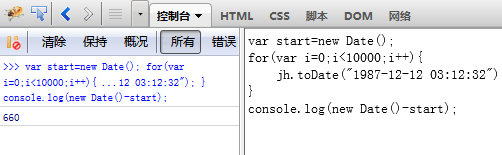
网络上关于JavaScript日期格式化的教程众多,多数内容已具备基本功能,但往往忽略了性能层面的考量。遵循“不要重复造轮子”的原则,本文选取了一个较为通用的日期处理函数作为基础,旨在通过性能优化提升其效率。首先展示优化前后的效率对比数据:针对将字符串转换为Date对象的toDate函数,在未进行任何优化的情况下,重复执行1万次耗时约为660毫秒。
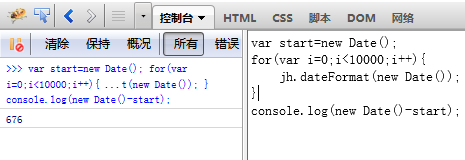
针对将Date对象格式化为字符串的dateFormat函数,在未优化的状态下,重复执行1万次耗时约为676毫秒。
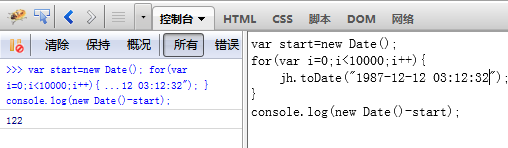
经过优化后的toDate函数,在相同测试条件下(重复执行1万次),耗时降至122毫秒。
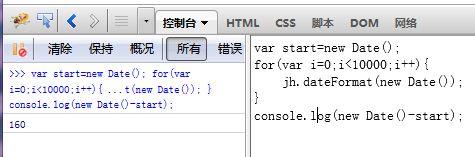
经过优化后的dateFormat函数,在相同测试条件下(重复执行1万次),耗时降至160毫秒。
前后性能差异显著,主要得益于对批处理场景下的缓存策略应用。观察现有网络上的日期格式化函数,大多依赖正则表达式进行匹配和替换,而正则运算本身较为消耗性能。因此,优化核心在于对正则匹配结果进行缓存,并为匹配值建立索引。这样在后续调用时无需重复执行正则匹配,从而大幅减少计算开销。接下来展示具体的实现代码。
(function(window) {
  var sinojh = {
    Version : "1.2",
    Copyright : "Copyright© sino-jh 2012",
    Author : "Jeff Lan",
    Email : "jefflan@live.cn"
  };
  /**
   * 方便于添加和重写类的属性
   * @param {Object} attributes 添加的属性
   */
  Function.prototype.prototypes = function(attributes) {
    for ( var a in attributes) {
      this.prototype[a] = attributes[a];
    }
  };
  /**
   * 获取Url参数
   * @param {String} parameter 参数名
   * @return {String} 参数值
   */
  sinojh.getUrlParameter = function(parameter) {
    if (!sinojh.getUrlParameter.cache) {
      var url = window.location.href;
      var paraString = url.substring(url.indexOf("?") + 1, url.length).split("&");
      var cache = {};
      for ( var i in paraString) {
        var j = paraString[i];
        cache[j.substring(0, j.indexOf("="))] = j.substring(j.indexOf("=") + 1, j.length);
      }
      sinojh.getUrlParameter.cache = cache;
    }
    return sinojh.getUrlParameter.cache[parameter];
  };
  /**
   * 日期格式化
   * @param {Date} date 日期对象
   * @param {String} formatStyle 格式化样式
   * @return {String} 日期型字符串
   */
  sinojh.dateFormat = function(date, formatStyle) {
    formatStyle = formatStyle ? formatStyle : sinojh.dateFormat.settings.formatStyle;
    var time = {
      "M+" : date.getMonth() + 1,
      "d+" : date.getDate(),
      "h+" : date.getHours(),
      "m+" : date.getMinutes(),
      "s+" : date.getSeconds(),
      "S" : date.getMilliseconds()
    };
    if (formatStyle == sinojh.dateFormat.formatStyleCache) {
      var replaceCache = sinojh.dateFormat.replaceCache;
      if (replaceCache["y+"]) {
        formatStyle = formatStyle.replace(replaceCache["y+"].replace, (date.getFullYear() + "").substring(replaceCache["y+"].index));
      }
      for ( var k in time) {
        if (replaceCache[k]) {
          formatStyle = formatStyle.replace(replaceCache[k].replace, replaceCache[k].replace.length == 1 ? time[k] : ("00" + time[k]).substring(("" + time[k]).length));
        }
      }
    } else {
      sinojh.dateFormat.formatStyleCache = formatStyle;
      var replaceCache = {};
      if (new RegExp("(y+)").test(formatStyle)) {
        var index = 4 - RegExp.$1.length;
        replaceCache["y+"] = {
          replace : RegExp.$1,
          index : index
        };
        formatStyle = formatStyle.replace(RegExp.$1, (date.getFullYear() + "").substring(index));
      }
      for ( var k in time) {
        if (new RegExp("(" + k + ")").test(formatStyle)) {
          replaceCache[k] = {
            replace : RegExp.$1
          };
          formatStyle = formatStyle.replace(RegExp.$1, RegExp.$1.length == 1 ? time[k] : ("00" + time[k]).substring(("" + time[k]).length));
        }
      }
      sinojh.dateFormat.replaceCache = replaceCache;
    }
    return formatStyle;
  };
  sinojh.dateFormat.settings = {
    formatStyle : "yyyy-MM-dd hh:mm:ss"
  };
  /**
   * 将日期格式的字符串转换成Date对象
   * @param {String} dateStr 日期格式字符串
   * @param {String} dateStyle 日期格式
   * @return {Date} 日期对象
   */
  sinojh.toDate = function(dateStr, dateStyle) {
    dateStyle = dateStyle ? dateStyle : sinojh.toDate.settings.dateStyle;
    var compare = sinojh.toDate.compare;
    var result = new sinojh.toDate.result();
    if (dateStyle == sinojh.toDate.settings.dateStyleCache) {
      var indexCache = sinojh.toDate.indexCache;
      for ( var k in compare) {
        if (indexCache[k]) {
          result[compare[k]] = dateStr.substring(indexCache[k].index, indexCache[k].index + indexCache[k].length);
        }
      }
    } else {
      var indexCache = {};
      for ( var k in compare) {
        if (new RegExp("(" + k + ")").test(dateStyle)) {
          var index = dateStyle.indexOf(RegExp.$1);
          var length = RegExp.$1.length;
          indexCache[k] = {
            index : index,
            length : length
          };
          result[compare[k]] = dateStr.substring(index, index + length);
        }
      }
      sinojh.toDate.indexCache = indexCache;
      sinojh.toDate.settings.dateStyleCache = dateStyle;
    }
    return new Date(result["y"], result["M"] - 1, result["d"], result["h"], result["m"], result["s"], result["S"]);
  };
  sinojh.toDate.compare = {
    "y+" : "y",
    "M+" : "M",
    "d+" : "d",
    "h+" : "h",
    "m+" : "m",
    "s+" : "s",
    "S" : "S"
  };
  sinojh.toDate.result = function() {
  };
  sinojh.toDate.result.prototypes( {
    "y" : "",
    "M" : "",
    "d" : "",
    "h" : "00",
    "m" : "00",
    "s" : "00",
    "S" : "000"
  });
  sinojh.toDate.settings = {
    dateStyle : "yyyy-MM-dd hh:mm:ss"
  };
  delete Function.prototype.prototypes;
  window.jh = sinojh;
}(this); 怎么优化 React 应用性能?避免不必要的重渲染
2026-11-05 12:43:40
怎么利用 Nuxt.js useHead 优化 SEO 与元数据管理
2026-11-05 10:37:58
JS混淆常见手段解析:字符串加密与控制流平坦化还原思路
2026-11-04 19:07:42
JavaScript能在浏览器中直接获取MAC地址吗
2026-11-03 20:34:17
JavaScript策略模式:用对象映射替代if-else分支
2026-11-03 19:46:11