

JS实现基于正则表达式的轻量提示插件
作者:青柠时间:2026-10-29 14:26:52浏览:412
本文介绍了一款基于正则表达式的JavaScript轻量提示插件。该插件通过配置正则规则对文本框内容进行实时检测,支持警告和提示两种类型,具有通用性。文章提供了完整的jQuery实现代码及HTML示例,展示如何配置pattern、type和text参数来实现自定义的输入过滤与提示功能。
插件功能概述
本文分享了一个基于正则表达式的轻量级提示插件,供读者参考使用。该插件利用JavaScript开发,核心功能是通过正则表达式对文本框输入内容进行实时检测,具备较强的通用性,可直接应用于实际项目中。
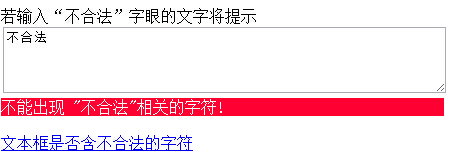
关键代码实现
注意:若浏览器中无法正常运行,请尝试切换浏览模式。以下是实现该功能的关键代码部分。
    $(document).ready(function () {
      $("#message").inputNotes(
       {
         sexwarning: {
           pattern: /(^|\s)色情(\s|$)/ig,
           type: 'warning',
           text: 'Do not type "sex"!'
         },
         numbersnote: {
           pattern: /[0-9]/,
           type: 'note',
           text: 'Do not type numbers!'
         }
       }
      );
    });
完整代码示例
具体分享代码如下:
<!DOCTYPE html>
<html xmlns="http://www.w3.org/1999/xhtml">
<head>
  <meta http-equiv="Content-Type" content="text/html; charset=utf-8" />
  <title>基于正则表达式的轻量提示插件</title>
  <script src="js/jquery-1.7.1.js"></script>
  <script src="js/jquery.inputnotes-0.6.js"></script>
</head>
<style>
  div.inputnotes div.warning
  {
    color: #fff;
    background: #f03;
  }
</style>
<body>
  若输入“不合法”字眼的文字将提示<br />
  <textarea  id="message" cols="60" rows="4" ></textarea>
  <a href="javascript:void(null);" onclick="alert( $('#message').hasInputNotes() )"><br />文本框是否含不合法的字符</a>
  <script>
    $(document).ready(function () {
      $("#message").inputNotes(
       {
         sexwarning: {
           pattern: /(^|\s)不合法(\s|$)/ig,
           type: 'warning',
           text: '不能出现 "不合法"相关的字符!'
         },
         numbersnote: {
           pattern: /[0-9]/,
           type: 'note',
           text: 'Do not type numbers!'
         }
       }
      );
    });

  </script>
</body>
</html>
以上就是基于正则表达式的轻量提示插件的完整示例,希望读者能够喜欢并将其应用到实际开发中。
作者最新文章
ES6模块化中js文件怎么用import和export交互
2026-11-05 17:00:48
JS读取本地文件时报错或无响应的常见原因
2026-11-05 16:32:31
let、const与var的区别:JavaScript变量声明最佳实践
2026-11-05 14:16:38
JS中直接定义静态二维数组的字面量写法
2026-11-05 14:16:08
JS 怎么查找字符串中所有匹配项的位置
2026-11-05 14:15:53