

JavaScript 实现动态变色 3D 旋转圆圈特效
作者:窗边听雨时间:2026-10-29 13:20:23浏览:184
本文提供一段 JavaScript 代码,用于在网页中实现一个具有 3D 旋转和颜色渐变效果的立体圆圈动画。该特效在黑色背景下展示多色圆点随空间位置变化颜色,适合用于网页装饰或前端交互演示。
JavaScript 3D 旋转圆圈特效介绍
本文介绍如何使用 JavaScript 创建一个具有 3D 视觉效果的动态圆圈实例,供读者参考学习。
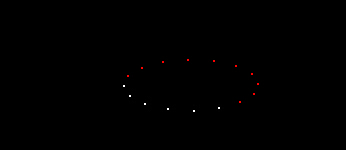
此处采用javascript编程手段构建具备动态变换功能的立体圆形图案,该特效应用于网页端的3D视觉呈现,实现圆圈的形态与色彩交替变化效果。构成圆周各节点的颜色存在差异,在纯黑色背景衬托下视觉效果更为清晰。
运行效果如下图所示:
具体代码如下:
完整代码实现
<html>
<head>
<title>变色的圆圈</title>
<style type="text/css">
<!--
body {
background-color: #000000;
}
-->
</style></head>
<body>
<script language="JavaScript">
var CoLoUrS=new Array('ff0000','ffffff','0000ff','ffffff');
var dots=16;
var step=0.3;
var a_StEp=0.05;
var RunTime=Xpos =Ypos =count_a=count=currStep =0;
var cntr=70;
var move_a=move=1;
var curColour;
document.write('<div id="moveDiv" style="position:absolute;top:0px;left:0px">');
for (i=0; i < dots; i++){
  document.write('<div style="position:absolute;top:0px;left:0px;width:2px;height:2px;background:#ffffff;font-size:2px"></div>');
}
document.write('</div>');
var x = moveDiv.all;
var numdiv=new Array(x[0],x[1],x[2],x[3],x[4],x[5],x[6],x[7],x[8],x[9],x[10],x[11],x[12],x[13],x[14],x[15]);
function colourStep(){
  count+=move;
  if (count >= numdiv.length) {count=0;count_a+=move}
  if (count_a == CoLoUrS.length) count_a=0;
  numdiv[count].style.background=CoLoUrS[count_a];
  setTimeout('colourStep()',100)
}
function divmove(){
  Ypos = document.body.scrollTop+document.body.offsetHeight/2 + document.body.offsetHeight/2.8*Math.cos((RunTime)/3)*Math.cos(RunTime/10);
  Xpos= document.body.scrollLeft+document.body.offsetWidth/2 + document.body.offsetWidth/2.4*Math.sin((RunTime)/5)*Math.sin(RunTime/20);
  RunTime+=a_StEp;
  Tma=setTimeout("divmove()", 10);
}
function overturn(){
  for (i=0;i<numdiv.length;i++){
    numdiv[i].style.top = Ypos+cntr*Math.cos((currStep + i*4)/10.2)*Math.cos(currStep/10);
    numdiv[i].style.left= Xpos+cntr*Math.sin((currStep + i*4)/10.2);
  }
  currStep+=step;
  setTimeout("overturn()",10);
}
function Shrink(){
  cntr-=0.5;
  GoShrink=setTimeout('Shrink()',10);
  if (cntr <=20){clearTimeout(GoShrink);Swell()}
}
function Swell(){
  cntr+=0.5;
  GoSwell=setTimeout('Swell()',10);
  if (cntr >=70){clearTimeout(GoSwell);Shrink()}
}
function transfer(){
  divmove();  //移动层
  overturn();  //使层进行翻转
  Shrink();  //改变层的大小
  colourStep();  //变换层的颜色
}
transfer();
</script>
</body>
</html>
希望本文提供的代码示例对读者掌握 JavaScript 程序设计有所帮助。
作者最新文章
anime.js 快速入门:怎么引入库并编写第一个 DOM 动画
2026-11-05 14:22:43
在线JS解密后变量名仍乱码?结合浏览器DevTools调试还原
2026-11-04 20:26:01
怎么在浏览器中运行JavaScript代码并查看输出结果
2026-11-04 09:07:33
JS 获取屏幕分辨率:window.screen.width 与 height 用法
2026-11-04 08:52:48
为什么推荐用DOMContentLoaded代替window.onload初始化JS
2026-11-04 08:42:33