

JavaScript实现支持拖动与关闭的浮动窗口详解
本文详细介绍如何使用JavaScript实现一个支持鼠标拖动和关闭功能的浮动窗口。通过配置bodycontent、title及removeable等参数,可自定义窗口内容与行为。代码兼容Firefox与Chrome,IE8存在轻微兼容问题,适合需要轻量级交互组件的前端场景。
JavaScript浮动窗口功能概述
本文通过具体实例,演示了如何利用JavaScript创建一个浮动窗口组件。
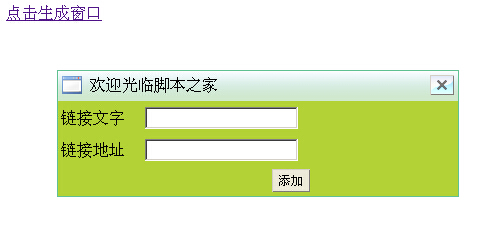
该浮动窗口功能完整,支持鼠标拖动交互及关闭操作。用户点击链接文字后,即可触发弹出层窗口(即弹出式对话框)的显示。
核心参数配置说明
在使用该组件时,需关注以下核心参数的配置说明:
bodycontent:指定窗口内部需要展示的具体内容;title:设置窗口顶部的标题文本;removeable:布尔值,用于控制窗口是否允许被拖动。
高度计算与兼容性注意事项
需要注意的是,内容区域的有效高度为设定总高度减去30px(即height-30px)。因此,在调用时需精确计算并预留好显示内容的实际高度与宽度。
兼容性方面,该实现方案在Firefox或Chrome浏览器下表现最佳;在IE8环境下运行时,可能会遇到一些微小的显示问题。
如需查看实际运行效果,可访问以下链接:
http://demo.jb51.net/js/2015/js-float-window-mousemove-codes/
具体的运行效果如下图所示:
完整代码实现
以下是实现该功能的具体代码部分:
<html>
<head>
<title>Js弹出浮动窗口,支持鼠标拖动和关闭</title>
<meta http-equiv="Content-Type" content="text/html; charset=utf-8" />
<script type="text/javascript">
/**
关于一些参数说明:
*bodycontent:要在窗口显示的内容,dom对象
*title:窗口标题,字符串类型
*removeable:窗口能否拖动,布尔类型
*注意:内容窗体的高度是height-30px,请计算好你要显示的内容的高度和宽度。弹出窗的id为"223238909",所以你的页面不要再取值为"223238909"的id了,以防js执行出错*/
function createdialog(width,height,bodycontent,title,removeable){
 if(document.getElementById("www_jb51_net")==null){
  /*创建窗口的组成元素*/
  var dialog = document.createElement("div");
  var dialogtitlebar= document.createElement("div");
  var dialogbody = document.createElement("div");
  var dialogtitleimg = document.createElement("span");
  var dialogtitle = document.createElement("span");
  var dialogclose = document.createElement("span");
  var closeaction = document.createElement("button");
  /*为窗口设置一个id,id如此怪异是为了尽量避免与其他用户取的id相同而出错*/
  dialog.id = "223238909";
  /*组装对话框标题栏,按从里到外的顺序组装*/
  dialogtitle.innerHTML = title;
  dialogtitlebar.appendChild(dialogtitleimg);
  dialogtitlebar.appendChild(dialogtitle);
  dialogtitlebar.appendChild(dialogclose);
  dialogclose.appendChild(closeaction);
  /*组装对话框主体内容*/
  if(bodycontent!=null){
   bodycontent.style.display = "block";
   dialogbody.appendChild(bodycontent);
  }
  /*组装成完整的对话框*/
  dialog.appendChild(dialogtitlebar);
  dialog.appendChild(dialogbody);
  /*设置窗口组成元素的样式*/
  var templeft,temptop,tempheight//窗口的位置(将窗口放在页面中间的辅助变量)
  var dialogcssText,dialogbodycssText;//拼出dialog和dialogbody的样式字符串
  templeft = (document.body.clientWidth-width)/2;
  temptop = (document.body.clientHeight-height)/2;
  tempheight= height-30;
 dialogcssText= "position:absolute;background:#65c294;padding:1px;border:4px;top:"+temptop+"px;left:"+templeft+"px;height:"+height+"px;width:"+width+"px;";
  dialogbodycssText = "width:100%;background:#ffffff;"+"height:" + tempheight + "px;";
  dialog.style.cssText = dialogcssText;
  dialogtitlebar.style.cssText = "height:30px;width:100%;background:url(images/titlebar.png) repeat;cursor:move;";
  dialogbody.style.cssText  = dialogbodycssText;
  dialogtitleimg.style.cssText = "float:left;height:20px;width:20px;background:url(images/40.gif);"+"display:block;margin:4px;line-height:20px;";
  dialogtitle.style.cssText = "font-size:16px;float:left;display:block;margin:4px;line-height:20px;";
  dialogclose.style.cssText  = "float:right;display:block;margin:4px;line-height:20px;";
  closeaction.style.cssText = "height:20px;width:24px;border-width:1px;"+"background-image:url(images/close.png);cursor:pointer;";
  /*为窗口元素注册事件*/
  var dialogleft = parseInt(dialog.style.left);
  var dialogtop = parseInt(dialog.style.top);
  var ismousedown = false;//标志鼠标是否按下
  /*关闭按钮的事件*/
  closeaction.onclick = function(){
   dialog.parentNode.removeChild(dialog);
  }
  /*实现窗口的移动,这段代码很典型,网上很多类似的代码*/
  if(removeable == true){
   var ismousedown = false;
   var dialogleft,dialogtop;
   var downX,downY;
   dialogleft = parseInt(dialog.style.left);
   dialogtop = parseInt(dialog.style.top);
   dialogtitlebar.onmousedown = function(e){
   ismousedown = true;
   downX = e.clientX;
   downY = e.clientY;
   }
   document.onmousemove = function(e){
    if(ismousedown){
    dialog.style.top = e.clientY - downY + dialogtop + "px";
    dialog.style.left = e.clientX - downX + dialogleft + "px";
    }
   }
   /*松开鼠标时要重新计算当前窗口的位置*/
   document.onmouseup = function(){
    dialogleft = parseInt(dialog.style.left);
    dialogtop = parseInt(dialog.style.top);
    ismousedown = false;
   }
  }
  return dialog;
 }//end if(if的结束)
}
</script>
<style>
table{background:#b2d235;}
button{font-size:12px;height:23;background:#ece9d8;border-width:1;}
#linkurl,#linkname,#savelink{width:100px;}
</style>
</head>
<body>
<!-- 显示窗口的地方 -->
<div id="here"></div><a id="clickhere" href="#">点击生成窗口</a>
<!-- 要嵌入到窗口的内容 -->
<div id="login" style="display:none;">
 <form action="#" method="post" onSubmit="return false;">
  <table width="400" height="95">
  <tr>
   <td width="78">链接文字</td>
   <td width="168"><input name="link.name" type="text"/></td>
   <td width="138" id="linktext"></td>
  </tr>
  <tr>
   <td>链接地址</td>
   <td><input name="link.url" type="text"/></td>
   <td id="linkurl"></td>
  </tr>
  <tr>
   <td></td>
   <td><button type="submit" style="float:right;">添加</button></td>
   <td id="savelink"></td>
  </tr>
  </table>
</form>
</div>
<script type="text/javascript">
var here = document.getElementById("here");
var login = document.getElementById("login");
var clickhere = document.getElementById("clickhere");
clickhere.onclick = function(){
here.appendChild(createdialog(400,95+30,login,"欢迎光临本站",true));
}
</script>
</body>
</html>
希望上述内容能为各位的JavaScript程序设计提供有效的参考与帮助。
JS处理含Emoji或中文的字符串转数组乱码问题
2026-11-05 16:12:28
JS怎么使用展开运算符合并对象
2026-11-05 14:42:18
ES6+环境下判断JS对象为空的简洁写法
2026-11-05 12:12:23
怎么通过replacer函数自定义JS中JSON的格式化输出
2026-11-05 11:19:44
JS正则表达式基础:字面量与RegExp构造函数的区别及常用元字符
2026-11-05 11:16:58