

原生JavaScript实现Tab选项卡切换功能
作者:像素猫时间:2026-10-29 04:32:33浏览:235
本文详细介绍如何使用原生JavaScript实现轻量级的Tab选项卡切换功能。通过封装getByClassName方法解决浏览器兼容性问题,并支持点击与鼠标悬停两种交互模式。代码简洁高效,无需依赖jQuery等庞大库,适用于需要快速实现标签页切换的前端场景。
获取类名元素的核心逻辑
分析使用原生JavaScript获取具有特定类名元素的代码实现:
具体代码如下:
getByClassName:function(className,parent){
var elem = [],
node = parent != undefined&&parent.nodeType==1?parent.getElementsByTagName('*'):document.getElementsByTagName('*'),
p = new RegExp("(^|\\s)"+className+"(\\s|$)");
for(var n=0,i=node.length;n<i;n++){
if(p.test(node[n].className)){
elem.push(node[n]);
                }
            }
return elem;
        }
parent参数为可选,但需先判断其是否存在且为DOM节点(parent != undefined&&parent.nodeType==1)。其中nodeType == 1用于判断节点是否为DOM元素,因为在Firefox浏览器中空白节点也被视为节点(.childnodes),利用该属性可排除空白符,确保只处理有效的DOM元素。
移除元素的类名操作:
具体代码如下:
var cur = new RegExp(this.sCur,'g'); //this.sCur即为类名,此处通过变量保存,例如:this.sCur = "cur";
this.oTab_btn[n].className = this.oTab_btn[n].className.replace(cur,'');
Tab选项卡配置与调用示例
调用示例:
具体代码如下:
<!doctype html>
<html lang="en">
<head>
<meta charset="UTF-8">
<title>Document</title>
<style type="text/css">
body,p,ul,li {padding: 0;margin: 0;}
ul {list-style: none;}
h3 {padding: 5px;background-color: #999;margin-bottom: 10px;}
pre {border: 1px dotted #000;}
.explan {padding: 10px;color: #333;line-height: 1.6;}
.box {width: 300px;height:100px;border: 1px solid #ccc;}
.box ul{height: 30px;line-height: 30px;}
.box ul li {float: left;display: inline;width: 150px;text-align: center;background-color: #eee;cursor: pointer;}
.box .tab-cur {background-color: #000;color: #fff;}
.box p {display: none;padding: 30px;}
/*tabB*/
#tabB {width: 450px;}
.box .tab-cur02 {background-color: #025023;}
</style>
</head>
<body>
<div class="explan">
<strong>使用阅读 :</strong> <br>
{'tabBtn':'#tabA .tab-i','tabCon':'#tabA .tab-c','cur':'tab-cur'} 【必选】 <br>
(1)'tabBtn':'#tabA .tab-i','tabCon':'#tabA .tab-c' 选择器:仅支持 #id .className,(ID + 空格 + 类名) 【必选】<br>
(2)'cur':'tab-cur'(默认) :用于标识切换按钮的当前状态(类名)【必选】<br>
(3)'type':'mouseover'|| 'clicl' 默认为点击事件 【可选】
</div>
<h3>tabA</h3>
<pre>new LGY_tab({'tabBtn':'#tabA .tab-i',
'tabCon':'#tabA .tab-c',
'cur':'tab-cur'
    });
</pre>
<div class="box" id="tabA">
<ul>
<li class="tab-i">btn-A</li>
<li class="tab-i">btn-B</li>
</ul>
<p class="tab-c">con-A</p>
<p class="tab-c">con-B</p>
</div>
<h3>tabB</h3>
 <pre>new LGY_tab({'tabBtn':'#tabB .tab-i',
 'tabCon':'#tabB .tab-k',
 'cur':'tab-cur02',
 'type':'mouseover'
 });
 </pre>
 <div class="box" id="tabB">
 <ul>
 <li class="tab-i">btn-A</li>
 <li class="tab-i">btn-B</li>
 <li class="tab-i">btn-C</li>
 </ul>
 <p class="tab-k">con-A</p>
 <p class="tab-k">con-B</p>
 <p class="tab-k">con-C</p>
 </div>
 <script type="text/javascript" src="下方的代码段.js"></script>
 <script type="text/javascript">
 //
 new LGY_tab({'tabBtn':'#tabA .tab-i',
 'tabCon':'#tabA .tab-c',
 'cur':'tab-cur'
 });
 //
 new LGY_tab({'tabBtn':'#tabB .tab-i',
 'tabCon':'#tabB .tab-k',
 'cur':'tab-cur02',
 'type':'mouseover'
 });
 //test
 //
 new LGY_tab({'tabBtn':'#tabB .tab-j',
 'tabCon':'#tabB .tab-k',
 'cur':'tab-cur02',
 'type':'mouseover'
 });
 </script>
</body>
</html>
完整JavaScript实现代码
JS详细代码:
具体代码如下:
function LGY_tab(option){
this.oTab_btn = this.getDom(option.tabBtn);//切换点击的元素
this.oTab_clist = this.getDom(option.tabCon); //切换的内容
if(!this.oTab_btn || !this.oTab_clist) return;
this.sCur = option.cur; //激活的状态
this.type = option.type || 'click';
this.nLen = this.oTab_btn.length;
this.int();
}
LGY_tab.prototype = {
getId:function(id){
return document.getElementById(id);
    },
getByClassName:function(className,parent){
var elem = [],
node = parent != undefined&&parent.nodeType==1?parent.getElementsByTagName('*'):document.getElementsByTagName('*'),
p = new RegExp("(^|\\s)"+className+"(\\s|$)");
for(var n=0,i=node.length;n<i;n++){
if(p.test(node[n].className)){
elem.push(node[n]);
            }
        }
return elem;
    },
getDom:function(s){
var nodeName = s.split(' '),
p = this.getId(nodeName[0].slice(1)),
c = this.getByClassName(nodeName[1].slice(1),p);
if(!p || c.length==0) return null;
return c;
    },
change:function(){
var cur = new RegExp(this.sCur,'g');
for(var n=0;n<this.nLen;n++){
this.oTab_clist[n].style.display = 'none';
this.oTab_btn[n].className = this.oTab_btn[n].className.replace(cur,'');
        }
    },
int:function(){
var that = this;
this.oTab_btn[0].className += ' '+this.sCur;
this.oTab_clist[0].style.display = 'block';
for(var n=0;n<this.nLen;n++){
this.oTab_btn[n].index = n;
this.oTab_btn[n]['on'+this.type] = function(){
that.change();
that.oTab_btn[this.index].className +=' ' + that.sCur;
that.oTab_clist[this.index].style.display = 'block';
            }
        }
    }
}
最终效果图展示:
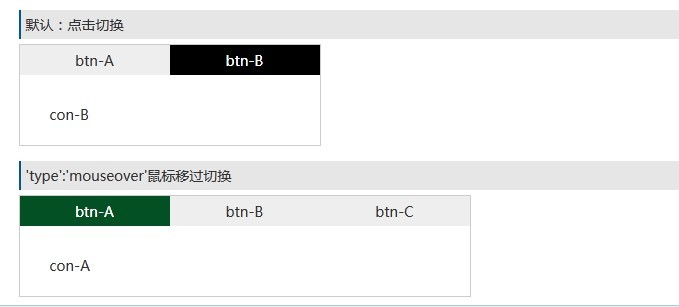
效果是否理想?该方案兼容性良好,代码简洁,完全可以替代功能庞大的jQuery选项卡切换插件。
作者最新文章
适合JavaScript初学者的实战项目:制作简易待办事项列表
2026-11-05 16:17:07
JS打开新标签页时怎么通过URL传递参数
2026-11-05 12:21:08
sigma.js 自定义节点样式:设置颜色、大小及标签显示的技巧
2026-11-05 09:55:00
JS 生成的统计图怎么导出为 PNG 图片或 PDF 文件?
2026-11-05 09:37:58
JavaScript事件处理实例:点击、输入与表单验证代码
2026-11-05 09:06:19