TypeScript 中类实现接口的完整指南:语法、多接口与可选属性处理
本文详解 TypeScript 中如何使用 implements 关键字让类实现接口。涵盖基本语法、构造函数参数简化、多接口同时实现、缺失属性报错处理,以及可选属性在类实例中不自动生成的注意事项,帮助开发者规范类型定义。
TypeScript 类实现接口的语法与验证
在 TypeScript 中,可以使用 implements 子句让类实现接口,例如 class Developer implements Employee {}。implements 子句的作用是验证类是否定义了接口要求的所有属性和方法,从而确保类满足接口的规范。
interface Employee {
  id: number;
  name: string;
  tasks: string[];

  doWork(): void;
}

class Developer implements Employee {
  constructor(
    public id: number, public name: string, public tasks: string[]
   ) {
    this.id = id;
    this.name = name;
    this.tasks = tasks;
  }

  doWork() {
    console.log(`${this.name} writes code`);
  }
}

const dev = new Developer(1, 'Tom', ['develop', 'test', 'ship']);

console.log(dev.name); // 👉️ "Tom"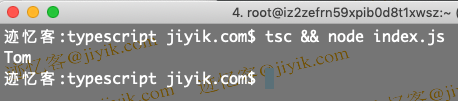
我们可以点击上方的运行示例按钮来查看代码执行的具体结果。
implements 子句的核心功能是检查一个类是否符合特定接口的定义要求。
如果类没有正确实现接口所规定的成员,TypeScript 编译器会抛出错误。
如果类在初始化时不需要将特定值作为参数传入,可以直接使用类属性进行定义。
interface Employee {
  id: number;
  name: string;
  tasks: string[];

  address: {
    country: string;
    city: string;
  };

  doWork(): void;
}

class Developer implements Employee {
  tasks: string[] = ['develop', 'test'];

  address: { country: string; city: string } = {
    country: 'Austria',
    city: 'Linz',
  };

  constructor(public id: number, public name: string) {
    this.id = id;
    this.name = name;
  }

  doWork() {
    console.log(`${this.name} writes code`);
  }
}

const dev = new Developer(1, 'Tom');

console.log(dev.name); // 👉️ "Tom"
上述示例中,类属性被直接赋值,同时在构造函数方法中接收参数进行初始化。
类实现多个接口的应用
利用这种方法,一个类可以同时实现多个接口。
interface Employee {
  id: number;
  salary: number;
}

interface Person {
  name: string;
}

class Developer implements Employee, Person {
  constructor(
    public id: number, public name: string, public salary: number
  ) {
    this.id = id;
    this.name = name;
    this.salary = salary;
  }
}

const dev = new Developer(1, 'Tom', 100);

console.log(dev.name); // 👉️ "Tom"
Developer 类同时实现了 Employee 和 Person 接口。
一个类可以根据实际需求实现任意数量的接口。
在实现接口时,必须确保类中包含了接口定义的所有必要属性和方法。
interface Employee {
  id: number;
  salary: number;
}

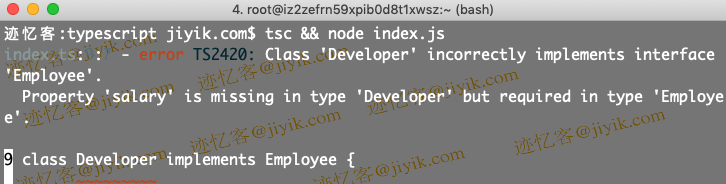
// ⛔️ Class 'Developer' incorrectly implements interface 'Employee'.
  // Property 'salary' is missing in type 'Developer'
  // but required in type 'Employee'.ts(2420)
class Developer implements Employee {
  constructor(public id: number) {
    this.id = id;
  }
}
处理缺失属性与可选属性
Developer 类虽然实现了 Employee 接口,但由于未定义必需的薪水属性,因此会触发错误。
解决方法是将 salary 属性添加到 Developer 类中,或者在接口定义中将该属性标记为可选。
interface Employee {
  id: number;
  salary?: number; // 👈️ optional property (can be undefined)
}

class Developer implements Employee {
  constructor(public id: number) {
    this.id = id;
  }
}
当 salary 属性被标记为可选时,类在实现接口时便无需定义该属性。
implements 子句的作用仅仅是验证类是否满足特定接口的结构要求,因此必须确保所有必需的属性和方法都已定义。
implements子句的目的仅在于检查类是否可以被视作接口类型,而不改变类的实际行为。
implements 子句不会修改类或其内部方法的类型定义。
interface Employee {
  multiply(a: number, b: number): number;
}

class Developer implements Employee {
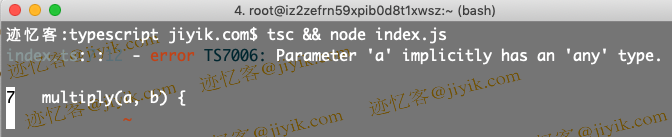
  // ⛔️ Error: Parameter 'a' implicitly has an 'any' type.ts(7006)
  multiply(a, b) {
    return a * b;
  }
}
implements 子句的类型检查限制
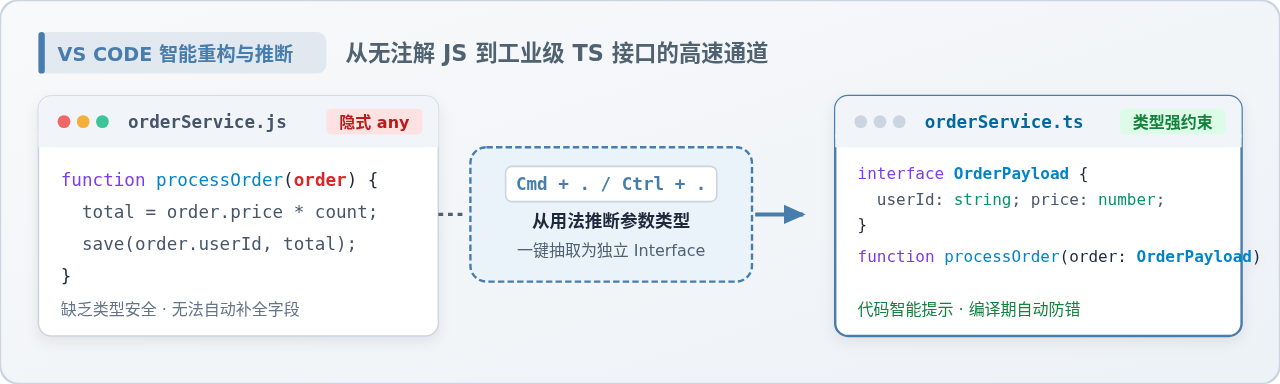
尽管该类实现了为 multiply 函数定义类型的 Employee 接口,但类中的 multiply 方法并不会自动获得类型约束。
这是因为 implements 子句仅用于类型检查,并不改变类的类型结构。
interface Employee {
  id: number;
  name?: string; // 👈️ optional property
}

class Developer implements Employee {
  constructor(public id: number) {
    this.id = id;
  }
}

const dev = new Developer(1);

// ⛔️ Error: Property 'name' does not exist on type 'Developer'.ts(2339)
console.log(dev.name);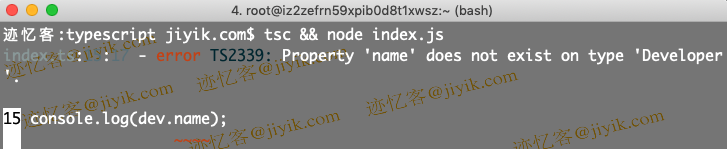
如果通过可选属性实现接口,该属性不会自动在类实例中创建。
我们在 Employee 接口中使用问号将 name 属性设置为可选。
这意味着该属性的值可以是字符串类型,也可以是 undefined。
Developer 类正确实现了 Employee 接口,因为 name 属性并非必需,但该属性不会自动分配给类的实例。
到此这篇关于TypeScript 中实现接口的类的文章就介绍到这了,更多相关TypeScript 接口的类内容请搜索本站以前的文章或继续浏览下面的相关文章希望大家以后多多支持本站!
怎么在本地运行JavaScript脚本:Node.js下载安装与环境配置教程
2026-11-05 09:02:33
JavaScript开发环境怎么搭建:Node.js安装与VS Code配置指南
2026-11-03 23:36:59
JavaScript零基础入门:环境搭建与第一个Hello World
2026-11-03 23:34:09
NW.js 是什么:基于 Chromium 和 Node.js 的桌面应用框架
2026-11-03 15:14:00
nvm、n 和官方安装包:哪种 Node.js 升级方式更适合你
2026-11-03 14:54:28