

llqrcode.js 实现图片二维码识别与解析
作者:阿沐时间:2026-10-25 22:57:45浏览:444
本文介绍如何使用 llqrcode.js 库实现从图片中识别二维码并解析其信息。通过引入该脚本,开发者可以方便地在网页端完成二维码扫描功能,获取二维码包含的 URL 或其他数据。
正文
llqrcode.js 具备扫描二维码的能力,主要用于从图片中识别二维码,并能解析出二维码所包含的信息。
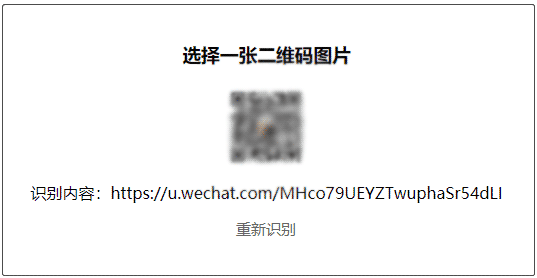
代码
<!DOCTYPE html>
<html>
<head>
    <meta charset="UTF-8">
    <title>llqrcode识别二维码</title>
    <script src="llqrcode.js"></script>
    <script>
        function getUrl(e,param){
            analyticCode.getUrl(
                param,e,function(url,param){
                    document.querySelector("#uploadQrcode").style.display = "none";
                    document.querySelector("#uploadQrcode_preview").innerHTML ="<img src='"+param+"' />";
                    document.querySelector("#qrcodeUrl").innerHTML ="识别内容:"+ url;
                    document.querySelector("#rescan").style.display = "block";
                }
            )
        }

        let getObjectURL = function(file){
            let url = null ;
            if (window.createObjectURL!=undefined) {
                url = window.createObjectURL(file) ;
            } else if (window.URL!=undefined) {
                url = window.URL.createObjectURL(file) ;
            } else if (window.webkitURL!=undefined) {
                url = window.webkitURL.createObjectURL(file) ;
            }
            return url ;
        }
        window.analyticCode = {
            getUrl : function(type,elem,fn){
                let url = null,src = null;

                if(type === 'img-url'){
                    url = elem.src;
                }else if(type === 'file-url' && elem.files.length > 0){
                    url = getObjectURL(elem.files[0]);
                }
                qrcode.decode(url);
                qrcode.callback = function(imgMsg){
                    fn(imgMsg,url);
                }
            }
        }
    </script>
    <style>
        h3{
            text-align: center;
            margin-top: 100px;
        }
        #uploadQrcode{
            width: 80px;
            height: 80px;
            margin:20px auto 0;
            border: 2px dashed #ccc;
            border-radius: 20px;
            font-size: 25px;
            line-height: 80px;
            text-align: center;
            color: #ccc;
            position: relative;
            cursor: pointer;
        }
        #selectQrcode{
            position: absolute;
            top: 0;
            left: 0;
            width: 100%;
            height: 100%;
            opacity: 0;
            cursor: pointer;
        }
        #qrcodeUrl{
            text-align: center;
            margin-top: 15px;
        }
        #uploadQrcode_preview{
            width: 80px;
            height: 80px;
            margin:20px auto 0;
        }
        #uploadQrcode_preview img{
            width: 80px;
            height: 80px;
        }
        #rescan{
            text-align: center;
            text-decoration: none;
            color: #666;
            font-size: 15px;
            margin-top: 15px;
            display: none;
        }
    </style>
</head>
<body>
    <h3>选择一张二维码图片</h3>
    <div id="uploadQrcode">
        <span>+</span>
        <input type="file" id="selectQrcode" onChange="getUrl(this,'file-url')" />
    </div>
    <!-- 图片预览 -->
    <div id="uploadQrcode_preview"></div>
    <!-- 识别结果 -->
    <p id="qrcodeUrl"></p>
    <a href="" id=" rel="external nofollow" rescan">重新识别</a>
</body>
</html>
llqrcode.js 下载
以上就是 llqrcode js 识别二维码解析二维码信息实例的详细内容,更多关于 llqrcode js 识别解析二维码信息的资料请关注本站其它相关文章!
作者最新文章
为什么叫JavaScript:语言命名由来及与Java的历史渊源
2026-11-05 11:37:48
JS获取当前时间年月日时分秒并格式化为YYYY-MM-DD HH:mm:ss
2026-11-04 21:25:21
不同语言间JS与Java/Python加密结果不一致怎么办
2026-11-04 18:27:23
Mock.js 拦截 Axios 和 Fetch 请求的原理与配置方法
2026-11-04 08:13:59
JS怎么获取当前日期并格式化为YYYY-MM-DD
2026-11-03 18:47:03