

基于Node.js与原生JavaScript实现三级联动菜单
作者:墨池时间:2026-10-26 04:21:58浏览:406
本文介绍如何使用Node.js搭建后端服务,结合原生JavaScript面向对象封装,实现前端三级联动菜单功能。通过Ajax异步请求获取城市数据,动态生成DOM结构,完整展示从接口定义到前端交互的全流程代码实现。
本文分享了一个使用JavaScript配合Node.js实现三级联动菜单的完整示例,供读者参考学习。
项目分析
1、效果
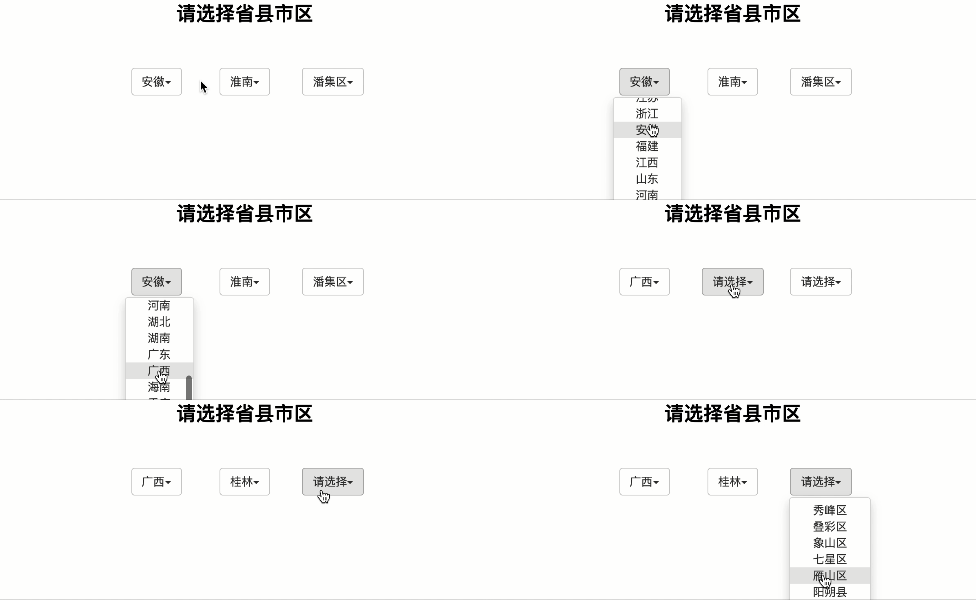
2、前端
采用面向对象的设计思路。
首先分析下拉列表的结构,构建对应的HTML结构和CSS样式。
绑定相关事件,包括点击和鼠标悬停等交互操作。
导入预先编写好的JavaScript文件,用于构造菜单项。
利用Ajax技术向服务端发起请求以获取所需数据。
根据每次获取的数据动态生成页面结构。
3、服务端
制定接口文档,明确接口定义、服务地址及端口号。
负责存储相关数据。
创建服务器实例。
接收来自前端的Ajax请求,并响应相应的数据。
代码
1、面向对象代码
export default class Select{
    //添加css样式
    static  addCSS(selector,style,title){
        if(title===undefined) title="xietian";
        var arr=Array.from(document.styleSheets);
        var  styleSheet=arr.reduce(function(value,item){
            if(item.title===title)return item;
            return value;
        },null);
        if(!styleSheet){
            var s=document.createElement("style");
            s.title=title;
            document.head.appendChild(s);
            styleSheet=document.styleSheets[document.styleSheets.length-1];
        }
        var str="";
        for(var prop in style){
            str+=prop.replace(/[A-Z]/g,function(value){
                return "-"+value.toLowerCase();
            })+":"+(typeof style[prop]==="number" ? style[prop]+"px" : style[prop])+";";
        }
        if(styleSheet.addRule){
            styleSheet.addRule(selector,str,styleSheet.cssRules.length);
        }else{
            styleSheet.insertRule(selector+"{ "+str+" }",styleSheet.cssRules.length);
        }
    }

//定义全局变量
    button;
    ul;
    class;
    constructor(parent,_class) {
        // this.id = _id;
        this.class = _class;
        this.elem = this.createEle();
        this.appendTo(parent);
    }
    //创建元素
    createEle() {
        const div = document.createElement('div');
        div.className = "dropdown " + this.class;
        this.button = document.createElement('button');
        this.button.className = "btn btn-default dropdown-toggle";
        this.button.addEventListener('click',e=>this.clickHander(e))
        this.content = document.createElement('span');
        this.content.innerText = "请选择";
        const carte = document.createElement('span');
        this.content.className = 'content';
        carte.className = 'carte';
        this.button.appendChild(this.content);
        this.button.appendChild(carte);
        this.ul = document.createElement('ul');
        this.ul.className = "dropdown-menu";
        this.button.appendChild(this.ul);
        div.appendChild(this.button)
        return div;
    }
    //添加点击事件
    clickHander(e) {
        this.ul.classList.toggle('on');
    }
   //增加li
    addli(list) {
        if(!list) return;
        const frg = document.createDocumentFragment();
        list.forEach(item=>{
            const li = document.createElement('li');
            li.innerHTML = item;
            li.addEventListener('click',e=>this.liHandler(e));

            frg.appendChild(li);
        })
        this.ul.appendChild(frg);
    }
    //给li添加的点击事件
    liHandler(e) {
        this.content.innerHTML = e.target.innerText;

    }
    //添加css样式
    addCSS() {
        Select.addCSS(".dropdown",{
            position: "relative",
            boxSizing: "border-box",
            width: "8.33333333%",
            display:"inline-block",
            minHeight: "1px",
            paddingRight: "15px",
            paddingLeft: "15px",
            fontSize: "14px",
            lineHeight: "1.42857143",
            color: "#333333",
        })
        Select.addCSS(".btn",{
            display:'inlineBlock',
            marginBottom:'0',
            outline:"none",
            fontWeight:'normal',
            textAlign:'center',
            whiteSpace:'nowrap',
            verticalAlign:'middle',
            touchAction:'manipulation',
            cursor:'pointer',
            backgroundImage:'none',
            border:'1px solid transparent',
            padding:'6px 12px',
            fontSize:'14px',
            lineHeight:'1.42857143',
            borderRadius:'4px',
            userSelect:'none',
        })
        Select.addCSS(".btn-default",{
           color:'#333',
            backgroundColor:'#fff',
            borderColor:'#ccc',
        })
        Select.addCSS(".btn-default:hover",{
            color:'#333',
            backgroundColor:'#e6e6e6',
            borderColor:'#adadad',
        })
        Select.addCSS(".carte",{
            display:'inline-block',
            width:'0',
            marginLeft: "0",
            height:'0',
            verticalAlign:'middle',
            borderTop:'4px dashed',
            borderRight:'4px solid transparent',
            borderLeft:'4px solid transparent',
        })
        Select.addCSS(".dropdown-menu",{
            position:'absolute',
            top:'100%',
            left:'15px',
            height:'200px',
            overflowY:'scroll',
            zIndex:'1000',
            display:'none',
            float:'left',
            minWidth:'83px',
            padding:'5px 0',
            margin:'2px 0 0',
            fontSize:'14px',
            textAlign:'left',
            listStyle:'none',
            backgroundColor:'#fff',
            backgroundClip:'paddingBox',
            border:'1px solid #ccc',
            border:'1px solid rgba(0, 0, 0, 0.15)',
            borderRadius:'4px',
            boxShadow:'0 6px 12px rgba(0, 0, 0, 0.175)',

        })
        Select.addCSS(".on", {
            display:"block!important",
        })
        Select.addCSS('li',{
            textAlign:"center",
        })
        Select.addCSS('li:hover',{
            backgroundColor:'#e6e6e6',
        })
    }
    //添加到html结构中的位置
    appendTo(parent) {
        if(typeof parent == 'string') parent=document.querySelector(parent);
        parent.appendChild(this.elem);
        this.addCSS();
    }

}
2、向服务器请求ajax
<script type="module">
        import Select from "./select.js";
        // var list = ["北京","上海","广州","深圳","武汉"];

        let citylist,provincelist,countylist,province_content,content_county;

        var sel_p = new Select('.box','province');

        ajax("city.json",(res)=>{
             provincelist = Object.keys(res);
            sel_p.addli(provincelist);
            sel_p.elem.addEventListener('click',clickHandler)
         province_content = document.querySelector('.province .content');
            county()
        })

        var sel_c = new Select('.box','city');

        function clickHandler(e) {
            if(e.target.constructor!== HTMLLIElement) return;
            ajax(`http://10.9.72.252:4001/province/?province=${e.target.innerText.trim()}`,function(res){
                 citylist = Object.keys(res.city)
                sel_c.addli(citylist);
                const province = document.querySelector('.province ul');
                province.addEventListener('click',cityHandler);
            })
        }


        function cityHandler(e) {
            const content_city = document.querySelector('.city .content');
            const li = document.querySelectorAll('.city li');
            const content_county  = document.querySelector('.county .content');
            content_county.innerText=content_city.innerText = "请选择";
            li.forEach(item=>{
                item.remove();
            })
        }
            //获取区县数据
       function county() {
           var sel_conuty = new Select('.box','county');
           sel_c.elem.addEventListener('click',e=>{
            if(e.target.constructor!== HTMLLIElement) return;
            ajax(`http://10.9.72.252:4001/city/?province=${province_content.innerText.trim()}&city=${e.target.innerText.trim()}`,function(res){
                // console.log(res);
                countylist =res.county
                sel_conuty.addli(countylist);
                const city = document.querySelector('.city ul');
                city.addEventListener('click',countyHandler);
            })
           })
       }

       function countyHandler(e) {
        const lis = document.querySelectorAll('.county li');
        const content_coun = document.querySelector('.county .content');
        content_coun.innerText = "请选择";
        lis.forEach(item=>{
                item.remove();
            })

       }
       //封装一个简单的
        function ajax(url, fn) {
                // XMLHttpRequest对象用于在后台与服务器交换数据
                var xhr = new XMLHttpRequest();
                xhr.open('GET', url, true)
                xhr.onreadystatechange = function () {
                    if(xhr.readyState == 4 && xhr.status ==200) {
                        //从服务器获得数据
                        fn.call(this, JSON.parse(xhr.responseText));
                    }
                };
                //发送数据
                xhr.send();
            }
</script>
3、服务端
const http = require('http');
const querystring= require('querystring');
const city = require("../city.json");
const server = http.createServer(function(req, res) {
    res.writeHead(200,{
        "content-type":"text/html;charset=utf-8",
        "Access-Control-Allow-Origin":"*",
        "Access-Control-Allow-Headers":"*",
        //请求头跨域 如果请求头发生修改并且非同源,就需要申请请求头跨域
    });
    req.on('data',function(_data) {
        data=_data
    })
    req.on('end',function () {
        // type是接口名称
        console.log(req.url);
        var type=req.url.trim().split("?")[0].replace(/\//g,"");
        console.log(type);
        if(req.method.toLowerCase()==="get"){
            if(req.url.includes("favicon.ico")) return res.end();//如果get请求的是图标直接返回空跳出
            // 如果是get请求,就从url中重新获取数据存入data变量
            data=req.url.includes("?") ? req.url.split("?")[1] : "";
        }
        // 首先判断是否可以通过JSON解析,如果通过JSON直接转换,如果不能就是querystring解析
        try{
            data=JSON.parse(data);
        }catch(e){
            data=data ? querystring.parse(data) : {};
            console.log(data);

        }
        let o = {}
        switch(type){
            case 'province':
                o = {};
                o.city = obj[data.province];
                break;
            case 'city':
                o.city = obj[data.province];
                o.county = o.city[data.city];
                break;
        }
        res.write(JSON.stringify(o));
        res.end();
    })
})
//监听4001端口
server.listen(4001,"你的地址",function() {
    console.log("服务器开启成功^_^");
})
以上就是本文的全部内容,希望对大家的学习有所帮助,也希望大家多多支持本站。
作者最新文章
macOS卸载Node.js指南:区分Homebrew与pkg安装包的处理方式
2026-11-05 11:28:12
JS逆向入门:浏览器Console调试与Node.js环境搭建指南
2026-11-05 10:57:15
Node.js 大版本升级需要注意哪些破坏性变更
2026-11-03 20:35:44
Node.js官网LTS版与Current版有什么区别
2026-11-03 19:33:49
Windows彻底卸载Node.js:清理AppData残留与PATH环境变量
2026-11-03 19:15:35