

原生JS实现简易抽奖系统
作者:拾光时间:2026-10-24 23:56:39浏览:336
本文介绍如何使用原生JavaScript实现一个简易的抽奖系统。通过控制按钮状态切换,利用定时器每50毫秒更新一次中奖内容,点击停止时清除定时器并展示最终结果。文章提供了完整的HTML结构与JS代码示例,适合前端初学者参考学习。
本文分享了一个使用JavaScript实现的简易抽奖系统的具体代码,供读者参考。
以下是该系统的运行效果展示。
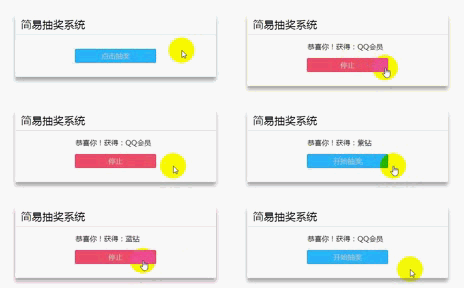
核心原理如下:
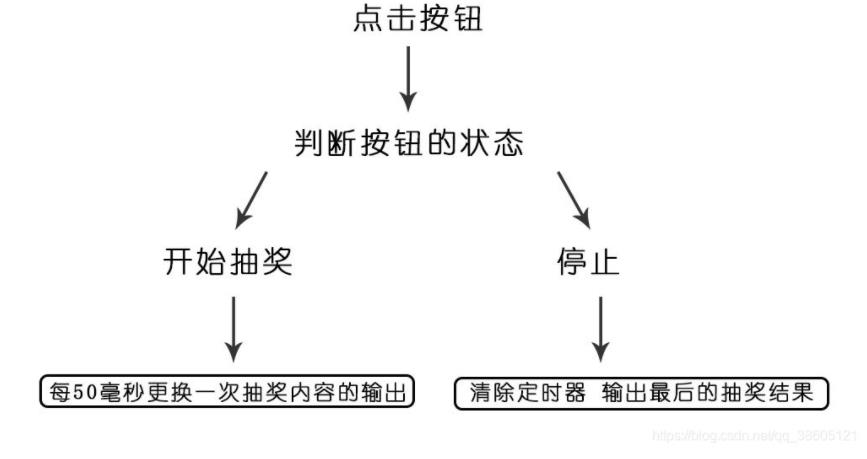
系统通过判断按钮的状态来决定执行“开始抽奖”还是“停止”操作。当变量 i 为 true 时,触发定时器,每隔 50 毫秒更换一次显示的中奖内容;当 i 为 false 时,清除定时器,并固定显示最后的抽奖结果。
下面提供了一张更直观的流程图,帮助理解逻辑。
接下来展示HTML页面结构与CSS样式代码。
<!doctype html>
<html lang="en">
<head>
    <meta charset="UTF-8">
    <title>Document</title>
    <style>
        * {
            margin: 0;
            padding: 0;
        }

        h2 {
            font-weight: normal;
        }

        .box {
            width: 450px;
            height: auto;
            background: #fff;
            border-radius: 3px;
            margin: 50px auto;
            padding-bottom: 1em;
            box-shadow: 0 10px 10px 0 rgba(0, 0, 0, 0.2), 0 5px 15px 0 rgba(0, 0, 0, 0.19);
        }

        .header {
            width: 100%;
            height: auto;
            padding: 0.5em 0.8em;
            border-bottom: 1px solid #ccc;
            box-sizing: border-box;
        }

        .body {
            width: 100%;
            height: auto;
            text-align: center;
        }

        .body:after {
            content: "";
            display: block;
            clear: both;
        }

        .body > div {
            width: 180px;
            margin: 0 auto;
        }

        .body > div > span {
            padding-top: 1em;
            float: left;
        }

        #tip {
            display: none;
        }

        .footer {
            width: 180px;
            height: 30px;
            background: #2ab8ff;
            line-height: 30px;
            text-align: center;
            margin: 1em auto;
            color: #ccc;
            border: 1px solid #2193cc;
            border-radius: 3px;
            cursor: pointer;
        }

        .footer:hover {
            background: #4ec1fb;
        }

    </style>
</head>
<body>
    <div class="box">
        <div class="header">
            <h2>简易抽奖系统</h2>
        </div>
        <div class="body">
            <div>
                <span id="tip">恭喜你!获得:</span>
                <span id="put"></span>
            </div>
        </div>
        <div class="footer">
            点击抽奖
        </div>
</div>
随后是核心的JavaScript逻辑代码部分。
<script>
        /* 获取按钮 */
        var btn = document.querySelector('.footer');
        /* 获取提示的标签 */
        var tip = document.querySelector('#tip');
        /* 获取要输出的标签 */
        var put = document.querySelector('#put');
        /* 定义中奖的项目 */
        var gift = ['QQ会员','黄钻','绿钻','黑钻','紫钻','红钻','蓝钻','钻皇'];
        /* 定义i==true 用于判断 */
        var i = true;
        /* 定义定时器 */
        var Timer;
        var n = 0;

        btn.onclick=function() {
            if (i == true) {
                btn.style.background = '#f1516c';
                btn.style.borderColor = '#db2745';
                tip.style.display = 'block';
                Timer = setInterval(function() {
                    n++;
                    if (n == gift.length) {
                        n = 0;
                    }
                    put.innerHTML = gift[n];
                },50)
                btn.innerHTML = '停止';
                i = false;
            }else {
                btn.style.background = '#2ab8ff';
                btn.style.borderColor = '#2193cc';
                clearInterval(Timer);
                btn.innerHTML = '开始抽奖';
                i = true;
            }
        }
</script>
以上就是本文的全部内容,希望对读者的学习有所帮助,也欢迎大家继续支持本站。
作者最新文章
JS处理含Emoji或中文的字符串转数组乱码问题
2026-11-05 16:12:28
JS怎么使用展开运算符合并对象
2026-11-05 14:42:18
ES6+环境下判断JS对象为空的简洁写法
2026-11-05 12:12:23
怎么通过replacer函数自定义JS中JSON的格式化输出
2026-11-05 11:19:44
JS正则表达式基础:字面量与RegExp构造函数的区别及常用元字符
2026-11-05 11:16:58