

JavaScript与jQuery实现七夕表白弹幕效果教程
作者:青柠时间:2026-10-24 14:10:02浏览:412
本文详细介绍如何使用原生JavaScript和jQuery两种技术实现网页弹幕效果。通过解析关键代码逻辑,展示如何动态生成随机颜色、位置及运动轨迹的弹幕元素,适用于七夕表白等互动场景。包含完整可运行的HTML、CSS及JS代码示例,帮助开发者快速掌握弹幕制作技巧。
JavaScript与jQuery实现七夕表白弹幕效果教程
本文分享利用JavaScript和jQuery技术实现网页弹幕效果的具体方法,供读者参考学习。
原生JavaScript实现弹幕效果
首先展示基于原生JavaScript实现的简易版弹幕效果。
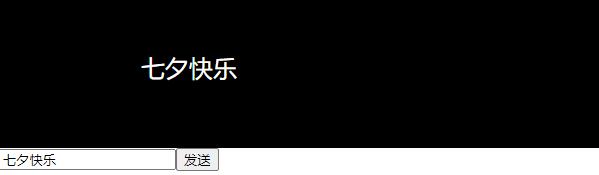
以下是实现该效果的核心代码片段。
<script>
        var si;
        function tangmu(){
            clearInterval(si);
            var text = document.getElementById("text");
            var tangmu = document.getElementById("tangmu");

            var textStyle="<font id=\"textStyle\">"+text.value+"</font>";

            mathHeight = Math.round(Math.random()*tangmu.offsetHeight)+"px";

            var textLeft=tangmu.offsetWidth+"px";

            tangmu.innerHTML=textStyle;

            var textStyleObj = document.getElementById("textStyle");

            textStyleObj.style.left=textLeft;
            textStyleObj.style.top=mathHeight;

            var x=parseInt(textStyleObj.style.left);

            si = setInterval("xunhuan("+x+")",100);

        }
        function xunhuan(left){
            var textStyleObj = document.getElementById("textStyle");
            textStyleObj.style.left=left;

            var x=parseInt(textStyleObj.style.left);

            if(x<textStyleObj.style.width){
                document.getElementById("tangmu").innerHTML="";
                clearInterval(si);
            }else{
                x-=18;
            }

            textStyleObj.style.left=x+"px";
        }
</script>
jQuery实现弹幕技术
接着介绍使用jQuery库实现的弹幕功能,其逻辑与原生JS类似,但代码更为简洁。
jQuery版本的运行效果如下所示。
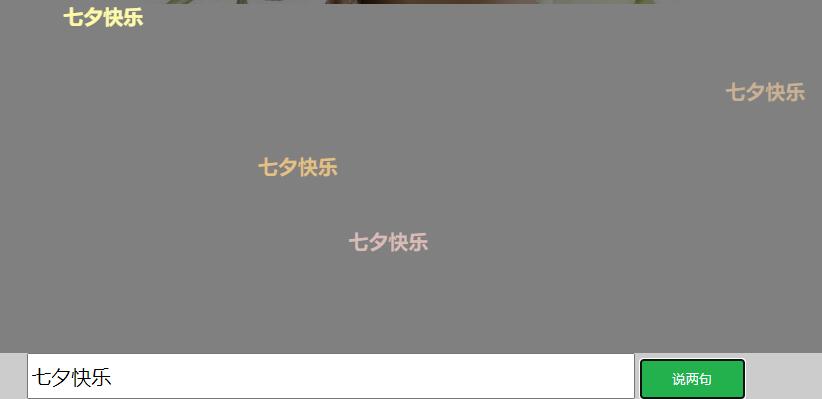
对应的关键实现代码如下。
<script src="jquery-1.11.1.js"></script>
<script>

    $(function () {
        $(".showBarrage,.s_close").click(function () {
            $(".barrage,.s_close").toggle("slow");
        });
        init_barrage();
    })

    //提交评论
    $(".send .s_btn").click(function () {
        var text = $(".s_text").val();
        if (text == "") {
            return;
        }

        var _lable = $("<div style='right:20px;top:0px;opacity:1;color:" + getRandomColor() + ";'>" + text + "</div>");
        $(".mask").append(_lable.show());
        init_barrage();
    })

    //初始化弹幕技术
    function init_barrage() {
        var _top = 0;
        $(".mask div").show().each(function () {
                    var _left = $(window).width() - $(this).width();//浏览器最大宽度,作为定位left的值
                    var _height = $(window).height();//浏览器最大高度
                    _top += 75;
                    if (_top >= (_height - 130)) {
                        _top = 0;
                    }
                    $(this).css({left: _left, top: _top, color: getRandomColor()});

                   //定时弹出文字
                    var time = 10000;
                    if ($(this).index() % 2 == 0) {
                        time = 15000;
                    }

                    $(this).animate({left: "-" + _left + "px"}, time, function () {
                        $(this).remove();
                    });

                }
        );

    }

    //获取随机颜色
    function getRandomColor() {
        return '#' + (function (h) {
                    return new Array(7 - h.length).join("0") + h
                })((Math.random() * 0x1000000 << 0).toString(16))
    }

</script>
以上内容为本文的全部分享,希望能为读者的学习提供有益帮助,同时也欢迎继续支持本站获取更多技术资源。
作者最新文章
ES6模块化中js文件怎么用import和export交互
2026-11-05 17:00:48
JS读取本地文件时报错或无响应的常见原因
2026-11-05 16:32:31
let、const与var的区别:JavaScript变量声明最佳实践
2026-11-05 14:16:38
JS中直接定义静态二维数组的字面量写法
2026-11-05 14:16:08
JS 怎么查找字符串中所有匹配项的位置
2026-11-05 14:15:53