

原生JS实现音乐播放器的示例代码
本文详细介绍使用原生JavaScript开发音乐播放器的完整示例。内容涵盖播放控制(播放/暂停/切歌)、进度条交互(拖拽与点击跳转)、歌词实时高亮显示及播放模式切换。通过归类DOM元素与音频API,实现功能模块化,提供完整代码参考与GitHub源码地址。
本文主要介绍如何使用原生JavaScript编写一个音乐播放器,并提供完整的示例代码供参考。
效果图
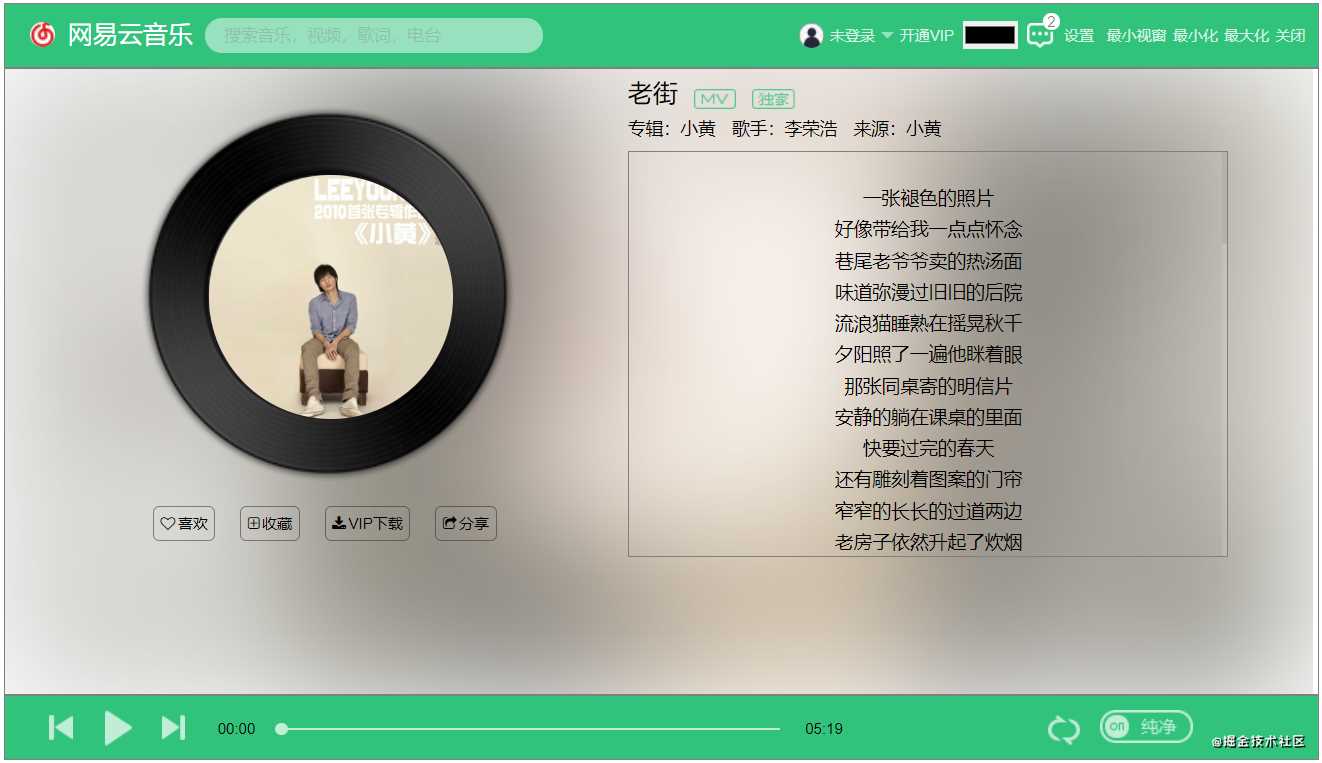
音乐播放器
- 播放控制
- 播放进度条控制
- 歌词显示及高亮
- 播放模式设置
播放器属性归类
根据播放器的功能模块,对播放器的属性和DOM元素进行归类整理。将实现相同功能的元素和属性封装在同一对象中,以便于后续的管理和操作。
const control = { //存放播放器控制
  play: document.querySelector('#myplay'),
 ...
  index: 2,//当前播放歌曲序号
 ...
}

const audioFile = { //存放歌曲文件及相关信息
  file: document.getElementsByTagName('audio')[0],
  currentTime: 0,
  duration: 0,
}

const lyric = { // 歌词显示栏配置
  ele: null,
  totalLyricRows: 0,
  currentRows: 0,
  rowsHeight: 0,
}

const modeControl = { //播放模式
  mode: ['顺序', '随机', '单曲'],
  index: 0
}

const songInfo = { // 存放歌曲信息的DOM容器
  name: document.querySelector('.song-name'),
 ...
}
播放控制
功能描述:负责控制音乐的播放与暂停、上一首、下一首切换,并在播放结束时触发相应事件及图标状态更新。 涉及Audio API:audio.play()、audio.pause() 以及 audio ended 事件。
// 音乐的播放和暂停,上一首,下一首控制
control.play.addEventListener('click',()=>{
  control.isPlay = !control.isPlay;
  playerHandle();
} );
control.prev.addEventListener('click', prevHandle);
control.next.addEventListener('click', nextHandle);
audioFile.file.addEventListener('ended', nextHandle);

function playerHandle() {
  const play = control.play;
  control.isPlay ? audioFile.file.play() : audioFile.file.pause();
  if (control.isPlay) {
 //音乐播放,更改图标及开启播放动画
    play.classList.remove('songStop');
    play.classList.add('songStart');
    control.albumCover.classList.add('albumRotate');
    control.albumCover.style.animationPlayState = 'running';
  } else {
    //音乐暂停,更改图标及暂停播放动画
 ...
  }
}


function prevHandle() {  // 根据播放模式重新加载歌曲
  const modeIndex = modeControl.index;
  const songListLens = songList.length;
  if (modeIndex == 0) {//顺序播放
    let index = --control.index;
    index == -1 ? (index = songListLens - 1) : index;
    control.index = index % songListLens;
  } else if (modeIndex == 1) {//随机播放
    const randomNum = Math.random() * (songListLens - 1);
    control.index = Math.round(randomNum);
  } else if (modeIndex == 2) {//单曲
  }
  reload(songList);
}

function nextHandle() {
  const modeIndex = modeControl.index;
  const songListLens = songList.length;
  if (modeIndex == 0) {//顺序播放
    control.index = ++control.index % songListLens;
  } else if (modeIndex == 1) {//随机播放
    const randomNum = Math.random() * (songListLens - 1);
    control.index = Math.round(randomNum);
  } else if (modeIndex == 2) {//单曲
  }
  reload(songList);
}
播放进度条控制
功能描述:实现播放进度的实时更新,并支持通过点击进度条来调整歌曲的播放位置。 涉及Audio API:audio timeupdate 事件、audio.currentTime 属性。
// 播放进度实时更新
audioFile.file.addEventListener('timeupdate', lyricAndProgressMove);
// 通过拖拽调整进度
control.progressDot.addEventListener('click', adjustProgressByDrag);
// 通过点击调整进度
control.progressWrap.addEventListener('click', adjustProgressByClick);
进度实时更新:通过动态修改对应DOM元素的位置或宽度来反映当前播放进度。
function lyricAndProgressMove() {
  const audio = audioFile.file;
  const controlIndex = control.index;
 // 歌曲信息初始化
  const songLyricItem = document.getElementsByClassName('song-lyric-item');
  if (songLyricItem.length == 0) return;
  let currentTime = audioFile.currentTime = Math.round(audio.currentTime);
  let duration = audioFile.duration = Math.round(audio.duration);

  //进度条移动
  const progressWrapWidth = control.progressWrap.offsetWidth;
  const currentBarPOS = currentTime / duration * 100;
  control.progressBar.style.width = `${currentBarPOS.toFixed(2)}%`;
  const currentDotPOS = Math.round(currentTime / duration * progressWrapWidth);
  control.progressDot.style.left = `${currentDotPOS}px`;

  songInfo.currentTimeSpan.innerText = formatTime(currentTime);

}
拖拽调整进度:支持通过鼠标拖拽进度条上的控制点,并同步更新歌曲的实际播放进度。
function adjustProgressByDrag() {
  const fragBox = control.progressDot;
  const progressWrap = control.progressWrap
  drag(fragBox, progressWrap)
}

function drag(fragBox, wrap) {
  const wrapWidth = wrap.offsetWidth;
  const wrapLeft = getOffsetLeft(wrap);

  function dragMove(e) {
    let disX = e.pageX - wrapLeft;
    changeProgressBarPos(disX, wrapWidth)
  }
  fragBox.addEventListener('mousedown', () => { //拖拽操作
    //点击放大方便操作
    fragBox.style.width = `14px`;fragBox.style.height = `14px`;fragBox.style.top = `-7px`;
    document.addEventListener('mousemove', dragMove);
    document.addEventListener('mouseup', () => {
      document.removeEventListener('mousemove', dragMove);
      fragBox.style.width = `10px`;fragBox.style.height = `10px`;fragBox.style.top = `-4px`;
    })
  });
}

function changeProgressBarPos(disX, wrapWidth) { //进度条状态更新
  const audio = audioFile.file
  const duration = audioFile.duration
  let dotPos
  let barPos

  if (disX < 0) {
    dotPos = -4
    barPos = 0
    audio.currentTime = 0
  } else if (disX > 0 && disX < wrapWidth) {
    dotPos = disX
    barPos = 100 * (disX / wrapWidth)
    audio.currentTime = duration * (disX / wrapWidth)
  } else {
    dotPos = wrapWidth - 4
    barPos = 100
    audio.currentTime = duration
  }
  control.progressDot.style.left = `${dotPos}px`
  control.progressBar.style.width = `${barPos}%`
}
点击进度条调整:支持直接点击进度条的任意位置,并同步更新歌曲的播放进度至点击处。
function adjustProgressByClick(e) {

  const wrap = control.progressWrap;
  const wrapWidth = wrap.offsetWidth;
  const wrapLeft = getOffsetLeft(wrap);
  const disX = e.pageX - wrapLeft;
  changeProgressBarPos(disX, wrapWidth)
}
歌词显示及高亮
功能描述:根据当前的播放进度,实时更新歌词的显示内容,并通过添加特定样式高亮当前正在播放的歌词行。 涉及Audio API:audio timeupdate 事件、audio.currentTime 属性。
// 歌词显示实时更新
audioFile.file.addEventListener('timeupdate', lyricAndProgressMove);

function lyricAndProgressMove() {
  const audio = audioFile.file;
  const controlIndex = control.index;

  const songLyricItem = document.getElementsByClassName('song-lyric-item');
  if (songLyricItem.length == 0) return;
  let currentTime = audioFile.currentTime = Math.round(audio.currentTime);
  let duration = audioFile.duration = Math.round(audio.duration);
  let totalLyricRows = lyric.totalLyricRows = songLyricItem.length;
  let LyricEle = lyric.ele = songLyricItem[0];
  let rowsHeight = lyric.rowsHeight = LyricEle && LyricEle.offsetHeight;
  //歌词移动
  lrcs[controlIndex].lyric.forEach((item, index) => {
    if (currentTime === item.time) {
      lyric.currentRows = index;
      songLyricItem[index].classList.add('song-lyric-item-active');
      index > 0 && songLyricItem[index - 1].classList.remove('song-lyric-item-active');
      if (index > 5 && index < totalLyricRows - 5) {
        songInfo.lyricWrap.scrollTo(0, `${rowsHeight * (index - 5)}`)
      }

    }
  })
}
播放模式设置
功能描述:支持点击切换播放模式(如顺序、随机、单曲),并同步更新相应的图标状态。 涉及Audio API:无。
// 播放模式设置
control.mode.addEventListener('click', changePlayMode);

function changePlayMode() {
  modeControl.index = ++modeControl.index % 3;
  const mode = control.mode;
  modeControl.index === 0 ?
    mode.setAttribute("class", "playerIcon songCycleOrder") :
    modeControl.index === 1 ?
      mode.setAttribute("class", "playerIcon songCycleRandom ") :
      mode.setAttribute("class", "playerIcon songCycleOnly")
}
项目预览
代码地址:https://github.com/hcm083214/audio-player
至此,关于原生JS实现音乐播放器的示例代码介绍完毕。如需了解更多关于JS音乐播放器的相关内容,建议搜索本站历史文章或继续阅读后续相关文章。感谢大家的支持!
ES6模块化中js文件怎么用import和export交互
2026-11-05 17:00:48
JS读取本地文件时报错或无响应的常见原因
2026-11-05 16:32:31
let、const与var的区别:JavaScript变量声明最佳实践
2026-11-05 14:16:38
JS中直接定义静态二维数组的字面量写法
2026-11-05 14:16:08
JS 怎么查找字符串中所有匹配项的位置
2026-11-05 14:15:53