
JS中element.attr与getAttribute有什么不同
在 JS 中, element.getAttribute 用于获取 HTML 标签上的原始属性值(如 id , class , data-* ),而 element.attr 是 jQuery 库提供的方法。原生 DOM 元素没有 attr 方法,调用会报错。如果需要操作自定义属性或类名,应使用 getAttribut
在 JS 中,element.getAttribute 用于获取 HTML 标签上的原始属性值(如 id, class, data-*),而 element.attr 是 jQuery 库提供的方法。原生 DOM 元素没有 attr 方法,调用会报错。如果需要操作自定义属性或类名,应使用 getAttribute、setAttribute 或 dataset。

getAttribute 与原生属性的关系
getAttribute 是 W3C 标准 API,专门读取 HTML 标签上声明的属性。它返回的是字符串类型,即使该属性在 JavaScript 对象中有对应的驼峰命名属性(如 className)。
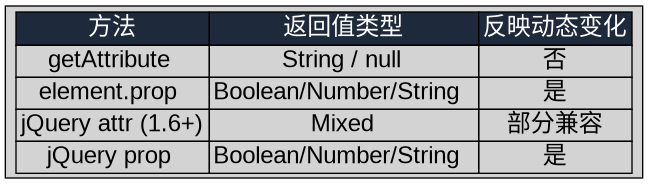
HTML 中的属性名通常是小写的,而 JavaScript 对象的属性名可能是驼峰的。getAttribute('class') 能正确获取元素的 class 字符串,但直接访问 element.class 会得到 undefined,因为正确的 JS 属性名是 className。getAttribute 始终返回初始的 HTML 值,不会反映通过 JS 动态修改后的状态(例如通过 element.className = 'new' 修改后,getAttribute('class') 仍显示旧值)。对于布尔属性(如 disabled),如果存在则返回空字符串 '',不存在则返回 null。
jQuery attr 的行为差异
如果你在使用 jQuery,$(el).attr() 提供了更智能的属性读写功能。它不仅处理 HTML 属性,还能自动映射到 DOM 对象的对应属性上,并支持链式调用和批量操作。

<!DOCTYPE html>
<html lang="en">
<head>
    <meta charset="UTF-8">
    <title>Attribute Demo</title>
    <script src="https://code.jquery.com/jquery-3.6.0.min.js"></script>
</head>
<body>
    <input type="checkbox" id="myCheck" checked>
    <button id="myBtn">Toggle</button>

    <script>
        const el = document.getElementById('myCheck');
        const btn = document.getElementById('myBtn');

        // 1. 初始状态检查
        console.log('Initial getAttribute:', el.getAttribute('checked')); // 输出: ""
        console.log('Initial prop:', el.checked); // 输出: true

        // 2. 动态取消选中
        el.checked = false;

        // 3. 再次检查
        console.log('After change getAttribute:', el.getAttribute('checked')); // 输出: null (HTML属性未变)
        console.log('After change prop:', el.checked); // 输出: false (DOM属性已变)

        // 4. jQuery 对比
        console.log('jQuery attr:', $('#myCheck').attr('checked')); // 输出: undefined (jQuery 1.6+ 推荐用 prop)
        console.log('jQuery prop:', $('#myCheck').prop('checked')); // 输出: false

        // 5. 设置 disabled 属性
        btn.disabled = true;
        console.log('Button getAttribute disabled:', btn.getAttribute('disabled')); // 输出: null
        console.log('Button prop disabled:', btn.disabled); // 输出: true
    </script>
</body>
</html>
运行上述 HTML 文件并在浏览器控制台查看输出。可以看到,getAttribute('checked') 在动态修改后仍为 null,而 el.checked 正确反映了 false。这证明了 getAttribute 仅读取 HTML 静态属性,不反映运行时状态。jQuery 的 prop 方法与原生 DOM 属性行为一致,适合获取动态状态。
JQuery 的 attr 方法在读取时,会优先尝试获取 DOM 对象的属性值(如 checked, selected),如果找不到再回退到 HTML 属性。这意味着 $(el).attr('checked') 能反映复选框当前的勾选状态,而 el.getAttribute('checked') 只能反映标签上的初始值。另外,attr 可以接受函数作为值来动态计算属性,这是原生 API 不具备的。注意:jQuery 1.6+ 引入了 prop 方法来明确区分 DOM 属性和 HTML 属性,建议在新项目中优先使用 prop 处理布尔属性,attr 处理 HTML 属性。
动态修改属性时的表现对比
当通过 JavaScript 动态改变元素属性时,getAttribute 和 attr 对“当前状态”的反映截然不同。理解这一区别是避免 Bug 的关键。
假设有一个按钮 <button id="btn">Click</button>。执行 document.getElementById('btn').disabled = true 后:
1. getAttribute('disabled') 仍然返回 null,因为它只读 HTML 源码中的静态属性。
2. $( '#btn' ).attr( 'disabled' ) 在 jQuery 1.5 及之前版本可能返回 'disabled' 或 true(行为不一致),但在 1.6+ 中,由于内部逻辑优化,它更多时候依赖 prop 的逻辑,但仍建议用 prop('disabled') 来获取当前状态。
因此,判断元素是否被禁用,最可靠的方式是使用 element.disabled 或 $(el).prop('disabled'),而不是 getAttribute 或 attr。
jQuery $(document).ready()与原生JS DOMContentLoaded的等价实现
2026-11-27 11:16:59
JS自定义双击检测:通过计算click时间间隔模拟dblclick
2026-11-27 09:59:25
利用Dreamweaver内置行为面板快速生成JavaScript代码
2026-11-26 23:08:17
1Password 披露员工 GitHub 账号失陷事件
2026-11-26 22:06:36
使用JavaScript实现个人网页暗黑模式切换
2026-11-26 17:08:13