
为什么JS函数调用后变量是undefined?常见返回值丢失原因排查
检查函数是否包含 return 语句,或确认调用位置是否正确捕获了返回值。
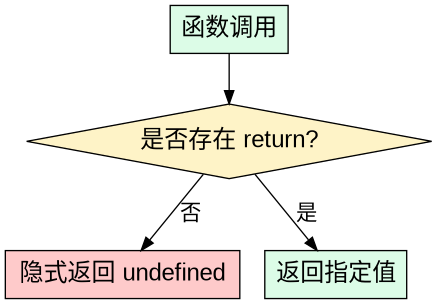
缺少 return 导致隐式 undefined
JS 函数默认返回 undefined,除非显式指定。常见于异步回调未处理、分支遗漏或拼写错误。

若函数体中无 return,或条件分支未覆盖所有路径,变量将接收 undefined。需确保每个执行路径均返回有效值。
异步操作与同步调用的时序错配
在文件 app.js 中直接调用含 setTimeout 的函数,因 JS 单线程特性,同步代码先执行完毕,此时异步结果尚未就绪。
function getValue() {
    return 42;
}

async function getAsyncValue() {
    return new Promise(resolve => {
        setTimeout(() => resolve('async result'), 100);
    });
}

// 测试同步函数
const syncResult = getValue();
console.log('Sync:', syncResult); // 输出: Sync: 42

// 测试异步函数(错误示范)
const wrongAsyncResult = getAsyncValue();
console.log('Wrong Async:', wrongAsyncResult); // 输出: Wrong Async: Promise { ... }

// 测试异步函数(正确示范)
getAsyncValue().then(result => {
    console.log('Correct Async:', result); // 输出: Correct Async: async result
});

// 测试箭头函数简写陷阱
const arrowWithBraces = () => {
    let x = 10;
    x; // 没有 return,返回 undefined
};

const arrowWithoutBraces = () => 10; // 自动返回 10

console.log('Arrow Braces:', arrowWithBraces()); // 输出: Arrow Braces: undefined
console.log('Arrow No Braces:', arrowWithoutBraces()); // 输出: Arrow No Braces: 10
运行程序后,控制台依次输出同步结果 42、Promise 对象、异步结果 'async result'、undefined 和 10。验证了显式 return 的必要性、异步时序的影响以及箭头函数简写形式的差异。排查时应优先检查函数体内是否有 return,再考虑异步逻辑的处理方式。
使用 Promise 或 async/await 可解决时序问题。示例演示如何正确等待异步结果并赋值给变量,避免在异步完成前读取数据。
箭头函数简写形式的返回值陷阱
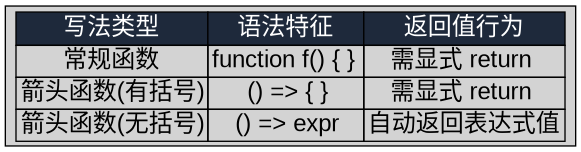
箭头函数若使用花括号 {} 包裹函数体,必须显式使用 return;若省略花括号,表达式值自动返回。混淆二者会导致意外 undefined。
对比两种写法:带花括号时若不写 return,即使有表达式也返回 undefined;不带花括号时直接返回表达式结果。注意对象字面量在简写形式中需用括号包裹以避免解析为块级作用域。
JavaScript数组转字符串后怎么去除首尾多余符号
2026-11-26 14:29:31
JS中怎么判断变量是否为多维数组
2026-11-26 13:50:43
JS除法保留两位小数:(a/b).toFixed(2)用法与精度陷阱
2026-11-26 12:43:53
JS递归遍历并修改多层嵌套JSON数据的实现方法
2026-11-26 12:09:34
JS forEach怎么终止循环:原理与替代方案
2026-11-26 11:56:36