
Intl.DateTimeFormat在现代JavaScript中的应用技巧
讲解Intl.DateTimeFormat在现代JavaScript中的实用技巧,涵盖实例缓存复用、样式与字段互斥规则、跨时区转换、formatToParts结构化提取及formatRange区间格式化。
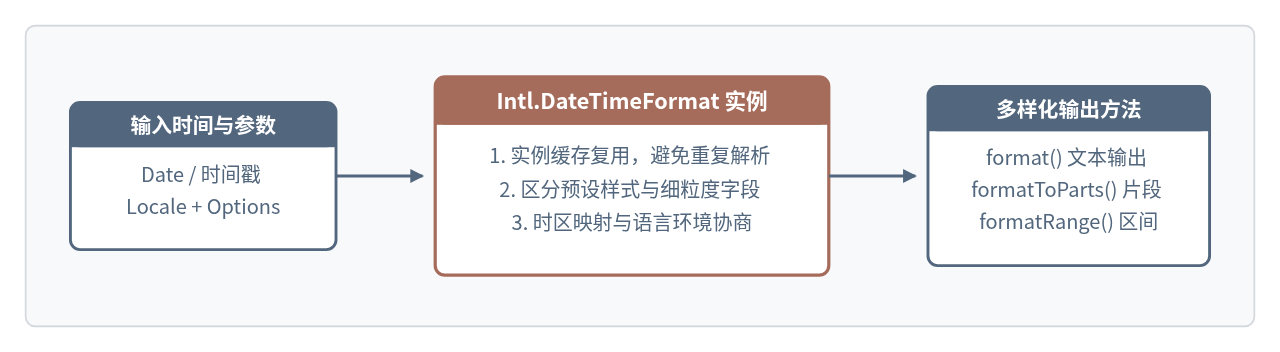
在 JavaScript 项目中处理日期展示时,很多人会直接调用 date.toLocaleString(),或者为了补零拼接 YYYY-MM-DD 而引入第三方日期库。实际上,浏览器和 Node.js 内置的 Intl.DateTimeFormat 已经能够处理本地化格式、IANA 时区换算、结构化片段提取以及时间区间合并。要把它用稳、用快,关键在于避开重复实例化、选项互斥和硬编码拆串这几个常见坑点。
从实例复用与缓存开始写起
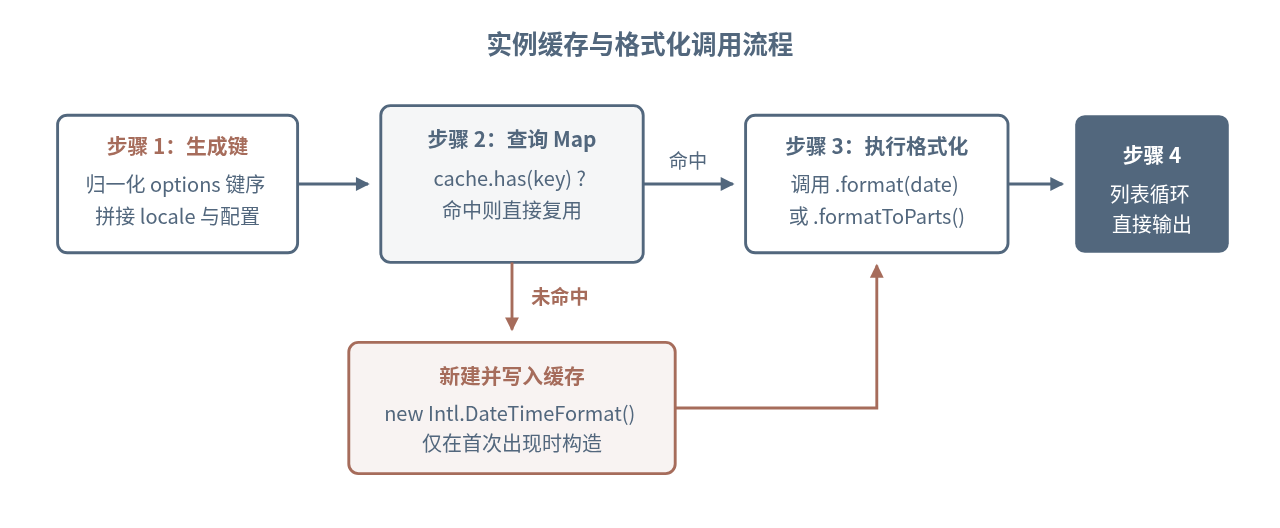
打开一个包含上百行数据的表格组件时,如果每一行都在渲染函数里调用 date.toLocaleString('zh-CN', options),或者每次都执行 new Intl.DateTimeFormat(...),JavaScript 引擎就不得不反复解析区域标识和配置项。Date.prototype.toLocaleString 在底层同样会创建格式化器,频繁调用会带来明显的构造开销。
更稳妥的做法是把配置固定且高频使用的格式化器提升到模块顶层;如果语言或时区需要根据用户设置动态变化,则用 Map 做一个轻量缓存工厂函数,按参数签名复用实例。
// 1. 固定配置直接提升为模块级常量
const orderTimeFormatter = new Intl.DateTimeFormat('zh-CN', {
  year: 'numeric',
  month: '2-digit',
  day: '2-digit',
  hour: '2-digit',
  minute: '2-digit',
  hourCycle: 'h23',
  timeZone: 'Asia/Shanghai'
});

// 2. 动态配置使用 Map 按参数序列化结果缓存
const formatterCache = new Map();

export function getDateFormatter(locale, options = {}) {
  const sortedEntries = Object.entries(options).sort(([a], [b]) => a.localeCompare(b));
  const cacheKey = `${locale}|${JSON.stringify(sortedEntries)}`;

  if (!formatterCache.has(cacheKey)) {
    formatterCache.set(cacheKey, new Intl.DateTimeFormat(locale, options));
  }
  return formatterCache.get(cacheKey);
}

const sampleDate = new Date('2026-11-12T00:30:00Z');
console.log(orderTimeFormatter.format(sampleDate));
console.log(
  getDateFormatter('en-US', { dateStyle: 'medium', timeZone: 'UTC' }).format(sampleDate)
);2026/11/12 08:30
Nov 12, 2026缓存键对 options 的属性名做了排序,这样 { month: '2-digit', year: 'numeric' } 和 { year: 'numeric', month: '2-digit' } 会命中同一个实例。如果应用中可能出现大量一次性时区组合,可以给 formatterCache 加一个容量上限,防止长期运行的服务端进程缓存无限增长。
dateStyle / timeStyle 与细粒度字段不能混用
Intl.DateTimeFormat 的配置选项分为两套模式:一套是预设风格(dateStyle 和 timeStyle),取值包括 'full'、'long'、'medium'、'short';另一套是细粒度字段(year、month、day、weekday、hour、minute、second 等)。
很多报错源于把两者写进同一个配置对象。例如想在 dateStyle: 'medium' 的基础上额外要求两位数小时,或者顺手写了 hour12: false,都会直接触发错误。
dateStyle 或 timeStyle,就不能同时传入 year、month、day、weekday、hour、minute、second、dayPeriod、timeZoneName 或 fractionalSecondDigits,否则构造函数会立即抛出 TypeError。
选择哪一套模式,取决于业务更看重“地道的本地习惯”还是“固定的界面结构”:
- 使用
dateStyle/timeStyle:适合文章发布时间、通知提醒等自然阅读场景。各语言会自动决定年月日顺序、逗号位置和星期表达,无需逐个调试字段。 - 使用细粒度字段:适合后台表格、监控日志和紧凑卡片。这时可以精确控制补零(
'2-digit')与进制。
在细粒度模式下控制 12/24 小时制时,优先使用 hourCycle(如 'h23')而不是 hour12: false。原因在于不同地区对“半夜零点”的习惯不同:hour12: false 在部分语言环境下可能映射成 'h24',把凌晨 0 点显示为 24:05;明确指定 hourCycle: 'h23' 则固定从 00 到 23 计数,不会出现 24 点。
const midnight = new Date('2026-11-12T16:05:00Z'); // 北京时间 2026-11-13 00:05

// 预设风格:遵循各语言自然习惯
const naturalZh = new Intl.DateTimeFormat('zh-CN', {
  dateStyle: 'long',
  timeStyle: 'short',
  timeZone: 'Asia/Shanghai'
});

// 细粒度字段:固定 24 小时制且零点显示为 00
const logFormatter = new Intl.DateTimeFormat('zh-CN', {
  year: 'numeric',
  month: '2-digit',
  day: '2-digit',
  hour: '2-digit',
  minute: '2-digit',
  hourCycle: 'h23',
  timeZone: 'Asia/Shanghai'
});

console.log(naturalZh.format(midnight));
console.log(logFormatter.format(midnight));2026年11月13日 00:05
2026/11/13 00:05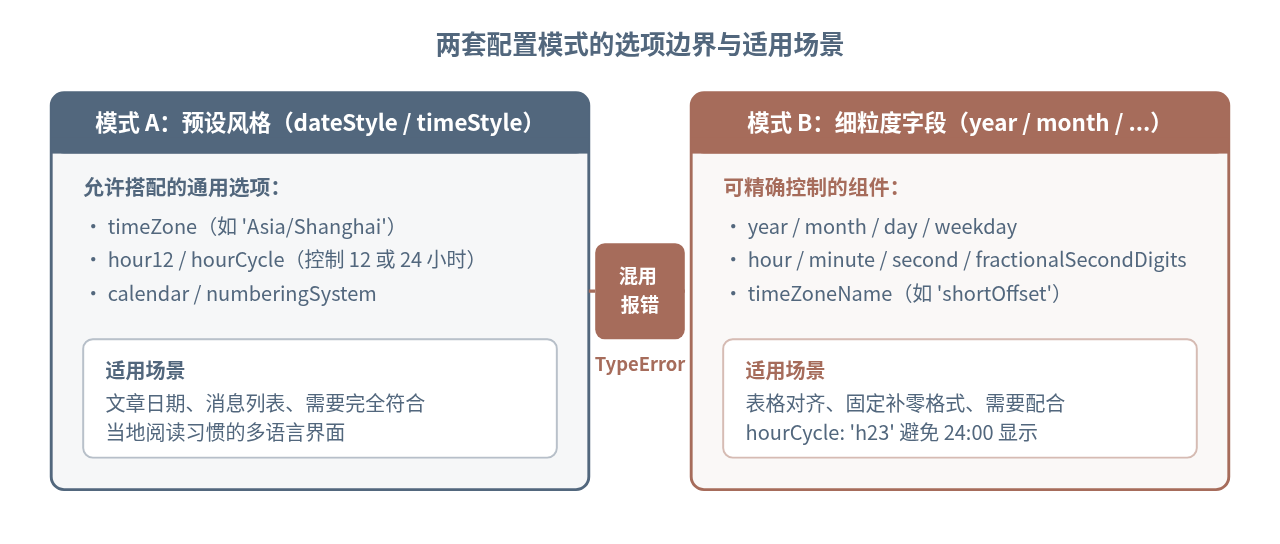
跨时区转换与 resolvedOptions() 的反向校验
JavaScript 的 Date 对象内部只保存一个以 UTC 纪元毫秒数表示的时间点,本身并不带时区。把同一个时间点展示到不同城市,不需要手动加减 8 * 3600 * 1000 这种容易被夏令时击穿的偏移量,直接指定 IANA 时区名称即可。
同时,Intl.DateTimeFormat 对传入的语言标签和参数会做运行时协商:比如传入一个浏览器不认识的扩展标签或平台默认值,实际生效的设置可能和预期不同。调用实例上的 resolvedOptions() 方法,就能看到引擎最终采用的 locale、timeZone、hourCycle、calendar 和 numberingSystem。
const eventInstant = new Date('2026-07-15T14:00:00Z');

const nyFormatter = new Intl.DateTimeFormat('en-US', {
  year: 'numeric',
  month: 'short',
  day: 'numeric',
  hour: '2-digit',
  minute: '2-digit',
  timeZone: 'America/New_York',
  timeZoneName: 'shortOffset'
});

const shFormatter = new Intl.DateTimeFormat('zh-CN', {
  year: 'numeric',
  month: '2-digit',
  day: '2-digit',
  hour: '2-digit',
  minute: '2-digit',
  hourCycle: 'h23',
  timeZone: 'Asia/Shanghai',
  timeZoneName: 'shortOffset'
});

console.log('纽约:', nyFormatter.format(eventInstant));
console.log('上海:', shFormatter.format(eventInstant));
console.log('实际生效配置:', shFormatter.resolvedOptions());纽约: Jul 15, 2026, 10:00 AM GMT-4
上海: 2026/07/15 22:00 GMT+8
实际生效配置: {
locale: 'zh-CN',
calendar: 'gregory',
numberingSystem: 'latn',
timeZone: 'Asia/Shanghai',
hourCycle: 'h23',
hour12: false,
year: 'numeric',
month: '2-digit',
day: '2-digit',
hour: '2-digit',
minute: '2-digit',
timeZoneName: 'shortOffset'
}注意上面纽约时间在 7 月自动呈现为 GMT-4(夏令时),而无需业务代码自己判断夏令时起止日期。如果要获取用户当前所在系统的时区名称传给后端,也可以直接读取 new Intl.DateTimeFormat().resolvedOptions().timeZone,返回值通常是标准的 IANA 时区字符串(如 'Asia/Shanghai')。
用 formatToParts() 做结构化拆解与安全自定义
实际开发中经常会遇到这样的设计要求:日期用深色,时间用浅色,或者必须拼出以短横线分隔的 2026-11-12。如果先拿 format() 的结果再写 str.split('/') 或正则替换,只要换到 en-US(11/12/2026)或 de-DE(12.11.2026),分隔符和字段顺序就会立刻错位。
formatToParts() 直接返回带语义标签的片段数组,每个元素包含 type 和 value。你可以按 type 筛选或给特定片段包裹 DOM 节点,完全不用猜测字符串里的斜杠和空格。
const now = new Date('2026-11-12T00:30:00Z');
const partsFormatter = new Intl.DateTimeFormat('en-CA', {
  year: 'numeric',
  month: '2-digit',
  day: '2-digit',
  hour: '2-digit',
  minute: '2-digit',
  second: '2-digit',
  hourCycle: 'h23',
  timeZone: 'Asia/Shanghai'
});

const parts = partsFormatter.formatToParts(now);
const partMap = Object.fromEntries(parts.map(({ type, value }) => [type, value]));

// 稳定拼装任意固定格式,不受语言分隔符变化影响
const customStamp = `${partMap.year}-${partMap.month}-${partMap.day} ${partMap.hour}:${partMap.minute}`;
console.log(parts.slice(0, 5));
console.log(customStamp);[
{ type: 'year', value: '2026' },
{ type: 'literal', value: '-' },
{ type: 'month', value: '11' },
{ type: 'literal', value: '-' },
{ type: 'day', value: '12' }
]
2026-11-12 08:30在 React、Vue 等前端框架里渲染日期徽章时,直接遍历 parts 数组,对 type === 'year'、'month'、'day' 与 'hour'、'minute' 应用不同的 className,既保留了本地化顺序,又实现了精确的视觉区分。
用 formatRange() 与 formatRangeToParts() 处理起止区间
展示活动周期或酒店入住退房时间时,如果把开始和结束时间分别调用两次 format() 再用 ~ 拼接,很容易出现“2026年11月12日 - 2026年11月15日”这样冗余的写法。现代浏览器和 Node.js 支持的 formatRange(startDate, endDate) 会自动判断两个日期共享的精度层级,把重复的年份或月份折叠掉。
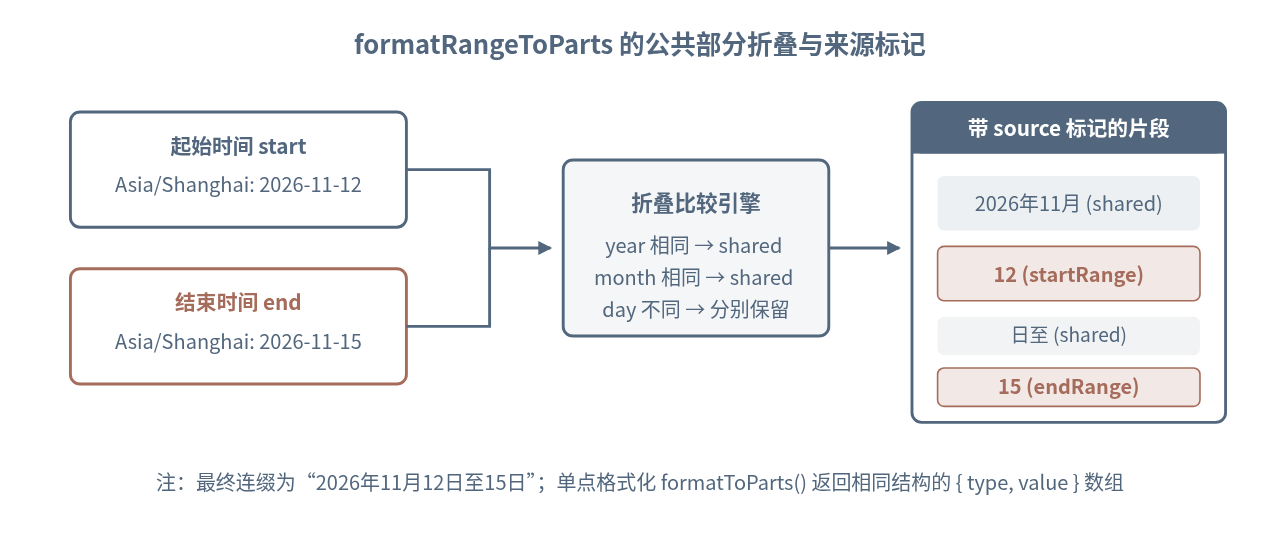
如果需要在页面上把“起始日期”和“结束日期”高亮,还可以调用 formatRangeToParts(),它在每个片段里多提供了一个 source 属性,值为 'shared'、'startRange' 或 'endRange'。
const rangeFormatter = new Intl.DateTimeFormat('zh-CN', {
  year: 'numeric',
  month: 'long',
  day: 'numeric',
  timeZone: 'Asia/Shanghai'
});

const start = new Date('2026-11-12T02:00:00Z');
const end = new Date('2026-11-15T10:00:00Z');

console.log(rangeFormatter.formatRange(start, end));
console.log(rangeFormatter.formatRangeToParts(start, end));2026年11月12日至15日
[
{ type: 'year', value: '2026', source: 'shared' },
{ type: 'literal', value: '年', source: 'shared' },
{ type: 'month', value: '11', source: 'shared' },
{ type: 'literal', value: '月', source: 'shared' },
{ type: 'day', value: '12', source: 'startRange' },
{ type: 'literal', value: '日至', source: 'shared' },
{ type: 'day', value: '15', source: 'endRange' },
{ type: 'literal', value: '日', source: 'shared' }
]formatRange() 会自动退化为单个日期(如 2026年11月12日);但如果第一个参数晚于第二个参数(start > end),部分运行环境下可能抛出 RangeError 或产生非预期结果,业务代码应在调用前确保起止顺序合法。
容易忽略的边界情况与封装建议
把 Intl.DateTimeFormat 封装成项目工具函数时,还需要处理三个细节,避免线上出现静默错误或白屏:
| 常见边界情况 | 实际表现 | 推荐处理方式 |
|---|---|---|
传入无效日期(如 new Date('abc')) |
formatter.format(badDate) 会直接抛出 RangeError,不像 toString() 那样返回 Invalid Date |
封装函数入口先用 Number.isNaN(date.getTime()) 拦截,返回占位符(如 '-') |
传入 undefined 作为参数 |
formatter.format(undefined) 不会报错,而是静默格式化当前时间 Date.now() |
显式判断 value == null,避免接口缺少字段时页面错误地显示“今天” |
| 不同运行环境的 ICU 数据差异 | 旧版运行时或精简版容器环境可能缺少部分冷门时区别名或完整中文风格细节 | 发布前在目标浏览器或 Node 版本中调用 resolvedOptions() 检查实际回退结果 |
export function safeFormatDate(input, locale = 'zh-CN', options = { dateStyle: 'medium', timeZone: 'Asia/Shanghai' }) {
  if (input == null || input === '') return '-';

  const date = input instanceof Date ? input : new Date(input);
  if (Number.isNaN(date.getTime())) return '-';

  return getDateFormatter(locale, options).format(date);
}

console.log(safeFormatDate(null));
console.log(safeFormatDate('not-a-date'));
console.log(safeFormatDate('2026-11-12T00:30:00Z'));-
-
2026年11月12日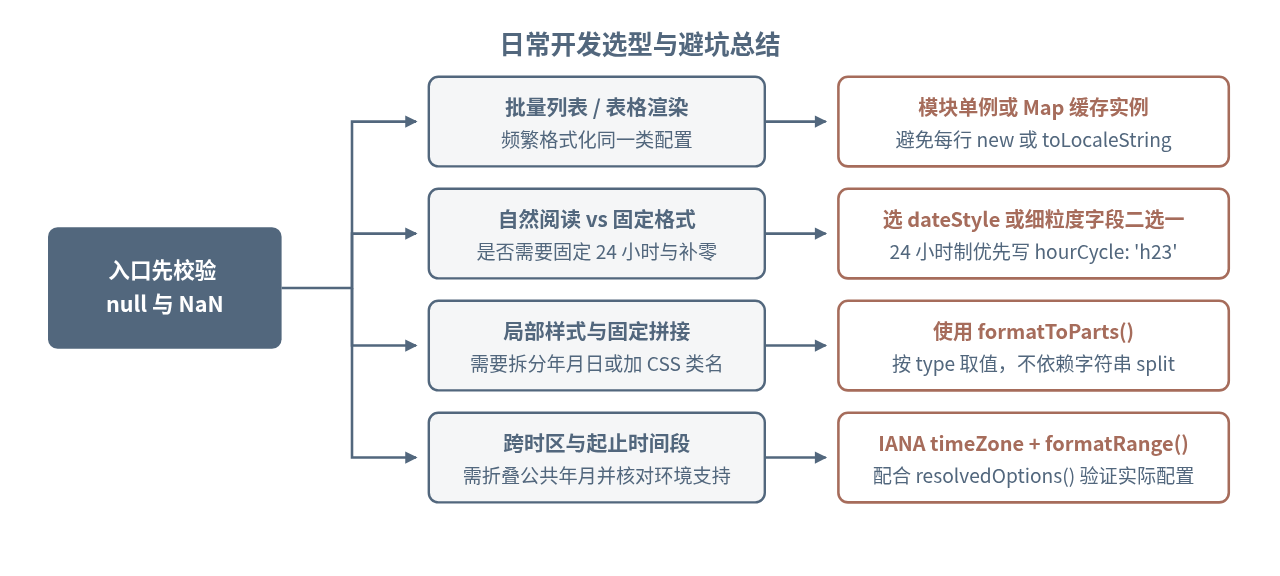
如果项目只需要做日期展示、时区换算和区间格式化,合理组合实例缓存、hourCycle、formatToParts() 和 formatRange() 就已经足够覆盖大多数需求;只有当业务涉及复杂的日期加减运算、相对时间解析或特定日历计算时,再按需补充专门的日期库即可。
JS数字加减为何变成字符串拼接?详解隐式类型转换陷阱
2026-11-21 20:36:13
为什么很多人觉得JavaScript比Python难学
2026-11-21 16:05:01
JS字符串转二进制:TextEncoder与Uint8Array转换指南
2026-11-21 10:50:41
JavaScript中ArrayBuffer、Blob与Base64的相互转换方法
2026-11-20 19:56:45
JS时间相减为什么是毫秒?理解Date隐式转换与单位换算
2026-11-20 16:06:51